
CloudM Migrate
CloudM Migrate moves users, mail, files, and shared data to Google Workspace or Microsoft 365.
What CloudM Migrate is
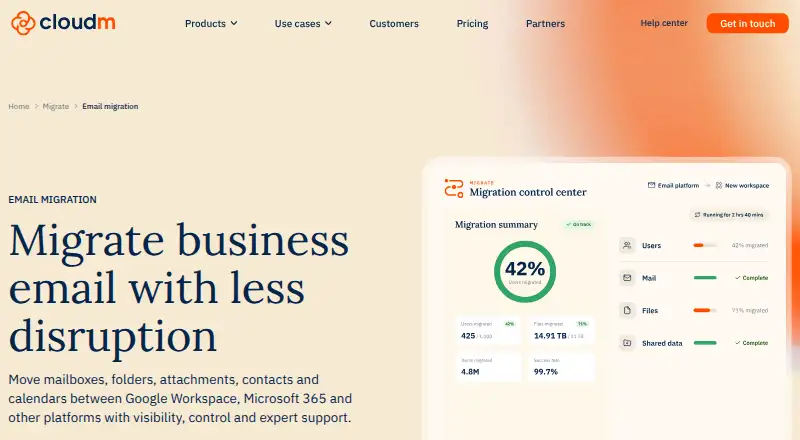
CloudM Migrate moves users, mail, files, and shared data to Google Workspace or Microsoft 365. It handles mailboxes, folders, attachments, contacts, and calendars, and supports more than 20 source platforms, including on-premises servers, Zimbra, Box, and Dropbox. Pre-migration discovery scans mailbox volumes, item counts, folder depth, and potential issues. Migration can proceed through pilot, bulk, and delta passes, with reporting, audit logs, and service logs for progress tracking and issue diagnosis. Customers can use CloudM-hosted deployment or run the tool in their own infrastructure. In self-hosted deployments, content remains within customer-controlled infrastructure, is encrypted in transit, and temporary files use AES-256 encryption. Each license includes a 12-month migration license and unlimited catch-up runs during its term. Document version history is supported for Microsoft 365 destinations, while Google Workspace receives only the latest version. Pricing is on request; options include licenses priced per user or data volume and serviced migration by quote.
Good
- Supports more than 20 source platforms.
- Discovery identifies mailbox details and potential issues.
- Pilot, bulk, and delta migration passes are supported.
- Each license includes unlimited catch-up runs during its term.
Watch out
- Pricing is available on request.
- Google Workspace destinations receive only the latest document version.
- Each license is limited to a 12-month migration period.
Who it suits
CloudM Migrate suits organizations moving mail, files, or shared data to Google Workspace or Microsoft 365. Its hosted and self-hosted deployment choices accommodate different infrastructure preferences.
Verdict
CloudM Migrate provides discovery, phased migration, monitoring, and hosted or self-hosted deployment options. Check destination-specific version history behavior and request pricing for the relevant license or service.
Plans and prices
From CloudM Migrate's own pricing page, checked 1 Oct 2026.
| Plan | Price | What it gives you |
|---|---|---|
| Google Workspace full user migration | Priced on request | Mail, calendar, contacts, tasks, chat · Unlimited data · Priced per user · 12-month migration license |
| Google Workspace mail only | Priced on request | Mail only · Unlimited data · Priced per user · 12-month migration license |
| Google Workspace Shared Drives & public folders | Priced on request | Shared Drives · Permissions · Folder structure · Version history · Priced per 10GB · Get a quote |
| Microsoft 365 full user migration | Priced on request | Mail, calendar, contacts, tasks, chat · Unlimited data · Priced per user · 12-month migration license |
| Microsoft 365 mail only | Priced on request | Mail only · Unlimited data · Priced per user · 12-month migration license |
| Microsoft 365 Shared Drives & public folders | Priced on request | Shared Drives, permissions, folder structure and version history · Priced per 100GB · Get a quote |
| Serviced migration Enterprise | Priced on request | Large or complex environments · Dedicated specialists, architects and project leadership · Bespoke planning · Get a quote |
| Serviced migration Standard | Priced on request | Best for fewer than 1,000 users · Project management · Migration execution · Go-live and post-migration support · Get a quote |
The facts
Each one read from CloudM Migrate's own pages, with the date it was checked.
What it does
- API
- The CloudM Migrate REST API supports authentication, connections, projects, batches, migration execution and monitoring.checked 1 Oct 2026
- Catch-up runs
- Every license includes unlimited catch-up runs for new or updated data during the license period.checked 1 Oct 2026
- Deployment
- Customers can choose CloudM-hosted deployment or run Migrate within their own infrastructure.checked 1 Oct 2026
- Discovery
- Pre-migration discovery scans mailbox volumes, item counts, folder depth and potential issues before migration.checked 1 Oct 2026
- Email migration
- It migrates mailboxes, folders, attachments, contacts and calendars between Google Workspace, Microsoft 365 and other platforms.checked 1 Oct 2026
- License duration
- CloudM describes every Migrate license as including a 12-month migration license.checked 1 Oct 2026
- Monitoring
- Reporting, audit logs and migration service logs provide progress tracking and issue diagnosis.checked 1 Oct 2026
- Phased runs
- Migrate supports pilot, bulk and delta passes to reduce disruption and keep mailbox data current through cutover.checked 1 Oct 2026
- Purpose
- CloudM Migrate moves users, mail, files and shared data to Google Workspace or Microsoft 365.checked 1 Oct 2026
- Security certifications
- CloudM is ISO 27001 and Cyber Essentials certified.checked 1 Oct 2026
- Self-hosted security
- In self-hosted deployments, migration content stays inside customer-controlled infrastructure, is encrypted in transit, and temporary files use AES-256 encryption.checked 1 Oct 2026
- Support
- CloudM offers serviced migrations with planning, execution, go-live support, issue resolution and post-migration support.checked 1 Oct 2026
- Version history limit
- Document version history is supported when the destination is Microsoft 365, while Google Workspace destinations receive only the latest document version.checked 1 Oct 2026
The company
- Founded
- 2008checked 23 Sep 2026
- Headquarters
- Altrincham, Cheshire, United Kingdomchecked 23 Sep 2026
Where it runs
- Source platforms
- CloudM states that Migrate supports more than 20 source platforms, including on-premises servers, Google Workspace, Microsoft 365, Zimbra, Box and Dropbox.checked 1 Oct 2026
The full review of CloudM Migrate
CloudM Migrate moves mail, files, users and shared data to Google Workspace or Microsoft 365, with options for hosted or self-hosted deployment. It suits organizations planning a structured migration across teams or platforms; its strongest case is the combination of discovery, staged runs and catch-up passes. Check the destination’s document-version behavior before choosing it.
Overview
Migrate covers mailbox content such as folders, attachments, contacts and calendars, along with shared data and files. It supports Google Workspace and Microsoft 365 destinations, tenant-to-tenant moves and IMAP, and draws from more than 20 source platforms, including on-premises servers, Zimbra, Box and Dropbox.
Its pre-migration discovery scans mailbox volumes, item counts and folder depth, and flags potential issues. Pilot, bulk and delta runs let teams validate and move data in phases, then keep mailboxes current through cutover. Reporting, audit logs and service logs help track progress and diagnose issues. That is a practical feature set for migrations where coordination and visibility matter, though the license price is quote-based rather than immediately comparable.
Key features
Phased migration and catch-up
Every license includes a 12-month migration license and unlimited catch-up runs during that license period for new or updated data. This helps teams run a staged cutover without treating each follow-up pass as a separate purchase. The 12-month term still matters: catch-up runs are unlimited within the license period, not beyond it.
Deployment, security and API
Customers can use CloudM-hosted deployment or run Migrate inside their own infrastructure. For self-hosted migrations, content stays within customer-controlled infrastructure; data is encrypted in transit, and temporary files use AES-256 encryption. CloudM is ISO 27001 and Cyber Essentials certified. The REST API supports authentication, connections, projects, batches, migration execution and monitoring, making it relevant to teams that want to integrate migration operations into existing workflows.
Document version history
Microsoft 365 destinations retain document version history, but Google Workspace destinations receive only the latest document version. Organizations that need prior versions preserved should treat that destination difference as a deciding constraint.
Pricing
CloudM Migrate is paid, with custom pricing. Its plans are priced by user or data volume, or by quote for serviced work; the purchase choice determines whether the scope is mail-only, full-user content, shared data, or an assisted migration.
| Plan | What it covers | Best fit |
|---|---|---|
| Google Workspace mail only | Priced per user; 12-month migration license; mail only; unlimited data. | Teams moving mail to Google Workspace without calendar, contacts, tasks or chat migration. |
| Google Workspace full user migration | Priced per user; 12-month migration license; mail, calendar, contacts, tasks and chat; unlimited data. | Teams moving a broader user workload to Google Workspace. |
| Microsoft 365 mail only | Priced per user; 12-month migration license; mail only; unlimited data. | Teams that need mail migration to Microsoft 365 but not the other listed user data. |
| Microsoft 365 full user migration | Priced per user; 12-month migration license; mail, calendar, contacts, tasks and chat; unlimited data. | Teams moving those user data types together to Microsoft 365. |
| Google Workspace Shared Drives & public folders | Priced per 10GB; quote required; Shared Drives, permissions, folder structure and version history. | Organizations migrating shared-drive or public-folder data to Google Workspace. |
| Microsoft 365 Shared Drives & public folders | Priced per 100GB; quote required; Shared Drives, permissions, folder structure and version history. | Organizations migrating shared data to Microsoft 365. |
| Serviced migration Standard | Quote required; project management, migration execution, go-live and post-migration support; best for fewer than 1,000 users. | Smaller projects that need CloudM’s team to manage delivery and support. |
| Serviced migration Enterprise | Quote required; for large or complex environments, with dedicated specialists, architects, project leadership and bespoke planning. | Complex migrations that warrant specialist-led planning and execution. |
The mail-only plans trade breadth for a narrower workload, while full-user plans bundle the additional listed data types without a stated data cap. Shared-data plans use different billing units by destination, so compare the quoted scope against the volume being moved. Serviced plans exchange a self-directed license for project and delivery support; Standard is positioned below 1,000 users, while Enterprise addresses large or complex environments. All license plans include unlimited catch-up runs during their 12-month period.
Platforms
CloudM Migrate is available as an API, self-hosted deployment, web product and Windows software. Its migration coverage includes Google Workspace, Microsoft 365 and IMAP, with hosted and customer-infrastructure deployment choices.
Who it's for
Migrate is best suited to organizations moving substantial mail or shared-data workloads that need discovery, staged execution, auditability or managed support. It is also a strong fit for teams that want to keep migration content within controlled infrastructure. It is less suitable when preserving document versions in a Google Workspace destination is essential, or when a buyer needs a clear upfront price before contacting the vendor.
Pros and cons
Pros
- Discovery and pilot, bulk and delta passes support planned migrations and reduce cutover disruption.
- Unlimited catch-up runs during the 12-month license help keep changed data current through migration.
- Hosted and self-hosted deployment options accommodate different infrastructure preferences.
- Serviced tiers add project management or dedicated specialists for teams that do not want to run the migration alone.
Cons
- Pricing requires a quote, making budget comparison harder before engaging CloudM.
- Google Workspace destinations receive only the latest document version, unlike Microsoft 365 destinations.
- Catch-up runs are tied to the 12-month license period, so the unlimited allowance is not perpetual.
Alternatives
For a broader category comparison, browse Email Migration Software.
- imapsync is a freemium alternative with Linux, macOS, self-hosted, web and Windows platforms; its Software only plan is €72, paid once. Consider it when a free plan is important or those platform options better fit your setup.
- MigrationWiz is a paid, API and web option with a free trial; its Mailbox plan is $14, paid once per user for full-fidelity mailbox migration, a wide roster of endpoints and up to 50 GB. Consider it when that defined mailbox scope and price suit the project.
- Cloudiway Mailbox Migration Tool is a paid web option with a free trial; its Standard plan is $570, paid once for 50 migration licenses covering one workload and unlimited delta passes. Choose it when that fixed license bundle matches the migration scope.
- SysTools Email Migration Tool runs on Linux and Windows, offers a free plan and trial, and its Free Demo covers full mailbox migration for up to 2 user accounts. Its paid version is $35, paid once for 5 users. It fits readers who want to start with a small free migration.
- CodeTwo Office 365 Migration is a self-hosted Windows tool with a free trial and one-off licensing; choose it when those deployment and licensing terms fit.
- CodeTwo Exchange Migration is a self-hosted Windows tool with a free trial and one-off licensing; consider it as another option for that platform and license model.
- MailJerry is a freemium alternative across Android, iOS, macOS, web and Windows. Its free plan allows unlimited mailboxes, capped at 150 MB per mailbox, three simultaneous migrations and one device; it suits small-volume needs that fit those limits.
- Zoho Mail is a freemium mail service across Android, iOS, Linux, macOS, web and Windows, with a forever-free plan for five users, one domain and 5 GB of mail storage per user. Consider it when a small free mail service, rather than a migration-focused product, is the need.
Verdict
Choose CloudM Migrate for a planned organizational move that benefits from discovery, phased runs, catch-up passes and the choice of hosted or self-hosted deployment. Its migration controls and serviced options are the main reasons to shortlist it; look elsewhere if Google Workspace must preserve document version history or a firm upfront price is essential.
Alternatives to CloudM Migrate
- 1

Box
Free planAndroidiOSWebAPI8.3From $5 a month - 2
Google Workspace
AndroidiOSWebAPI7.9From $7 a month - 3
rclone
Free planAndroidWebAPILinux7.6Free plan - 4
ShareGate
WebAPISelf-hostedWindows6.7$5,995 one-time - 5

Egnyte
AndroidiOSmacOSWindows6.6From $22 a month - 6

MigrationWiz
WebAPI6.5$14 one-time