BoardFlow
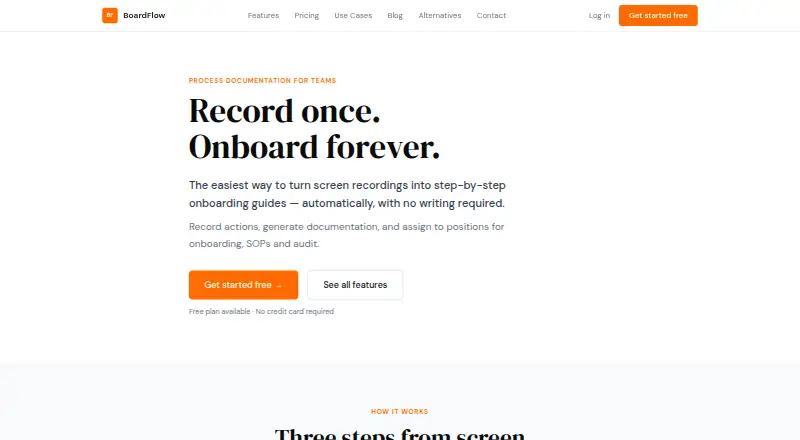
BoardFlow records browser workflows and turns them into onboarding guides that can be assigned by team or position.
What BoardFlow is
BoardFlow records browser workflows and turns them into onboarding guides that can be assigned by team or position. Its Chrome extension captures clicks, form entries, page navigation, and tab switches across browser tabs. The resulting guides include numbered steps, descriptions, URLs, and screenshots, and can be edited before publishing. Organizations can use those guides as role-specific checklists, while team owners and managers can view completion status. Guides can also be shared through public links that do not require viewers to have accounts. BoardFlow describes timestamped workflow documentation with screenshots that can be exported for audit purposes. Its web app for guides, team management, and checklists runs in a modern browser without installation. The Free plan includes one team and 10 guide recordings. Pro costs $5 a month and includes three teams, 50 guide recordings total, unlimited members, advanced progress tracking, and priority support. Business costs $15 a month, with 20 teams and 100 recordings; organization dashboards are listed as coming soon.
Good
- Captures browser actions across tabs.
- Editable guides include screenshots and URLs.
- Public links work without viewer accounts.
- Managers can view team completion status.
- Web app needs no installation.
Watch out
- Recording requires the Chrome extension.
- Recordings and documentation are stored on BoardFlow servers.
- Business organization dashboards are marked coming soon.
Who it suits
BoardFlow is aimed at operations managers, team leads, and organizations documenting processes or onboarding new hires. It suits teams that want assigned guides and completion tracking.
Verdict
BoardFlow turns browser procedures into shareable, trackable onboarding guides. Check the team and recording limits of each plan when choosing between Free, Pro, and Business.
Plans and prices
From BoardFlow's own pricing page, checked 15 Oct 2026.
| Plan | Price | What it gives you |
|---|---|---|
| Free | Free | 1 team · 10 guide recordings · automatic step-by-step docs · role-based onboarding checklists · Chrome extension recording · public sharing links |
| Pro | $5 a month | 3 teams · 50 guide recordings total · priority support · advanced progress tracking · unlimited members · monthly |
| Business | $15 a month | 20 teams · 100 guide recordings total · everything in Pro · organization dashboards coming soon · monthly |
The facts
Each one read from BoardFlow's own pages, with the date it was checked.
What it does
- Async onboarding
- New hires can work through guides at their own pace without live walkthroughs.checked 15 Oct 2026
- Audit documentation
- Compliance workflows can produce timestamped, screenshot-based documentation that can be exported for audits.checked 15 Oct 2026
- Automatic guide generation
- After recording, BoardFlow creates numbered steps with titles, plain-English descriptions, URLs and screenshots.checked 15 Oct 2026
- Automatic updates
- Re-recording a changed process updates the guide for all employees assigned to it.checked 15 Oct 2026
- Cross-tab recording
- Recording works across all browser tabs and includes automatic screenshots for steps.checked 15 Oct 2026
- Data handling
- The terms state that recordings and documentation are stored on BoardFlow's servers, accessible to the user and organization members, and not sold to third parties.checked 11 Oct 2026
- Data sale statement
- The terms state that BoardFlow does not sell user data to third parties.checked 15 Oct 2026
- Domain registration
- An Alibaba Cloud WHOIS page reports boardflow.online was registered on March 18, 2026 through One.com A/S.checked 15 Oct 2026
- Generated guides
- Generated guide steps include numbered titles, plain-English descriptions, URLs, and screenshots, and can be edited before publishing.checked 11 Oct 2026
- Guide editing
- Users can edit step text, add notes, remove irrelevant actions and reorder steps before publishing.checked 15 Oct 2026
- Installation requirement
- Recording requires the BoardFlow Chrome extension, while guides, team management and checklists run in a modern browser without installation.checked 15 Oct 2026
- Integrations
- The maker's pages reviewed describe Chrome extension recording and browser-based guides but do not name third-party integrations.checked 11 Oct 2026
- Intended users
- The maker describes the product for operations managers, new hires, and team leads using it for onboarding and process documentation.checked 11 Oct 2026
- Limit: Business dashboards
- The Business plan lists organization dashboards as coming soon.checked 15 Oct 2026
- Onboarding checklists
- Employees receive personal checklists generated from guides assigned to their positions.checked 15 Oct 2026
- Praise: change handling
- Microlaunch says re-recording a changed process updates position-linked guides so employees do not use outdated procedures.checked 15 Oct 2026
- Praise: consistency
- Microlaunch says recording the workflow once helps keep procedures consistent across teams and locations.checked 15 Oct 2026
- Praise: reusable training
- Microlaunch describes reusable guides that can be assigned to specific job roles for consistent training.checked 15 Oct 2026
- Praise: role assignment
- Microlaunch says guides can be assigned directly to job positions so new hires receive the appropriate instructions.checked 15 Oct 2026
- Praise: SOP and audit use
- Microlaunch lists onboarding, SOP, audit and documentation workflows among the product's intended uses.checked 15 Oct 2026
- Praise: workflow automation
- Microlaunch presents BoardFlow as a way to convert a task recording into detailed onboarding documentation without manual writing.checked 15 Oct 2026
- Progress tracking
- Owners and managers can view guide-completion status across their teams.checked 15 Oct 2026
The company
- Content ownership
- Users retain ownership of content created with BoardFlow, while granting BoardFlow a limited storage and serving licence.checked 15 Oct 2026
Money
- Limit: Free recording quota
- The Free plan limits users to 10 guide recordings and one team.checked 15 Oct 2026
The full review of BoardFlow
BoardFlow is a browser-workflow capture and onboarding platform for operations managers, team leads, and organizations training new hires on repeatable procedures. It is strongest when instructions must be tied to roles and completion status, while teams producing many recordings will need to watch its quotas closely.
The combination of Chrome capture, editable guides, and manager reporting gives browser-based processes a practical structure without requiring employees to install the web app.
Overview
BoardFlow pairs a Chrome extension with a browser-based workspace. The extension records clicks, form entries, page navigation, and tab changes across browser tabs, then creates a guide containing numbered steps, plain-language explanations, URLs, and screenshots. Authors can revise those steps before publishing, making the recording a draft for accurate documentation rather than a fixed playback.
The web app manages guides, teams, and checklists in any modern browser. Guides can be assigned to teams and positions, so employees receive onboarding work relevant to their role. Team owners and managers can see completion status across their team, connecting documentation with measurable follow-through.
Public sharing links allow people to open a guide without an account, useful for distributing procedures beyond an organization’s managed members. BoardFlow also says it can produce timestamped, audit-ready workflow documentation with exportable screenshots. Recordings and documentation are stored on BoardFlow’s servers, are accessible to the user and organization members, and are not sold to third parties.
Key features
Browser workflow capture
Capturing several browser actions across tabs gives process authors a detailed starting point for software procedures. This is particularly suitable for onboarding tasks performed in web applications, where screenshots and destination URLs clarify each step.
Editable, role-based guides
Generated instructions remain editable before publication, allowing authors to correct wording or remove unnecessary actions. Assigning guides to teams and positions turns a general procedure into role-specific checklists instead of a one-size-fits-all document.
Progress and audit reporting
Managers can monitor completion across their team, while timestamped documentation and exportable screenshots support audit-oriented record keeping. Advanced progress tracking is reserved for Pro, so organizations needing richer oversight must move beyond the entry tier.
Sharing and access
Public links remove the account requirement for viewers, which lowers friction for external or broad distribution. The web app itself requires no installation, although recording depends on the Chrome extension.
Pricing
BoardFlow uses a freemium model, with paid plans from $5/mo and monthly billing.
Free
The Free plan supports one team and 10 guide recordings, with Chrome extension recording and public sharing links. It is a sensible starting point for a small operation documenting a limited set of procedures, but the recording ceiling will constrain teams that continually add or refresh workflows.
Pro — $5 a month
Pro raises capacity to 3 teams and 50 guide recordings total, adds unlimited members, priority support, and advanced progress tracking. Email support replies usually arrive within 24 hours, while priority support is the practical advantage for teams relying on onboarding operations. This is the best fit for growing teams that need more than one team structure and stronger completion oversight.
Business — $15 a month
Business covers 20 teams and 100 guide recordings total. Organization dashboards are marked as coming soon, so buyers should choose it primarily for the larger team and recording allowances rather than treating dashboards as an established capability. It suits organizations standardizing procedures across many departments.
Across the paid tiers, recording totals remain finite, making production volume the key budgeting consideration. No third-party integrations are named, so teams expecting connectors to other services should confirm compatibility before committing.
Platforms
BoardFlow is available as a Chrome extension and a web application. The extension handles recording; guides, team administration, and checklists run in any modern browser without installation.
Who it's for
BoardFlow fits operations managers documenting repeatable browser procedures, team leads assigning role-based training, and organizations onboarding new hires through checklists. It is less suitable for teams whose processes do not occur primarily in a browser or whose documentation volume exceeds the plan recording limits.
Pros and cons
Pros
- Detailed capture: clicks, inputs, navigation, and tab switches produce a useful first draft for browser procedures.
- Editable guides: authors can refine generated steps, screenshots, and descriptions before publishing.
- Role-based accountability: team and position assignments connect instructions to the employees expected to complete them.
- Account-free viewing: public links make guide distribution straightforward for viewers without accounts.
- Low-cost Pro tier: $5 a month adds unlimited members and advanced progress tracking.
Cons
- Recording quotas: Free, Pro, and Business cap recordings at 10, 50, and 100 respectively.
- Chrome dependency for recording: capture is provided through the Chrome extension rather than a platform-neutral recorder.
- Limited integration detail: no named third-party integrations are provided.
- Business dashboard uncertainty: organization dashboards are still coming soon.
Alternatives
Browse Employee Onboarding Software for a wider category comparison.
Choose Whale instead if you need Android, iOS, API, extension, and web access, with a Free plan for 10 members and 20 Playbook items.
Boardon is another freemium web and API option for teams considering a privately owned Swedish EdTech platform.
HollyHR is the better direction when everyday HR functions and API/MCP reads with signed webhooks matter alongside onboarding.
50skills Offboarding suits organizations focused on offboarding and wanting a two-week trial with access to essential features.
ChiefOnboarding is an alternative for teams considering self-hosting, with web and API access.
Newployee is worth considering for centralized task management, embedded onboarding surveys, and journey templates.
Open Onboarding offers a web-based free tier with AI-assisted checklists and one reusable template.
Boilerplate is a paid alternative available on Android, iOS, API, and web.
Verdict
Choose BoardFlow if your team needs to turn browser procedures into assigned onboarding work with manager-visible completion. Its strongest case is the inexpensive Pro plan combining editable capture, unlimited members, and advanced progress tracking. Look elsewhere if you need non-Chrome recording, named integrations, or higher documentation quotas than its 100-recording Business ceiling.
Alternatives to BoardFlow
- 1

50skills Offboarding
Free planAndroidiOSWebAPI8.1From $291 a month - 2

Whale
Free planAndroidiOSWebAPI8.1From $249 a month - 3
Aphinity
AndroidiOSWebAPI7.5From $15 a month - 4
EmployeeConnect
AndroidiOSWebSelf-hosted7.4 - 5

HollyHR
Free planWebAPI7.4From £1 a month - 6

Boardon
Free planWebAPI7.3From $58 a month