
BlitzCut AI
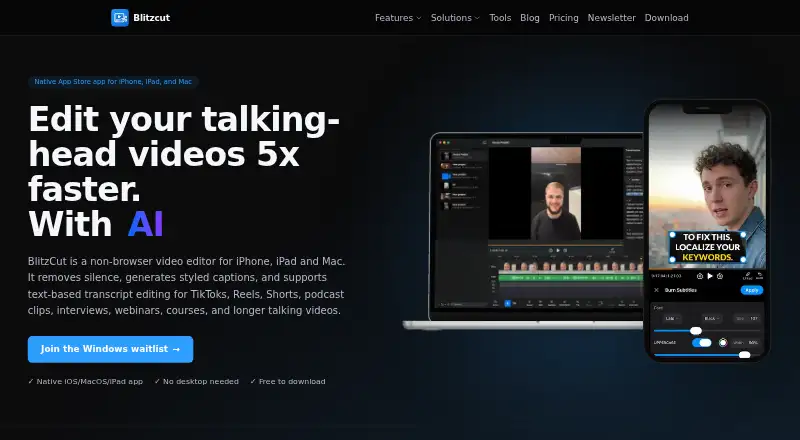
BlitzCut AI edits short-form clips and longer talking videos by removing pauses, generating captions, and letting you cut footage through transcript edits.
What BlitzCut AI is
BlitzCut AI edits short-form clips and longer talking videos by removing pauses, generating captions, and letting you cut footage through transcript edits. Delete words or sentences from a transcript to remove the corresponding footage, or translate the transcript in one tap. The app also lists filler-word removal, noise reduction, loudness leveling, speed control from 0.5x to 4x, reframing, text-to-speech, AI chat editing, overlays, and a multi-clip timeline. It accepts MP4, MOV, and M4V files and exports MP4 up to 4K in 9:16, 16:9, and 1:1 formats. Silence removal and manual editing work on-device, while captions, transcription, and text-to-speech need internet access. The maker reports 95%+ transcription accuracy on clear speech, with results affected by audio quality, speaking speed, accents, and technical terms. It is available for iPhone, iPad, and Mac. The free tier includes all features with watermarked exports; Premium removes the watermark and adds priority processing. US Premium plans are $16.99 a month or $69.99 a year, each with a 3-day trial.
Good
- Removes silence and filler words on-device
- Transcript edits cut matching footage
- Exports MP4 up to 4K
- Free tier includes full feature access
Watch out
- Free exports include a watermark
- AI captions and speech tools need internet
- Not currently available on Android or Windows
- AI features share inputs with third-party providers
Who it suits
BlitzCut AI suits people editing TikTok, Reels, Shorts, podcast clips, interviews, webinars, courses, or YouTube recordings on Apple devices. It may also suit editors who want to cut footage by editing a transcript.
Verdict
BlitzCut AI combines transcript-based editing with short-form and longer-video tools for Apple devices. The free tier retains a watermark, while Premium removes it and adds priority processing.
Plans and prices
From BlitzCut AI's own pricing page, checked 3 Oct 2026.
| Plan | Price | What it gives you |
|---|---|---|
| BlitzCut Premium · US (monthly) | $16.99 a month | Full feature access during 3-day trial · no watermark · priority processing · $16.99/mo |
| BlitzCut Premium · US (yearly) | $69.99 a year | Full feature access during 3-day trial · no watermark · priority processing · $69.99/yr |
The facts
Each one read from BlitzCut AI's own pages, with the date it was checked.
What it does
- Captions
- The maker reports 95%+ transcription accuracy on clear speech and says accuracy depends on audio quality, speaking speed, accents, and technical jargon.checked 3 Oct 2026
- Editing tools
- The feature page lists speed control from 0.5x to 4x, reframing to 9:16, 1:1, or 16:9, text-to-speech, AI chat editing, a multi-clip timeline, overlays, and cross-device sync.checked 3 Oct 2026
- Formats and export
- It accepts MP4, MOV, and M4V; exports MP4 up to 4K in 9:16, 16:9, and 1:1 aspect ratios.checked 3 Oct 2026
- Intended users
- The maker describes use for TikTok, Reels, Shorts, podcast clips, interviews, webinars, courses, and YouTube recordings.checked 3 Oct 2026
- Internet requirements
- AI captions, transcription, and text-to-speech require internet access; silence removal and manual editing are on-device.checked 3 Oct 2026
- Privacy and AI processing
- The privacy notice says AI features use third-party providers including OpenAI, and user inputs, outputs, and personal information are shared with and processed by those providers.checked 3 Oct 2026
- Purpose
- BlitzCut AI edits short-form clips and long-form talking videos by removing silence, generating captions, and enabling transcript-based editing.checked 3 Oct 2026
- Security
- The privacy notice says the maker uses technical and organizational security measures but does not guarantee complete security of internet transmissions or stored information.checked 3 Oct 2026
- Silence removal
- The app removes pauses on-device, and the maker says silence removal works without an internet connection.checked 3 Oct 2026
- Support
- The FAQ says support is available through the in-app help center.checked 3 Oct 2026
- Transcript editing
- Deleting words or sentences from the transcript cuts the matching footage, and transcripts can be translated in one tap.checked 3 Oct 2026
The company
- Founded
- 2024checked 28 Sep 2026
Money
- Free tier
- The FAQ says the free tier includes full feature access with watermarked exports, while Premium removes the watermark and adds priority processing.checked 3 Oct 2026
- Subscription billing
- The maker says plans include the same features and are billed and managed through the App Store; prices vary by country.checked 3 Oct 2026
Where it runs
- Other platforms
- The FAQ says BlitzCut AI is not currently available on Android or Windows; the home page lists Linux, Windows, and Android waitlists.checked 3 Oct 2026
- Supported devices
- The app is available through Apple's App Store for iPhone, iPad, and Mac; the pricing page specifies iOS 18+, iPadOS 18+, and macOS 15.6+.checked 3 Oct 2026
Alternatives to BlitzCut AI
- 1

EchoWave Podcast Editor
Free planAndroidiOSWebAPI8.2From $9 a month - 2
Vizard
Free planAndroidiOSWebAPI8.2From $29 a month - 3
Auphonic
Free planAndroidiOSWebAPI8.1From $11 a month - 4

Descript
Free planWebmacOSWindows8.0From $24 a month - 5

Kapwing
Free planWebmacOSWindows7.6From $16 a month - 6

Riverside Magic Audio
Free planAndroidiOSWebmacOS7.5From $24 a month