
Riverside Magic Audio
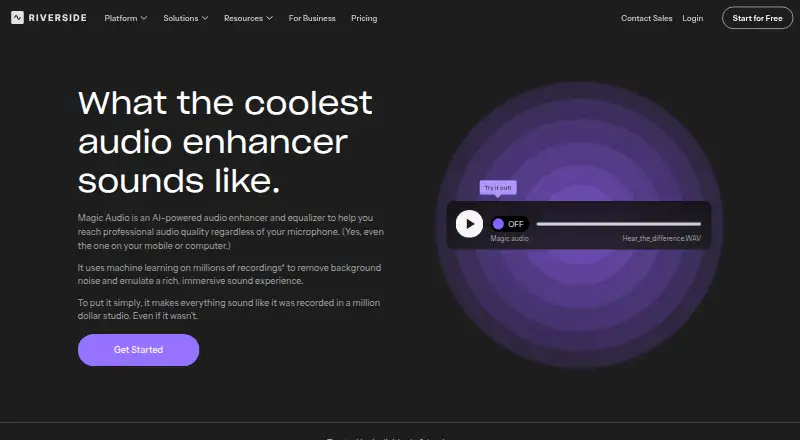
Riverside Magic Audio is an audio enhancer and equalizer for improving recordings.
What Riverside Magic Audio is
Riverside Magic Audio is an audio enhancer and equalizer for improving recordings. It uses AI to reduce background noise, echo and reverb, and adjusts frequency bands, voice clarity, loudness and volume. Riverside describes it for podcasts, social clips, meetings, interviews, voice recordings and tutorials. You can upload audio or video in formats including MP3, WAV, OGG, MP4, MPEG and WEBM. Magic Audio is available on Android, iOS, macOS and the web, and is included in Riverside’s Pro plan. The free plan includes a one-off two hours of multi-track recordings, video up to 720p, a Riverside watermark and 44.1 kHz audio. Pro is $24/month on annual billing, and the listed pricing note includes a 14-day trial. Riverside says it does not use customer data to train the model, and Magic Audio does not require AI credits. Separate-track download hours are limited by plan, although recording is unlimited on Pro, Grow and Webinar.
Good
- Reduces background noise, echo and reverb.
- Adjusts frequency bands, voice clarity and loudness.
- Accepts listed audio and video formats.
- Does not require AI credits.
- Available on Android, iOS, macOS and web.
Watch out
- Free multi-track recording is a one-off two hours.
- Free video is limited to 720p and has a watermark.
- Separate-track download hours are capped by plan.
Who it suits
It suits people improving podcast recordings, interviews, meetings, tutorials or social clips. Users choosing a plan should note that separate-track download hours are capped by plan.
Verdict
Magic Audio combines noise and reverb reduction with voice and volume adjustments for several recording uses. Check the plan’s separate-track download limit and free-plan restrictions against your needs.
Plans and prices
From Riverside Magic Audio's own pricing page, checked 30 Sep 2026.
| Plan | Price | What it gives you |
|---|---|---|
| Free | Free | 2 hours of multi-track recordings (one-off) · up to 720p video · Riverside watermark · 44.1 kHz audio · $0/month |
| Pro | $24 a month | 1 studio · 15 hrs of separate track downloads · Magic Audio included · $288 annually; $24/month annual rate |
| Grow | $34 a month | 2 studios · 20 hrs of separate track downloads · everything in Pro plus live streaming · $408 annually; $34/month annual rate |
| Webinar | $79 a month | 3 studios · 25 hrs of separate track downloads · up to 100 webinar registrants · $408 annually; $79/month annual rate shown |
| Business | Priced on request | Unlimited studios · unlimited separate track downloads · up to 10,000 webinar registrants · SOC2 and ISO27001 compliance · Contact Sales for pricing |
The facts
Each one read from Riverside Magic Audio's own pages, with the date it was checked.
What it does
- AI credits
- The pricing FAQ says Magic Audio does not require AI credits.checked 30 Sep 2026
- Audio adjustments
- It adjusts frequency bands, voice clarity, loudness, and volume levels.checked 30 Sep 2026
- Data use
- The Magic Audio page says Riverside does not use your data to train the model.checked 30 Sep 2026
- Integrations
- Riverside lists HubSpot integration for webinar leads and Salesforce and Marketo integrations on Business.checked 30 Sep 2026
- Noise and reverb
- It removes background noise and reduces echo and reverb.checked 30 Sep 2026
- Purpose
- Magic Audio is Riverside’s AI-powered audio enhancer and equalizer for improving recordings with one click.checked 30 Sep 2026
- Support
- The Business plan includes 24/7 live priority chat support and a dedicated customer success manager.checked 30 Sep 2026
- Upload formats
- The product page says uploaded audio and video formats include MP3, WAV, OGG, MP4, MPEG, and WEBM.checked 30 Sep 2026
- Use cases
- Riverside describes Magic Audio for podcasts, social media clips, company meetings, interviews, voice recordings, and tutorials.checked 30 Sep 2026
The company
- Company
- Riverside says it was founded in 2020 by brothers Gideon and Nadav.checked 30 Sep 2026
- Founded
- 2020checked 28 Sep 2026
Money
- Plan limit
- Separate track download hours are capped by plan, while recording itself is unlimited on Pro, Grow, and Webinar.checked 30 Sep 2026
The full review of Riverside Magic Audio
Riverside Magic Audio is a batch processor for cleaning up speech recordings and adjusting their sound. It is best suited to podcasters and teams handling interviews, clips or meetings; whether it is the right fit depends largely on how many separate-track download hours they need.
Overview
Magic Audio combines background-noise removal and echo and reverb reduction with adjustments to frequency bands, voice clarity, loudness and volume. That breadth is useful for spoken-word material with distracting room sound or uneven levels, but the product is aimed at enhancement rather than detailed manual mixing.
It accepts audio and video, including MP3, WAV, OGG, MP4, MPEG and WEBM. Processing is batch-based, so it suits recordings that can be cleaned up as files, not a workflow requiring real-time processing. Riverside says customer data is not used to train the model, and Magic Audio requires no AI credits.
Key features
- Noise and room cleanup: Noise removal, echo and reverb reduction, and voice isolation tackle common distractions in speech recordings. This is a strong fit for podcasts, interviews and voice recordings, though the features do not make it a full production suite.
- Level and voice adjustments: Frequency-band, clarity, loudness and volume adjustments give users more control than noise cleanup alone. They are relevant to meetings and tutorials as well as podcasts, where clear, consistent speech matters.
- Audio and video uploads: Support for the named audio and video formats makes it usable with either kind of source file. Riverside also describes it for social media clips and company meetings.
Pricing
Magic Audio uses a freemium model, with a 14-day trial and paid plans starting at $24/month on annual billing. It is included in Pro, Grow, Webinar and Business, and does not use AI credits. The key recurring constraint is separate-track download hours: recording is unlimited on Pro, Grow and Webinar, but downloads remain capped by plan.
- Free — $0/month: Includes a one-off two hours of multi-track recordings, up to 720p video, a Riverside watermark and 44.1 kHz audio. It is a way to try the service without a subscription, but the one-off recording allowance and watermark make it a limited choice for ongoing work.
- Pro — $24/month annual rate, billed $288 annually: Includes one studio, 15 hours of separate-track downloads and Magic Audio. It is the entry paid option for an individual or small workflow that can stay within that download allowance.
- Grow — $34/month annual rate, billed $408 annually: Provides two studios, 20 hours of separate-track downloads and Pro features plus live streaming. The extra studio and download hours suit users who need more capacity or streaming, but cost more than Pro.
- Webinar — $79/month: Includes three studios, 25 hours of separate-track downloads and up to 100 webinar registrants. Its webinar capacity makes it the relevant option for smaller events; the annual billing amount shown is $408 annually, which conflicts with the stated $79/month rate.
- Business — custom pricing: Includes unlimited studios and separate-track downloads, up to 10,000 webinar registrants, SOC2 and ISO27001 compliance, 24/7 live priority chat support and a dedicated customer success manager. It fits organizations that need those scale, compliance or support provisions; the price requires contacting sales.
Platforms
Riverside supports Android, iOS, macOS and web. That range makes it accessible across mobile devices and desktop or browser workflows.
Who it's for
Choose Magic Audio if you need batch cleanup and voice-level adjustments for podcasts, social clips, company meetings, interviews, voice recordings or tutorials. Pro is a sensible starting point for modest separate-track download needs; Grow or Webinar makes more sense when the additional studios, streaming or registrant capacity is relevant. If you need unlimited separate-track downloads or business-grade support and compliance, Business is the tier to consider. Look elsewhere if you need real-time processing or detailed manual mixing.
Pros and cons
- Pros: Noise, echo and reverb reduction sit alongside voice isolation and level adjustments, covering several common speech-recording problems in one batch workflow.
- Pros: Audio and video uploads, mobile and desktop platforms, and no AI-credit requirement offer flexibility across the stated recording uses.
- Cons: Paid plans cap separate-track download hours, so unlimited recording on Pro, Grow and Webinar does not mean unlimited downloads.
- Cons: The free plan's two hours of multi-track recording are one-off, and its watermark and 720p video cap limit its appeal for repeated professional use.
- Cons: The Webinar plan's stated monthly rate and annual billed amount do not align, making its cost difficult to reconcile.
Alternatives
For a broader directory of options, compare AI Speech Enhancement Software, Video Podcast Software and AI Podcast Editing Software.
- LALAL.AI is worth considering if its free relaxed queue suits your needs: it allows 10 minutes and 200 MB uploads, with previews but no full downloads.
- Auphonic offers a free tier with two hours per month and AI-based audio algorithms, a different fit if a monthly free production allowance is the priority.
- CrystalSound has a free Starter plan; its features and limits are not described.
- Denoise may suit a mobile-only workflow: its free tier lets users import and denoise and hear the full before-and-after, while saving or exporting requires Pro.
- AudioEnhancerMAX is a free alternative.
- Chatterbox TTS is a free open-source option for research and development, with models under the MIT license.
- DeepFilterNet is free and open source under the MIT or Apache-2.0 license.
- Adobe Enhance Speech is a web alternative with a free plan capped at one file at a time, 30 minutes and 500 MB per file, and one hour of enhancement per day; it has no strength adjustment.
Verdict
Magic Audio is a good choice for podcasters and teams who want batch noise and room cleanup plus voice and volume adjustments across common audio and video formats. Its main advantage is the combination of those tools without AI-credit use; its main drawback is that separate-track downloads are limited on paid plans. Check that allowance against your workload before choosing a tier, and look elsewhere if you need a real-time or manual-mixing workflow.
Getting started
- Open the Riverside Magic Audio website
- Choose the free plan or start the 14-day trial
- Sign up for Riverside
- Upload an MP3, WAV, OGG, MP4, MPEG, or WEBM file
- Process the recording with Magic Audio
- Download tracks within your plan’s separate-track allowance
Limits worth knowing
The free plan allows two hours of multi-track recordings as a one-off, up to 720p video, a Riverside watermark, and 44.1 kHz audio. Separate-track download hours are capped by plan; Business lists unlimited downloads.
Questions
Is there a free plan?
Yes. The Free plan costs $0 and includes a one-off two hours of multi-track recordings, up to 720p video, a Riverside watermark, and 44.1 kHz audio.
How much is Pro?
Pro is $24.00 per month when billed annually, or $288 annually. It includes one studio, 15 hours of separate-track downloads, and Magic Audio.
Which platforms are supported?
Riverside lists Android, iOS, macOS, and web access.
What files can I upload?
Supported uploads include MP3, WAV, OGG, MP4, MPEG, and WEBM audio or video.
Does it use AI credits or training data?
Magic Audio does not require AI credits. Riverside says it does not use your data to train the model.
Alternatives to Riverside Magic Audio
- 1

LALAL.AI
Free planAndroidiOSWebAPI8.3From €6.75 a month - 2
Auphonic
Free planAndroidiOSWebAPI8.1From $11 a month - 3

Denoise
Free planAndroidiOS7.8From $2.99 a month - 4

Krisp AI Meeting Assistant
AndroidiOSExtensionmacOS7.8From $8 a month - 5
DeepFilterNet
Free planOpen sourceAPILinuxmacOSSelf-hosted7.6Free plan - 6

ElevenLabs
Free planWebAPI7.6From $6 a month