CrystalSound
CrystalSound is a desktop app for reducing unwanted sound during calls and recording meetings.
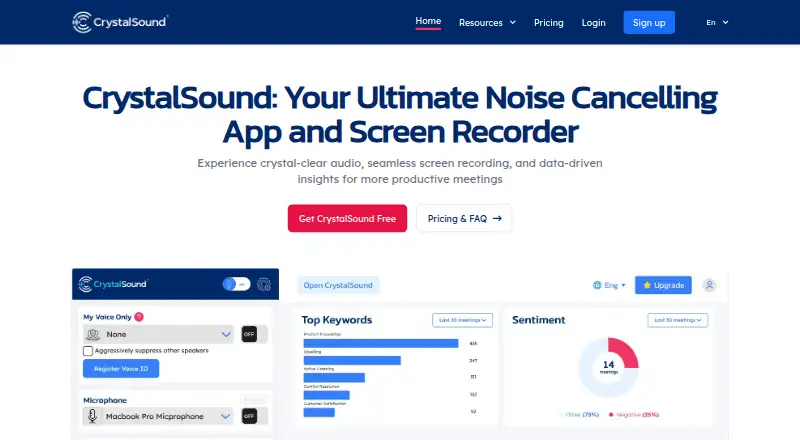
What CrystalSound is
CrystalSound is a desktop app for reducing unwanted sound during calls and recording meetings. Its bidirectional noise cancellation is designed to reduce background noise on both sides of a conversation. My Voice Only uses a registered voice profile to filter out other sounds and voices. The app can record the screen and both sides of audio, then provide meeting minutes, keywords, and meeting insights. It also enhances MP3, WAV, and FLAC files, and lists pitch shift, reverb, and robotic voice effects. CrystalSound works with conference apps; its site displays OBS, Discord, Loom, Slack, Teams, Skype, and Meet logos. It runs on Windows, macOS, and Linux, with 4 GB RAM listed as the minimum for each. Audio and VoiceID are processed on-device. The free Starter plan is available, and a 7-day trial is offered. Elite is listed at $228 a year and marked “Coming soon”; no price is shown for Enterprise or Premium.
Good
- Reduces background sound on both sides of calls.
- My Voice Only filters using a registered voice profile.
- Records screen and bidirectional audio.
- Enhances MP3, WAV, and FLAC recordings.
- Audio and VoiceID are processed locally.
Watch out
- Elite is marked “Coming soon.”
- Enterprise and Premium prices are not shown.
- Requires 4 GB RAM on each supported system.
Who it suits
CrystalSound suits people who want call noise reduction, meeting recording, or audio enhancement on a desktop system. Its listed features may also suit users who want meeting notes and insights alongside recording.
Verdict
CrystalSound combines call audio processing, recording, and meeting insights in a desktop app. A free Starter plan and a 7-day trial are listed, while Elite is marked as coming soon.
Plans and prices
From CrystalSound's own pricing page, checked 4 Oct 2026.
| Plan | Price | What it gives you |
|---|---|---|
| Starter | Free | Starter plan; features and limits not listed on the page |
| Elite (Coming soon) | $228 a year | Unlimited noise cancellation · Meeting transcription · Performance analysis · Risk analysis · Areas of improvement · USD/User/Year |
| Enterprise | Priced on request | Unlimited noise cancellation · Bi-directional noise cancellation · Secure offline screen recording · Bulk order discounts · VDI support |
| Premium | — | Unlimited noise cancellation · Cloud call recording (Preview) · Automatic titles, smart meeting minutes, and keyword and sentiment analysis unavailable · USD/User/Year; price not shown on page |
The facts
Each one read from CrystalSound's own pages, with the date it was checked.
What it does
- Audio enhancement
- Audio file enhancement supports MP3, WAV, and FLAC recordings.checked 4 Oct 2026
- Integrations
- The homepage says CrystalSound works with conference apps and displays OBS, Discord, Loom, Slack, Teams, Skype, and Meet logos.checked 4 Oct 2026
- Minimum requirements
- The guide lists Windows 10 (20H1), supported recent macOS versions, and Linux with glibc 2.28 or later; it lists 4 GB RAM for each system.checked 4 Oct 2026
- My Voice Only
- My Voice Only uses a registered voice profile to eliminate unwanted noise or other people's voices.checked 4 Oct 2026
- Noise cancellation
- The product describes bidirectional noise cancellation that reduces background noise from both the user and the other party.checked 4 Oct 2026
- Product
- CrystalSound is an AI noise-cancellation app and screen recorder for clearer audio and more productive meetings.checked 4 Oct 2026
- Recording and insights
- The site describes screen and bidirectional audio recording, meeting minutes, keywords, and meeting insights.checked 4 Oct 2026
- Refund policy
- The pricing page offers a 30-day money-back guarantee on subscriptions and says refunds are not issued for unused time after that period.checked 4 Oct 2026
- Security standards
- The privacy statement says its Vercel and Firebase services are certified under standards including ISO 27001, ISO 27017, ISO 27018, SOC 1, SOC 2, and SOC 3.checked 4 Oct 2026
- Support
- The company lists [email protected] for help with problems and requests.checked 4 Oct 2026
- Supported systems
- The installation guide provides requirements and installation instructions for Windows, macOS, and Linux.checked 4 Oct 2026
- Tracking
- CrystalSound collects app version, settings, email, operating system, usage times, and apps using its virtual speaker or microphone; paid users can disable usage tracking in settings.checked 4 Oct 2026
- Voice effects
- The listed voice changer effects are pitch shift, reverb, and robotic effects.checked 4 Oct 2026
The company
- Company and location
- The privacy statement identifies Nami Technology Joint-stock Company and lists its address in Ho Chi Minh City, Viet Nam.checked 4 Oct 2026
- Headquarters
- Ho Chi Minh City, Viet Namchecked 28 Sep 2026
Where it runs
- On-device privacy
- The privacy statement says audio and VoiceID are processed locally and are not sent off the device or accessible to NamiTech.checked 4 Oct 2026
The full review of CrystalSound
CrystalSound is a desktop audio tool for cleaning up calls, recording meetings and working with audio files. It is best suited to people who want noise control and meeting capture together across Windows, macOS or Linux. Its range is appealing, but the unclear limits on Starter and custom pricing on several paid plans make it harder to judge the commitment.
Overview
CrystalSound goes beyond microphone cleanup: it offers noise reduction for both sides of a call, screen and audio recording, and meeting summaries and analysis. That makes it a stronger fit for people who need a record of conversations as well as clearer sound than for someone looking only to process standalone audio.
Its privacy approach has a notable advantage: the company says audio and VoiceID are processed locally and are not sent off the device or accessible to NamiTech. It also says its Vercel and Firebase services hold ISO and SOC certifications. The app collects account and usage data, including email, settings, operating system, usage times, and which apps use its virtual speaker or microphone. Paid users can turn off usage tracking in settings.
Key features
Bidirectional noise cancellation is the central draw, since it targets background noise from both the user and the other person in a call. My Voice Only adds voice-profile-based filtering to remove unwanted noise or other speakers. These tools suit calls in busy environments, though the product’s intended advantage is most relevant when both outgoing and incoming sound matter.
For meetings, CrystalSound combines screen and bidirectional audio recording with minutes, keywords and meeting insights. The mix can help users who want both a capture and a concise record of a conversation. Audio-file enhancement supports MP3, WAV and FLAC, while voice effects include pitch shift, reverb and robotic effects; those are useful additions, but the meeting workflow is the more distinctive reason to choose the app.
The homepage shows compatibility logos for OBS, Discord, Loom, Slack, Teams, Skype and Meet, indicating a broad range of conference and creator-app contexts. CrystalSound also offers echo removal and voice isolation.
Pricing
Starter costs nothing. It establishes a no-cost way to try CrystalSound, but its features and limits are not defined, so users cannot know whether it covers their regular workload before installing it.
Elite is priced at $228 a year, billed USD/User/Year, and is marked as coming soon. Its stated package includes unlimited noise cancellation, meeting transcription, performance analysis, risk analysis and areas of improvement. The per-user annual billing makes it a more substantial commitment than a free tier, and it is not an immediate option while it remains forthcoming.
Premium has custom pricing and is billed per user per year. It includes unlimited noise cancellation and cloud call recording in preview; automatic titles, smart meeting minutes, and keyword and sentiment analysis are unavailable on this plan. It may suit buyers who chiefly want noise cancellation and cloud recording, but those seeking the fuller meeting-analysis set should compare its limits carefully.
Enterprise also has custom pricing. It offers unlimited noise cancellation, bidirectional noise cancellation, secure offline screen recording, VDI support and bulk-order discounts, making it the plan aimed at organizations with deployment or purchasing needs beyond an individual user. A free trial lasts 7 days. Subscriptions carry a 30-day money-back guarantee; after that period, unused time is not refunded.
Platforms
CrystalSound runs on Windows, macOS and Linux. The installation requirements include Windows 10 (20H1), supported recent macOS versions, or Linux with glibc 2.28 or later, and 4 GB RAM on each system. That desktop focus is useful for work calls and recording from a computer, but it does not serve users looking for a mobile app.
Who it's for
CrystalSound is a reasonable shortlist choice for desktop users who regularly take calls, record meetings and want voice cleanup in the same app. Its local audio and VoiceID processing may also matter to users cautious about voice data leaving their device. It is less suited to buyers who need transparent plan quotas and firm, immediately available paid options before making a decision.
Pros and cons
- Pro: Bidirectional cancellation addresses both ends of a call, not just the user's microphone.
- Pro: Recording, meeting minutes and insights extend its usefulness beyond live call cleanup.
- Pro: Local processing of audio and VoiceID is a meaningful privacy measure.
- Con: Starter's features and limits are undefined, making the free plan difficult to evaluate.
- Con: Elite is marked as coming soon, while Premium and Enterprise use custom pricing.
- Con: Mobile platforms are not supported.
Alternatives
For dedicated audio separation, LALAL.AI has a free tier with 10 minutes in its Relaxed Queue and a 200 MB per-file upload limit, and spans desktop, mobile, web and API platforms; its free plan does not provide full downloads. Choose it when broad device coverage and audio-file processing matter more than CrystalSound's call and meeting tools.
Auphonic is a better fit for monthly audio production: its free plan includes 2 hours per month and AI-based audio algorithms, though free productions include a jingle and credits do not stack. It also supports web and API use alongside desktop systems.
Riverside Magic Audio suits users focused on recording sessions: its free tier provides a one-off 2 hours of multi-track recording, up to 720p video, a watermark and 44.1 kHz audio. It supports mobile, macOS and web rather than Linux or Windows.
DPDFNet is a free, Apache-2.0-licensed option across mobile, desktop, API and self-hosted platforms, with no commercial pricing or usage limits stated.
Denoise is a mobile alternative for importing and denoising audio: users can hear the full before-and-after result free, but saving or exporting requires Pro.
AudioEnhancerMAX is a free option for users seeking an audio enhancer across Android, Linux, macOS, web and Windows.
Chatterbox TTS is a free, MIT-licensed open-source model option for research and development on Linux, macOS and self-hosted systems.
DeepFilterNet is a free, open-source alternative for Linux, macOS and Windows.
Browse more options in AI Speech Enhancement Software.
Verdict
CrystalSound is worth considering for desktop users who want cleaner two-way calls and meeting capture, minutes and insights under one roof. Local audio and VoiceID processing strengthens the case for voice-conscious users. Look elsewhere if you need known free-plan limits, an available paid tier with clear pricing, or mobile support.
Alternatives to CrystalSound
- 1

LALAL.AI
Free planAndroidiOSWebAPI8.3From €6.75 a month - 2
Auphonic
Free planAndroidiOSWebAPI8.1From $11 a month - 3
Denoise
Free planAndroidiOS7.8From $2.99 a month - 4

Krisp AI Meeting Assistant
AndroidiOSExtensionmacOS7.8From $8 a month - 5
DeepFilterNet
Free planOpen sourceAPILinuxmacOSSelf-hosted7.6Free plan - 6

ElevenLabs
Free planWebAPI7.6From $6 a month