Bay-Master
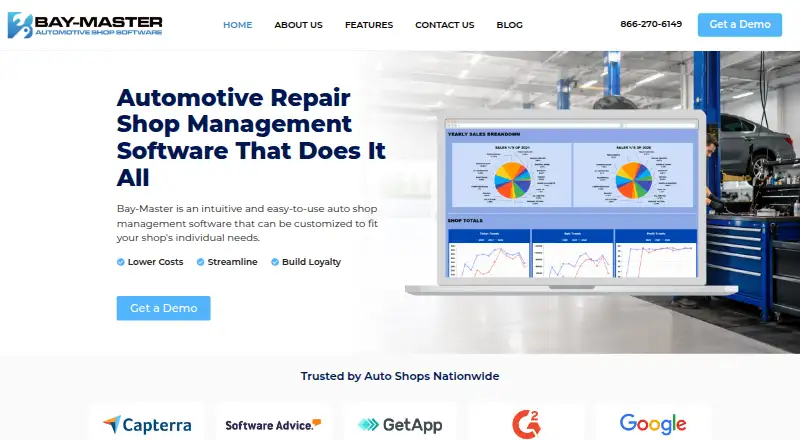
Bay-Master is automotive repair shop management software for handling estimates, work orders, payments, inventory, scheduling, reporting, and customer commun…
What Bay-Master is
Bay-Master is automotive repair shop management software for handling estimates, work orders, payments, inventory, scheduling, reporting, and customer communications. Shops can arrange tickets by bay, set committed times, and view schedules by day, week, or month. Staff can customize digital inspection forms, add notes and pictures from a tablet or smartphone, and create estimates linked to an inspection. Parts tools show supplier availability, compare prices, check shop inventory, and order vehicle-compatible parts from a ticket. Customer features include service history, financing, text and email marketing, and reminders for appointments, services due, recommendations, or inactive customers. A QuickBooks interface can post sales and receivables, track postings, and update inventory from deliveries and sales. Other listed connections include Carfax, Worldpac, MOTOR, Wisetack, PartsTech, NAPA Auto Parts, and Nexpart. Bay-Master lists Workstation + Cloud access and Android, iOS, web, and Windows platforms. Its Essentials, Traditional, and High Performance packages have no displayed prices; visitors are directed to sales for pricing.
Good
- Customizable inspections include notes and pictures.
- Schedules can be viewed by day, week, or month.
- Parts ordering can compare supplier availability and prices.
- QuickBooks interface can update sales and inventory.
- Available on Android, iOS, web, and Windows.
Watch out
- Plan prices are not displayed.
- Technician tablet connections vary by package.
Who it suits
Bay-Master suits auto repair shops that need to manage jobs, parts, inspections, schedules, and customer communication. Essentials is described as an option for a small shop that mainly needs to create invoices.
Verdict
Bay-Master brings shop workflow, parts, inspection, and customer-management tools together. Shops must contact sales for pricing, and the listed tablet connection counts differ by package.
Plans and prices
From Bay-Master's own pricing page, checked 9 Oct 2026.
| Plan | Price | What it gives you |
|---|---|---|
| Essentials | Priced on request | Workstation + Cloud · Tech Tablet Connections · listed features include scheduling, inventory, reporting, digital inspections, QuickBooks integration, and marketing |
| High Performance | Priced on request | Workstation + Cloud x 3 · Tech Tablet Connections x 5 · listed features include scheduling, inventory, reporting, digital inspections, QuickBooks integration, and marketing |
| Traditional | Priced on request | Workstation + Cloud x 1 · Tech Tablet Connections x 2 · listed features include scheduling, inventory, reporting, digital inspections, QuickBooks integration, and marketing |
The facts
Each one read from Bay-Master's own pages, with the date it was checked.
What it does
- Accounting integration
- The features page lists a QuickBooks interface for posting sales, receivables, delivery invoices, and inventory updates.checked 9 Oct 2026
- Customer communications
- The software supports text and email reminders for appointments, services due, recommendations, and inactive customers.checked 9 Oct 2026
- Customer management
- The product includes customer financing, text and email marketing, service history, and customer communications.checked 9 Oct 2026
- Digital inspections
- Users can customize inspection forms, add notes and pictures, and create estimates related to an inspection.checked 9 Oct 2026
- Inspections
- The software supports customizable digital inspection forms with notes and pictures, accessible on a tablet or smartphone.checked 9 Oct 2026
- Integrations
- The site lists integrations or connections with QuickBooks, Carfax, Worldpac, MOTOR, Wisetack, PartsTech, NAPA Auto Parts, and Nexpart.checked 9 Oct 2026
- Intended customer
- The Essentials package is described as keeping things simple for a small shop that just needs to create an invoice.checked 9 Oct 2026
- Other integrations
- The home page displays integrations or partner logos for Carfax, Worldpac, MOTOR, Wisetack, PartsTech, NAPA Auto Parts, Nexpart, and QuickBooks.checked 9 Oct 2026
- Parts ordering
- Bay-Master can show supplier availability, compare prices, check shop inventory, and order vehicle-compatible parts from a ticket.checked 9 Oct 2026
- Payment data
- Bay-Master says it does not receive or store customers’ credit card information and uses an outside processor or Fullsteam Operations LLC for subscription and point-of-sale payments.checked 9 Oct 2026
- Pricing
- The features page directs visitors to speak with sales and does not display plan prices.checked 9 Oct 2026
- Product
- Bay-Master is automotive repair shop management software for managing customers, estimates, work orders, payments, inventory, parts ordering, scheduling, and reporting.checked 9 Oct 2026
- Purpose
- Bay-Master is auto repair shop management software for managing customers, estimates, work orders, payments, inventory, parts ordering, scheduling, and reporting.checked 9 Oct 2026
- QuickBooks
- The QuickBooks interface can post sales and accounts receivable tickets, track postings, and update inventory from deliveries and sales.checked 9 Oct 2026
- Scheduling
- Shops can schedule tickets, name their bays, set committed times, and view schedules by day, week, or month.checked 9 Oct 2026
- Security
- Bay-Master says it follows generally accepted industry standards to protect personal and financial information in transmission and storage, while stating it cannot guarantee absolute security.checked 9 Oct 2026
- Security reporting
- Baymaster invites reports of vulnerabilities in its hosted applications and associated services through its responsible disclosure policy.checked 9 Oct 2026
- Support
- The contact page lists support by voicemail at (855) 211-2828 and a direct line at (732) 473-0260, with office hours Monday through Friday, 9:00 AM–5:30 PM EST.checked 9 Oct 2026
The company
- Headquarters
- The contact page lists a mailing address at PO Box 610, 715 W Park Ave, Oakhurst, NJ 07755.checked 9 Oct 2026
Money
- Plan configuration
- The features page lists Essentials, Traditional, and High Performance; the listed technician tablet connections are 2 for Traditional and 5 for High Performance.checked 9 Oct 2026
Where it runs
- Platform access
- The features page lists Workstation + Cloud access, and says digital inspections can be accessed on a tablet or smartphone.checked 9 Oct 2026
The full review of Bay-Master
Overview
Bay-Master is automotive shop-management software for handling work orders, estimates, payments, parts, scheduling, and customer communications. It is best suited to repair shops that want those workflows and digital inspections in one system; shops that need a price before evaluating a package will have to contact sales.
Key features
Customizable digital inspection forms support notes and photos, and shops can create estimates from an inspection. That connects the inspection to follow-up work rather than leaving findings as a separate checklist.
Scheduling covers tickets, named bays, committed times, and day, week, or month views. Parts ordering can compare supplier availability and prices, check shop inventory, and order vehicle-compatible parts from a ticket—useful for shops coordinating parts and repair work in the same workflow.
Customer tools include service history, financing, and text and email marketing, with reminders for appointments, services due, recommendations, and inactive customers. The QuickBooks interface can post sales and accounts-receivable tickets, track postings, and update inventory from deliveries and sales. Other named connections include Carfax, Worldpac, MOTOR, Wisetack, PartsTech, NAPA Auto Parts, and Nexpart.
Bay-Master says it uses generally accepted industry standards to protect personal and financial information in transit and storage, while not guaranteeing absolute security. It says it does not receive or store customers’ credit-card data; subscription and point-of-sale payments go through an outside processor or Fullsteam Operations LLC.
Pricing
Bay-Master uses custom pricing; shops must speak with sales, and no plan prices are provided. The features page describes three packages, all with Workstation + Cloud access and listed features including scheduling, inventory, reporting, digital inspections, QuickBooks integration, and marketing.
- Essentials: Intended to keep things simple for a small shop that just needs to create an invoice. The listed package details do not give a technician tablet-connection count.
- Traditional: Workstation + Cloud x 1 and two technician tablet connections. This is the defined middle option for shops needing more than the Essentials description, though the package details do not specify a distinct feature difference.
- High Performance: Workstation + Cloud x 3 and five technician tablet connections. The additional listed workstation/cloud access and tablet connections may suit a larger team, but the price is custom.
Because prices are custom, buyers cannot compare package costs from the published plan breakdown alone. Support is available by voicemail at (855) 211-2828 and by direct line at (732) 473-0260, Monday through Friday, 9:00 AM–5:30 PM EST.
Platforms
Bay-Master lists Android, iOS, web, and Windows support, with Workstation + Cloud access. Digital inspections can be opened on a tablet or smartphone, making mobile devices part of the inspection workflow rather than limiting it to a workstation.
Who it's for
Bay-Master is a fit for automotive repair shops that want work orders, estimate approvals, inventory, technician time tracking, vehicle history, inspections, and customer follow-up in a single shop-management product. Essentials is positioned for a small shop with straightforward invoicing needs; the packages with defined tablet connections better clarify capacity for shops coordinating technicians across devices. Shops that require transparent package pricing before a sales conversation may prefer another option.
Pros and cons
- Pro: Inspections can include notes and photos and lead to estimates, keeping findings connected to proposed work.
- Pro: Ticket-based parts ordering combines supplier comparison, availability, and inventory checks in the repair workflow.
- Pro: QuickBooks posting and inventory updates support accounting handoffs for sales, receivables, deliveries, and sales.
- Con: Package prices are custom, so shops cannot assess cost or compare tiers without contacting sales.
- Con: Tablet connection counts are specified for Traditional and High Performance, but not Essentials, making that package harder to evaluate for technician-device needs.
Alternatives
For a broader comparison, browse Automotive Repair Software. ARI is worth considering for a published monthly price and a free plan and trial; ARI Pro is $39.99 a month and includes invoicing, inspections, inventory, accounting, appointments, reminders, and time tracking.
Carstio is a free, self-hosted web option with a free plan, unlimited users, clients, and cars, and all features included. CCC ONE Repair Workflow is another paid option for Android, iOS, web, and Windows. Mitchell RepairCenter is a paid option for Android, iOS, API, and Windows.
GEM-CAR may suit shops that want a free trial and published tiers: I Standard is $149 a month with 100 GB storage and two users, while II Premium is $299 a month. OpenAuto is a free and open-source Windows option with a no-cost core application. Shop OS is a free web option for shops under 10 jobs per month.
Verdict
Bay-Master is a strong candidate for repair shops that want inspections, estimates, parts ordering, scheduling, customer follow-up, and accounting connections within one shop workflow. Its clearest advantage is linking operational tasks from inspections and tickets through parts and QuickBooks updates. Look elsewhere if published pricing is essential to your shortlist or if the Essentials package needs a clearly stated tablet capacity before you can assess fit.
Getting started
- Visit the Bay-Master website.
- Speak with sales about package pricing.
- Choose among Essentials, Traditional, or High Performance.
- Use Workstation + Cloud access.
- Access digital inspections on a tablet or smartphone.
Questions
How much does Bay-Master cost?
Plan prices are not displayed; the features page directs visitors to speak with sales.
What packages are available?
Bay-Master lists Essentials, Traditional, and High Performance. Traditional lists two technician tablet connections, while High Performance lists five.
Which platforms does Bay-Master support?
Listed platforms are Android, iOS, web, and Windows. The features page also lists Workstation + Cloud access.
Does Bay-Master connect to QuickBooks?
Yes. Its QuickBooks interface can post sales and accounts receivable tickets, track postings, and update inventory from deliveries and sales.
Can staff use digital inspections on mobile devices?
Digital inspection forms can be accessed on a tablet or smartphone and customized with notes and pictures.
Alternatives to Bay-Master
- 1
Fullbay
AndroidiOSWebAPI7.8From $188 a month - 2

GEM-CAR
AndroidiOSWebmacOS7.6From $149 a month - 3

Shopmonkey
AndroidiOSWebAPI7.6From $215 a month - 4

R.O. Writer
AndroidiOSWebSelf-hosted7.4From $199 a month - 5
GetAFix
AndroidiOSWebAPI7.1 - 6
AutoLeap
AndroidiOSWeb6.9From $179 a month