
Backlog
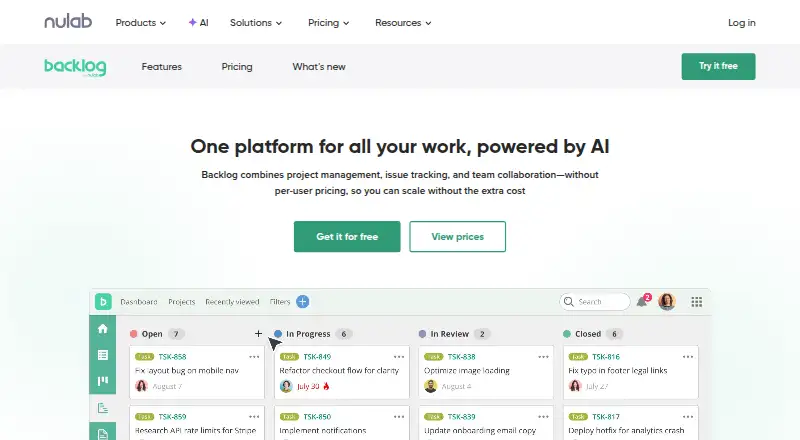
Backlog brings project management, issue tracking, and team collaboration together, with no per-user pricing.
What Backlog is
Backlog brings project management, issue tracking, and team collaboration together, with no per-user pricing. Teams can organize work with issues, Kanban-style boards, subtasks, Gantt charts, burndown charts, and issue templates; available tools vary by plan. Built-in Git repositories and Subversion support cover code management. The platform works in a browser and on iOS and Android, and its open API supports custom integrations. Listed connections include Cacoo, Slack, Jenkins, Microsoft Teams, Google Drive, Dropbox, and iCal Sync. The Free plan supports 10 users and one project. Starter costs $35 per month; Standard is $100 per month, and Premium is $175 per month. Paid plans include a 30-day trial without a credit card, though plans cannot be switched during the trial. Enterprise adds security options including SAML single sign-on, SCIM provisioning, audit logs, and centralized user and access management, and can be installed on a private server.
Good
- No per-user pricing
- Built-in Git and Subversion support
- Browser, iOS, and Android access
- Open API for custom integrations
Watch out
- Free plan limited to 10 users and one project
- No automation rules
- Plans cannot be switched during the trial
Who it suits
Backlog suits teams that want project and issue tracking alongside code management. Enterprise may fit organizations needing private hosting and centralized security controls.
Verdict
Backlog combines planning, issue tracking, and code management in one platform. Check plan limits and features to find the right fit for your team.
Plans and prices
From Backlog's own pricing page, checked 30 Sep 2026.
| Plan | Price | What it gives you |
|---|---|---|
| Free | Free | 10 users · 1 project · 100 MB storage · Git & Subversion · Board · Free forever |
| Starter | $35 a month | 30 users · 5 projects · 1 GB storage · Git & Subversion · Board · Subtasking · billed monthly |
| Standard | $100 a month | Unlimited users · 100 projects · 30 GB storage · Gantt charts (6 months view) · Burndown chart · Issue templates · billed monthly |
| Premium | $175 a month | Unlimited users · Unlimited projects · 100 GB storage · AI Assistant · 3rd level subtasks · Unlimited Gantt view · Custom fields · Dedicated support · billed monthly |
| Enterprise | Priced on request | Unlimited users · SAML SSO · SCIM provisioning · Audit logs · Advanced security and compliance · Private server installation · Contact |
The facts
Each one read from Backlog's own pages, with the date it was checked.
What it does
- AI Assistant
- The AI Assistant is included with Premium and Enterprise, which each include 2,000 credits monthly.checked 30 Sep 2026
- API
- Backlog supports custom integrations through its open API and links to API documentation for developers.checked 30 Sep 2026
- Automation rules
- Nochecked 22 Sep 2026
- Code management
- Backlog provides built-in Git repositories and Subversion support.checked 30 Sep 2026
- Guest access
- Yeschecked 22 Sep 2026
- Integrations
- Listed integrations include Cacoo, Slack, Redmine and Jira importers, Jenkins, Microsoft Teams, Google Drive, Dropbox, and iCal Sync.checked 30 Sep 2026
- Pricing limits
- The Free plan allows 10 users and one project, while Starter allows 30 users; Standard, Premium, and Enterprise allow unlimited users.checked 30 Sep 2026
- Private hosting
- The Enterprise plan can be installed on a private server, with control over data, users, security settings, updates, and permissions.checked 30 Sep 2026
- Purpose
- Backlog combines project management, issue tracking, and team collaboration in one platform without per-user pricing.checked 30 Sep 2026
- Security
- Enterprise security features include SAML single sign-on, SCIM user provisioning, audit logs, centralized user and access management, and security integrations.checked 30 Sep 2026
- Support
- The pricing page lists email support across plans, dedicated support on Premium, and an Enterprise Customer Success Manager on Enterprise.checked 30 Sep 2026
- Supported access
- Backlog is accessible in a browser and on iOS and Android mobile devices.checked 30 Sep 2026
- Task and project tools
- Its plans include issue tracking, Kanban-style boards, and features such as subtasks, Gantt charts, burndown charts, and issue templates.checked 30 Sep 2026
- Time tracking
- Nochecked 22 Sep 2026
The company
- Founded
- 2004checked 28 Sep 2026
- Headquarters
- Fukuoka, Japanchecked 28 Sep 2026
- Maker
- Nulab, Inc. was established in 2004 with headquarters in Fukuoka, Japan.checked 30 Sep 2026
Money
- Free plan
- Yeschecked 22 Sep 2026
- Free-plan user limit
- 10checked 22 Sep 2026
- Trial
- Paid plans have a 30-day free trial with no credit card required, and plans cannot be switched during the trial.checked 30 Sep 2026
The full review of Backlog
Backlog is a project and issue tracking platform with built-in Git and Subversion support, best suited to development teams that want work planning and code management together. It offers a capable free starting point, but project, storage and feature limits make plan choice important as a team grows.
Overview
Backlog brings issue tracking, project management and team collaboration into one service. Kanban-style boards, custom workflows and roadmaps give teams ways to organize work, while guest access can accommodate collaborators who do not need a full seat. Built-in Git repositories and Subversion support are a meaningful advantage for teams that want repositories beside their work items rather than in a separate service.
The platform connects with Slack, Microsoft Teams, Jenkins, Google Drive, Dropbox, Cacoo and iCal Sync, and includes Jira and Redmine importers. Its open API supports custom integrations. The notable omissions are automation rules and time tracking; teams that depend on either should look elsewhere or plan to add another tool.
Key features
Planning and issue tracking
Boards handle day-to-day task flow, while subtasks help break larger issues into manageable work. Starter adds subtasks, but teams needing issue templates, burndown charts or Gantt planning must move to Standard. Standard's Gantt view is limited to six months, which may constrain longer-range planning. Premium removes that view limit, adds third-level subtasks and custom fields, and is better suited to teams with more detailed workflows.
Code and integrations
Git repositories and Subversion support are included even on Free, giving small teams a way to keep code management and issue tracking together from the outset. The API and range of integrations provide options for connecting existing tools, while the Jira and Redmine importers are useful for teams moving from either platform.
AI and enterprise controls
Premium and Enterprise include 2,000 AI Assistant credits monthly. Enterprise adds SAML single sign-on, SCIM user provisioning, audit logs and centralized user and access management, along with security integrations. It can also be installed on a private server, giving organizations control over data, users, security settings, updates and permissions. Those controls make Enterprise the relevant tier for organizations with stricter governance or hosting requirements, rather than teams seeking only basic project tracking.
Pricing
Backlog uses flat monthly plan prices rather than per-user pricing, which can make costs more predictable for larger teams. Paid plans have a 30-day free trial with no credit card required, but plans cannot be switched during the trial. Email support is available across plans; Premium adds dedicated support, and Enterprise includes a Customer Success Manager.
| Plan | Price | Limits and included features |
|---|---|---|
| Free | free, Free forever | 10 users, 1 project, 100 MB storage; Git, Subversion and board. |
| Starter | $35 a month, billed monthly | 30 users, 5 projects, 1 GB storage; Git, Subversion, board and subtasks. |
| Standard | $100 a month, billed monthly | Unlimited users, 100 projects, 30 GB storage; Gantt charts with a six-month view, burndown charts and issue templates. |
| Premium | $175 a month, billed monthly | Unlimited users and projects, 100 GB storage; AI Assistant, third-level subtasks, unlimited Gantt view, custom fields and dedicated support. |
| Enterprise | Custom pricing | Unlimited users; private hosting and enterprise security features. |
Free is a practical fit for a small team evaluating the core workflow, but one project and 100 MB of storage are tight ceilings. Starter raises capacity to five projects and 30 users, yet still caps storage at 1 GB and lacks the planning charts and templates that arrive at Standard. Standard suits teams that need those views and unlimited seats, although its 100-project cap and six-month Gantt window remain. Premium removes the project cap and expands storage to 100 GB, with advanced fields and support; the higher monthly price is most defensible when those additions will be used. Enterprise is the custom-priced choice for private hosting and centralized security controls.
Platforms
Backlog is available in a browser and on iOS and Android. It also supports API access and self-hosted deployment, so teams can choose between using the service in the cloud and an Enterprise private-server installation.
Who it's for
Backlog is strongest for software and development teams that want issue tracking, project planning and code repositories in one platform, particularly when flat plan pricing is preferable to per-user charges. It can also suit teams migrating from Jira or Redmine, or organizations that need private hosting and enterprise access controls. It is a weaker fit for teams that require automation rules or time tracking, and the free tier is too constrained for larger projects or storage needs.
Pros and cons
- Pros: Git and Subversion support are included on the free plan, keeping repository access available even to small teams.
- Pros: Flat monthly pricing and unlimited users on Standard and above can suit teams that would otherwise face per-seat costs.
- Pros: Custom workflows, roadmaps, guest access, an open API and integrations support varied team processes and connected tool stacks.
- Pros: Enterprise combines private hosting with SAML, SCIM, audit logs and centralized access management for organizations with stronger control requirements.
- Cons: Free limits teams to 10 users, one project and 100 MB, so it is mainly a small-scale starting point.
- Cons: Automation rules and time tracking are absent, leaving teams reliant on those workflows to add another tool or choose a different platform.
- Cons: Advanced planning features begin at Standard, and its Gantt view covers only six months.
- Cons: Premium costs $175 a month, while Enterprise uses custom pricing, making the advanced tiers a substantial commitment over Free and Starter.
Alternatives
Linear is worth considering for teams that want a free plan with unlimited members, two teams and 250 issues, alongside its Agent platform and Linear Agent; it supports more desktop platforms than Backlog.
YouTrack may suit teams that prioritize a generous free cloud allowance: its Cloud Free plan supports up to 10 users with 30 GB of storage. Its Cloud plan starts at $5.40 a month.
MantisBT is an option for teams seeking a free, self-hosted open-source bug tracker.
Bugzilla is a free and open-source alternative.
Trac is a free, self-hosted project software option.
Launchpad offers a free plan for open-source projects.
Buildtable has a free plan for one game and two team members, with Bug Center and Tasks.
Shortcut offers a free plan for up to 10 users, one workspace and 5 GB of storage, making it another option for small teams weighing free-tier limits.
Browse Game Bug Tracking Software, Issue Tracking Software and Project Management Software for more options by category.
Verdict
Backlog is a strong choice for development teams that want planning, issue tracking and Git or Subversion repositories under one roof, with flat monthly pricing that does not rise by user count. Its main drawbacks are the absence of automation rules and time tracking, plus sharply tiered project, storage and planning limits. Choose it when integrated code and work management matters more than those missing capabilities; otherwise, look for a tracker aligned with your workflow.
Getting started
- Visit the Backlog website.
- Choose the Free plan or a paid plan; paid plans offer a 30-day trial without a credit card.
- Use Backlog in a browser or access it on iOS or Android.
- Use the open API for custom integrations if needed.
Limits worth knowing
The Free plan allows 10 users, one project, and 100 MB of storage. Starter allows 30 users, five projects, and 1 GB of storage; Standard has 100 projects and 30 GB, while Premium has unlimited projects and 100 GB. The paid-plan trial lasts 30 days, and plans cannot be switched during it.
Questions
What does the Free plan include?
It allows 10 users and one project, with 100 MB of storage, Git and Subversion, and a board.
Is there a free trial?
Paid plans include a 30-day trial with no credit card required. Plans cannot be switched during the trial.
Which platforms does Backlog support?
Backlog is available on the web, iOS, and Android. Enterprise can also be installed on a private server.
Does Backlog integrate with other tools?
Listed integrations include Cacoo, Slack, Redmine and Jira importers, Jenkins, Microsoft Teams, Google Drive, Dropbox, and iCal Sync. An open API supports custom integrations.
Who makes Backlog?
The maker is Backlog, founded in 2004 and headquartered in Fukuoka, Japan.
Alternatives to Backlog
- 1
Jira
Free planAndroidiOSWebAPI8.4Free plan - 2

Linear
Free planAndroidiOSWebAPI8.4From $10 a month - 3
Zoho Sprints
Free planAndroidiOSWebAPI8.2From $1 a month - 4

Azure Test Plans
Free planWebAPIExtensionLinux8.1From $6 a month - 5
Redmine
Free planOpen sourceWebAPILinuxmacOS7.8Free plan - 6
Trac
Free planOpen sourceWebAPILinuxmacOS7.6Free plan