
Backblaze Computer Backup
Backblaze Computer Backup is a paid service for backing up computer files to unlimited cloud storage, with no restrictions on file type or size.
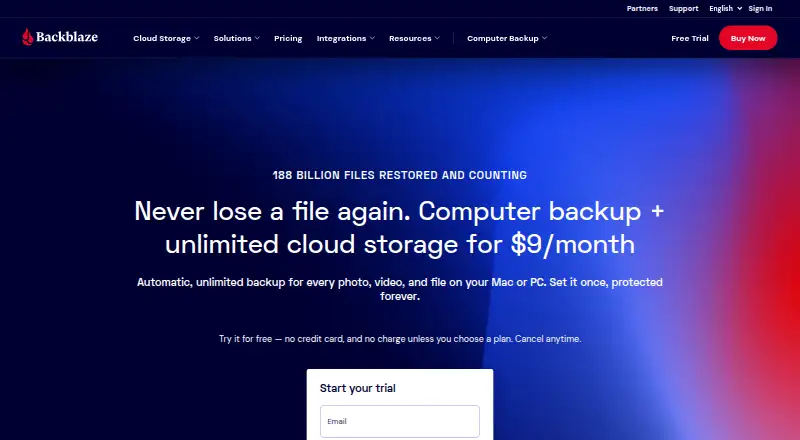
What Backblaze Computer Backup is
Backblaze Computer Backup is a paid service for backing up computer files to unlimited cloud storage, with no restrictions on file type or size. Native backup software is available for Mac and PC, and backed-up data can be accessed through iOS and Android apps. Files are encrypted before leaving the computer and remain encrypted in Backblaze data centers; users can also choose an additional private encryption key. Two-factor verification is available through TOTP and SMS. Users can restore files through the web, mobile apps, or a shipped hard drive, and share individual files they have backed up. The listed personal monthly option is $9 per month for unlimited cloud backup for one computer. Other personal options are $8.25 per month when paid annually and $7.88 per month when paid bi-annually. A 15-day trial is available, but there is no free plan. Business features include multiple-user management and administrative controls; business deployment tools include MSI Installer, JAMF, and Munki. Business accounts list Google and Microsoft SSO, while enterprise accounts list Okta and Azure AD.
Good
- Unlimited storage with no file-type or size restrictions.
- Files are encrypted before leaving the computer.
- Optional private encryption key is available.
- Restore through web, mobile apps, or shipped hard drive.
- 15-day trial available.
Watch out
- No free plan.
- Mobile backup is not offered.
- Monthly plan costs $9 per month.
- Server backup is not offered.
Who it suits
It suits people who want cloud backups for a Mac or PC and access to backed-up data from mobile devices. Businesses may also consider it for multi-user administration and deployment controls.
Verdict
Backblaze Computer Backup combines unlimited file storage with several restore methods and encryption options. Check that its computer-focused backup scope and paid plans fit your needs.
Plans and prices
From Backblaze Computer Backup's own pricing page, checked 20 Sep 2026.
| Plan | Price | What it gives you |
|---|---|---|
| Monthly | $9 a month | Unlimited backup data · billed monthly |
| Yearly | $8.25 a year | Unlimited backup data · paid annually |
| Yearly | $8.25 a month | Unlimited backup data · paid annually |
| Two Years | $7.88 a month | Unlimited backup data · paid bi-annually |
| Two Years | $7.88 a year | Unlimited backup data · paid bi-annually |
| Personal Two Years | $7.88 a month | Best value; save 8% · $7.88/mo paid bi-annually |
| Personal Yearly | $8.25 a month | Annual billing · $8.25/mo paid annually |
| Personal Monthly | $9 a month | Unlimited cloud backup for one computer · $9/mo |
The facts
Each one read from Backblaze Computer Backup's own pages, with the date it was checked.
What it does
- Backup scope
- The service backs up user-generated data from computers and connected external drives.checked 28 Sep 2026
- Business administration
- Business features include multiple-user management and administrative controls.checked 28 Sep 2026
- Computer backup
- Yeschecked 20 Sep 2026
- Customer reach
- Backblaze says it is trusted by 500,000 customers in over 175 countries.checked 28 Sep 2026
- Deployment tools
- Business deployment supports MSI Installer, JAMF, and Munki.checked 28 Sep 2026
- File sharing
- Users can share individual files that they have backed up.checked 28 Sep 2026
- Mobile backup
- Nochecked 20 Sep 2026
- Paid from
- 7.88checked 20 Sep 2026
- Private encryption
- Files are encrypted before leaving the computer and remain encrypted in Backblaze data centers.checked 28 Sep 2026
- Private key
- An optional private encryption key provides an additional way to protect backups.checked 28 Sep 2026
- Ransomware protection
- The service protects against ransomware that can encrypt and destroy files.checked 28 Sep 2026
- Restore methods
- Restores are available through the web, mobile apps, or a shipped hard drive.checked 28 Sep 2026
- Restore modes
- filechecked 20 Sep 2026
- Server backup
- Nochecked 20 Sep 2026
- SSO integrations
- Business accounts support SSO through Google and Microsoft; enterprise supports Okta and Azure AD.checked 28 Sep 2026
- Storage limit
- There are no storage limits and no restrictions on file type or size.checked 28 Sep 2026
The company
- Company status
- Backblaze is publicly traded under the ticker BLZE.checked 28 Sep 2026
- Founded
- 2007checked 28 Sep 2026
- Headquarters
- San Francisco, California, USAchecked 28 Sep 2026
Where it runs
- Desktop platforms
- Native backup software is available for Mac and PC.checked 28 Sep 2026
- Mobile apps
- Backed-up data can be accessed through iOS and Android mobile apps.checked 28 Sep 2026
Money
- Free plan
- Nochecked 20 Sep 2026
- Free trial
- The trial lasts 15 days and does not require a credit card.checked 28 Sep 2026
- Monthly price
- $9 per month for computer backup and unlimited cloud storage.checked 28 Sep 2026
The full review of Backblaze Computer Backup
Overview
Backblaze Computer Backup is a paid cloud backup service for files on Mac and Windows computers. It is best for people who want to protect a computer without managing a storage quota. Unlimited storage and several restore routes are compelling, but the service does not back up phones, tablets, or servers.
Key features
Backblaze places no limit on storage and accepts files of any type or size, so large or varied computer collections do not require quota management. The scope is narrower than the headline capacity suggests: it backs up computer files, not mobile devices or servers.
Files are encrypted before they leave the computer and remain encrypted in Backblaze data centers. An optional private key adds a further protection option, and every account supports TOTP or SMS two-factor verification. Ransomware protection is included. These safeguards are useful for protecting backups and account access, though using a private key is optional.
Files can be restored through the web, mobile apps, or a shipped hard drive. That range suits both individual retrieval and cases where downloading is inconvenient. The iOS and Android apps provide access to backed-up data; they do not back up the devices themselves. Users can also share individual backed-up files.
Business features include multiple-user management and administrative controls. Deployment supports MSI Installer, JAMF, and Munki; business SSO supports Google and Microsoft, while enterprise SSO adds Okta and Azure AD. These administration tools matter to organizations, but they do not change the computer-focused backup scope.
Pricing
There is no free plan, but a 15-day trial lets prospective users evaluate the service before paying. The Monthly plan costs $9 a month and includes unlimited backup data for one computer. It is the most flexible billing option, though it costs more over time than committing to a longer term.
The Personal Yearly plan is $8.25 a month, billed annually, with unlimited backup data. It reduces the monthly rate in exchange for annual billing. The Personal Two Years plan is $7.88 a month, paid bi-annually, and is marked as saving 8%; it offers the lowest stated monthly rate but requires the longest commitment. All three plans include unlimited backup data, so the trade-off is billing flexibility rather than storage capacity.
The pricing information also gives annual and two-year figures as $8.25 per year and $7.88 per year, respectively, while describing both plans as monthly rates billed annually or bi-annually. The plan terms above reflect the stated monthly rates and billing periods.
Platforms
Native backup software is available for Mac and PC, with backed-up files accessible through the web and iOS and Android apps. Mobile access is useful when retrieving files away from the computer, but it is not a substitute for mobile-device backup.
Who it's for
Choose Backblaze if your priority is unlimited cloud backup for a computer's files, with multiple ways to retrieve them and encryption options. It is less suitable if you need phone or tablet backup, server coverage, or a free plan.
Pros and cons
- Pro: No storage limits or file-type and size restrictions, which suits large or mixed computer collections.
- Pro: Web, app, and shipped-hard-drive restores provide alternatives to downloading files.
- Pro: Encryption, an optional private key, two-factor verification, and ransomware protection strengthen the backup offering.
- Con: Backup covers computer files rather than mobile devices or servers, so it cannot serve as a single backup solution for those needs.
- Con: There is no free plan, and the lowest monthly rate requires a two-year billing commitment.
Alternatives
Consider IDrive if you want a free plan or broader platform coverage, including Linux; its Basic plan has 10 GB of storage, while IDrive Mini is $0.25 a month for 100 GB and one user. Choose EaseUS Todo Backup if a free Windows or Mac option for file, system, disk, and partition backup and recovery is more important than Backblaze's unlimited cloud storage; its Home Yearly plan is $39.95 a year for one computer and 1 TB of cloud storage.
Infrascale Workstation Backup is another paid alternative with a storage-based cloud plan in 1 TB increments, unlimited endpoint devices, and unlimited retention. BDRShield Endpoint Backup offers a free plan and trial, with endpoint/workstation backup under custom-quote subscription or perpetual licensing. Datto Endpoint Backup for Windows uses consumption-based pricing tied to storage used, with pricing requested from Datto.
NinjaOne is an endpoint-management alternative with a plan starting at $1.50 per device per month at 10,000 endpoints. Axcient x360Recover offers usage-based pricing with endpoint rates varying by workstation or server. UrBackup is a free-plan alternative whose core is open-source, self-hosted file and image backup software.
For broader category comparisons, browse Endpoint Backup Software, Continuous Data Protection Software, Cloud Backup Services, or Backup software.
Verdict
Backblaze Computer Backup is a strong fit for anyone who wants unlimited cloud backup for a Mac or PC and values encryption plus flexible restore methods. Its main advantage is removing storage limits; look elsewhere if you need mobile or server backup, a free tier, or more flexible billing than its paid plans allow.
Getting started
- Open the Backblaze Computer Backup website
- Choose monthly, annual, or bi-annual billing
- Start the 15-day trial
- Install the native backup software on Mac or PC
- Use iOS or Android apps to access backed-up data
Limits worth knowing
There is no free plan. Personal options provide unlimited backup data, while the service does not back up mobile devices or servers.
Questions
How much does it cost?
The monthly plan is $9 per month. The annual option is $8.25 per month when paid annually, and the two-year option is $7.88 per month when paid bi-annually.
Is there a free plan or trial?
There is no free plan. A 15-day trial is available.
Which platforms are supported?
The listed platforms are Android, iOS, macOS, web, and Windows. Native backup software is available for Mac and PC.
What can be backed up?
The service backs up computer files, with no storage limits or restrictions on file type or size. Mobile backup and server backup are not provided.
How can files be restored?
Restores are available through the web, mobile apps, or a shipped hard drive. Individual backed-up files can also be shared.
What security options are included?
Files are encrypted before leaving the computer and remain encrypted in Backblaze data centers. An optional private encryption key and two-factor verification through TOTP or SMS are available.
Alternatives to Backblaze Computer Backup
- 1
UrBackup
Free planOpen sourceAndroidWebAPILinux9.4Free plan - 2

IDrive
Free planAndroidiOSWebLinux9.2From $0.25 a month - 3

Bareos
Free planOpen sourceWebAPILinuxmacOS9.1From €480 a year - 4

MSP360 Backup
Free planAndroidiOSWebAPI9.0Free plan - 5

iCloud Backup
Free planAndroidiOSWebAPI8.6From $0.99 a month - 6

Acronis True Image
AndroidiOSWebAPI8.4From $49.99 a year