
BDRShield Endpoint Backup
BDRShield Endpoint Backup protects endpoint files and folders with backups and provides Windows disk images for recovery after data loss or cyberattacks.
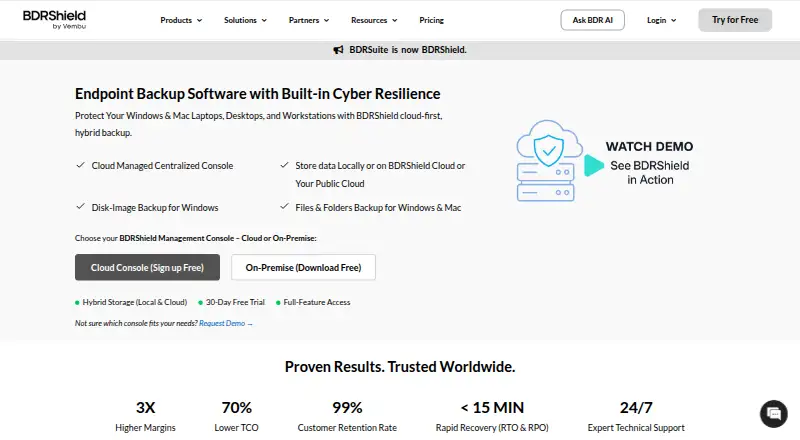
What BDRShield Endpoint Backup is
BDRShield Endpoint Backup protects endpoint files and folders with backups and provides Windows disk images for recovery after data loss or cyberattacks. Backups can be stored locally, in BDRShield Cloud, or in customer cloud storage such as S3, Azure Blob, Google Cloud, MinIO, and Wasabi. Windows and Mac endpoint backups can be managed through a cloud console or a self-hosted centralized console; hosts can be added through CSV import or AD/LDAP integration. Scheduled incremental and synthetic full backups are supported, with a stated 15-minute RPO. Recovery options include file and folder, disk or partition, bare-metal, and instant recovery; backed-up endpoints can also boot as VMs on VMware, Hyper-V, or KVM. Listed safeguards include immutable and air-gapped backups, malware scanning before backup and restore, MFA, and AES-256 encryption in transit and at rest. Retention can be set by version count or time period, and reports and email alerts cover job outcomes. The product offers a free plan and 30-day trial; paid licensing is by custom quote, with subscription and perpetual options.
Good
- Supports local and multiple customer cloud storage options.
- Offers cloud or self-hosted centralized management.
- Recovery includes bare-metal and instant options.
- Lists immutable backups, malware scanning, and MFA.
- 24/7 expert technical support is advertised.
Watch out
- Paid pricing is by custom quote.
- Windows disk image backups are specified for Windows.
- Subscription and perpetual license availability is listed without prices.
Who it suits
It is intended for organizations, including SMBs and enterprises, as well as managed service providers. The varied storage and recovery options may suit teams managing mixed endpoint environments.
Verdict
BDRShield combines endpoint backup management with several storage choices and recovery paths, including VM boot options. Its free plan and 30-day trial allow a look at the offering, while paid licensing requires a custom quote.
Plans and prices
From BDRShield Endpoint Backup's own pricing page, checked 15 Oct 2026.
| Plan | Price | What it gives you |
|---|---|---|
| 30-Day Free Trial | Free | Full-featured Enterprise access · 30 days |
| Free Edition | Free | 10 endpoints · 10 VMs · 10 Microsoft 365 users · 10 Google Workspace users · 10 AWS EC2 instances · 10 Azure VMs · community support · free forever |
| Endpoint/Workstation Backup | $12 a year | Endpoint backup module · 1 endpoint per year |
| Standard Cloud BDRShield | $30 a year | 50 GB cloud storage included · per user per year |
| Enterprise Cloud BDRShield | $48 a year | 50 GB cloud storage included · per user per year |
| Enterprise Edition — Endpoint/Workstation Backup | Priced on request | Per endpoint · Windows, Linux, or Mac endpoint · Custom quote; subscription and perpetual licenses are available. |
The facts
Each one read from BDRShield Endpoint Backup's own pages, with the date it was checked.
What it does
- API
- BDRShield exposes an HTTP Web Services API for backup actions, job monitoring, recovery status and configuration automation.checked 15 Oct 2026
- Bulk onboarding
- Endpoints can be added in bulk through CSV upload or integrated with Active Directory and LDAP.checked 15 Oct 2026
- Disk-image backup
- Windows disk-image jobs capture the operating system, applications, configurations and other machine data for whole-system recovery.checked 15 Oct 2026
- Documentation
- The technical-documentation hub links user guides, API automation material, evaluator guides, workload guides, best-practices guidance, release notes and upgrade instructions.checked 15 Oct 2026
- Encryption
- Backup data is protected with AES-256 encryption in transit and at rest, using either system-generated or customer-selected keys.checked 15 Oct 2026
- Endpoint coverage
- Endpoint protection covers Windows, Linux and Mac computers through file/folder backup, with Windows also supporting disk-image backup.checked 15 Oct 2026
- File and folder backup
- The endpoint product backs up selected files and folders on Windows and Mac devices.checked 15 Oct 2026
- Integrations
- Supported backup environments include VMware, Hyper-V, Proxmox, KVM, oVirt, AWS, Azure, Microsoft 365, Google Workspace, SQL Server, PostgreSQL, MySQL, Exchange and SharePoint.checked 15 Oct 2026
- Licence status
- The documentation points users to a Vembu EULA and describes subscription and perpetual commercial licensing; no open-source licence is identified on the reviewed pages.checked 15 Oct 2026
- Limit: Gartner complaint
- The sole Gartner Peer Insights reviewer said earlier releases often failed backups for unclear reasons, although the current release met expectations.checked 15 Oct 2026
- Limit: licensing clarity
- SaaSworthy reviewers describe the licensing model as confusing and say it can lead to incorrect purchases.checked 15 Oct 2026
- Limit: reliability and cleanup
- A TrustRadius reviewer reported failed or slow jobs, unsuccessful restores, difficult cleanup of old data and weak support for clustered Hyper-V environments.checked 15 Oct 2026
- Limit: restore experience
- Independent feedback cites unintuitive restore workflows, slow restores and a restore interface that needs improvement.checked 15 Oct 2026
- Management
- Windows and Mac endpoint backups can be managed through a cloud console or a self-hosted centralized console.checked 30 Sep 2026
- Management consoles
- The product offers a cloud management console and a self-hosted centralized console, with Windows, Linux and Docker installers for on-premises deployment.checked 15 Oct 2026
- Monitoring
- Job-level reports and automated email alerts cover successful, failed, or missed backup tasks.checked 30 Sep 2026
- Notable release
- The download page lists BDRShield version 9.2.0 Update 2 as released on September 1, 2026.checked 15 Oct 2026
- Onboarding
- Hosts can be imported by CSV or added through AD/LDAP integration.checked 30 Sep 2026
- Praise: ease of setup
- Independent reviews repeatedly describe setup, configuration and the web administration interface as straightforward, especially for simpler environments.checked 15 Oct 2026
The company
- Company legal name
- Crunchbase identifies the maker's legal name as Vembu Technologies Pvt Ltd and names Sekar Vembu as founder and CEO.checked 15 Oct 2026
- Company size
- LinkedIn places Vembu Technologies in the 201–500 employee range and displays 282 employees.checked 15 Oct 2026
- Headquarters
- Chennai, Tamil Nadu, Indiachecked 23 Sep 2026
- Maker headquarters and founding
- LinkedIn lists Vembu Technologies headquarters in Pleasanton, California, and says it was founded in 2002.checked 15 Oct 2026
Money
- Limit: support access on free tier
- A Trustpilot reviewer liked the free product and support response but noted that Free Edition users must start in the forum and do not receive a dedicated contact.checked 15 Oct 2026
The full review of BDRShield Endpoint Backup
Overview
BDRShield Endpoint Backup is endpoint backup software for organizations that need centralized protection across Windows, Mac, and Linux machines. It is best suited to SMBs, enterprises, and managed service providers that want flexible storage destinations and multiple recovery routes. Its breadth of recovery options is a strong draw, though custom pricing means buyers must weigh those capabilities against a quote rather than a published rate.
Key features
Backup and storage
BDRShield backs up endpoint files and folders, with Windows disk-image backups for recovery after data loss or cyberattacks. Scheduled incremental and synthetic full backups give administrators two job types, and the advertised 15-minute RPO targets a relatively short interval between recovery points. Retention can be set by version count or time period, which lets teams shape how much backup history they keep.
Backups can go to local storage, BDRShield Cloud, or customer cloud storage such as S3, Azure Blob, Google Cloud, MinIO, and Wasabi. That flexibility suits organizations with existing storage infrastructure or data-placement preferences; teams seeking a single, built-in destination may find the range less important.
Management, recovery, and security
Windows and Mac backups can be managed from either a cloud console or a self-hosted centralized console. Hosts can be imported by CSV or added through AD/LDAP integration, useful for organizations that want to bring existing directories or host lists into onboarding.
Recovery spans files and folders, disks or partitions, bare-metal restoration, and instant recovery. Backed-up endpoints can also boot as virtual machines on VMware, Hyper-V, or KVM. This breadth gives administrators options from a targeted file restore to a full-machine recovery, including virtualization-based recovery paths.
BDRShield describes immutable and air-gapped backups, malware scanning before backup and restore, MFA, and end-to-end AES-256 encryption in transit and at rest. Job-level reports and email alerts cover successful, failed, or missed tasks, while the product advertises 24/7 expert technical support.
Pricing
The pricing model is freemium, with a free plan and a 30-day trial. The named Enterprise Edition — Endpoint/Workstation Backup is billed by custom quote, per endpoint, for Windows, Linux, or Mac endpoints; subscription and perpetual licenses are available. The edition includes both file and image backup scope, bare-metal recovery, and ransomware protection.
The free plan may let prospective buyers explore the product without an initial license purchase, and the trial provides a 30-day evaluation window. However, no free-plan seat or storage cap is given, so teams should confirm the applicable limits before relying on it for ongoing endpoint coverage. Custom pricing also means organizations need a quote to assess total cost; the per-endpoint basis makes endpoint count central to that discussion.
Platforms
BDRShield supports Linux, macOS, Windows, web, and self-hosted deployments. Its endpoint coverage is mixed-OS, although the cloud-console and self-hosted management options are specifically described for Windows and Mac backups.
Who it's for
BDRShield is a strong fit for organizations and MSPs that need centralized endpoint coverage, multiple storage destinations, and recovery options extending from individual files to virtual-machine boot. Its directory onboarding and reporting features also suit teams managing many endpoints. It is a weaker fit for buyers who need transparent, comparable pricing before engaging with a vendor, or who only need a basic backup tool for one personal computer.
Pros and cons
- Pros: Multiple recovery paths, including bare-metal, instant recovery, and VM boot on VMware, Hyper-V, or KVM, give administrators flexibility during different kinds of recovery.
- Pros: Local, vendor-cloud, and customer-cloud storage choices accommodate different infrastructure preferences.
- Pros: Immutable and air-gapped backup options, malware scanning, MFA, and AES-256 encryption address several layers of backup security.
- Cons: Enterprise pricing requires a custom quote, making upfront cost comparisons difficult.
Alternatives
For a broad comparison, browse Endpoint Backup Software. IDrive is worth considering if you want a freemium service with a 10 GB Basic plan or a 100 GB, one-user IDrive Mini plan at $0.25 a month; it also supports mobile platforms that BDRShield does not list. Choose Axcient x360Recover if its paid, usage-based Direct-to-Cloud endpoint pricing better matches your buying approach. Datto Endpoint Backup for Windows is another paid option, with consumption-based pricing tied to storage used.
EaseUS Todo Backup is a more approachable fit for Mac and Windows users who want a free plan or a published personal Home Yearly price of $39.95 a year for one computer and 1 TB cloud storage. Cove Data Protection is a paid alternative for buyers comparing endpoint coverage across Linux, Mac, web, and Windows. CrashPlan Endpoint Backup may suit per-user licensing needs, with 50 GB of pooled managed storage per licensed user and custom-quote pricing. Druva Endpoint Data Protection is another paid choice, with Enterprise and Elite per-user plans and endpoint pricing available by contacting Druva. Xopero ONE is a paid alternative with pricing by request.
Verdict
Choose BDRShield Endpoint Backup if you manage a mixed endpoint estate and value destination flexibility, layered backup security, and several routes to restore or boot protected machines. The main reason to choose it is the combination of centralized management and broad recovery options. Look elsewhere if you need a clear published price or a straightforward personal backup purchase without a custom quote.
Alternatives to BDRShield Endpoint Backup
- 1
UrBackup
Free planOpen sourceAndroidWebAPILinux8.7Free plan - 2

IDrive
Free planAndroidiOSWebLinux8.4From $0.25 a month - 3
NinjaOne
AndroidiOSWebAPI7.9From $1.50 a month - 4
Backblaze for Business
AndroidiOSWebAPI7.6From $99 a year - 5
EaseUS Todo Backup
Free planmacOSSelf-hostedWindows7.5From $39.95 a year - 6
CrashPlan Endpoint Backup
WebAPILinuxmacOS7.3From $2.99 a month