
Atlabs AI UGC Avatar Video
Atlabs AI UGC Avatar Video turns a script and AI voice into a talking-avatar video without a camera or recording.
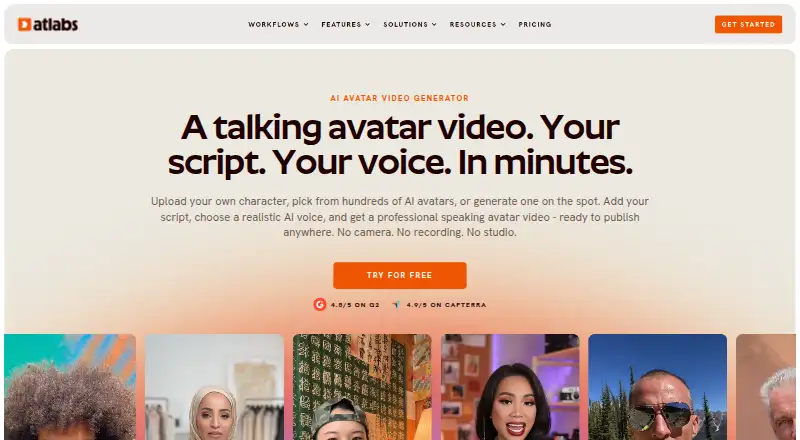
What Atlabs AI UGC Avatar Video is
Atlabs AI UGC Avatar Video turns a script and AI voice into a talking-avatar video without a camera or recording. Users can upload an image, select an avatar from the library, or describe one to generate. Atlabs says its lip-sync engine matches mouth movements to the script. Its AI voices cover 40+ languages, with choices for accents, genders, and tones, plus controls for emotion, pace, and emphasis. A built-in script writer can draft text from a topic and target audience. The service generates captions and exports in 16:9, 9:16, and 1:1 formats for destinations including YouTube, LinkedIn, TikTok, and Instagram. Users may connect YouTube to publish directly; Atlabs says YouTube data and content are not used to train AI models. Videos may be used personally or commercially. The free plan includes one video up to 25 seconds, and downloads carry a watermark.
Good
- Create avatars from uploaded images or descriptions
- Voice options span 40+ languages
- Script drafting and automatic captions included
- Exports in three aspect ratios
- Personal and commercial use permitted
Watch out
- Free-plan downloads include a watermark
- Free plan allows one video up to 25 seconds
- Web platform only
Who it suits
It suits content creators, agencies, marketing teams, e-learning and training teams, personal brands, coaches, and HR teams seeking avatar videos from scripts. The free plan may suit someone making a single short video, if a watermark is acceptable.
Verdict
Atlabs brings avatar selection or creation, script drafting, voice controls, captions, and multiple export formats into a web workflow. Consider the free-plan watermark and length limit, or a paid tier starting at $19 a month.
Plans and prices
From Atlabs AI UGC Avatar Video's own pricing page, checked 3 Oct 2026.
| Plan | Price | What it gives you |
|---|---|---|
| Lite | $19 a month | 1,800 credits/year · 24 minutes of video · up to 2-minute videos · 720p export · $15/mo billed as $180 annually; 3 months free |
| Pro | $39 a month | 4,200 credits/year · 36–48 minutes of video · up to 5-minute videos · 1080p export · $29/mo billed as $348 annually; 3 months free |
| Plus | $79 a month | 9,000 credits/year · 84–120 minutes of video · up to 10-minute videos · 1080p export · $59/mo billed as $708 annually; 3 months free |
| Max | $249 a month | 31,200 credits/year · 300–420 minutes of video · up to 15-minute videos · 1080p export · $189/mo billed as $2,268 annually; 3 months free |
| Free | Free | Free credits for first avatar video · watermark on free-plan downloads |
| Enterprise | Priced on request | Unlimited 4K videos · data security & SSO · dedicated support · Custom pricing |
The facts
Each one read from Atlabs AI UGC Avatar Video's own pages, with the date it was checked.
What it does
- Avatar options
- Users can upload an image, choose from the avatar library, or describe a new avatar to generate.checked 3 Oct 2026
- Captions and formats
- Atlabs offers automatically generated captions and exports in 16:9, 9:16, and 1:1 aspect ratios.checked 3 Oct 2026
- Intended users
- The product page names content creators, agencies, e-learning and training teams, personal brands and coaches, marketing teams, and HR teams as intended users.checked 3 Oct 2026
- Lip sync
- The product page says its lip-sync engine matches the avatar’s mouth movements to each word in the script.checked 3 Oct 2026
- Maximum resolution
- 4kchecked 23 Sep 2026
- Paid from
- 19checked 23 Sep 2026
- Privacy and security
- The privacy policy says data is stored on secure AWS servers, the site is regularly scanned for vulnerabilities, and personal or store account data is not sold.checked 3 Oct 2026
- Publishing destinations
- The product page lists YouTube, LinkedIn, TikTok, Instagram Reels, and Instagram Feed as destinations for exported formats.checked 3 Oct 2026
- Script writing
- A built-in AI script writer can draft a script from a topic and target audience.checked 3 Oct 2026
- Support
- The pricing page lists standard live chat for Lite and Pro, priority live chat for Plus and Max, and dedicated support for Enterprise.checked 3 Oct 2026
- Voice and languages
- The page describes AI voices in 40+ languages, with multiple accents, genders, and tones, plus voice preview and controls for emotion, pace, and emphasis.checked 3 Oct 2026
- What it does
- Atlabs turns a script and an AI voice into a talking avatar video without a camera or recording.checked 3 Oct 2026
- YouTube integration
- Atlabs says users can optionally connect a YouTube account to publish videos directly and that it does not use YouTube data or content to train AI models.checked 3 Oct 2026
The company
- Founded
- 2024checked 28 Sep 2026
- Video ownership
- Atlabs says users may use generated avatar videos for personal or commercial purposes.checked 3 Oct 2026
Money
- Free plan
- Yeschecked 23 Sep 2026
- Free-plan limit
- The help page says videos downloaded on the free plan include a watermark.checked 3 Oct 2026
The full review of Atlabs AI UGC Avatar Video
Atlabs AI UGC Avatar Video turns a script into a talking-avatar video without a camera or recording. It suits creators and teams that need scripted presenter content for social channels, marketing, or training. Its range of avatar and voice options is a strong draw, but short-video caps and a free-plan watermark make the entry tier a limited publishing option.
Overview
Atlabs brings avatar creation, script drafting, AI voice generation, captions, and export into a web workflow. You can select an avatar from its library, upload an image, or describe an avatar to generate. Atlabs says its lip-sync engine matches mouth movements to each word in the script, making the format a natural fit for prepared presenter videos rather than footage-led work.
The built-in writer drafts from a topic and target audience, and voice controls adjust emotion, pace, and emphasis. These tools can reduce the steps between an idea and a first draft, though they do not remove the need to review scripts for accuracy and brand fit. Atlabs says generated avatar videos can be used personally or commercially. It also says YouTube data and content are not used to train AI models; its privacy policy says data is stored on secure AWS servers, the site is regularly scanned for vulnerabilities, and personal or store account data is not sold.
Key features
- Flexible avatar starting points: Choose a library option, upload an image, or describe a new avatar to generate. That range helps users seeking a particular presenter style, while custom avatars add another route beyond presets.
- Multilingual voice controls: Atlabs describes AI voices in 40+ languages, with multiple accents, genders, and tones. Voice preview and controls for emotion, pace, and emphasis give creators ways to shape delivery before export.
- Script drafting and captions: The writer can draft from a subject and audience, and captions are generated automatically. This can speed up routine content production, but a generated script still needs human review.
- Social-friendly formats: Exports support 16:9, 9:16, and 1:1, with YouTube, LinkedIn, TikTok, Instagram Reels, and Instagram Feed named as destinations. Users can optionally connect a YouTube account to publish directly.
- Resolution varies by plan: The product supports up to 4K, but 4K is reserved for Enterprise; Lite exports at 720p, while Pro, Plus, and Max export at 1080p.
Pricing
Atlabs is freemium, with a free plan and paid plans starting at $19 a month. The free plan gives one video up to 25 seconds, and downloads include a watermark, so it is best treated as a brief preview rather than a regular publishing tier. A free trial is also offered.
| Plan | Price and billing | Included limits |
|---|---|---|
| Free | free | One video up to 25 seconds; downloads include a watermark. |
| Lite | $19 a month; billed $15/mo billed as $180 annually; 3 months free | 1,800 credits/year, 24 minutes of video, up to 2-minute videos, 720p export. |
| Pro | $39 a month; billed $29/mo billed as $348 annually; 3 months free | 4,200 credits/year, 36–48 minutes of video, up to 5-minute videos, 1080p export. |
| Plus | $79 a month; billed $59/mo billed as $708 annually; 3 months free | 9,000 credits/year, 84–120 minutes of video, up to 10-minute videos, 1080p export. |
| Max | $249 a month; billed $189/mo billed as $2,268 annually; 3 months free | 31,200 credits/year, 300–420 minutes of video, up to 15-minute videos, 1080p export. |
| Enterprise | Custom pricing | Unlimited 4K videos, voice cloning, data security and SSO, and dedicated support. |
Lite is the lowest paid step, but its 720p ceiling and two-minute maximum keep it aimed at short clips. Pro raises the limit to five minutes and 1080p; Plus and Max make more annual video time and longer individual videos available for heavier production schedules. Enterprise is the option for unlimited 4K output and voice cloning, rather than a published fixed-price tier. Lite and Pro include standard live chat; Plus and Max include priority live chat, and Enterprise includes dedicated support.
Platforms
Atlabs is a web product. Its exports cover landscape, portrait, and square formats, and an optional YouTube connection supports direct publishing.
Who it's for
Content creators, agencies, marketing teams, personal brands and coaches can use Atlabs for scripted social or promotional videos without arranging a camera shoot. E-learning and training teams, as well as HR teams, may find the avatar format useful for repeatable explanations and internal content. It is less suited to users whose work depends on live footage or who need longer, high-resolution videos on a low-cost plan.
Pros and cons
Pros
- Several ways to source an avatar: A library, uploaded image, and generated avatar let users choose how closely the presenter should match a desired identity.
- Voice and language flexibility: 40+ languages and controls for delivery give creators more room to tailor a scripted clip to an audience.
- Multiple aspect ratios and captions: Automatic captions and 16:9, 9:16, and 1:1 exports suit varied social placements.
- Commercial use is permitted: Generated avatar videos can be used for personal or commercial purposes.
Cons
- The free tier is highly constrained: One video up to 25 seconds and a watermark limit its usefulness for ongoing publishing.
- Entry paid exports are modest: Lite tops out at 720p and two minutes per video, while 4K requires Enterprise.
- Annual billing figures matter: The lower billed monthly figures are paired with annual totals, so readers should weigh the commitment against their expected production volume.
Alternatives
For audio-led clips or other approaches to repurposing content, compare Podcast Clip Makers and AI Avatar Generators; for a broader video-generation category, see AI video generators.
- Headliner is a better fit for podcast-style audiograms and captioned clips, with unlimited video clips and captioned clips on its free plan, plus one unwatermarked audiogram per month.
- Podcli suits users who want a free, no-watermark option with no minute cap and no subscription, and who are comfortable with its AGPL-3.0 terms.
- ClipForge is worth considering for iOS and web users turning source video into clips; its free tier is one lifetime clip set, with a watermark and outro.
- ngram is an alternative for explainer-video creation, with a free tier of 600 one-time credits and watermarked 720p exports.
- OpusClip is another option for clip creation, with a free plan that provides 60 credits per month and watermarked clips up to 1080p.
- Video To Reel is a mobile option for turning video into reels, with Android and iOS apps and a free allowance of one video per month.
- ClipEmber offers a web-based free plan with five videos every month, file-upload ingest, a full editor, and manual download.
- Cliperoni is an alternative for users seeking a free plan with 250 minutes per month of source content, 5 GB of cloud storage, and one member; free clips carry a short outro.
Verdict
Atlabs is a strong match for creators and teams who want a browser-based way to make scripted avatar videos with adjustable voices, automatic captions, and social-ready formats. Its main advantage is the joined-up avatar-to-export workflow; its main trade-off is that the free tier is too short and watermarked for regular use, while 4K and voice cloning sit behind custom-priced Enterprise. Choose it for repeatable presenter content; look elsewhere if your priority is live footage, a generous free publishing allowance, or 4K at a lower tier.
Getting started
- Open the Atlabs AI UGC Avatar Video website
- Choose an avatar from the library, upload an image, or describe one to generate
- Enter a script or use the AI script writer with a topic and target audience
- Select a voice, language, and voice controls
- Choose captions and an export aspect ratio
- Use the free plan or select a paid plan
- Optionally connect YouTube for direct publishing
Limits worth knowing
The free plan allows one video up to 25 seconds, and downloaded videos carry a watermark. Lite limits videos to two minutes and 720p export; higher listed tiers increase duration and resolution, while Enterprise lists unlimited 4K videos.
Questions
Is Atlabs AI UGC Avatar Video free?
Yes.
Which platforms does Atlabs support?
It is available on the web.
Can I use generated videos commercially?
Yes. Atlabs says generated avatar videos may be used for personal or commercial purposes.
What resolutions are available?
The service supports up to 4K resolution. Listed paid tiers include 720p or 1080p exports, and Enterprise lists unlimited 4K videos.
Does Atlabs offer voice cloning?
Voice cloning is listed for the Enterprise plan.
Can Atlabs publish directly to YouTube?
Yes. You can optionally connect a YouTube account for direct publishing.
Alternatives to Atlabs AI UGC Avatar Video
- 1
Lacuna
Free planiOSWebAPIExtension8.2From $9.50 a month - 2

Renderforest Slideshow Maker
Free planAndroidiOSWebAPI8.2From $8 a month - 3
Solmi AI Cover Generator
Free planAndroidiOSWeb7.3From $35 a month - 46.0From $39 a month
- 5
Specterr
Web5.7 - 6
FRAX3D
AndroidiOSWebWindows5.3