Podcli
Podcli is a free command-line tool for turning podcast episodes and interviews into social clips.
What Podcli is
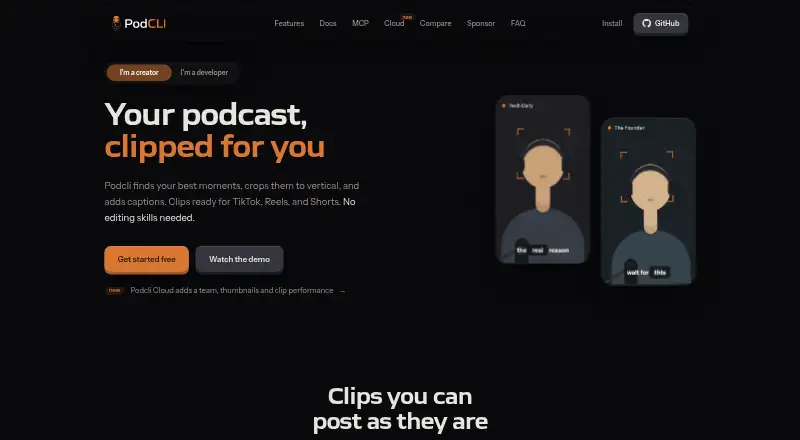
Podcli is a free command-line tool for turning podcast episodes and interviews into social clips. It supports transcription, clip selection, vertical reframing, captions, thumbnails and export, with face tracking, logo branding and output in 9:16, 16:9 or 1:1 formats. Word-timed captions come in four styles, while transcription uses Whisper and pyannote for word timestamps and speaker labels. The CLI runs transcription, clip selection, cropping and export locally; video, transcripts, project files and finished clips remain on the device. Optional AI clip scoring or suggestions use a provider account configured by the user, and the maker says these requests do not pass through podcli.com. Podcli supports macOS on Apple Silicon, Linux on x64 or arm64, and Windows on x64. It has no watermark or minute cap, and its source code is published under GNU AGPL-3.0. Its MCP server provides 26 tools for MCP clients including Claude Code, Codex and Cursor. Podcli Cloud is a separate remote-rendering option that uploads episodes to its storage; pricing has not been announced.
Good
- Transcription and clip export run locally.
- No watermark or minute cap.
- Offers face tracking and four caption styles.
- Supports macOS, Linux and Windows.
Watch out
- Mac support is limited to Apple Silicon.
- Windows support is limited to x64.
- Cloud pricing has not been announced.
Who it suits
Podcli suits people making clips from podcasts and interviews, especially those comfortable with a command-line workflow. It is not intended to replace a full multitrack editor, DAW or zero-setup hosted editor.
Verdict
Podcli combines local clip creation with optional provider-based AI suggestions and MCP tools. Its command-line workflow is aimed at podcast and interview clips, not full multitrack editing.
Plans and prices
From Podcli's own pricing page, checked 30 Sep 2026.
| Plan | Price | What it gives you |
|---|---|---|
| Podcli | Free | No watermark · no minute cap · no subscription · AGPL-3.0 |
| Podcli Cloud | Priced on request | Paid plan pricing not announced; join waitlist |
The facts
Each one read from Podcli's own pages, with the date it was checked.
What it does
- AI integrations
- Optional AI clip suggestions can use Claude or Codex; the page also says users may use their own Claude or OpenAI API key.checked 30 Sep 2026
- AI scoring
- Optional AI clip scoring uses a provider account configured by the user and is not routed through podcli.com.checked 30 Sep 2026
- Clip features
- Podcli offers face tracking, word-timed captions in four styles, logo branding, and 9:16, 16:9, or 1:1 output.checked 30 Sep 2026
- Cloud distinction
- Podcli Cloud uploads episodes to its storage for remote rendering, and its pricing is not yet announced.checked 30 Sep 2026
- License
- The source code is published under GNU AGPL-3.0, with commercial licensing available for teams needing another arrangement.checked 30 Sep 2026
- Local processing
- The CLI runs transcription, clip selection, cropping, and export locally, and its video, transcript, project files, and exported clips stay on the device.checked 30 Sep 2026
- MCP integrations
- Podcli provides an MCP server with 26 tools for use with Claude Code, Codex, Cursor, or any MCP client.checked 30 Sep 2026
- Security and privacy
- The maker says the CLI does not upload podcast files and that the only network calls are optional requests to the Claude or Codex API for clip suggestions.checked 30 Sep 2026
- Support
- The maker lists [email protected] for support and commercial licensing inquiries.checked 30 Sep 2026
- Supported systems
- Podcli supports macOS, Linux, and Windows; the installer specifies Apple Silicon for macOS, x64 or arm64 for Linux, and x64 for Windows.checked 30 Sep 2026
- Transcription
- The workflow uses Whisper and pyannote for word timestamps and speaker labels.checked 30 Sep 2026
- What it does
- Podcli turns podcast episodes and interviews into social clips with transcription, clip selection, vertical reframing, captions, thumbnails, and export.checked 30 Sep 2026
- Who it is for
- Podcli is best suited to podcast and interview clipping and is not intended to replace a full multitrack editor, a DAW, or a zero-setup hosted editor.checked 30 Sep 2026
The company
- Headquarters
- Tbilisi, Georgiachecked 28 Sep 2026
The full review of Podcli
Overview
Podcli is a command-line tool for turning podcast episodes and interviews into social clips. It suits creators comfortable with a CLI who want local processing and control over their media. Its free plan has no minute cap or watermark, but Podcli is a focused clipping tool, not a full editor or a hosted, zero-setup service.
Key features
From episode to clip
Automatic clip detection, face tracking, and vertical reframing help adapt long-form video for short-form formats. Word-timed captions come in four styles, with logo branding and exports in 9:16, 16:9, or 1:1. That is a capable creation pipeline for podcast and interview excerpts; social publishing is not included, so posting remains a separate step.
Local processing and AI
The CLI handles transcription, clip selection, cropping, and export locally, keeping the video, transcript, project files, and finished clips on the device. Whisper and pyannote provide word timestamps and speaker labels. Optional scoring and clip suggestions can use Claude or Codex, with the user configuring a provider account or their own Claude or OpenAI API key. The maker says those requests go to the provider rather than podcli.com and that the CLI does not upload podcast files.
MCP and licensing
An MCP server exposes 26 tools for Claude Code, Codex, Cursor, and other MCP clients. This makes Podcli a more natural fit for people already working with those tools than for users seeking a conventional visual editor. The source is published under GNU AGPL-3.0; teams needing a different arrangement can inquire about commercial licensing.
Pricing
Podcli: free. The plan includes no watermark, no minute cap, no subscription, and AGPL-3.0 licensing. It is unusually straightforward for regular clipping, though the command-line workflow and self-managed provider setup are part of the trade-off.
Podcli Cloud: custom pricing. The paid plan's pricing has not been announced; Cloud uploads episodes to its storage for remote rendering. Choose it only if a hosted rendering workflow is what you need and its eventual terms suit you.
Platforms
Podcli supports macOS, Linux, and Windows, with installers for Apple Silicon on macOS, x64 or arm64 on Linux, and x64 on Windows. It also has an API and web presence, but the core workflow described is the local CLI.
Who it's for
Podcli is best for podcast and interview creators who want local clip creation, flexible framing, and optional provider-backed AI suggestions without a per-minute cap. It is a poor fit for people who need multitrack editing, a DAW, or a hosted editor requiring no setup.
Pros and cons
- Pros: The free plan has no watermark or minute cap, making sustained clip creation possible without a subscription.
- Pros: Local processing keeps media and project files on-device, while AI suggestions are optional rather than required.
- Pros: Captions, face tracking, branding, and three aspect ratios cover key steps in preparing clips.
- Cons: A CLI is less suited to users who want a visual, zero-setup workflow.
- Cons: It does not replace a multitrack editor or DAW, and it has no social publishing.
- Cons: Cloud pricing is custom pricing, with the paid plan's price not announced.
Alternatives
For podcast and interview clips, browse Podcast Clip Makers.
- Headliner is worth considering if you want Android or iOS support and a web workflow: its Forever Free plan includes unlimited video and captioned clips, one unwatermarked audiogram per month, unlimited watermarked audiograms, and 1080p video.
- Atlabs AI UGC Avatar Video is a web-based option for avatar video; its free plan allows one video up to 25 seconds, while Lite is $19 a month.
- ngram is a web and extension option for AI-generated explainer footage; its free plan provides 600 one-time credits, up to 60 seconds of premium AI-generated footage, 720p exports, and a watermark.
- OpusClip may suit users who want an API, iOS, or web option; its free plan gives 60 credits per month and up to 1080p clips, but adds a watermark, has no editing, and clips stop being exportable after three days.
- ClipEmber is a web and API alternative whose free plan includes five videos each month, file-upload ingest, a full editor, and manual download.
- Cliperoni offers a cloud-based alternative with 250 minutes of source content per month, 5 GB storage, and one member on its free plan; free clips carry a short Cliperoni outro.
- Clipkiln is another web-based alternative.
- OpenClip offers web and API access; its free plan includes a demo project, tools access, 10 runs per day, 200 MB inputs, a 10-minute input-duration limit, and watermarks on visual outputs.
Verdict
Choose Podcli if you make podcast or interview clips, are comfortable with a command line, and value local processing without a watermark or minute cap. Its focused pipeline and optional AI integrations make that use case clear. Look elsewhere if you need full multitrack editing, social publishing, or a hosted workflow that works without setup.
Getting started
- Visit the Podcli website.
- Install the build for macOS Apple Silicon, Linux x64 or arm64, or Windows x64.
- Run the CLI workflow to transcribe, select clips, crop and export.
- Configure a provider account if you want optional AI clip scoring or suggestions.
- Use the MCP server with Claude Code, Codex, Cursor or another MCP client.
Questions
Is Podcli free?
Yes. The Podcli plan is free, with no watermark, minute cap or subscription.
Which systems does Podcli support?
It supports macOS on Apple Silicon, Linux on x64 or arm64, and Windows on x64.
Does the CLI upload podcast files?
The maker says the CLI does not upload podcast files. Optional requests to Claude or Codex APIs can be made for clip suggestions.
Is Podcli open source?
Its source code is published under GNU AGPL-3.0. Commercial licensing is available for teams needing another arrangement.
Does Podcli have a cloud option?
Podcli Cloud uploads episodes to its storage for remote rendering. Its pricing has not been announced.
Can I use Podcli with an AI assistant?
Its MCP server offers 26 tools for Claude Code, Codex, Cursor or any MCP client. Optional clip suggestions can use Claude or Codex, including a user's own Claude or OpenAI API key.