
Appetize
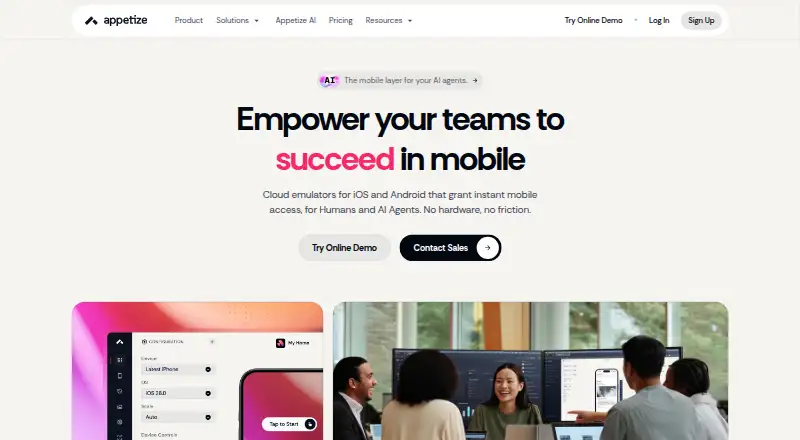
Appetize runs native iOS and Android apps on virtual mobile devices that users access through a browser.
What Appetize is
Appetize runs native iOS and Android apps on virtual mobile devices that users access through a browser. Teams can share, embed, and preview uploaded apps, as well as use the platform for demos, onboarding, training, mobile testing, and screenshot automation. Debugging tools include network traffic monitoring, logs, UI automation, proxy settings, device and OS selection, language and locale options, mock location, and deep links. AppRecorder automation for Playwright supports building, running, and debugging end-to-end tests; JavaScript SDK and REST API options are also listed. Appetize names GitHub Actions, GitLab, Bitrise, and Jenkins as CI/CD integrations, and supports Claude Code, Codex, and Cursor through its CLI and REST API. There are no real devices. Customers upload their own app files; iOS uploads must be Simulator builds, and IPA files are not supported. The Free plan is free and includes 30 minutes refilled monthly, with a three-minute session limit. Paid plans begin with Starter at $59 a month.
Good
- Supports iOS and Android virtual devices.
- Offers Playwright and AppRecorder automation.
- Includes network monitoring and debug logs.
- Free plan includes 30 minutes monthly.
- Lists a 99.9% uptime Service Level Agreement.
Watch out
- No real devices are available.
- iOS uploads must be Simulator builds; IPA files are unsupported.
- Free sessions are limited to three minutes.
- Starter includes 500 minutes, then charges $0.06/min.
Who it suits
Appetize suits teams that need browser-accessible iOS and Android app previews, testing, or demos. It may also suit teams building Playwright tests or sharing uploaded apps through embedded sessions.
Verdict
Appetize combines browser-based access to virtual mobile devices with testing, debugging, and sharing tools. Check its upload requirements, session limits, and included minutes against your workflow before choosing a plan.
Plans and prices
From Appetize's own pricing page, checked 7 Oct 2026.
| Plan | Price | What it gives you |
|---|---|---|
| Free | Free | Single user · 2 active devices maximum · 30 minutes refilled monthly |
| Starter | $59 a month | 3 active devices maximum · 500 minutes included, then $0.06/min · $708/year |
| Premium | $319 a month | 16 active devices maximum · 500 minutes included, then $0.06/min · $3828/year |
| Enterprise | Priced on request | Per User or Metered billing · Custom Built Solutions · Private Clouds or Self-Hosting · 24/7 support |
The facts
Each one read from Appetize's own pages, with the date it was checked.
What it does
- Automation
- Appetize provides AppRecorder automation for Playwright to build, run, and debug end-to-end tests on Appetize devices.checked 7 Oct 2026
- Debugging
- Features include monitoring network traffic, debug logs, UI automation, proxy configuration, device and OS selection, language and locale settings, mock location, and deep links.checked 7 Oct 2026
- Hosting
- Enterprise customers can contact Appetize about private clouds or self-hosting.checked 7 Oct 2026
- Integrations
- Its Appetize AI page names GitHub Actions, GitLab, Bitrise, and Jenkins as CI/CD integrations and also lists Claude Code, Codex, and Cursor support through the CLI and REST API.checked 7 Oct 2026
- Privacy
- Appetize says its policies address GDPR and CCPA and that it operates a dedicated EU Cloud and uses approved contractual or other lawful transfer mechanisms.checked 7 Oct 2026
- Security
- Appetize states that it maintains an ISO 27001 security program, is SOC 2 Type 2 compliant, and has a CSA CAIQ with over 260 controls across 17 domains.checked 7 Oct 2026
- Service level
- The pricing page says Appetize backs its availability promise with a 99.9% uptime Service Level Agreement.checked 7 Oct 2026
- Sharing and embedding
- Appetize supports running, embedding, and sharing uploaded apps through browser-accessible sessions.checked 7 Oct 2026
- Support
- The pricing page directs users to submit a support ticket and lists 24/7 support for Enterprise.checked 7 Oct 2026
- Upload requirement
- Customers upload app files themselves; iOS uploads must be iOS Simulator builds, and IPA files are not supported.checked 7 Oct 2026
- Use cases
- The platform lists live and embedded previews, mobile app support, training and onboarding, demos, mobile testing, and screenshot automation as use cases.checked 7 Oct 2026
- What it does
- Appetize is a cloud-based platform for running and testing native iOS and Android apps on virtual mobile devices from a web browser.checked 7 Oct 2026
Money
- Free plan
- Yeschecked 21 Sep 2026
- Plan limit
- The Free plan has a three-minute session limit, while Starter and Premium list unlimited sessions in the plan comparison.checked 7 Oct 2026
The full review of Appetize
Appetize runs native iOS and Android apps on virtual devices in a browser, with tools for testing, debugging, and sharing. It suits developers and teams that need browser-accessible app sessions or automated mobile tests. Its strongest case is a combined preview-and-testing workflow; the trade-offs are simulator-only iOS uploads, no real devices, and metered minutes on paid plans.
Overview
Upload an app to create a browser-accessible session that can be run, embedded, or shared. That makes Appetize useful for demos, onboarding, training, and support as well as development: viewers can open an app without installing it on their own device. The upload requirement matters, though. iOS apps must be iOS Simulator builds; IPA files are not supported.
Appetize focuses on virtual iOS and Android devices rather than real-device testing. Teams needing physical hardware coverage should look elsewhere. Its 99.9% uptime Service Level Agreement and stated security program—ISO 27001, SOC 2 Type 2, and a CSA CAIQ covering over 260 controls across 17 domains—may be relevant to organizations evaluating a hosted workflow. Appetize also says its policies address GDPR and CCPA, and that it operates a dedicated EU Cloud and uses approved contractual or other lawful transfer mechanisms.
Key features
Testing and automation
AppRecorder for Playwright lets teams build, run, and debug end-to-end tests on Appetize devices. The JavaScript SDK and REST API provide additional automation interfaces. For CI/CD, Appetize names GitHub Actions, GitLab, Bitrise, and Jenkins; its AI page also describes Claude Code, Codex, and Cursor support through the CLI and REST API. This breadth suits teams that want mobile sessions in an automated workflow, though the included minutes still constrain how much testing a plan covers.
Debugging and device controls
Network traffic monitoring, debug logs, UI automation, and proxy configuration support investigation beyond simply viewing an app. Device and OS selection, language and locale settings, mock location, and deep links help teams reproduce particular app states. These controls make Appetize more useful for development and diagnosis than a basic app-sharing link.
Sharing and support
Browser sessions can be shared or embedded, giving teams a practical way to present an app or guide users through onboarding. Enterprise includes 24/7 support; the pricing page directs other users to submit a support ticket.
Pricing
Appetize is freemium. Its paid plans include 500 minutes, then charge $0.06/min; the monthly prices below are billed annually at the stated yearly totals.
| Plan | Price and allowance | Best fit |
|---|---|---|
| Free | free; one user, two active devices maximum, and 30 minutes refilled monthly. Sessions are limited to three minutes. | Individuals assessing the workflow or handling brief, occasional previews. The short sessions and monthly allowance limit sustained testing. |
| Starter | $59 a month (billed $708/year); three active devices maximum, 500 included minutes, then $0.06/min. Unlimited sessions. | Small teams that need longer or more frequent sessions than Free allows. The three-device cap and metered overage make it less suited to larger parallel workloads. |
| Premium | $319 a month (billed $3828/year); 16 active devices maximum, 500 included minutes, then $0.06/min. Unlimited sessions. | Teams that need more active devices and session capacity. It raises the device ceiling, but the same included minutes mean heavy use can still incur overage. |
| Enterprise | Custom pricing; per-user or metered billing, private clouds or self-hosting, and 24/7 support. | Organizations requiring those hosting options or round-the-clock support, with pricing structured around their needs. |
The Free plan has no paid commitment but is sharply capped by single-user access, two active devices, 30 monthly minutes, and three-minute sessions. Starter and Premium remove the session limit and allow more active devices, but both retain the 500-minute allowance and per-minute overage. Enterprise is the route to private cloud or self-hosting.
Platforms
Appetize supports web access to virtual iOS and Android devices, plus API and self-hosted options. Browser testing is supported, but real-device testing is not. That distinction makes it a fit for browser-based virtual sessions, not a substitute for checking behavior on physical phones and tablets.
Who it's for
Appetize is best suited to mobile developers and product teams that want to combine browser previews, debugging, and automated tests on virtual iOS and Android devices. It also fits teams sharing an app for demos, training, or onboarding. It is a weaker choice for workflows dependent on IPA uploads, real hardware, or consistently high test volume without per-minute charges.
Pros and cons
- Pros: Browser-accessible sessions can be shared or embedded, useful for demos and onboarding without requiring viewers to install the app.
- Pros: Playwright automation, SDK and API access, CI/CD integrations, and debugging controls support development and test workflows in one platform.
- Pros: The Free plan provides 30 minutes each month, and paid plans offer unlimited sessions.
- Cons: iOS uploads must be Simulator builds; IPA files are unsupported.
- Cons: There are no real devices, leaving physical-device verification to another tool.
- Cons: Paid plans include 500 minutes and charge $0.06/min afterward, so sustained use can exceed the subscription price.
- Cons: Free sessions stop at three minutes, limiting longer demonstrations or debugging sessions.
Alternatives
- Device Farm Software is a broader category to browse when comparing device-testing tools.
- Android emulators is a relevant category for readers focused on Android emulation.
- Maestro is worth considering when running tests on your own devices matters: its free Local plan includes Maestro MCP, Viewer, Studio, CLI, and local agents.
- SureAsset is a better match for asset lifecycle management, hardware and software license tracking, and API access and automation.
- Samsung Remote Test Lab is a free option to consider for Samsung device access, with limited daily credits and reservation times that vary by device.
- TestMu AI Real Device Cloud may suit teams prioritizing real-device testing; its free plan allows one parallel test, five live sessions per month, and sessions up to two minutes.
- Firebase Cloud Messaging is an alternative for readers looking for a no-cost cloud messaging service.
- TestingBot is an alternative to compare for live and visual testing, including real iOS and Android devices.
- BrowserStack Live is another option for live desktop and mobile testing, with a Freelancer plan that includes 100 minutes and one user/account.
- Sauce Labs Cross-Browser Testing is an alternative for live testing across browser and mobile platforms.
Verdict
Choose Appetize if your team needs to share virtual iOS and Android apps in a browser and wants testing, debugging, and automation tools alongside those sessions. Its combination is compelling for simulator-based development and demos, but the iOS upload restriction, absence of real devices, and paid-minute overages are meaningful constraints. Look elsewhere if physical-device coverage or predictable high-volume testing is central to your workflow.
Getting started
- Open the Appetize website.
- Choose the Free, Starter, Premium, or Enterprise option.
- Upload your app files; iOS uploads must be Simulator builds.
- Run or share the app in a browser-accessible session.
- Use the available automation, integrations, or debugging tools as needed.
Limits worth knowing
The Free plan allows two active devices and 30 minutes refilled monthly, with sessions limited to three minutes. Starter and Premium include 500 minutes each, then charge $0.06 per minute; their active-device limits are three and 16, respectively.
Questions
Is Appetize free?
Yes. Its Free plan costs nothing and includes one user, two active devices, and 30 minutes refilled monthly.
What does Starter cost?
Starter costs $59 a month, billed at 708 USD per year. It includes three active devices and 500 minutes, then charges $0.06 per minute.
Does Appetize use real devices?
No. Appetize uses virtual mobile devices.
Which platforms and operating systems does it support?
Its listed platforms are Android, API, iOS, self-hosted, and web. App operating-system coverage is iOS and Android.
Can I upload an iOS IPA file?
No. iOS uploads must be iOS Simulator builds, and IPA files are not supported.
Alternatives to Appetize
- 1
Perfecto
AndroidiOSWebAPI7.9From $83 a month - 2

TestingBot
AndroidiOSWebAPI7.9From $20 a month - 3

Maestro
Free planAndroidiOSWebLinux7.6From $250 a month - 4
 7.5
7.5 - 5

TestMu AI Real Device Cloud
Free planAndroidiOSWebAPI7.4From $49 a month - 6

BrowserStack Live
AndroidiOSWebmacOS7.2From $12.50 a month