
TestingBot
TestingBot provides a cloud testing grid for automated and manual testing on real browsers and physical mobile devices.
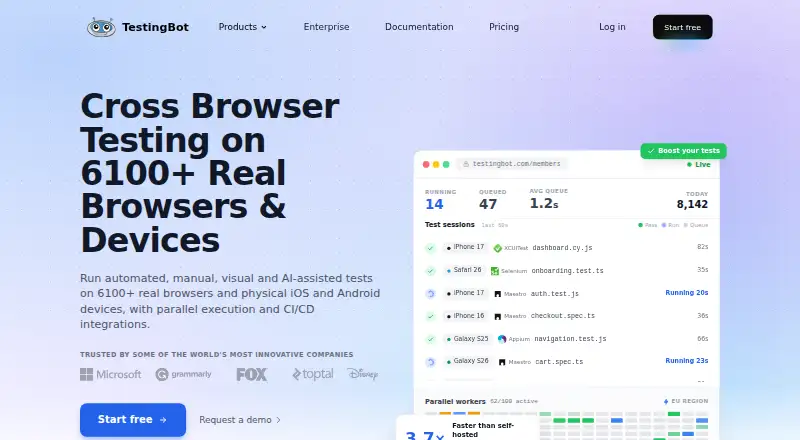
What TestingBot is
TestingBot provides a cloud testing grid for automated and manual testing on real browsers and physical mobile devices. Its options include automated, live manual, visual, and AI-assisted testing, with stated support for Selenium, Appium, Playwright, Cypress, Puppeteer, Espresso, XCUITest, and Maestro. Automated runs can execute in parallel, with concurrency controlled through test configuration or a CI pipeline. Listed integrations include Jenkins, GitHub Actions, GitLab CI, CircleCI, Azure DevOps, Bamboo, TeamCity, Travis CI, Jira, and Slack; a public REST API and webhooks support custom connections. TestingBot lists a free plan and a 14-day trial. Live costs €20 a year, billed annually, or €30 month-to-month; Automated is €50 a year, billed annually, or €70 month-to-month. Pay As You Go costs €60, paid once-time payment, and Automated Pro is €90 a year, billed annually, or €120 month-to-month. Enterprise pricing is by contact. The company was founded in 2011 and is headquartered in Moerbeke, Belgium.
Good
- Tests on real browsers and physical mobile devices.
- Supports automated, live manual, visual, and AI-assisted testing.
- Automated runs can execute in parallel.
- Provides a public REST API and webhooks.
- Lists a free plan and a 14-day trial.
Watch out
- Tests stop when monthly testing time is exhausted.
- On-premise deployments are not supported.
- Enterprise pricing is available by contact.
Who it suits
TestingBot suits software teams that need browser and physical-device testing across automation frameworks, manual sessions, and CI workflows. Its free plan and trial may help teams evaluate those options.
Verdict
TestingBot combines several testing approaches with framework, CI, and issue-tracker integrations. Check plan testing-time limits and the lack of on-premise deployment before choosing it.
Plans and prices
From TestingBot's own pricing page, checked 15 Oct 2026.
| Plan | Price | What it gives you |
|---|---|---|
| Live | $20 a month | unlimited live testing · unlimited visual testing · real iOS and Android devices · 24x7 support · annually; $30 month-to-month |
| Automated | $50 a month | 1000 automated minutes/month · unlimited live testing · unlimited visual testing · real iOS and Android devices · annually; $70 month-to-month |
| Pay As You Go | €60, paid once | 1000 minutes · 1 parallel session · $0.06/minute · never expires · video recordings · local testing · one-time payment |
| Automated Pro | $90 a month | unlimited automated testing · unlimited live testing · unlimited visual testing · real iOS and Android devices · annually; $120 month-to-month |
| Enterprise | Priced on request | 10+ parallel tests · unlimited testing · SSO · priority support · enterprise security features |
The facts
Each one read from TestingBot's own pages, with the date it was checked.
What it does
- AI testing
- An AI agent can create and execute tests from natural-language instructions, with MCP access for assistants such as Cursor and Claude Code.checked 15 Oct 2026
- API
- TestingBot provides a public REST API and webhooks for custom integrations.checked 4 Oct 2026
- API scope
- The API documents browser/device discovery, team management, tests and builds, insights, storage, webhooks and mobile-app automation endpoints.checked 15 Oct 2026
- Chrome extension
- The browser extension lets users launch a remote browser or device session for the page currently open in Chrome or Firefox.checked 15 Oct 2026
- Data residency
- The company says test data, videos and logs remain on European infrastructure, including Belgium, Germany, Finland and Switzerland.checked 15 Oct 2026
- Deployment
- The pricing FAQ says Enterprise supports private cloud and that on-premise deployments are not supported.checked 4 Oct 2026
- Documentation
- The help center contains framework guides for Selenium, Playwright, Appium, Cypress and mobile testing, plus API, tunnel, capabilities, FAQ and changelog sections.checked 15 Oct 2026
- Encryption
- The security whitepaper states that data is encrypted at rest with AES-256 and in transit with TLS 1.2 or later.checked 4 Oct 2026
- Frameworks
- TestingBot states that it supports Selenium, Appium, Playwright, Cypress, Puppeteer, Espresso, XCUITest and Maestro.checked 4 Oct 2026
- Funding disclosure
- The reviewed Crunchbase profile does not provide a verified funding amount and shows no usable funding-round details.checked 15 Oct 2026
- Integrations
- Official integrations include Slack, Jira, GitHub and CI/CD systems such as GitHub Actions, Jenkins, CircleCI, GitLab CI, Bitbucket Pipelines, Travis CI, TeamCity and Azure DevOps.checked 15 Oct 2026
- Limit: pricing model
- Reviewers complain that monthly subscriptions can be expensive when they only need a few hours of testing or occasional access.checked 15 Oct 2026
- Limits
- The pricing FAQ says that tests stop running after the monthly testing time is reached until the next billing month or a plan upgrade.checked 4 Oct 2026
- Limit: speed and responsiveness
- Several Capterra reviews report slow manual sessions, laggy feeds, slow interaction or an unintuitive interface.checked 15 Oct 2026
- Mobile testing
- Physical iOS and Android devices support manual and automated Appium, Espresso, XCUITest and Maestro testing.checked 15 Oct 2026
- Notable update
- On October 13, 2026, TestingBot announced Tunnel 5.0 with improved reconnection, host allowlists, SSH host-key verification and self-contained downloads.checked 15 Oct 2026
Where it runs
- Browser coverage
- The platform lists Internet Explorer 8 through 11, Edge, Chrome, Safari, Firefox and Opera across real operating systems.checked 15 Oct 2026
- Limit: device reliability
- One Capterra reviewer reported that paid device sessions failed, while another said some older devices were slow.checked 15 Oct 2026
The company
- Company history
- TestingBot says it was founded in 2011 to provide a cloud platform for cross-browser and mobile testing.checked 4 Oct 2026
- Company legal name
- The privacy policy identifies Norento BV, trading as TestingBot, as the data controller.checked 15 Oct 2026
- Company size
- LinkedIn reports a company size of 2–10 employees, and Crunchbase lists a 1–10 employee range.checked 15 Oct 2026
- Founded
- TestingBot says it was founded in 2011 to simplify Selenium testing; LinkedIn lists 2012 as the founded year.checked 15 Oct 2026
- Headquarters
- Norento BV lists Vlinderhof 18, 9180 Moerbeke, Belgium; LinkedIn identifies Moerbeke in the Flemish Region as headquarters.checked 15 Oct 2026
- Ownership and founder
- Crunchbase describes TestingBot as a private, for-profit company and names Jochen Delabie as founder.checked 15 Oct 2026
The full review of TestingBot
Overview
TestingBot is a cloud testing grid for automated and manual checks on real browsers and physical mobile devices. It suits teams that need several testing approaches, parallel runs and links to their CI and issue-tracking workflows. Its breadth is appealing, but monthly testing-time limits and the absence of on-premise deployment matter when choosing a plan.
Key features
TestingBot combines automated, live manual, visual and AI-assisted testing. It supports Selenium, Appium, Playwright, Cypress, Puppeteer, Espresso, XCUITest and Maestro, giving teams a choice of established frameworks rather than requiring a single testing stack. Automated tests can run in parallel, with concurrency controlled through test configuration or a CI pipeline; the number of parallel tests depends on the plan.
Integrations include Jenkins, GitHub Actions, GitLab CI, CircleCI, Azure DevOps, Bamboo, TeamCity, Travis CI, Jira and Slack. A public REST API and webhooks also make custom integrations possible. The security posture includes GDPR compliance by design, CSA STAR Level 1 registration, isolated machines or devices wiped after test sessions, and encryption at rest with AES-256 and in transit with TLS 1.2 or later. Test logs, videos, screenshots and other artifacts are stored and processed in EU datacenters.
Pricing
TestingBot offers a free plan and a 14-day trial. Paid plans start at €20 a year, billed annually, for Live, or €30 month-to-month. Live provides unlimited live and visual testing on real iOS and Android devices, but does not include automated testing time.
Automated costs €50 a year, billed annually, or €70 month-to-month. It adds 1,000 automated minutes per month while retaining unlimited live and visual testing. Pay As You Go costs €60, paid once-time payment for 1,000 testing minutes and one parallel session. At €0.06 per minute, unused minutes never expire; the plan includes automated, manual, visual and AI testing, but its single-session cap limits throughput.
Automated Pro costs €90 a year, billed annually, or €120 month-to-month. It removes the automated-time cap and includes unlimited live and visual testing, real iOS and Android devices, and 24x7 support via email, chat and Slack. This is the stronger fit for sustained automated workloads; the less expensive Automated plan suits teams able to work within 1,000 minutes each month. Enterprise has custom pricing and offers unlimited testing, 10+ parallel tests, single sign-on, priority support and private cloud. It is the option for larger workloads or private-cloud requirements, but on-premise deployment is not supported.
On plans with monthly testing-time limits, tests stop until the next billing month or a plan upgrade once the allowance is reached. Check that cap against expected usage before committing.
Platforms
TestingBot supports Android, iOS, Linux, macOS, web and Windows testing, with API support as well. Real mobile devices are available for testing.
Who it's for
TestingBot is a strong fit for software teams that want a shared cloud service for browser and mobile testing, already use supported automation frameworks, and need CI or issue-tracker integrations. Its parallel execution and broad mix of testing types can serve teams with both automated and manual workflows. Buyers who require on-premise deployment should look elsewhere; teams with substantial automation needs should also weigh the monthly-minute limits of the lower-cost plans.
Pros and cons
- Pro: Supports a broad set of testing approaches and frameworks, so teams can combine manual, visual and automated checks without switching to a single prescribed framework.
- Pro: Real iOS and Android devices, CI integrations and configurable parallel runs support testing within existing delivery workflows.
- Pro: EU data residency, encryption and wiped test machines or devices offer concrete security safeguards for test artifacts and sessions.
- Con: Monthly testing-time caps stop tests when the allowance is exhausted, which can interrupt work until renewal or an upgrade.
- Con: On-premise deployment is unavailable, so organizations that require it cannot use TestingBot on those terms.
- Con: The Pay As You Go plan allows only one parallel session, limiting concurrent testing despite minutes that never expire.
Alternatives
For mobile and browser testing comparisons, see Mobile App Testing Software, Browser Testing Software, Device Farm Software and Browser Automation Tools.
- TestMu AI is a freemium option with a free plan and support for self-hosted environments; consider it if those are priorities.
- AWS Device Farm is a paid alternative with a free trial and per-instance-minute desktop browser testing; consider it if that billing model suits your browser workload.
- pCloudy is a paid alternative with a free trial and a $19/month browser-cloud manual-testing plan that includes one parallel test and 3,500+ browser and OS combinations.
- Mobile Device Cloud offers prepaid hours, including €100 for five hours and three concurrent sessions; consider it if you prefer a prepaid device-cloud package.
- Maestro has a free open-source local plan for running on your own devices; consider it if local execution is preferable to a cloud testing grid.
- BrowserStack Live offers live desktop and mobile testing with a free plan; its Freelancer plan includes 100 minutes and one user/account.
- Espresso is a free option for Android UI testing on Android 4.0.1/API 14 or later, limited to a single target app.
- Detox is a free alternative available on Windows, macOS and Linux.
Verdict
Choose TestingBot if your team wants one cloud platform for browser and real-device testing, multiple testing methods, and integrations with its existing frameworks and CI tools. The range of plans helps match different workloads, but monthly testing-time caps can constrain lower-cost automation, and teams requiring on-premise deployment should choose another option.
Alternatives to TestingBot
- 1
Perfecto
AndroidiOSWebAPI7.9From $83 a month - 2

Maestro
Free planAndroidiOSWebLinux7.6From $250 a month - 3

Appetize
Free planAndroidiOSWebAPI7.5From $59 a month - 4
 7.5
7.5 - 5

TestMu AI Real Device Cloud
Free planAndroidiOSWebAPI7.4From $49 a month - 6

BrowserStack Live
AndroidiOSWebmacOS7.2From $12.50 a month