
TestMu AI Real Device Cloud
TestMu AI Real Device Cloud provides live and automated testing on physical iOS and Android devices through a browser or CI.
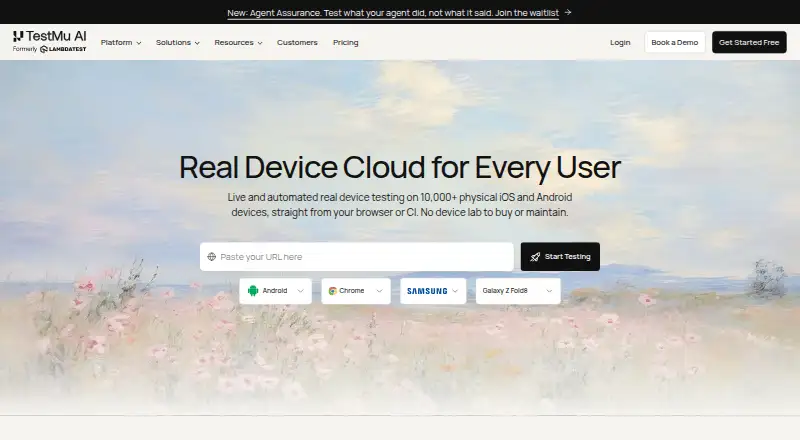
What TestMu AI Real Device Cloud is
TestMu AI Real Device Cloud provides live and automated testing on physical iOS and Android devices through a browser or CI. Teams can simulate 3G, 4G, 5G, and offline network conditions, test biometric prompts, and run video streaming tests. Accessibility checks include dynamic text sizing, high contrast, colour inversion, reduced motion, display zoom, and Assistive Touch. Appium Inspector and native DevTools help teams locate elements, inspect app state, debug layouts, and verify accessibility. Users can set device locations in more than 150 countries and connect Appium, XCUITest, Espresso, Detox, or Maestro suites. Apps can be uploaded as .apk, .aab, or .ipa files, or provided by URL. Deployment options include a shared public cloud, dedicated devices, and on-premise installations. The free plan includes one parallel test and five live sessions per month, each up to two minutes. Real Device Plus Live is listed at $49 a month per parallel test, while Real Device Plus Automation Cloud costs $249 a month per parallel test.
Good
- Tests run on physical iOS and Android devices.
- Network, biometric, and video streaming conditions are supported.
- Device locations can be set in more than 150 countries.
- Supports Appium, XCUITest, Espresso, Detox, and Maestro.
- Offers shared, dedicated, and on-premise deployment options.
Watch out
- Free plan allows five live sessions per month.
- Free sessions are limited to two minutes each.
- Paid prices are listed per parallel test.
Who it suits
The shared public cloud is positioned for teams getting started or with variable demand. Dedicated devices are aimed at enterprises needing isolation and an SLA, while on-premise deployment is positioned for regulated industries with strict data-residency needs.
Verdict
TestMu AI Real Device Cloud offers live and automated testing with real iOS and Android devices, including accessibility checks and several deployment choices. The free plan is limited to short sessions, and paid pricing is per parallel test.
Plans and prices
From TestMu AI Real Device Cloud's own pricing page, checked 30 Sep 2026.
| Plan | Price | What it gives you |
|---|---|---|
| Free | Free | 1 parallel test · 5 live sessions per month · up to 2 minutes per session |
| Real Device Plus Live | $49 a month | per parallel test · live testing on 10,000+ real Android and iOS devices · month to month |
| Real Device Plus Automation Cloud | $249 a month | per parallel test · Appium, Espresso, and XCUITest automation on real devices · month to month |
| Dedicated / Private Real Device Cloud | Priced on request | Dedicated devices · SLA · premium support · on-premise options |
The facts
Each one read from TestMu AI Real Device Cloud's own pages, with the date it was checked.
What it does
- Accessibility
- Real-device accessibility checks include dynamic text sizing, high contrast, colour inversion, reduced motion, display zoom, and Assistive Touch.checked 30 Sep 2026
- Automation frameworks
- Teams can connect Appium, XCUITest, Espresso, Detox, or Maestro suites to the cloud with one endpoint change.checked 30 Sep 2026
- Deployment choices
- The product is offered as a shared public cloud, dedicated devices reserved for a team, or an on-premise deployment behind the customer's firewall.checked 30 Sep 2026
- Enterprise support
- Dedicated devices are described as available 24/7 without queuing, with guaranteed SLAs and priority support.checked 30 Sep 2026
- Integrations
- Real Device Cloud lists integrations with App Store, Play Store, App Center, and TestFlight for app access in supported scenarios.checked 30 Sep 2026
- Intended users
- The page positions the public cloud for teams getting started or with variable demand, dedicated cloud for enterprises needing isolation and SLA, and on-premise cloud for regulated industries with strict data residency.checked 30 Sep 2026
- Location testing
- Users can set a device location in more than 150 countries to test regional app behavior.checked 30 Sep 2026
- Security and compliance
- The product page describes SOC 2, GDPR, and HIPAA-compliant infrastructure and offers private cloud and on-premise deployment.checked 30 Sep 2026
- Security details
- The FAQ states sessions use isolated, wiped devices, with traffic encrypted in transit using TLS 1.2 or higher and at rest using AES-256.checked 30 Sep 2026
- Testing conditions
- It supports network throttling for 3G, 4G, 5G, and offline conditions, plus biometric prompt simulation and video streaming tests.checked 30 Sep 2026
- What it does
- Real Device Cloud offers live and automated testing on 10,000+ physical iOS and Android devices through a browser or CI.checked 30 Sep 2026
Where it runs
- App uploads
- The product accepts .apk, .aab, and .ipa files directly or by URL for testing on real iOS and Android devices.checked 30 Sep 2026
- Device debugging
- The cloud provides Appium Inspector and native DevTools to locate elements, debug layouts, inspect app state, and verify accessibility.checked 30 Sep 2026
The company
- Founded
- 2017checked 23 Sep 2026
- Headquarters
- San Francisco, California, United Stateschecked 23 Sep 2026
The full review of TestMu AI Real Device Cloud
Overview
TestMu AI Real Device Cloud gives app teams access to physical iOS and Android devices for live and automated testing through a browser or CI. It suits teams that need broad device coverage, realistic network and accessibility checks, or deployment choices ranging from shared cloud to on-premise. Its breadth is compelling, but the free tier is too constrained for sustained testing and paid plans charge per parallel test.
Key features
Access to more than 10,000 physical iOS and Android devices gives teams a way to check apps on actual hardware rather than rely only on virtual devices. Network throttling covers 3G, 4G, 5G and offline conditions; biometric prompt simulation and video streaming tests address other real-world scenarios. These are useful checks for apps sensitive to connectivity or device interactions, though the per-parallel-test pricing can make simultaneous work costly.
Accessibility checks cover dynamic text sizing, high contrast, colour inversion, reduced motion, display zoom and Assistive Touch. Appium Inspector and native DevTools help teams locate elements, inspect app state, debug layouts and verify accessibility. This combination makes the service more useful than a device pool alone for teams diagnosing failures, but it assumes testing workflows that can make use of these tools.
Teams can set device locations in more than 150 countries, upload APK, AAB and IPA files directly or by URL, and connect Appium, XCUITest, Espresso, Detox or Maestro suites with one endpoint change. Integrations with App Store, Play Store, App Center and TestFlight support app access in specified scenarios. The range helps teams fold device coverage into existing testing, rather than requiring a single automation framework.
Deployment comes in shared public cloud, dedicated devices, and on-premise options. Dedicated devices are described as available around the clock without queuing, with guaranteed SLAs and priority support. The service describes SOC 2, GDPR and HIPAA-compliant infrastructure; sessions use isolated, wiped devices, with TLS 1.2-or-higher encryption in transit and AES-256 at rest. These provisions make private deployment relevant to enterprises and regulated teams, though dedicated and on-premise options require custom pricing.
Pricing
| Plan | Price | What it includes |
|---|---|---|
| Free | free | 1 parallel test, 5 live sessions per month, up to 2 minutes per session |
| Real Device Plus Live | $49 a month, billed month to month | Per parallel test; live testing on 10,000+ real Android and iOS devices |
| Real Device Plus Automation Cloud | $249 a month, billed month to month | Per parallel test; Appium, Espresso and XCUITest automation on real devices |
| Dedicated / Private Real Device Cloud | Custom pricing | Dedicated devices, SLA, premium support and on-premise options |
The free plan is useful for brief evaluations, not regular QA: five sessions monthly and a two-minute cap leave little room for meaningful testing. Real Device Plus Live suits teams that need manual sessions and device access without automation. Automation Cloud costs substantially more, but is the relevant step up for teams running the named automation frameworks on real devices. Both paid plans are priced per parallel test, so greater concurrency raises the practical cost. There is no free trial. The service also gives a paid-from figure of $39/mo (annual), distinct from the month-to-month plan prices above.
Platforms
TestMu AI supports Android, iOS, web, API and self-hosted environments. Real-device coverage focuses on iOS and Android, with mobile web testing and browser testing also supported. The broader OS coverage includes Windows, macOS and ChromeOS, but the real-device cloud's stated physical-device range is iOS and Android.
Who it's for
The shared public cloud fits teams starting out or dealing with variable demand. Dedicated cloud is better suited to enterprises that need device isolation, guaranteed SLAs and priority support; on-premise deployment addresses regulated industries with strict data-residency needs. Teams with only occasional, short live checks can start free, but anyone needing ongoing testing will quickly need a paid plan.
Pros and cons
- Pros: More than 10,000 real iOS and Android devices, plus support for five automation frameworks, give teams broad device and workflow coverage.
- Pros: Detailed accessibility checks, network conditions and location testing help expose issues beyond basic app launch and UI checks.
- Pros: Shared, dedicated and on-premise deployment options accommodate different levels of control and data residency.
- Cons: The free tier caps sessions at five per month and two minutes each, limiting its usefulness beyond a short evaluation.
- Cons: Paid plans charge per parallel test, so teams that need more simultaneous runs should account for concurrency in their budget.
- Cons: Dedicated and private deployments use custom pricing, making costs less predictable for organizations that need isolation or on-premise hosting.
Alternatives
Browse Device Farm Software for more options. Choose TestingBot if its free plan and free trial or its annual live plan at €20 a year better fit your budget and evaluation needs. AWS Device Farm is worth considering if you prefer usage-based desktop browser testing, priced at $0.01 per instance minute, and can work without a free plan. pCloudy offers a manual browser-cloud plan at $19 a month for one parallel test, which may suit teams prioritizing browser and OS combinations over TestMu AI's stated real-device breadth.
DeviceFarmer is a free alternative for teams looking for an open device-farm option. Element34 Real Device Cloud is an alternative with annual licensing and custom quotes, structured as an add-on to an existing SBOX instance. Maestro offers a free, open-source local plan for running on your own devices, making it a better fit when local execution is the priority. Tencent WeTest is another paid alternative with a free trial. Quash Mobile Device Farm is a paid alternative with a free trial.
Verdict
TestMu AI Real Device Cloud is a strong fit for mobile QA teams that need real-device coverage, broad automation compatibility and realistic accessibility, network or location checks. Its deployment flexibility is a meaningful advantage for enterprises with isolation or residency needs. Look elsewhere if you need generous free testing, simple predictable pricing at higher concurrency, or a local-only device setup.
Alternatives to TestMu AI Real Device Cloud
- 1
Perfecto
AndroidiOSWebAPI7.9From $83 a month - 2

TestingBot
AndroidiOSWebAPI7.9From $20 a month - 3

Maestro
Free planAndroidiOSWebLinux7.6From $250 a month - 4

Appetize
Free planAndroidiOSWebAPI7.5From $59 a month - 5
 7.5
7.5 - 6

BrowserStack Live
AndroidiOSWebmacOS7.2From $12.50 a month