
Apache Superset
Apache Superset is a free, open-source platform for exploring data and building visualizations.
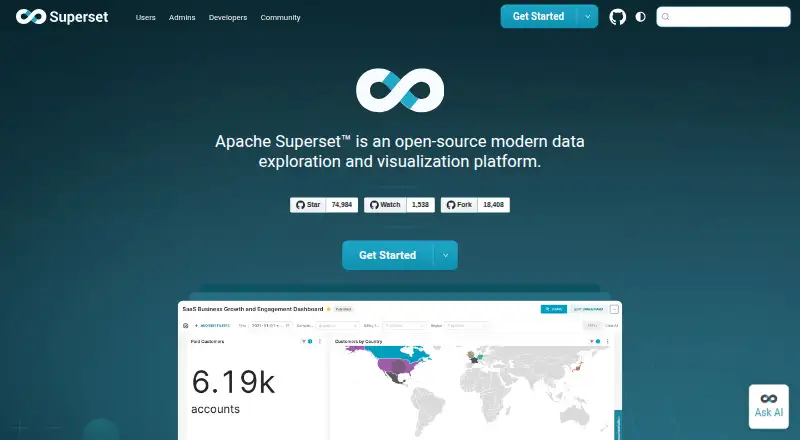
What Apache Superset is
Apache Superset is a free, open-source platform for exploring data and building visualizations. Users can create charts and tables with a no-code builder and drag-and-drop tools, or work in a SQL IDE. Interactive dashboards offer filters, cross-filters, and drill-to-detail and drill-by features. Superset includes more than 40 visualization types, with custom visualizations supported through plug-ins. Other listed tools include caching, Jinja templating, CSS templates, and a semantic layer. Its guide covers 81 databases, including PostgreSQL, Google BigQuery, Trino, Apache Hive, and Apache Spark SQL; each database engine needs a separately installed driver. Superset is self-hosted, with installation options including Docker Compose, Kubernetes, and a Python package. The guide calls Kubernetes a production best-practice option but notes that it requires Kubernetes expertise. Flask AppBuilder handles authentication, users, permissions, and roles. Superset also offers row-level security, scheduled reports, embedded analytics, natural-language queries, and an OpenAPI-specification REST API. Most API endpoints require JWT authentication. It is free under the listed plan.
Good
- Free, open-source data exploration and visualization.
- Offers no-code chart building and a SQL IDE.
- Includes more than 40 visualization types.
- Supports row-level security and scheduled reports.
- Lists 81 supported databases.
Watch out
- Database drivers must be installed separately.
- Self-hosting requires deployment and administration.
- Kubernetes production deployment requires Kubernetes expertise.
- Superset is not a database firewall.
Who it suits
Superset suits teams that want to explore data, build dashboards, and host their analytics platform themselves. Its database coverage and chart-building options may fit users who work with SQL or prefer visual tools.
Verdict
Apache Superset brings chart creation, dashboards, and a broad database list to a self-hosted analytics platform. Teams should account for driver setup and maintain database security beyond Superset’s own safeguards.
Plans and prices
From Apache Superset's own pricing page, checked 4 Oct 2026.
| Plan | Price | What it gives you |
|---|---|---|
| Apache Superset | Free | Open-source data exploration and visualization platform · self-managed installation options |
The facts
Each one read from Apache Superset's own pages, with the date it was checked.
What it does
- Analytics features
- The site lists data caching, Jinja templating, dashboard filters, CSS templates, a semantic layer, cross-filters, and drill-to-detail and drill-by features.checked 4 Oct 2026
- API
- Superset exposes an OpenAPI specification REST API for automation, integrations, and custom applications, and most endpoints require JWT authentication.checked 4 Oct 2026
- Chart building
- Users can explore data with a no-code visualization builder or SQL IDE.checked 4 Oct 2026
- Dashboards
- Users can explore data through interactive dashboards and create charts and tables with drag-and-drop tools.checked 4 Oct 2026
- Database support
- The database guide lists 81 supported databases and says drivers must be installed separately for each database engine.checked 4 Oct 2026
- Deployment
- self-hostedchecked 21 Sep 2026
- Deployment options
- Official installation methods include Docker Compose, Kubernetes, and installation as a Python package from PyPI.checked 4 Oct 2026
- Embedded analytics
- Yeschecked 21 Sep 2026
- Integration examples
- The supported database list includes Trino, Apache Hive, Apache Spark SQL, PostgreSQL, and Google BigQuery.checked 4 Oct 2026
- Licensing
- The Apache Software Foundation identifies Apache License 2.0 as its current license and says ASF software is licensed according to the listed license terms.checked 4 Oct 2026
- Natural-language queries
- Yeschecked 21 Sep 2026
- Production deployment
- The installation guide describes Kubernetes as the best-practice method for production and says it requires Kubernetes expertise.checked 4 Oct 2026
- Purpose
- Apache Superset is an open-source modern data exploration and visualization platform.checked 4 Oct 2026
- Row-level security
- Yeschecked 21 Sep 2026
- Scheduled reports
- Yeschecked 21 Sep 2026
- Security controls
- Authentication, user management, permissions, and roles are handled by Flask AppBuilder, and Superset provides built-in roles including Admin, Alpha, Gamma, sql_lab, and Public.checked 4 Oct 2026
- Security limitation
- The security guide says Superset is not a database firewall and that its safeguards supplement rather than replace robust database security.checked 4 Oct 2026
- Support and community
- The Superset site directs users to community support through Slack, GitHub, a mailing list, and community meetups.checked 4 Oct 2026
- Visualizations
- Superset ships with more than 40 pre-installed visualization types and supports custom visualizations through its plug-in architecture.checked 4 Oct 2026
The company
- Founded
- 2015checked 28 Sep 2026
Money
- Free plan
- Yeschecked 21 Sep 2026
The full review of Apache Superset
Apache Superset is an open-source platform for exploring data and building visualizations. It best suits teams prepared to manage their own analytics deployment and database connections. Its combination of visual chart building, SQL access, and interactive dashboards is compelling, provided the team can handle the operational and security work.
Overview
Superset brings chart creation, dashboards, and analytics controls into a self-hosted platform. Users can work through a no-code visualization builder or a SQL IDE, making it useful both for visual exploration and for analysts who want direct query control. The trade-off is that organizations—not a hosted provider—must manage installation and production operations.
It is free and open source under Apache License 2.0. Superset’s API also supports automation, integrations, and custom applications, though most endpoints require JWT authentication.
Key features
More than 40 built-in visualization types cover a broad range of charting needs, and a plug-in architecture allows custom visualizations. Drag-and-drop tools let users create charts and tables for interactive dashboards. This range works well for teams assembling a shared analytics experience; teams seeking a simple hosted charting tool may find the self-managed platform more than they need.
Dashboard filters, cross-filters, drill-to-detail, and drill-by features support exploration beyond a static report. Data caching, Jinja templating, CSS templates, and a semantic layer provide further ways to shape analytics and presentation. Row-level security, scheduled reports, embedded analytics, and natural-language queries extend the platform’s scope, though the breadth of features does not remove the need to operate and secure the underlying data systems.
The database guide covers 81 databases, including Trino, Apache Hive, Apache Spark SQL, PostgreSQL, and Google BigQuery. Drivers must be installed separately for each database engine, so connecting a varied data estate requires setup work. Superset exposes an OpenAPI REST API for integrations and automation; most endpoints require JWT authentication.
Pricing
Apache Superset — free. The free plan is an open-source data exploration and visualization platform with self-managed installation options. There are no paid tiers described; the cost advantage comes with responsibility for installation, database drivers, and production deployment.
Platforms
Superset is available as a web application and API, with Linux and self-hosted platforms. Official installation methods include Docker Compose, Kubernetes, and a Python package from PyPI. Kubernetes is the recommended production approach in the installation guide, but it requires Kubernetes expertise—an important operational constraint for teams without that skill set.
Who it's for
Superset is a strong fit for organizations that want open-source analytics, need both visual exploration and SQL, and can manage self-hosted software. Its database breadth and dashboard controls are particularly useful when a team wants to build interactive, embedded, or scheduled analytics around multiple data sources.
It is a weaker fit for readers who want a managed service or lack the people to install database drivers and run production infrastructure. Superset’s security controls include authentication, user management, permissions, roles, and row-level security, but it is not a database firewall. Its safeguards supplement rather than replace robust database security.
Pros and cons
- Pro: More than 40 built-in visualizations, custom visualization support, and interactive dashboard tools give teams flexibility in how they present and explore data.
- Pro: The database guide covers 81 engines, while the SQL IDE and REST API support query-driven work and integrations.
- Pro: The software is free and open source under Apache License 2.0, with self-managed installation choices.
- Con: Database drivers must be installed separately, adding work when connecting multiple engines.
- Con: Production Kubernetes deployment requires expertise, and self-hosting leaves ongoing operations with the organization.
- Con: Superset’s security features do not replace database-level security, so teams must protect their data systems independently.
Alternatives
For a broader comparison, see Data Visualization Software and Business Intelligence Tools.
- Datawrapper is worth considering for charts, maps, and tables with web publishing and embedding, plus PNG downloads on its free plan.
- amCharts offers a free plan with full functionality, commercial use, and unlimited users and pages, making it an option for teams prioritizing those terms.
- Vizzlo may suit users looking for chart types with a free plan that applies a watermark, or a Professional plan at $19 a month after a trial.
- Plotly is another self-hosted option; its free plan includes 10 trial credits, 3 private viewers, and 1 app.
- Kibana offers a free and open self-managed plan with community support and free Elastic Stack features.
- ClicData is an alternative with API, Linux, macOS, self-hosted, web, and Windows platforms; its Basic plan has yearly or monthly billing options, with yearly plans requiring a 12-month commitment.
- Infogram may fit a single user seeking online publishing, with its Basic plan offering 35+ interactive chart types and up to 10 projects.
- AnyChart is a paid alternative with developer-oriented plans beginning at $49 a month for two developers.
Verdict
Choose Apache Superset if your team wants a free, flexible analytics platform and has the expertise to install, run, and secure it. Its broad database coverage, SQL and visual workflows, and interactive dashboards are the main reasons to choose it. Look elsewhere if you need a managed service or cannot take on driver setup and production operations.
Getting started
- Visit https://superset.apache.org/ for Apache Superset.
- Choose a self-hosted installation route: Docker Compose, Kubernetes, or the Python package from PyPI.
- Install the driver separately for each database engine you plan to use.
- Configure authentication, users, permissions, and roles through Flask AppBuilder.
- Use the no-code visualization builder or SQL IDE to explore data and build charts.
Limits worth knowing
The free plan is a self-managed installation. Each database engine requires a separately installed driver, and Kubernetes requires expertise for production deployment.
Questions
How much does Apache Superset cost?
The listed plan is free. It is an open-source platform with self-managed installation options.
Can Apache Superset be self-hosted?
Yes. Its listed platforms include self-hosted, and installation options include Docker Compose, Kubernetes, and a Python package from PyPI.
Which databases does Superset support?
The database guide lists 81 supported databases, including Trino, Apache Hive, Apache Spark SQL, PostgreSQL, and Google BigQuery. Drivers must be installed separately for each database engine.
Is Apache Superset open source, and what license does it use?
Yes. Apache Superset is open source, and the Apache Software Foundation identifies Apache License 2.0 as its current license.
Does Superset have an API?
Yes. It exposes a REST API with an OpenAPI specification for automation, integrations, and custom applications. Most endpoints require JWT authentication.
Where can users get community support?
The Superset site directs users to Slack, GitHub, a mailing list, and community meetups.