
Agon
Agon is studio management software for fitness studios, installed on a studio’s Mac or Windows computer.
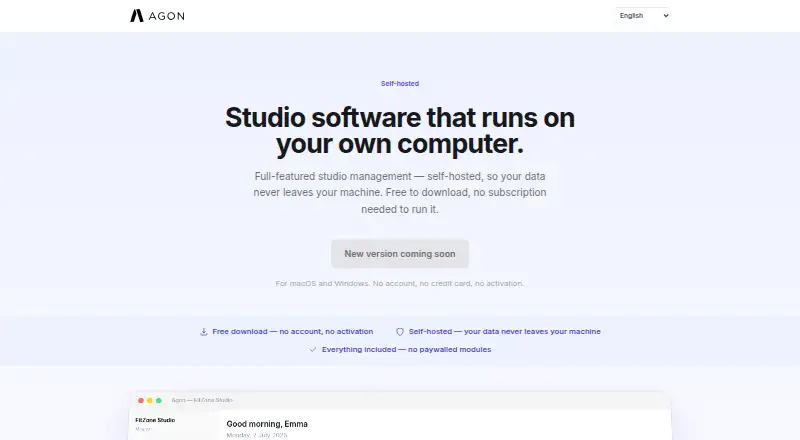
What Agon is
Agon is studio management software for fitness studios, installed on a studio’s Mac or Windows computer. It covers class schedules, client records, memberships, payments, check-in, and reports without requiring the user to set up or maintain a server. Timetables support recurring classes and configurable booking windows. Clients can book through the mobile app, with automatic waitlist management and credit deduction. Client profiles include booking history and membership tracking, with GDPR data tools. Membership types integrate with Stripe and include payment history. Staff can check clients in using QR codes, manual entry, or the app, then export attendance, revenue, and retention reports to CSV. Agon says studio data remains in a local SQLite database on the user’s machine and that it does not store or access the data. A secure tunnel lets mobile apps and remote devices connect without exposing the database directly. The AI Assistant can use a Google Gemini or Groq key, or a local model. A free download includes all modules; a separate pricing note lists From €129/mo · 14-day trial.
Good
- Runs locally without a user-managed server.
- Waitlists are managed automatically for app bookings.
- Check-in supports QR codes, manual entry, or the app.
- Reports export to CSV.
- Free download includes all modules.
Watch out
- Requires a Mac or Windows computer for installation.
- Support is best-effort by email; no phone line or SLA.
Who it suits
Agon suits fitness studios that want to manage classes, memberships, payments, check-ins, and reporting from their own computer. It may appeal to studios that prefer local data storage and do not want to maintain a server.
Verdict
Agon brings core studio operations together in a locally installed application, with mobile booking and remote access. Consider its email-only support terms and desktop installation model before choosing it.
Plans and prices
From Agon's own pricing page, checked 7 Oct 2026.
| Plan | Price | What it gives you |
|---|---|---|
| Free download | Free | No subscription needed to run · no account · no activation · all modules included |
The facts
Each one read from Agon's own pages, with the date it was checked.
What it does
- AI assistant
- The AI Assistant can use a user’s Google Gemini or Groq key, or a local model; prompts go directly from the computer to the chosen provider.checked 7 Oct 2026
- Check-in and reports
- Check-in can use QR codes, manual entry, or the app; attendance, revenue, and retention reports can be exported to CSV.checked 7 Oct 2026
- Class scheduling
- It supports timetables, recurring classes, and configurable booking windows for each class.checked 7 Oct 2026
- Client management
- Client profiles include booking history and membership tracking, with GDPR data tools.checked 7 Oct 2026
- Data storage
- Agon says studio data stays in a local SQLite database on the user’s machine and that Agon does not store or access it.checked 7 Oct 2026
- Intended users
- Agon is presented as studio management software for fitness studios, covering classes, clients, memberships, payments, check-in, and reports.checked 7 Oct 2026
- Online booking
- Clients can book through the mobile app, with automatic waitlist management and credit deduction.checked 7 Oct 2026
- Payments
- Membership types integrate with Stripe and include payment history.checked 7 Oct 2026
- Purpose
- Agon is self-hosted studio management software that runs on the studio’s own computer.checked 7 Oct 2026
- Remote access
- A secure tunnel lets mobile apps and remote devices reach the installation without directly exposing its database.checked 7 Oct 2026
- Setup
- Agon installs as a desktop application on Mac or Windows, with no server for the user to set up or maintain.checked 7 Oct 2026
- Support
- Support is by email on a best-effort basis, usually within one business day; there is no phone line or SLA.checked 7 Oct 2026
The full review of Agon
Overview
Agon combines class scheduling, client records, memberships, payments, check-in and reporting in a studio-installed desktop app. It is best suited to fitness studios that want those operations together while keeping their data on a studio computer; the central trade-off is choosing a local installation over a web-based workspace.
There is no separate server for the studio to set up or maintain, but Agon does require installation on a Mac or Windows computer. Mobile booking and remote access extend its reach beyond that computer.
Key features
Timetables, recurring classes and configurable booking windows give studios control over schedules and when clients can reserve spots. Client profiles connect booking history with membership tracking, and GDPR data tools support handling client information. Together, these features make Agon a sensible fit for studios that need recurring classes and member records in one system.
Clients can book through the mobile app, with automatic waitlist management and credit deduction. Membership types integrate with Stripe, and payment history is recorded. That joins reservations and membership payments in the same workflow, though the studio still relies on its computer-based installation.
Check-in can use QR codes, manual entry or the app. Attendance, revenue and retention reports can be exported to CSV, which gives studio owners records they can use outside Agon. Agon says the data remains in a local SQLite database on the user’s machine and that it does not store or access it. A secure tunnel allows mobile apps and remote devices to connect without directly exposing the database.
The AI Assistant can use a Google Gemini or Groq key supplied by the user, or a local model. Prompts go from the computer directly to the selected provider, so studios should choose this feature according to their preferred model and data-handling setup.
Pricing
Agon’s Free download plan costs nothing, requires no subscription, account or activation, and includes all modules. That is a substantial way to use the full feature set without a recurring charge, although it does not remove the desktop installation requirement.
The pricing note gives a starting price of €129/mo and a 14-day trial. Since Agon also provides a no-subscription free download, the paid starting price is most relevant to readers considering a paid option; studios should weigh it against the free plan before committing. Support is by email on a best-effort basis, usually within one business day, with no phone line or SLA—a meaningful limitation for studios that need guaranteed response times.
Platforms
Agon is available for Android, iOS, macOS and Windows. The studio application installs on Mac or Windows, while clients can use the mobile app to book and mobile apps or remote devices can connect through the secure tunnel. Studios seeking a browser-based desktop workspace should consider the installation model carefully.
Who it's for
Agon fits fitness studios managing recurring classes, memberships and client bookings that value local data storage and want check-in and operational reports alongside those workflows. Its included modules and free download make it worth considering for studios that can run the software from a Mac or Windows computer.
It is a weaker fit for operators who need phone support, a service-level commitment or a web-based desktop product. The local setup is also a deliberate choice: studios should be comfortable keeping the main database on their own machine, even with remote access available.
Pros and cons
- Pros: The free download includes all modules and needs no subscription, account or activation, lowering the barrier to using the full studio workflow.
- Pros: Booking, waitlists, credit deduction, Stripe-linked membership types and check-in options connect routine studio operations rather than leaving them as separate tasks.
- Pros: Local SQLite storage, GDPR data tools and CSV exports give studios control over where records are kept and how reports are used.
- Cons: The studio app requires a Mac or Windows installation, so it is not a browser-based desktop workspace.
- Cons: Support has no phone line or SLA, which may not suit studios that need guaranteed help.
- Cons: The paid starting price of €129/mo may be difficult to justify for a studio that can use the free download instead.
Alternatives
For a broader comparison, start with Pilates Studio Software. Choose WellnessLiving instead if you want Android, iOS and web access; its Starter plan is $62 a month billed annually for one staff member, with class and appointment booking, the Achieve Client App, Elevate Staff App and POS.
easybook.studio is an alternative for studios that want a web-based freemium option: its free plan allows 25 customers and one team member with unlimited bookings, but accepts cash payments only. Momence is worth considering if you prefer a web and mobile offering with custom pricing tailored to the business.
Phorma offers founding-studio pricing for the first studios in each city, with pricing through a demo. Gymdesk is another paid option, with a $75 a month plan for up to 50 members and no free plan. Zen Planner starts at $99 a month for its Studio plan, covering 0–45 active members, and has no free plan.
bsport may suit studios looking for a booking widget, online payments, marketing suite and staff management, with pricing for its Start and Build plans. Hone offers an Instructor plan at $14 a month for solo instructors and unlimited class plans, or Studio Starter at $49 a month for up to three.
Verdict
Choose Agon if your fitness studio wants scheduling, client and membership records, booking, payments, check-in and reporting together, and values keeping its database on a studio computer. The full-module free download is its clearest reason to try it. Look elsewhere if a web-based desktop workspace or guaranteed phone support matters more than local installation and storage.
Getting started
- Visit the Agon website.
- Download the desktop application for Mac or Windows.
- Run Agon without a subscription, account, or activation, or review the paid option from €129/mo with a 14-day trial.
- Set up class timetables, client records, memberships, and payment details.
- Connect mobile apps or remote devices through the secure tunnel.
Limits worth knowing
The listed paid option starts at €129/mo and has a 14-day trial. Support is by best-effort email, usually within one business day, with no phone line or SLA.
Questions
Is Agon free?
A free download costs nothing and includes all modules, with no subscription, account, or activation needed to run it.
What is the listed paid pricing?
The pricing note says From €129/mo · 14-day trial.
Which platforms are supported?
The listed platforms are Android, iOS, macOS, and Windows. The desktop application installs on Mac or Windows.
Where is studio data stored?
Agon says data stays in a local SQLite database on the user’s machine and that Agon does not store or access it.
Which payment service does Agon integrate with?
Membership types integrate with Stripe and include payment history.
How does the AI Assistant use a model?
It can use the user’s Google Gemini or Groq key, or a local model. Prompts go directly from the computer to the selected provider.
Alternatives to Agon
- 1

WellnessLiving
Free planAndroidiOSWebAPI8.3From $69 a month - 2

Arketa
AndroidiOSWebAPI7.8From $49 a month - 3

bsport
AndroidiOSWebAPI7.8From €150 a month - 4
Punchpass
AndroidiOSWeb7.6From $59 a month - 5
Zen Planner
AndroidiOSWebAPI7.6 - 6

Gymdesk
AndroidiOSWeb7.5From $75 a month