
Adobe Workfront
Adobe Workfront is paid work management software from Adobe Workfront, a maker founded in 1982 and headquartered in San Jose, California.
What Adobe Workfront is
Adobe Workfront is paid work management software from Adobe Workfront, a maker founded in 1982 and headquartered in San Jose, California. Its listed capabilities include automation rules, time tracking, guest access, and nine native integrations. The Select plan covers essential work management and collaboration, task automations, real-time insights, AI tools, resource management, reporting, integrations, and review workflows. Prime includes Select features and adds advanced work management and security capabilities, portfolio management, and expanded enterprise controls. Ultimate includes Prime features, enhanced automation and data management, access to Workfront Fusion, and advanced enterprise capabilities. Pricing is available on request, and there is no free plan. The tier structure gives organizations a way to consider the work management and collaboration features they need, with the upper plans listing broader portfolio, security, automation, and enterprise capabilities.
Good
- Includes task automation and time tracking
- Guest access is supported
- Nine native integrations are listed
- Plans include reporting and review workflows
Watch out
- No free plan is listed
- Pricing is available on request
Who it suits
Workfront suits organizations coordinating tasks, time, resources, and review workflows. Prime and Ultimate may suit teams that need portfolio management or expanded enterprise capabilities.
Verdict
Workfront combines work management with automation, time tracking, and collaboration features, with additional capabilities across its higher plans. Readers should account for the lack of a free plan and request pricing to compare options.
Plans and prices
From Adobe Workfront's own pricing page, checked 12 Oct 2026.
| Plan | Price | What it gives you |
|---|---|---|
| Select | Priced on request | Essential collaboration, work execution, and acceleration features · some enterprise administration, security, and compliance features · Workfront Planning listed as contact sales |
| Prime | Priced on request | Includes Select features plus advanced work management and security · Workfront Planning listed as contact sales |
| Ultimate | Priced on request | Includes Prime features plus enhanced automation and data management · Workfront Fusion and Data Connect listed as included · Workfront Planning listed as contact sales |
The facts
Each one read from Adobe Workfront's own pages, with the date it was checked.
What it does
- Adobe integrations
- Adobe lists integrations with Experience Manager Assets, Creative Cloud, Adobe Express, Frame.io, and GenStudio for Performance Marketing.checked 12 Oct 2026
- AI governance
- Adobe says AI and agent actions follow existing permissions, roles, and licensing, MCP uses Workfront OAuth authentication, and actions are logged and auditable.checked 12 Oct 2026
- Audience
- Adobe positions Workfront for enterprise project management, cross-functional teams, marketing organizations, and agencies managing client work.checked 12 Oct 2026
- Automation
- Workfront can standardize work with project templates, automate review stages, and build process automations without a developer team.checked 12 Oct 2026
- Automation rules
- Yeschecked 22 Sep 2026
- Guest access
- Yeschecked 22 Sep 2026
- Mobile
- The Workfront mobile app is available for iOS and Android and supports tasks, projects, proofs, approvals, requests, and timesheets.checked 12 Oct 2026
- Native integrations
- 9checked 22 Sep 2026
- Purpose
- Adobe describes Workfront as a human-agent work management solution for planning, tracking, and managing work across teams and departments.checked 12 Oct 2026
- Reporting
- Workfront provides dashboards and report widgets, and can export Workfront data to data lakes or business intelligence tools.checked 12 Oct 2026
- Reviews
- Workfront offers digital proofing and automated approval workflows, with Frame.io integration for reviews and approvals.checked 12 Oct 2026
- Salesforce limitation
- Adobe says native Salesforce integration support is being phased out and will no longer function after February 28, 2026, recommending Workfront Fusion instead.checked 12 Oct 2026
- Security features
- Adobe's plan comparison lists encryption at rest, single sign-on, and admin controls; it marks some enterprise security and compliance features as limited in Select.checked 12 Oct 2026
- Support
- Adobe's package comparison lists education and support across Select, Prime, and Ultimate, including Experience League access and critical-issue support.checked 12 Oct 2026
- Third-party integrations
- Workfront Fusion provides low-code connectors for applications including Slack, Microsoft Teams, and Figma, and supports services with a public API.checked 12 Oct 2026
- Time tracking
- Yeschecked 22 Sep 2026
- Work intake
- Workfront supports project intake, work requests, custom forms, and agile or hybrid work styles.checked 12 Oct 2026
The company
- Founded
- 1982checked 23 Sep 2026
- Headquarters
- San Jose, California, USAchecked 23 Sep 2026
Money
- Free plan
- Nochecked 22 Sep 2026
- Planning
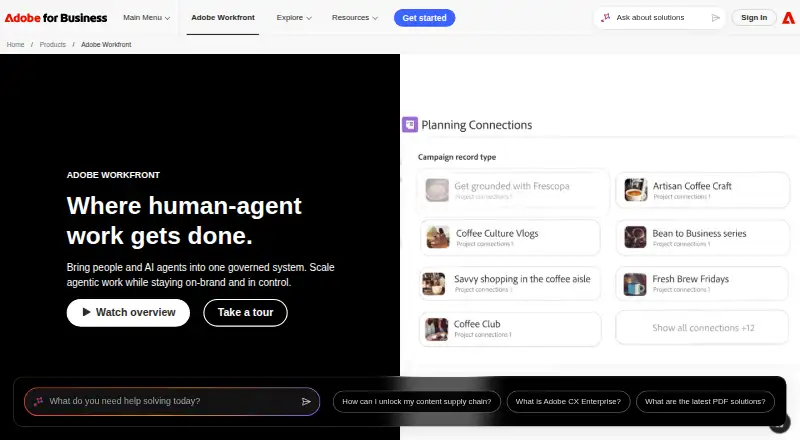
- Workfront Planning links planning and execution records and offers shareable interactive calendar and timeline views.checked 12 Oct 2026
The full review of Adobe Workfront
Adobe Workfront is an enterprise work-management system for planning, routing, executing, reviewing, and reporting on work across departments. It suits marketing organizations, agencies, cross-functional teams, and larger project operations that need one governed process. The breadth is compelling for complex coordination, while custom pricing and a Salesforce transition make due diligence essential.
Overview
Workfront brings planning and execution into the same system. Planning records can connect to delivery records, with shareable interactive calendars and timelines for communicating schedules. Intake tools cover project requests, work requests, and custom forms, and teams can organize work using agile or hybrid approaches. That range is valuable when many departments need a common operating model; smaller teams seeking a straightforward task list may be paying for more structure than they need.
Key features
Templates standardize recurring projects, while automated review stages and process automations can be built without a developer team. Digital proofing and automated approval workflows address review-heavy work, and Frame.io integration is particularly relevant to creative teams. Dashboards and report widgets expose operational status, with export to data lakes or business-intelligence tools for broader analysis.
Adobe integrations include Experience Manager Assets, Creative Cloud, Adobe Express, Frame.io, and GenStudio for Performance Marketing. Workfront Fusion adds low-code connections for services such as Slack, Microsoft Teams, and Figma, and can work with services offering a public API. Adobe says native Salesforce integration is being phased out and will stop functioning after February 28, 2026, so Salesforce users should plan around Fusion instead.
Automation rules, time tracking, guest access, and nine native integrations cover core coordination needs. AI and agent actions inherit existing permissions, roles, and licensing; MCP uses Workfront OAuth authentication, and actions are logged for auditability. Listed security capabilities include encryption at rest, single sign-on, and administrator controls, although some enterprise security and compliance features are limited in Select.
The iOS and Android app handles tasks, projects, proofs, approvals, requests, and timesheets, making mobile follow-up practical rather than merely read-only.
Pricing
Workfront has no free plan and uses pricing on request. That makes a direct cost comparison harder, particularly for organizations budgeting per seat, but the three-tier structure clarifies how capabilities scale.
Select
Select is the entry tier, with essential work management and collaboration, task automations, real-time insights, AI tools, resource management, reporting, integrations, and review workflows. It fits teams adopting a governed work process without the advanced portfolio and enterprise controls of higher tiers. Some enterprise security and compliance capabilities are limited at this level.
Prime
Prime includes Select and adds advanced work-management and security capabilities, portfolio management, and expanded enterprise controls. It is the more appropriate tier for organizations coordinating multiple portfolios or requiring stronger governance.
Ultimate
Ultimate includes Prime, enhanced automation and data management, full Workfront Fusion access, and advanced enterprise capabilities. It is aimed at organizations that need extensive cross-system orchestration and the broadest control set. Adobe publishes no prices for any tier, so request a quote that reflects users, integrations, and required controls.
Platforms
Workfront is available on Android, iOS, the web, and through an API. Mobile coverage includes the main execution, approval, request, and time-entry activities, while the API and Fusion support wider system integration.
Who it's for
Choose Workfront for enterprise project management, marketing operations, cross-functional delivery, or agencies managing client work where intake, approvals, resource visibility, and reporting must connect. It is less suitable for a small team that wants transparent self-serve pricing, a free starting tier, or only lightweight task tracking.
Pros and cons
- Pros: Planning and execution records stay connected, reducing the gap between roadmaps and delivered work.
- Pros: Templates, review automation, proofing, and approvals address repetitive coordination and creative sign-off.
- Pros: Adobe ecosystem links and Fusion connectors support marketing and production toolchains.
- Pros: Time tracking, guest access, dashboards, exports, mobile apps, and auditable AI actions cover operational governance.
- Cons: There is no free plan and every tier uses custom pricing, which slows low-risk evaluation and budget comparison.
- Cons: Native Salesforce support is scheduled to end after February 28, 2026, requiring a Fusion migration for affected teams.
- Cons: Select limits some enterprise security and compliance features, potentially pushing regulated organizations toward Prime or Ultimate.
Alternatives
Airtable is the better fit when a freemium option, a free trial, and structured record and API quotas matter; its Team plan is $20 a month billed annually with 50,000 records per base, 100,000 API calls per workspace per month, and 20 GB of attachments.
ClickUp suits buyers wanting a free tier with unlimited tasks and free-plan members; its Free Forever plan includes 60MB of storage and one form, while Unlimited costs $10 a month.
Wrike is an alternative for teams seeking a freemium work platform, with its free plan allowing unlimited users, 2GB storage per account, and 200 active tasks per account.
monday work management is worth considering when a free plan with two seats, three boards, and three Docs is sufficient; its Basic plan is $9 a month billed annually and includes 1,000 AI credits per month.
Workamajig is a paid alternative for in-house teams, with plans beginning at $49 a month for 10+ users and a free month with annual payment.
Brandsystems is a paid web-based marketing resource-management option with demo-led pricing.
Opal is a paid enterprise option delivered through API, iOS, and web apps.
Planful is a paid API and web platform with subscriptions tailored to company size, user count, and selected modules.
For category browsing, see Marketing Planning Software, Marketing Project Management Software, IT Project Management Software, AI Project Management Software, Creative Project Management Software, and Work Management Software.
Verdict
Adobe Workfront is a strong choice for enterprises and agencies that need connected planning, intake, approvals, automation, time tracking, and governed reporting across teams. Choose it when Adobe ecosystem integration and enterprise controls justify a sales-led purchase; look elsewhere if you need free onboarding, published seat pricing, a lightweight tracker, or dependable native Salesforce support.
Alternatives to Adobe Workfront
- 1
Brandworkz
Free planAndroidiOSWebAPI8.2$500 one-time - 2

Screendragon
WebAPI7.1From $20 a month - 3

Workamajig
WebAPImacOSSelf-hosted6.9 - 4

Seismic
AndroidiOSWebAPI6.8 - 5
Proof MRM
WebAPI6.7From $29 a month - 6
Marvia
WebAPI6.1