
8bit.page
8bit.page is a browser-based workspace for making pixel art, animating it, exporting files, and publishing artwork.
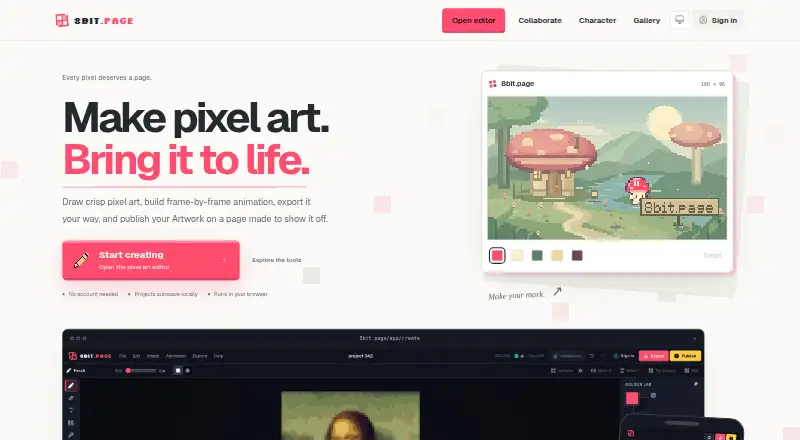
What 8bit.page is
8bit.page is a browser-based workspace for making pixel art, animating it, exporting files, and publishing artwork. Its editor includes drawing tools, layers, palettes, symmetry, shortcuts, and image-to-pixel conversion with adjustable detail and color count. Projects can use fixed or expandable canvases, with standard custom dimensions up to 1024 px and an advanced option up to 2048 px. Animation tools support frame-by-frame work, onion skinning, live playback, per-frame timing, and animation tags. Exports include still images, animated formats, sprite sheets with JSON metadata, and video; some formats require fixed-canvas Projects. You can create, animate, and export without paying or making an account. Editable Projects autosave in the current browser, while signed-in users can opt individual Projects into Cloud sync and version recovery. Publishing creates a rendered Artwork page with public or link-only visibility and optional comments, downloads, and expiry. Private live editing supports up to eight editors including the owner; guests can join without accounts. Link-only pages are not password protected.
Good
- Create, animate, and export without payment or an account.
- Animation includes onion skinning and per-frame timing.
- Exports include sprite sheets with JSON metadata.
- Private live editing supports up to eight editors.
Watch out
- Tilemap tools are not included.
- Link-only Artwork can be viewed by anyone with its link.
- Some export formats require fixed-canvas Projects.
Who it suits
8bit.page suits pixel artists, game developers, and animators who want a browser-based editor with animation and export tools. It also fits people who want to make or share pixel art without signing in to start.
Verdict
8bit.page combines pixel-art editing, animation, export, publishing, and optional collaboration in a browser workspace. Consider its lack of tilemap tools and the visibility of link-only pages when deciding whether it fits your work.
Plans and prices
From 8bit.page's own pricing page, checked 8 Oct 2026.
| Plan | Price | What it gives you |
|---|---|---|
| Free | Free | Create pixel art, animate, and export for free · Private Artwork and retained cloud Project versions share online storage · Limit increases reviewed individually |
The facts
Each one read from 8bit.page's own pages, with the date it was checked.
What it does
- Animation
- Users can build frame-by-frame animations with onion skinning, live playback, per-frame timing, and animation tags.checked 8 Oct 2026
- Artwork pages
- Publishing creates a page for rendered Artwork, with public or link-only visibility and settings for comments, downloads, and expiry.checked 8 Oct 2026
- Audience
- The maker describes the product as intended for pixel artists, game developers, animators, and anyone who wants to place a few pixels.checked 8 Oct 2026
- Canvas sizes
- Projects support fixed or expandable canvases; standard custom dimensions go up to 1024 px and an advanced size option goes up to 2048 px.checked 8 Oct 2026
- Collaboration
- Private collaboration sessions support up to eight people; the owner signs in, while invited guests do not need accounts.checked 8 Oct 2026
- Drawing
- The editor has drawing tools, layers, palettes, and keyboard, pointer, clipboard, and drag-and-drop workflows.checked 8 Oct 2026
- Editor tools
- The editor includes drawing tools, layers, palettes, symmetry, shortcuts, and image-to-pixel conversion.checked 8 Oct 2026
- Export
- Exports include still images, animation loops, sprite sheets with JSON metadata, and video in formats including PNG, SVG, GIF, APNG, WebP, WebM, and MP4.checked 8 Oct 2026
- Export formats
- Exports include PNG, JPG, WebP, SVG, GIF, APNG, animated WebP, sprite sheets with JSON metadata, WebM, and MP4, with some formats limited to fixed-canvas Projects.checked 8 Oct 2026
- Image conversion
- The image-to-pixel-art workflow lets users adjust detail and color count, then add the result as a new layer.checked 8 Oct 2026
- Local saving and Cloud
- Editable Projects autosave in the current browser by default, while signed-in users can opt individual Projects into Cloud sync and version recovery.checked 8 Oct 2026
- Notable limit
- Animated exports use fixed-canvas Projects, and export availability depends on canvas mode and export type.checked 8 Oct 2026
- Privacy
- The privacy policy says 8bit.page does not sell personal information and does not use Artwork to train AI models.checked 8 Oct 2026
- Product
- 8bit.page is a browser-based workspace for drawing pixel art, animation, export, publishing, and sharing.checked 8 Oct 2026
- Saving
- Editable Projects autosave in the browser on the current device; signed-in users can optionally sync individual Projects through 8bit Cloud.checked 8 Oct 2026
- Security
- The privacy policy says the service uses reasonable technical and organisational measures, while noting that absolute security cannot be guaranteed.checked 8 Oct 2026
- Security and privacy
- The privacy policy says it uses reasonable technical and organisational measures, does not sell personal information, and does not use Artwork to train AI models.checked 8 Oct 2026
- Sharing
- Publishing creates a rendered Artwork page with public or private-link visibility and optional comments and downloads.checked 8 Oct 2026
- Support
- Users can send questions, technical issue reports, or feedback through the contact form.checked 8 Oct 2026
- What it does
- 8bit.page is a browser-based pixel art workspace for drawing, animation, export, publishing, and sharing.checked 8 Oct 2026
- Who it is for
- The maker describes 8bit.page as for pixel artists, game developers, animators, and anyone who wants to place a few pixels.checked 8 Oct 2026
Money
- Free use
- You can create pixel art, animate, and export without paying, and no account is needed to start.checked 8 Oct 2026
The company
- Ownership
- Users retain ownership of everything they create and publish on 8bit.page.checked 8 Oct 2026
Where it runs
- Platforms
- The editor runs in a browser and has a mobile layout for phones and tablets; the site says no installation is needed.checked 8 Oct 2026
The full review of 8bit.page
8bit.page is a browser workspace for creating pixel art, animation, exports, and shareable artwork pages. It fits pixel artists, animators, and game developers who want a capable free tool without an account at the outset. Its strongest case is the combination of animation control and unusually broad export support; its weakest points are browser-dependent project storage and the absence of tilemap editing.
Overview
You can start drawing, animating, and exporting at no cost, without registering first. The product keeps the workflow in a browser, from pixel construction through rendered publishing, so it suits people who want one lightweight workspace rather than separate drawing, animation, and sharing utilities.
Projects autosave in the current browser on the current device by default. That is convenient for casual work, but it makes signed-in Cloud sync and version recovery a sensible precaution for anything you cannot recreate. Individual Projects can be opted into Cloud sync. Published Artwork can be public or visible through a private link, with controls for comments, downloads, and expiry.
Key features
The editor combines drawing tools, layers, palettes, indexed-color controls, symmetry, shortcuts, and keyboard, pointer, clipboard, and drag-and-drop workflows. Image-to-pixel conversion provides controls for detail and color count, then places the result on a new layer. That is useful when a reference needs further editing rather than merely being converted and exported.
Animation is built frame by frame. Onion skinning, live playback, per-frame timing, and animation tags give artists practical control over motion and frame organization. Fixed or expandable canvases are supported; standard custom dimensions reach 1024 px, while an advanced size option reaches 2048 px. There are no tilemap tools, so a developer building maps from reusable tiles will need another application for that stage.
Exports include PNG, JPG, WebP, SVG, GIF, APNG, animated WebP, WebM, and MP4, plus sprite sheets with JSON metadata. Some formats are limited to fixed-canvas Projects, making canvas choice part of the delivery decision. Publishing renders an Artwork page rather than exposing an editable Project. A private live editing session supports up to eight editors including the owner; the owner must sign in, while guests can join without accounts.
Pricing
The Free plan costs free. It includes pixel creation, animation, and export, with no paid trial because the core use is free. Private Artwork and retained Cloud Project versions share online storage, and limit increases are reviewed individually. That makes the plan a strong fit for individuals, learners, and small projects, while teams should consider the shared-storage constraint before treating it as a long-term archive. No paid plan or standard upgrade price is provided, so larger needs require custom pricing or an individual review of limits.
Platforms
8bit.page runs in a web browser and is identified for Android, iOS, and web use. Its browser-local saving means device and browser continuity matter unless Projects are synced through Cloud.
Who it's for
Pixel artists get layers, palettes, indexed color, symmetry, conversion, and animation controls in one place. Animators benefit from onion skinning, timing, tags, and video or animated-image exports. Game developers get sprite-sheet JSON metadata and many delivery formats, but not tilemap tools. It also suits anyone who wants to place a few pixels and publish a rendered page without creating an account first.
Pros and cons
Pros
- Broad delivery options: Still images, animation, sprite sheets with JSON metadata, and video cover varied production handoffs.
- Serious frame controls: Onion skinning, playback, timing, and tags are more useful for animation work than a basic flipbook.
- Low-friction start: Free creation, animation, and export work without an account.
- Guest collaboration: A private session can include up to eight editors, with only the owner required to sign in.
- Clear privacy position: Users retain ownership; the policy says personal information is not sold and Artwork is not used to train AI models.
Cons
- No tilemaps: Game projects that depend on tile-based level construction need a separate tool.
- Browser-first storage: Unsynced Projects remain in the current browser, so Cloud opt-in is important for continuity.
- Link-only is not access-controlled: Anyone who receives the unlisted link can view the Artwork, and it is not password protected.
- Export caveat: Fixed-canvas requirements for some formats can restrict an otherwise flexible project setup.
- Shared storage: Private Artwork and retained Cloud versions draw from the same online-storage allowance.
Alternatives
Browse the Pixel Art Software category for more options.
Choose Pixelorama instead if you want free, open-source software across Windows, Linux, macOS, Android, and web, with optional payment on itch.io.
Hexcalibur is another free-plan, cross-platform option for users seeking a focused creative utility.
Pick Pixelc if open-source availability across desktop, web, and Android matters and a separate Android Premium purchase is acceptable.
Pix2D is a free, open-source alternative spanning Android, Linux, macOS, web, and Windows.
Choose PixelWall when tilemap editing, scripting, API or CLI access, and frame exports are priorities.
void◆sprite is a free-download, name-your-own-price pixel editor offered as alpha software.
Pick Picotap if you want every feature on its free plan and can accept ads in the artwork list and when closing the editor.
Pixel Studio suits users who prefer Android, iOS, macOS, or Windows and are willing to consider its one-time PRO purchase for features such as Google Drive sync.
Verdict
8bit.page is a strong free choice for pixel artists and animators who value frame controls, sprite-sheet metadata, video exports, and browser-based publishing. Choose it when those capabilities outweigh local-browser storage and the lack of tilemaps. Look elsewhere if tilemap construction, password-protected sharing, or a conventional desktop-first archive is central to your workflow.
Getting started
- Open 8bit.page in a web browser
- Start a pixel-art Project without creating an account
- Choose a fixed or expandable canvas
- Draw, animate, or convert an image into a new pixel-art layer
- Export the work or publish an Artwork page
- Sign in to enable optional Cloud sync, version recovery, or owner-led collaboration
Limits worth knowing
The Free plan costs 0.00 USD. Private Artwork and retained cloud Project versions share online storage, and limit increases are reviewed individually; some export formats are limited to fixed-canvas Projects.
Questions
Can I use 8bit.page without an account?
Yes. You can create pixel art, animate, and export without paying or signing in.
Which platforms support 8bit.page?
It is supported in a web browser; the listed platforms are web, Android, and iOS.
What export formats are available?
Exports include PNG, JPG, WebP, SVG, GIF, APNG, animated WebP, sprite sheets with JSON metadata, WebM, and MP4.
Does 8bit.page have tilemap tools?
No. Tilemap tools are not included.
How does cloud saving work?
Projects autosave in the current browser by default. Signed-in users can optionally sync individual Projects through 8bit Cloud and recover versions.
How many people can edit privately together?
A private live editing session supports up to eight editors including the owner; the owner signs in, while guests can join without accounts.
Alternatives to 8bit.page
- 1
LibreSprite
Free planOpen sourceAndroidWebAPILinux8.0Free plan - 2
Pixelc
Free planOpen sourceAndroidWebLinuxmacOS7.8Free plan - 3

PixelWall
Free planWebAPILinuxmacOS7.6$15 one-time - 4
Avidemux
Free planOpen sourceWebLinuxmacOSWindows7.3Free plan - 5
Hexcalibur
Free planWebLinuxmacOSWindows7.2Free plan - 6
PixelAoi
Free planAPIWindows7.2$17 one-time