Free tools Windows power users keep installed
One-click scans. No signup required.
Everything Xiaomi is reader-supported. When you buy through links on our site, we may earn an affiliate commission. As an Amazon Associate I earn from qualifying purchases. Learn more
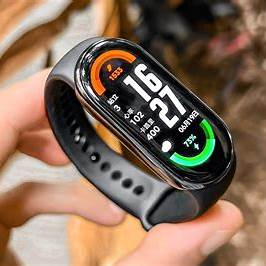
The Xiaomi Mi Band 8 is a versatile fitness tracker that offers a range of health and activity monitoring features. To unlock its full potential, you need to pair it with the Mi Fitness app (also known as Xiaomi Wear). This guide provides detailed instructions on how to pair your Mi Band 8 with the Mi Fitness app on both Android and iOS devices.
Prerequisites
Before you begin, ensure the following:
- Your smartphone runs on Android 8.0 or higher or iOS 12.0 or higher.
- The Mi Fitness app is installed on your device.
- Bluetooth is enabled on your smartphone.
- Your Mi Band 8 is charged and powered on.
Step-by-Step Pairing Process
- Download and Install the Mi Fitness App
- Android Users: Visit the Google Play Store and search for “Mi Fitness.” Download and install the app.
- iOS Users: Go to the App Store and search for “Mi Fitness.” Download and install the app.
- Launch the Mi Fitness App and Sign In
- Open the Mi Fitness app on your smartphone.
- Sign in with your existing Xiaomi account or create a new one if you don’t have an account.
- Add a New Device
- After signing in, tap on the “+” icon or select “Add Device”.
- Choose “Band” from the list of device types.
- Select Mi Band 8
- From the list of available devices, select “Mi Band 8″.
- Pair the Devices
- The app will search for nearby devices. Ensure your Mi Band 8 is close to your smartphone.
- Once the Mi Band 8 appears on the screen, tap on it to initiate pairing.
- A pairing request will be sent to your Mi Band 8. Confirm the pairing on the band by tapping the checkmark.
- Complete the Setup
- After successful pairing, the app will guide you through the initial setup, including selecting watch faces and configuring notifications.
Troubleshooting Tips
If you encounter issues during the pairing process:

As an Amazon Associate I earn from qualifying purchases.
PC Slower Than It Used to Be?
A free scan shows the junk files, broken settings and background clutter dragging Windows down - then fixes them in one click.Free scan · Windows 10 & 11Crashes, No Sound, or Screen Glitches?
Random freezes, missing sound and display glitches usually trace back to one bad driver. Find and replace yours safely.Free scan · under a minute- Ensure Bluetooth is Enabled: Verify that Bluetooth is turned on and functioning properly on your smartphone.
- Restart Devices: Restart both your smartphone and Mi Band 8 to reset any temporary glitches.
- Reset Mi Band 8: If pairing fails repeatedly, consider resetting your Mi Band 8 to factory settings and attempting the pairing process again.
- Update Firmware: Ensure that both the Mi Fitness app and your smartphone’s operating system are up to date.
Additional Tips
- Region Settings: Some users have reported improved pairing success by setting the region to “China” within the Mi Fitness app settings.
- Permissions: Grant all necessary permissions to the Mi Fitness app, including access to Bluetooth, location, and notifications, to ensure seamless functionality.
- Battery Optimization: Disable battery optimization for the Mi Fitness app to prevent it from being closed in the background, which can disrupt the connection with your Mi Band 8.
Conclusion
Pairing your Mi Band 8 with the Mi Fitness app is a straightforward process that enhances your ability to monitor and manage your health and fitness data effectively. By following the steps outlined above, you can ensure a successful pairing and enjoy the full range of features offered by your Mi Band 8.
Quick Recap
Shopping ad

- Big, Bright 1.72" AMOLED Display: See more, scroll less. The 1.72" AMOLED display with a slim 2.0 mm bezel delivers a wider, cleaner view for workouts, messages, and daily stats. With 1500 nits of brightness, it remains easy to read outdoors and sharp in the office
- 21 Day Battery Life: Power through busy weeks. With up to 21 days of battery life, Xiaomi Smart Band 10 stays ready for work, travel, and long training blocks. Charge less often and stay focused on your day
- 150+ Sports Modes: Train your way. With 150+ sports modes, Xiaomi Smart Band 10 helps you track running, cycling, gym sessions, and more. Get the workout data you need to stay motivated and work toward your fitness goals
- Ultra Light 15.95 g Design: Comfort from gym to office. At just 15.95 g, this slim band sits lightly on your wrist during workouts and workdays. Wear it all day without bulk or distraction, with a clean look that fits any routine
- Sport & Office Ready: One band for daily wear. Designed for movement and work, Xiaomi Smart Band 10 transitions easily from training time to office time. Stay organized, look sharp, and keep your fitness and daily routine on track
Shopping ad
Shopping ad

- Stunning images, smooth touch: Immerse yourself in brilliant clarity with the large 1.72-inch AMOLED display.Vacuum filling sealing technology enables symmetrical 2.0mm ultra-thin bezels, expanding screen-to-body ratio from 66% to 73%. Enjoy incredibly smooth and seamless interaction with crisp, color-accurate images, right on your wrist.
Shopping ad

- Stunning images, smooth touch: Immerse yourself in brilliant clarity with the large 1.72-inch AMOLED display.Vacuum filling sealing technology enables symmetrical 2.0mm ultra-thin bezels, expanding screen-to-body ratio from 66% to 73%. Enjoy incredibly smooth and seamless interaction with crisp, color-accurate images, right on your wrist.
Shopping ad

- Stunning images, smooth touch: Immerse yourself in brilliant clarity with the large 1.72-inch AMOLED display.Vacuum filling sealing technology enables symmetrical 2.0mm ultra-thin bezels, expanding screen-to-body ratio from 66% to 73%. Enjoy incredibly smooth and seamless interaction with crisp, color-accurate images, right on your wrist.
- Fast charging, longer adventures: Say goodbye to daily charging hassles! Enjoy an exceptional 21 days of battery life on a single charge. And when you need more power, it only takes an hour to fully recharge the device with fast charging. Freedom without limits!
- Revolutionize your swimming and training sessions: The Xiaomi smartwatch is equipped with a new high-precision electronic compass that tracks swimming direction like never before, delivering unparalleled accuracy for pool sessions. Plus, gain detailed insights through professional analysis of your workouts to optimize each session.
- Master your nighttime recovery: Discover the secrets of your sleep with comprehensive and enhanced sleep monitoring. Get comprehensive insights into your sleep stages and quality, helping you wake up refreshed and optimize your well-being.
- 1500 nits HBM brightness,Glanceable in any light:25% brighter than before, the display achieves a remarkable 1500 nits HBM brightness, making every message readable even in direct sunlight.
Product prices and availability are accurate as of the date/time indicated and are subject to change. Any price and availability information displayed on Amazon at the time of purchase will apply.
Independent reader supportYour contribution helps us test, update, and keep practical guides available for everyone.



