The Tool Desk
Outbyte PC Repair FREEClear out junk files and repair common Windows errorsFree Scan →Outbyte Driver Updater FREEScan for outdated or missing drivers - takes under a minuteDriver Scan →Everything Xiaomi is reader-supported. When you buy through links on our site, we may earn an affiliate commission. As an Amazon Associate I earn from qualifying purchases. Learn more
You can make a personal AI love song for your boyfriend on a Xiaomi, Redmi, or POCO phone by writing a few specific memories into original lyrics, generating a vocal song, then revising the lines that sound generic. Suno and Treblo both list Android access and song generation with vocals and lyrics; RHYMEBOOK can help shape the lyrics before you make the track. Check each vendor’s site for current device availability and whether it supports the exact sound or genre you want.
Choose A Phone-Friendly Workflow
| Tool | Established Fit | Phone Access | Useful Limits To Know |
|---|---|---|---|
| Suno | Generates songs with vocals, lyrics, instrumentation, and production; supports editing and section replacement. | Web, iOS, and Android. | Free plan excludes commercial rights and stem separation. Pro limits downloads to 20 songs per month. |
| Treblo | Generates songs with structure, lyrics, and vocals; supports editing, inpainting, and extending. | Web, iOS, and Android. | Consumer and API offerings use different pricing models; API free trial requires card verification. |
| RHYMEBOOK | Lyrics and rhyme drafting with genre, mood, theme, and song-structure inputs. | Web, iOS, and Android. | Free plan limits AI suggestions, chats, demos, and transcription; text is the listed export format. |
For the shortest route, draft lyrics in Suno or Treblo and generate there. If you want to shape the words first, use RHYMEBOOK for a lyric draft, then copy the text into the song tool. No specific genre or Xiaomi interface behavior is established here, so verify those details with the vendor before you rely on them.
As an Amazon Associate I earn from qualifying purchases.
Windows Errors? Fix Them Before They Spread
Repair common Windows errors and clear accumulated junk for a smoother, more stable PC - no reinstall needed.Free scan · no reinstallOutdated Drivers Are Slowing You Down
One free scan finds every outdated or missing driver and matches the right update for your exact hardware.Free scan · exact hardware matchGather Details That Make The Song Feel Like His
Before opening a generator, jot down a handful of details only the two of you would recognize. Concrete images and small habits tend to make more personal lyrics than broad declarations.
- One shared scene: where you were, what happened, and one thing you noticed.
- Two or three details about him, such as a phrase he says, a hobby, or the way he helps you.
- The feeling you want the song to leave him with: amused, reassured, nostalgic, or deeply romantic.
- A simple central message that can become the chorus, such as “you make ordinary days feel like home.”
- Any names or private details you do not want included in a generated result.
Draft A Singable, Personal Lyric
- Start with one scene in the first verse. Use a real detail rather than a generic line like “you are perfect.” For example: “The rain kept tapping on the diner glass / You gave me your sleeve and made me laugh.” Treat this as a writing prompt, not a claim that a tool will produce a particular result.
- Give the chorus one short idea to repeat. Keep the wording conversational and easy to sing, such as “You turn the long way home into my favorite road.”
- Use the next verse to add a different detail about him or your relationship. Avoid squeezing every memory into one song.
- Ask RHYMEBOOK for a draft using the relationship details, mood, and structure you chose, then edit the result so it sounds like something you would actually say. Its listed lyric-generation inputs include genre, mood, theme, and song structure; check its site for exact controls and current limits.
- Read the lyrics aloud and replace awkward phrases, hard-to-sing names, or details that feel too private. Keep a copy of your final wording on your phone before moving to the music step.
Generate The Song In Suno Or Treblo
- Open Suno or Treblo on your phone through the vendor’s Android app or web access. If the app is unavailable for your device or region, check the vendor site for supported access.
- Choose the option for creating a song from text or lyrics, if offered in the current interface. Both products list complete song generation with vocals and lyrics; exact screen labels can change, so follow the current in-product prompts.
- Paste in your lyrics if the interface accepts them. Otherwise, use a concise description of the story and the chorus idea, and review the generated lyrics carefully for made-up details.
- Describe the musical direction with elements that suit a personal gift: for example, “warm, intimate vocal; gentle acoustic feel; restrained backing; clear chorus; affectionate and sincere, not comic.” This is an example prompt, not a guaranteed genre or instrument preset. Check the product’s current controls for the styles and instruments it actually supports.
- Generate a version and listen through with headphones. Note the exact line that feels wrong, such as an invented memory or a chorus that hides the message.
- Use the available lyric editing or section replacement tools to revise that part where supported. Suno lists editing and section replacement; Treblo lists editing and inpainting. Check the vendor interface for availability on your account and plan.
- Save or share the result using the options currently offered by the product. Confirm the available file formats and download conditions on the vendor’s site before planning a particular delivery method.
Make The Gift Feel Personal Without Overloading It
- Keep the chorus focused on one promise, thank-you, or shared image, then let the verses carry the extra details.
- Use a detail he will recognize, but avoid sensitive information that you would not want included in an online generation workflow.
- If the vocal mispronounces a name, try a simpler lyric phrasing or remove the name. Do not assume a particular pronunciation control exists unless the product lists it.
- Listen once as a song and once while reading the lyrics. The first pass checks the feeling; the second catches errors that are easy to miss in a full playback.
Check Voice, Cover, Sample, And Sharing Terms
Use lyrics and recordings you have permission to use. If you want a real person’s voice, get that person’s consent before uploading or imitating it, and review the platform’s voice and content terms. For covers, samples, or commercial sharing, check the chosen service’s current terms and rights for your account and plan. The listed Suno Free plan does not include commercial rights, and RHYMEBOOK lists text as its export format; neither fact establishes permission for a particular cover, sample, or public release.
Shopping ad
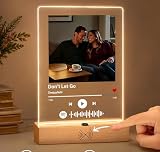
- 1. REAL MUSIC PLAYBACK — NO PHONE SCAN NEEDED Unlike ordinary Spotify code plaques, this custom music plaque features a built-in speaker and real music playback button. Simply press once to instantly hear your favorite song — no app, no scanning, no phone required. Turn memories into music you can truly feel.
- 2. PERSONALIZED PHOTO + SONG = A UNIQUE LOVE GIFT Upload your favorite photo and choose a meaningful song to create a one-of-a-kind personalized keepsake. Perfect for couples, anniversaries, birthdays, weddings, Valentine's Day, Mother's Day, or long-distance relationships.
- 3. EXCLUSIVE MOTION SENSOR NIGHT LIGHT Our plaque includes an intelligent auto-sensing LED light that automatically turns on in the dark when someone approaches. It creates a warm romantic atmosphere beside your bed, desk, or living room — a feature rarely found on Amazon.
- 4. PREMIUM ACRYLIC DISPLAY WITH MODERN DESIGN Made from crystal-clear acrylic with a minimalist wooden base, this custom music plaque blends beautifully with any room decor. Whether used as a bedside lamp, memory display, or romantic decoration, it becomes an emotional centerpiece.
- 5. MEANINGFUL GIFT THEY’LL NEVER FORGET More than just a decoration — this is a gift filled with emotion, memories, and sound. Watching someone hear “your song” instantly creates a powerful emotional reaction, making it ideal for romantic surprise gifts.
For U.S. copyright registration, the Copyright Office says entirely AI-generated works are not copyrightable and prompts alone do not make someone the author; human-authored parts of a mixed work may be protected. Applicants registering a work with more than a minimal amount of AI-generated material must disclose it and describe the human contribution. See the U.S. Copyright Office AI report and its registration guidance.
Quick Recap
Shopping ad

- ANNIVERSARY GIFT FOR YOUR PARTNER: Make this anniversary unforgettable with a personalized music song cover. Upload your favorite photo, choose a song title and artist name to create a one-of-a-kind, meaningful gift. This unique keepsake will warm their heart and fill their space with memories, showing just how much they are loved and appreciated! The perfect way to celebrate your special moments together.
- MADE IN THE USA: This valentines day, give your partner a gift that’s crafted with care right here in the USA. Using advanced UV printing technology, the design is printed onto acrylic glass, ensuring a vibrant, long-lasting, and durable finish that will endure for years to come. It’s a high-quality, meaningful gift that’s sure to make a lasting impression.
- ANNIVERSARY GIFTS FOR HIM: Click “Customize Now” to upload your favorite photo and personalize it with a song title and artist name. This unique song cover makes the perfect valentines day, anniversary, or birthday gift, allowing you to show your partner just how much they mean to you with a thoughtful and personal touch!
- ENJOY YOUR FAVORITE MUSIC: Just scan the code with your smartphone! Open Spotify, tap the camera icon in the top right corner, and grant camera access. Then, scan the song code on the plaque, and your chosen music will start playing instantly on your smartphone. Important: The plaque itself does not produce sound. An unforgettable gift for music lovers and special moments—turn memories into melodies!
- You were probably looking for " valentines gift for him ", " music glass art " , " personalized acrylic song with photo ", " music picture frame " or " 1 year anniversary gift for girlfriends ". Now you have found the perfect unique gift.
Shopping ad

- CUSTOM SONG LYRICS PRINT WITH PHOTO: Personalize your favorite lyrics with a photo, names, and date to create a one-of-a-kind print that captures your love story and special memories
- ROMANTIC GIFT FOR COUPLES: A thoughtful personalized gift for your wife, husband, fiance, boyfriend, girlfriend, or partner for weddings, engagements, anniversaries, Valentine's Day, birthdays, Christmas, and holidays
- CELEBRATE ANNIVERSARIES & WEDDINGS: Suitable for 1st to 50th anniversaries, weddings, and special milestones with your wedding song, first dance song, or favorite lyrics as a sentimental reminder of your story together
- PREMIUM PRINT, FRAME OR CANVAS OPTIONS: Choose a premium matte print, handcrafted solid wood frame with real glass, or ready-to-hang gallery canvas with multiple sizes including 8x10, 11x14, and 16x20 for the bedroom, living room, or home
- PERSONALIZED COUPLE WALL DECOR: Turn your photo and favorite lyrics into beautiful artwork for newlyweds, spouses, and couples to celebrate love, marriage, milestones, and special moments together
Shopping ad
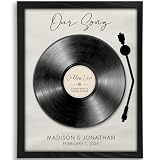
- Personalized to You: Each custom our song art print is uniquely created with your chosen song, names, and special date, turning meaningful music into a one-of-a-kind keepsake. It’s a romantic way to celebrate your love story, whether it marks your wedding song, first dance, anniversary, the day you met, or another unforgettable moment.
- Premium artwork: All art prints are printed on 270G premium matte paper with a linen embossed finish that combines crisp details with a soft, refined finish
- Unforgettable & Unique: Whether you’re celebrating a first anniversary, searching for meaningful couple gift ideas, shopping for husband gifts from wife, or looking for a romantic gift for your boyfriend, this personalized our song art print turns a special song into a lasting keepsake. It’s a beautiful way to honor your wedding song, first dance, anniversary, or any memory that deserves to be remembered forever.
- Perfect Romantic Gift: Ideal for anniversaries, weddings, Valentine’s Day, engagements, or just because, this personalized our song art print is a meaningful gift for couples that celebrates the moments and music that matter most. Thoughtful and personal, it’s a beautiful way to show how much you cherish your shared memories.
- Made in the USA: All artwork is designed and printed in North Carolina
Shopping ad

- HOW TO SCAN THE SPOTIFY CODE: After opening Spotify on your phone, you'll see a camera icon in the top-right corner. Tap this button and point your phone's camera at the song's barcode on the record label. Please Note that our product cannot play audio, so you'll need to use your phone to play the song
- EXCELLENT CLARITY: Acrylic has superior optical clarity that allows photos to sparkle without distortion. It provides a crystal clear viewing angle that enhances the color and detail of the image for a stunning visual effect
- CUSTOM ENGRAVING: Our acrylic photo frame offers personalized custom engraving options to add a special charm to the frame. You can have the frame engraved with a name, date or meaningful message to make it a truly unique and sentimental keepsake
- EASY MAINTENANCE: Acrylic frames are easy to clean and maintain. Simply wipe with a soft cloth and mild cleaning solution to remove dust or stains. In addition, acrylic is resistant to UV rays, reducing the risk of photos fading over time
- UNIQUE GIFTS: Personalized picture frames make thoughtful and unique gifts for special occasions. Whether it's a wedding, birthday or anniversary, a customized photo on an acrylic frame adds a personal touch that the recipient will cherish
Product prices and availability are accurate as of the date/time indicated and are subject to change. Any price and availability information displayed on Amazon at the time of purchase will apply.
Quick wins for a faster PC:
Fix the driver behind crashes, sound loss and screen glitchesFind Drivers →Repair Windows errors before they cause bigger problemsFix Now →



