Everything Xiaomi is reader-supported. When you buy through links on our site, we may earn an affiliate commission. As an Amazon Associate I earn from qualifying purchases. Learn more
Automating your Xiaomi lights to respond to motion isn’t just smart—it’s incredibly satisfying. Whether you’re lighting up a hallway the moment you walk through or ensuring bathroom lights shut off automatically, pairing a Xiaomi motion sensor with your smart lights brings both convenience and energy efficiency. Here’s how to get it all set up.
Why Automate Xiaomi Lights with Motion?
The benefits are real:
- Convenience: No fumbling for switches.
- Energy Saving: Lights go off when you leave.
- Safety: Avoid late-night stumbles.
- Security: Detect unexpected movement.
- Comfort: Create ambiance when you enter a room.
What You’ll Need
- Xiaomi Smart Home Hub (Gateway): Critical for Zigbee-based sensors and lights.
- Xiaomi Smart Light(s): Includes Mi LED bulbs, Yeelight, or those controlled via smart plugs.
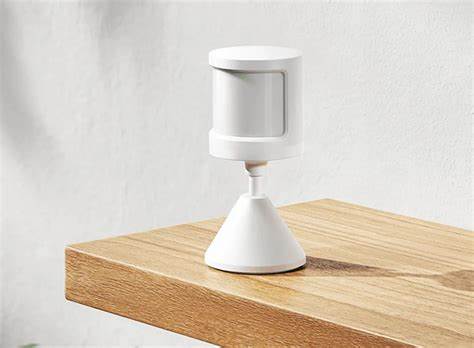
- Xiaomi Motion Sensor (PIR): The core trigger device.
- Mi Home App: Central control for setup and automation.
- Stable 2.4GHz Wi-Fi: For hub connectivity.
Phase 1: Device Setup
- Hub Setup
- Plug it in.
- Open Mi Home App > Tap “+” to add the hub.
- Connect to your Wi-Fi and confirm it’s online.
- Add Your Lights
- Ensure lights are powered.
- In Mi Home App, go to your Hub > Add sub-device.
- Choose your light, follow pairing steps.
- Assign room names for clarity.
- Add the Motion Sensor
- Insert battery.
- In Mi Home App, go to Hub > Add sub-device.
- Press the pairing button until LED flashes.
- Assign it a room and clear name.
Phase 2: Create Automations
- Automation to Turn Lights On
- In Mi Home App, go to “Automation.”
- Tap “+” to create new automation.
- IF: Motion is detected.
- THEN: Turn on light(s).
- Optionally, set brightness, color temperature, or color.
- Automation to Turn Lights Off
- Create a separate automation.
- IF: No motion detected for X minutes (try 2-3 mins to start).
- THEN: Turn off light(s).
Advanced Tips
- Sensor Placement: Mount at 6-8 feet high, away from windows or pets.
- Ambient Light Condition: Use lux detection to prevent lights turning on in daylight.
- Multiple Lights: Add them all under the same action.
- Effective Periods: Run automations only at night if desired.
- Battery Life: Check battery levels regularly.
- Test Rigorously: Walk through the setup multiple times.
My Experience
The first time I set this up, I forgot the “off” automation. So the hallway light just stayed on… indefinitely. Lesson learned. Once I added the second rule, it was perfect. Enter, lights on. Leave, lights off. Super efficient and oddly satisfying.
As an Amazon Associate I earn from qualifying purchases.
Final Thoughts
With a Xiaomi motion sensor and a bit of setup in the Mi Home App, you’ve got a responsive, efficient lighting system. Hands-free, worry-free, and kind of fun to watch in action.
Quick Recap
Shopping ad

- 【16M Colors & True-White】Choose from 16 millions of colors or set the bulb from warm to cool whites(2500K-6500K) thanks to the RGBW true-white LED. Explore endless smart home lighting possibilities to create your favorite light effects for everything from a party to a late-night study session.
- 【Superior Lighting Performance】Enjoy a truly superior lighting performance with these a 220° beam angle for wider coverage, a color rendering index (CRI) > 90 for truly vibrant colors, and a luminous 800LM brightness level. Fully dim the lights from 1%-100% to match the mood anytime of day.
- 【Voice & App Control】These are smart bulbs that work with Alexa and Google Home, so you can simply use voice commands to set the lights. Or conveniently control from anywhere from your smart phone with Tapo app. Create scenes in the app, or activate Away Mode to simulate being home while on vacation.
- 【Energy Monitoring & Energy Saving】Monitor the WiFi light bulbs energy usage in real-time and view its historical power consumption within the Tapo app. Tapo smart bulbs use 60% lees standby power (<0.2W) versus competitors, saving you energy and money.
- 【Schedule & Timer】Create regular schedules and countplans to turn on/off with the brightness you set. Sunrise and sunset modes allow the light to activate automatically according to your time zone.
Shopping ad

- 【Matter-Certified】 Matter devices work with any certified platform such as Apple Home, Alexa, Google Home & SmartThings. All Matter-certified devices in your local area network (LAN) will work smoothly even when your home internet goes offline. Take control of your smart home with Matter Multi-Admin by granting access to trusted individuals to manage your devices with ease and security.
- 【Extra Bright 1100-Lumen Light】Tapo L535E provides 1100 lumens of crisp, high-quality lighting, which is brighter than most standard 800-lumen smart color bulbs. It can brighten up your daily routine or activities and is ideal for any space in your home that requires brighter lighting.
- 【Millions of Colors & Dimmable】 Easily design scenarios with various vivid colors for your daily routine or special activities with this smart light bulbs. Adjust the brightness from 1% to 100% conveniently with the Tapo app.
- 【Vibrant Colors & Tunable white】 Experience more attractive and vibrant colors with a higher Color Rendering Index (CRI). Witness the true color spectrum in every corner of your home. Tune your lights to warm white (2500K) for restful sleep in the evening, or cool white (6500K) during working hours or when you need a morning boost.
- 【Voice & Remote Control】 Free up your hands by using simple voice commands with Alexa, Siri, or Google Assistant. Control your smart light bulbs from anywhere with the Tapo app Dim, turn on or off, or change the colors of your light bulb remotely at your fingertips.
Shopping ad

- Mi Motion-Activated Night Light 2
Shopping ad

- Magnetic attraction design: Place it anywhere, also works as a flashlight
- Rotates 360° for diffuse lighting: Set it up and use it anywhere
- Two adjustable brightness settings: Low for soft, gentle lighting and High for bright, clear lighting
- 365 day long-life batteries: Minimal energy consumption
- Light sensor + infrared detection: Wide 120° sensing area, turns on automatically when someone approaches
Shopping ad

- Long battery life Soft ambient glow Smart dual sensor detection Effortless switching between two modes
Product prices and availability are accurate as of the date/time indicated and are subject to change. Any price and availability information displayed on Amazon at the time of purchase will apply.
Independent reader supportYour contribution helps us test, update, and keep practical guides available for everyone.