ZGameEditor
ZGameEditor is a free development tool for creating small arcade-style games, demos, and screensavers.
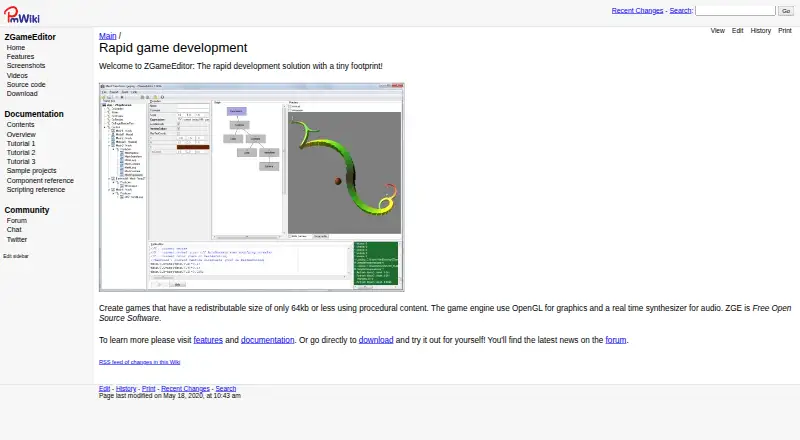
What ZGameEditor is
ZGameEditor is a free development tool for creating small arcade-style games, demos, and screensavers. Its integrated environment supports building, previewing, and testing projects with 2D and 3D graphics, gameplay components, GLSL vertex and fragment shaders, multiple render passes, and render-to-texture. Creators can import bitmap textures, MIDI music, 3DS models, and RAW sampled audio, while the engine includes a real-time audio synthesizer. Each project is stored in one XML-based file that can be edited manually. Simple applications can be made without programming; advanced projects can use a C-style scripting language. Projects may call external libraries such as DLLs for modules including music players or physics engines. Depending on imported content, standalone applications can be 64 KB or less. Created applications may be distributed royalty-free, and the complete source code is available under the MIT License. ZGameEditor supports Android, Linux, macOS, and Windows. Documentation, tutorials, sample projects, and a community forum are linked from its website.
Good
- Free editor with royalty-free content distribution
- Supports 2D and 3D graphics
- Includes built-in preview and testing
- Can create applications without programming
- MIT-licensed complete source code
Watch out
- Standalone size depends on imported content
- Advanced work requires a C-style scripting language
- No free trial is offered separately
Who it suits
ZGameEditor suits creators making compact arcade games, demonstrations, or screensavers across desktop and Android targets. It supports both no-code experiments and projects requiring scripting or external libraries.
Verdict
ZGameEditor offers a compact, free environment for small multi-platform projects, with graphics, audio, scripting, and testing tools. Its single-file workflow and royalty-free distribution suit lightweight creations, while more advanced integrations require technical work.
Plans and prices
From ZGameEditor's own pricing page, checked 9 Oct 2026.
| Plan | Price | What it gives you |
|---|---|---|
| ZGameEditor | Free | Freeware editor · royalty-free distribution of created content |
The facts
Each one read from ZGameEditor's own pages, with the date it was checked.
What it does
- Audio
- The game engine includes a real-time audio synthesizer.checked 9 Oct 2026
- Development environment
- It includes an integrated developer environment for building, previewing, and testing games.checked 9 Oct 2026
- Distribution
- Applications created with ZGameEditor can be distributed royalty-free.checked 9 Oct 2026
- Graphics
- The editor supports 3D graphics, game-play components, GLSL vertex and fragment shaders, multiple render passes, and render-to-texture.checked 9 Oct 2026
- Imports
- It can import bitmaps as textures, MIDI files for music, 3DS models, and sampled audio in RAW format.checked 9 Oct 2026
- Integrations
- Projects can call external libraries such as DLLs for integration with modules including music players or physics engines.checked 9 Oct 2026
- License
- The complete source code is available under the MIT License.checked 9 Oct 2026
- Project format
- Each project uses a single XML-based file that can be edited manually.checked 9 Oct 2026
- Purpose
- ZGameEditor is a tool for creating small arcade-style games, demos, and screensavers.checked 9 Oct 2026
- Scripting
- Simple applications can be made without programming, and advanced applications can use a C-style scripting language.checked 9 Oct 2026
- Security and compliance
- The maker pages reviewed do not state security certifications or compliance claims.checked 9 Oct 2026
- Small outputs
- Standalone applications can be 64 KB or less, depending on how much content is imported.checked 9 Oct 2026
- Support
- The site links to documentation, tutorials, sample projects, and a community forum.checked 9 Oct 2026
Where it runs
- Platforms
- The editor is Windows-only; applications can also run on Linux, Mac OS X, and Android.checked 9 Oct 2026
Alternatives to ZGameEditor
- 1

Unity
Free planAndroidiOSWebAPI8.4Free plan - 2

Unity Version Control
Free planWebAPILinuxmacOS8.1Free plan - 3

Ren'Py
Free planOpen sourceAndroidiOSWebAPI7.9Free plan - 4

Construct 3
Free planAndroidiOSWebLinux7.8Free plan - 5

CopperCube
Free planAndroidWebExtensionmacOS7.7€37 one-time - 6
Clickteam Fusion 2.5
Free planAndroidiOSWebmacOS7.6$99.99 one-time