Clickteam Fusion 2.5
Clickteam Fusion 2.5 is a visual development tool for building 2D games and applications.
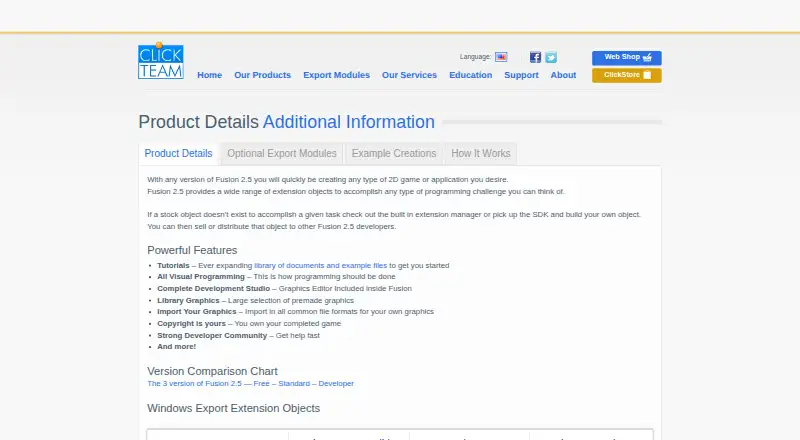
What Clickteam Fusion 2.5 is
Clickteam Fusion 2.5 is a visual development tool for building 2D games and applications. Its Event Editor lets users set behavior through conditions and actions arranged in a grid, while the Frame Editor is for placing objects. A graphics editor, library graphics, and support for importing common image formats provide ways to create and add visuals. Box2D physics is integrated into movement properties for most objects. Listed export targets include Windows, HTML5, Flash, iOS, Android/OUYA, and XNA; some require optional modules. The free edition can create and publish HTML5 games and apps without royalties, but its HTML5 export is limited. It is available for Windows, macOS, iOS, Android, and web, with mobile export and console export listed. The Free Edition costs nothing. Fusion 2.5 (PC) costs $99.99, paid once, and commercial games and apps must include a “Created with Fusion” logo. Developer (PC) costs $399.99, paid once.
Good
- Visual logic uses conditions and actions in a grid.
- Includes frame and graphics editors.
- Box2D is integrated into object movement properties.
- Free edition permits royalty-free HTML5 publication.
Watch out
- Free edition has limited HTML5 export.
- Some export options require optional modules.
- Commercial apps on the PC standard edition need a Fusion logo.
Who it suits
It suits people who want to create 2D games or applications using visual logic rather than writing code. The free edition is limited to HTML5 export, while paid editions include commercial use.
Verdict
Fusion 2.5 combines visual application logic with editors for layouts and graphics, plus several export options. Check export requirements and edition limits against the platforms and commercial terms you need.
Plans and prices
From Clickteam Fusion 2.5's own pricing page, checked 3 Oct 2026.
| Plan | Price | What it gives you |
|---|---|---|
| Fusion 2.5 Free Edition | Free | Free edition · limited HTML5 export |
| Fusion 2.5 (PC) | $99.99, paid once | Standard edition · commercial games and apps must include a “Created with Fusion” logo |
| Fusion 2.5 Developer (PC) | $399.99, paid once | Developer edition |
The facts
Each one read from Clickteam Fusion 2.5's own pages, with the date it was checked.
The company
- Company
- Clickteam describes itself as the development group behind Klik and Play, The Games Factory, and Multimedia Fusion, and says it has existed for more than 15 years.checked 3 Oct 2026
- Headquarters
- Portland, Oregon, United States; Clickteam also lists a Paris, France officechecked 28 Sep 2026
What it does
- Editors
- The software includes a Frame Editor for positioning objects and an Event Editor for defining application behavior.checked 3 Oct 2026
- Export options
- The product page lists Windows, HTML5, Flash, iOS, Android/OUYA, and XNA export options, with some requiring optional modules.checked 3 Oct 2026
- Extensions and APIs
- The Extension SDKs let developers create extensions that can use platform functions and communicate with third-party SDKs and APIs.checked 3 Oct 2026
- Graphics
- Fusion includes a graphics editor and library graphics, and supports importing graphics in common file formats.checked 3 Oct 2026
- Mobile export
- Yeschecked 24 Sep 2026
- Physics
- The product integrates the Box2D physics engine into the movement properties of most objects.checked 3 Oct 2026
- Purpose
- Fusion 2.5 is a visual development tool for creating 2D games and applications.checked 3 Oct 2026
- Security and privacy
- Clickteam’s website privacy policy says personal information is accessible only to authorized employees, agents, and contractors, and that payment information is not stored on its online servers.checked 3 Oct 2026
- Source code model
- closed_sourcechecked 24 Sep 2026
- Support
- The free-edition page says users can access Clickteam Community forums and live chat support.checked 3 Oct 2026
- System requirement
- The free-edition page lists Windows 10, 8.x, 7, Vista, or XP Service Pack 3 and says an internet connection is required for installation, updates, and downloading.checked 3 Oct 2026
- Visual programming
- Its Event Editor presents program logic as conditions and actions in a grid, without requiring users to enter code.checked 3 Oct 2026
- Visual scripting
- Yeschecked 24 Sep 2026
Money
- Free edition
- The free edition supports HTML5 game and app creation and publication without royalties, and its HTML5 export is listed as limited in the version comparison.checked 3 Oct 2026
Where it runs
- Target platforms
- Windows,macOS,iOS,Android,HTML5checked 24 Sep 2026
The full review of Clickteam Fusion 2.5
Clickteam Fusion 2.5 is a visual development tool for making 2D games and applications. It best suits creators who want event-based logic instead of a code-first workflow and need to target desktop, mobile, or web. Its range is useful, but export restrictions, optional modules, and edition terms should shape the buying decision.
Overview
Fusion splits projects between a Frame Editor for arranging objects and an Event Editor where conditions and actions are assembled in a grid. That separation makes interactive behavior approachable for visual thinkers and reduces the need to type code. It is less compelling for teams that require a fully open, code-centric engine, although scripting support includes C++, Java, Objective-C, JavaScript, and ActionScript.
The product is closed source and aimed at 2D work. A graphics editor, included library graphics, and imports from common formats cover routine asset preparation. Box2D is built into the movement properties of most objects, providing a practical physics foundation without making physics the entire workflow. Extension SDKs can expose platform functions and connect to third-party SDKs and APIs when built-in capabilities are insufficient.
Key features
- Event-driven visual programming: Conditions and actions in the Event Editor let users define behavior without entering code. This is the clearest reason to choose Fusion for small teams, educators, and creators who think in rules and interactions.
- Layout and art workflow: The Frame Editor handles object placement, while the graphics editor, library assets, and common-format imports support a self-contained 2D pipeline.
- Physics integration: Box2D movement properties give most objects access to established physics behavior, useful for games that need collisions and motion without building those systems from scratch.
- Extensibility: Extension SDKs can communicate with platform functions and outside SDKs or APIs. That broadens the tool's reach, but projects depending on specialized integrations may still require programming expertise.
- Broad export menu: Windows, HTML5, Flash, iOS, Android/OUYA, and XNA exports are listed, with some requiring optional modules. Console export is also supported, so platform planning matters before committing to an edition.
Pricing
| Plan | Price | Terms and fit |
|---|---|---|
| Fusion 2.5 Free Edition | free | HTML5 game and app creation and royalty-free publication; HTML5 export is limited. It is the sensible starting point for learning or testing a browser-focused project. |
| Fusion 2.5 (PC) | $99.99, paid once | Standard edition for commercial games and apps, which must include a “Created with Fusion” logo. Choose it when a one-time desktop purchase meets your commercial needs and that branding is acceptable. |
| Fusion 2.5 Developer (PC) | $399.99, paid once | Developer edition. Its higher one-time cost is aimed at users who need the developer tier rather than the standard PC package. |
The free edition includes access to Clickteam Community forums and live chat support. Installation, updates, and downloads require an internet connection. The paid model has no recurring renewal stated, but optional export modules and edition-specific restrictions can materially change the total cost and publishing workflow.
Platforms
Fusion targets Windows, macOS, iOS, Android, and HTML5, and the directory lists Android, iOS, macOS, web, and Windows availability. The export list also names Flash, Android/OUYA, XNA, and console output. Because some targets require optional modules and the free edition limits HTML5 export, verify the exact module and edition combination for every intended release platform.
Who it's for
Fusion is a strong fit for solo developers, hobbyists, and small 2D teams who want to build logic visually, arrange scenes quickly, and retain routes to mobile, desktop, and browser deployment. It also suits learners who prefer event grids to conventional programming. Look elsewhere if open-source licensing, unrestricted HTML5 output, or a purely code-driven pipeline is central to the project. Commercial creators should budget for the PC edition and accept its required logo, or evaluate the Developer edition against their publishing requirements.
Pros and cons
Pros
- Visual logic is central: The condition-and-action grid lowers the barrier to building interactive behavior.
- Useful 2D toolset: Layout, graphics, imported assets, and integrated Box2D cover core production tasks.
- Extensible exports: Mobile, desktop, web, and console routes provide room to expand a project.
- Royalty-free free edition publishing: Beginners can create and publish HTML5 projects without royalties, within its export limits.
Cons
- Edition and module constraints: Some exports need optional modules, while free HTML5 output is limited.
- Commercial branding on the standard PC edition: Paid commercial projects must carry a “Created with Fusion” logo.
- Closed source: Teams seeking to modify the engine itself or rely on an open development model should consider alternatives.
- Windows installation requirement: The free-edition system requirements list Windows 10, 8.x, 7, Vista, or XP Service Pack 3, plus internet access for installation and updates.
Alternatives
Browse Game Visual Scripting Software, Game Development Software, and Game Engine Software for broader category comparisons.
- Construct 3 is the better pick for individuals wanting a freemium, browser-oriented tool with a personal license that unlocks all features and can be cancelled any time.
- Armory3D suits developers who prefer a free, open-source engine delivered as a Blender add-on and external SDK.
- GDevelop is worth choosing when a freemium workflow with a free tier and monthly or yearly upgrades fits better.
- Stencyl is an alternative for creators comparing web and desktop publishing tiers, including its annual Indie plan.
- CopperCube may appeal to users seeking a free edition and open-source WebGL engine code.
- Flowlab is preferable for trying a free, browser-based plan, though its free tier caps games, levels, objects, and exporting.
- Visionaire Studio is another option for freeware projects or a one-time professional license with a scene limit on the free tier.
- GameMaker fits users who want a free non-commercial plan or a professional one-time purchase, with no console exports on the free tier.
Verdict
Choose Clickteam Fusion 2.5 if you want a mature visual-event workflow for 2D games and applications, backed by physics, extensions, and multiple export paths. Its main reason to look elsewhere is the combination of limited free HTML5 output, optional export modules, standard-edition branding, and a closed-source model.
Alternatives to Clickteam Fusion 2.5
- 1

Construct 3
Free planAndroidiOSWebLinux7.8Free plan - 2

CopperCube
Free planAndroidWebExtensionmacOS7.7€37 one-time - 3

Stencyl
Free planAndroidiOSWebLinux7.6From $99 a year - 4

Armory3D
Free planAndroidiOSWebLinux7.5Free plan - 5
Visionaire Studio
Free planAndroidiOSLinuxmacOS7.5€75 one-time - 6

GameMaker
Free planAndroidiOSLinuxmacOS7.3From $79.99 a month