
CopperCube
CopperCube is a 3D authoring tool for creating games and apps, including projects made without programming.
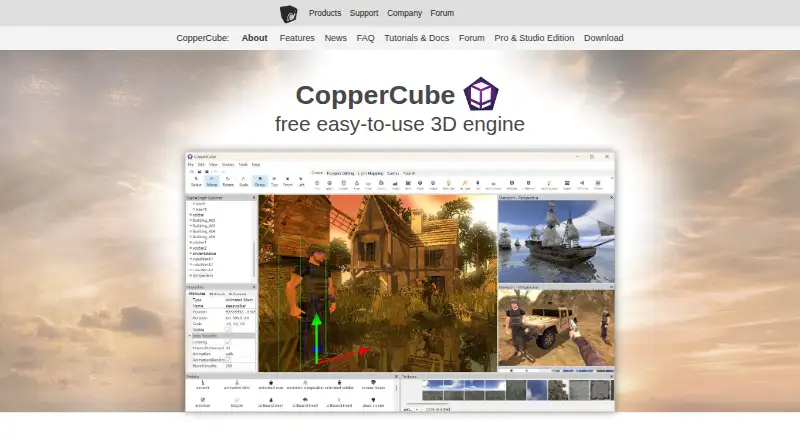
What CopperCube is
CopperCube is a 3D authoring tool for creating games and apps, including projects made without programming. Its maker cites first-person shooters, adventures, walkthroughs, simulators, and e-learning apps as possible uses. A click-based event and action system supports no-code interactions, and JavaScript is available for scripting across publishing targets. Visual tools include terrain editing, real-time shadows, static lighting, moving vegetation, water rendering, particle effects, and a built-in lightmapper. It can import formats including FBX, 3DS, OBJ, and X. Publishing options include Windows, WebGL, macOS, and Android, though Android publishing is marked deprecated. The current editor is Windows-only from version 6.4; a macOS editor download is available for version 6.3. The free edition allows unlimited scenes and apps with no royalties or revenue limit. Professional costs 37.00 EUR once, and Studio costs 126.00 EUR once; Studio includes game client source code for Windows, Mac, and Android. Commercial publishing and sales are permitted with any edition, without royalties.
Good
- Free edition supports unlimited scenes and apps.
- No royalties or revenue limit for projects.
- Visual event and action system supports no-code interactions.
- Imports FBX, 3DS, OBJ, and X formats.
- Professional and Studio are one-time purchases.
Watch out
- Android publishing is marked deprecated.
- Current editor is Windows-only from version 6.4.
- Professional costs 37.00 EUR once.
- Studio costs 126.00 EUR once.
Who it suits
CopperCube may suit people creating 3D games, walkthroughs, simulators, or e-learning apps, whether they prefer visual interactions or JavaScript. The current editor is aimed at Windows users, with a macOS download available for version 6.3.
Verdict
CopperCube offers visual authoring, JavaScript scripting, and several publishing targets, alongside a free edition and paid one-time licenses. Check the editor version and Android publishing status against the platform you plan to use.
Plans and prices
From CopperCube's own pricing page, checked 24 Sep 2026.
| Plan | Price | What it gives you |
|---|---|---|
| Free Edition | Free | Free edition of the CopperCube editor and engine |
| Professional Edition | — | Professional CopperCube features and publishing options |
| Free | Free | Unlimited scenes and apps · no royalties · no revenue limit · Windows, Mac, Android, WebGL |
| Professional | €37, paid once | Unlimited scenes and apps · no royalties · no revenue limit · post-processing effects · custom Win32 binary · video playback · customizable loading screen logo · command line interface · One time payment |
| Studio | €126, paid once | Professional edition features · game client source code for Windows, Mac, and Android · One time payment |
The facts
Each one read from CopperCube's own pages, with the date it was checked.
What it does
- 3D imports
- The FAQ says CopperCube imports formats including FBX, 3DS, OBJ, and X.checked 5 Oct 2026
- Commercial rights
- The maker says users may publish and sell projects created with any edition, with no royalties.checked 5 Oct 2026
- Integrations
- Windows games can include Steam overlay and Steam Achievements integration.checked 5 Oct 2026
- Interactions and scripting
- A click-based event and action system supports no-code interactions, while JavaScript scripting is available across publishing targets.checked 5 Oct 2026
- License and updates
- A purchased license is per seat and covers unlimited projects and use time; minor updates and service packs are included, excluding the next major release.checked 5 Oct 2026
- Mobile export
- Yeschecked 24 Sep 2026
- Open source
- The WebGL engine code is open source; the Studio edition includes Windows, Mac, and Android client source code.checked 5 Oct 2026
- Product
- CopperCube is a 3D authoring tool for creating games and apps, including without programming.checked 5 Oct 2026
- Publishing targets
- It can publish Windows apps, WebGL websites, macOS apps, and Android apps; Android publishing is marked deprecated on the features page.checked 5 Oct 2026
- Scripting languages
- JavaScriptchecked 24 Sep 2026
- Security and compliance
- The opened maker pages describe model-file handling but do not state security certifications or compliance standards.checked 5 Oct 2026
- Source code model
- closed_sourcechecked 24 Sep 2026
- Support
- The maker directs users to its forum and offers free hints for small one-time questions; more involved programming help can be paid work.checked 5 Oct 2026
- Use cases
- The maker describes it as suitable for first-person shooters, adventures, walkthroughs, simulators, and e-learning apps.checked 5 Oct 2026
- Visual scripting
- Yeschecked 24 Sep 2026
- Visual tools
- Features include terrain editing, real-time shadows, static lighting, vegetation movement, water rendering, particle effects, and a built-in lightmapper.checked 5 Oct 2026
Where it runs
- Editor platforms
- The current editor is Windows-only starting with version 6.4; the maker provides a macOS editor download for version 6.3.checked 5 Oct 2026
- Target platforms
- Windows,WebGL,Androidchecked 24 Sep 2026
Money
- Free plan
- Yeschecked 24 Sep 2026
The company
- Headquarters
- Neulengbach, Austriachecked 28 Sep 2026
- Maker location
- Ambiera e.U. lists its address as Emmersdorferstraße 62, 3040 Neulengbach, Austria.checked 5 Oct 2026
The full review of CopperCube
CopperCube is a 3D authoring tool for games and interactive applications, combining visual scene building with optional JavaScript. It is best suited to creators making modest 3D games, walkthroughs, simulators, or learning software who can work with a desktop editor. The strongest case is its royalty-free commercial publishing from the free edition; the major constraint is that the current editor is Windows-only.
Overview
A click-based event-and-action system lets non-programmers create interactions, while JavaScript provides a route to more controlled behavior across publishing targets. That pairing is practical for prototypes and complete small projects, but teams seeking a broad, platform-neutral editor should account for CopperCube's Windows focus.
The tool supports first-person shooters, adventures, walkthroughs, simulators, and e-learning apps. Projects made with any edition may be published and sold without royalties or a revenue ceiling, so the free edition remains commercially relevant rather than merely a trial.
Key features
- 3D scene authoring: Terrain editing, real-time shadows, static lighting, moving vegetation, water rendering, particle effects, and a built-in lightmapper cover common environment and lighting work. These tools reduce the need to assemble every visual effect through code.
- Visual interactions and JavaScript: Click-based events and actions suit straightforward no-code logic; JavaScript handles behavior that needs scripting. Using both lets beginners start visually while leaving developers room to extend projects.
- Asset import: FBX, 3DS, OBJ, and X files can be imported, which helps creators bring existing 3D assets into scenes.
- Publishing: CopperCube can produce Windows applications, WebGL websites, macOS applications, and Android applications. Android publishing is marked deprecated, so it is a poor foundation for a new Android-first product.
- Steam integration: Windows games can include Steam overlay and Steam Achievements, a useful addition for PC releases aimed at Steam.
- Source options: The WebGL engine is open source, while the Studio edition adds client source code for Windows, Mac, and Android. CopperCube itself otherwise uses a closed-source model.
Pricing
The Free Edition costs nothing and includes the editor and engine. The Free plan provides unlimited scenes and apps, no royalties, no revenue limit, and Windows, Mac, Android, and WebGL publishing. It is the sensible starting point for learners, hobbyists, and commercial creators who can accept the standard feature set.
Professional costs 37.00 EUR as a one-time payment. It keeps unlimited scenes and apps and adds post-processing effects, a custom Win32 binary, video playback, a customizable loading-screen logo, and a command-line interface. Choose it when branded Windows builds, media playback, or automated workflows justify a modest perpetual fee.
Studio costs 126.00 EUR as a one-time payment and includes Professional features plus game client source code for Windows, Mac, and Android. It is aimed at developers who need to modify or inspect the client rather than simply publish projects.
Purchased licenses are per seat and cover unlimited projects and use time. Minor updates and service packs are included, but the next major release is excluded. There is no free trial beyond the free edition, and support centers on the forum, with small one-off questions answered free and larger programming work offered as paid help.
Platforms
The current editor is Windows-only from version 6.4 onward. A macOS editor download exists for version 6.3, so Mac users should verify that older editor version meets their needs. Publishing targets include Windows, WebGL, macOS, and Android, although Android export is deprecated.
Who it's for
CopperCube fits solo creators, educators, and small teams building 3D games, simulations, walkthroughs, or e-learning apps without wanting to write every interaction. It is especially attractive when royalty-free commercial distribution and one-time licensing matter. It is less suitable for Mac-first development, Android-first roadmaps, or teams that require a current cross-platform editor.
Pros and cons
Pros
- Free edition allows unlimited scenes and apps, commercial sales, and no royalties or revenue limit.
- Visual authoring covers terrain, lighting, water, vegetation, particles, and lightmapping.
- JavaScript is available across publishing targets, with Steam features for Windows games.
- Professional and Studio are one-time purchases rather than recurring subscriptions.
Cons
- Version 6.4 and later require Windows for editing; the Mac editor is tied to version 6.3.
- Android publishing is deprecated, weakening the tool for new mobile projects.
- The free edition lacks Professional additions such as post-processing, video playback, custom Win32 binaries, and command-line operation.
- Studio's source-code access costs more and remains per seat.
Alternatives
Construct 3 is the better choice for a browser-oriented, multi-platform workflow with a personal license and free trial. Armory3D suits users who specifically want an open-source engine built around a Blender add-on and external SDK. GDevelop offers a freemium route for creators who prefer a broader desktop and mobile platform spread. Stencyl is an alternative for visual development with web and desktop publishing tiers. Clickteam Fusion 2.5 is worth considering for its commercial PC edition and limited free HTML5 export. Flowlab is aimed at constrained browser-based experimentation, with its free tier limited to three games and no exporting. Visionaire Studio targets visual adventure creation, while GameMaker is an alternative game-development environment with a free non-commercial tier.
For broader comparisons, see Game Visual Scripting Software, Game Development Software, and Game Engine Software.
Verdict
Choose CopperCube if you want visual 3D authoring, optional JavaScript, and royalty-free commercial publishing from a free edition, particularly for Windows-led projects. Look elsewhere if you need a current Mac editor, dependable Android publishing, or a more open-ended cross-platform development base.
Alternatives to CopperCube
- 1

Construct 3
Free planAndroidiOSWebLinux7.8Free plan - 2
Clickteam Fusion 2.5
Free planAndroidiOSWebmacOS7.6$99.99 one-time - 3

Stencyl
Free planAndroidiOSWebLinux7.6From $99 a year - 4

Armory3D
Free planAndroidiOSWebLinux7.5Free plan - 5
Visionaire Studio
Free planAndroidiOSLinuxmacOS7.5€75 one-time - 6

GameMaker
Free planAndroidiOSLinuxmacOS7.3From $79.99 a month