YoloLabel
YoloLabel is a free desktop GUI for marking object bounding boxes in images used to train YOLO neural networks.
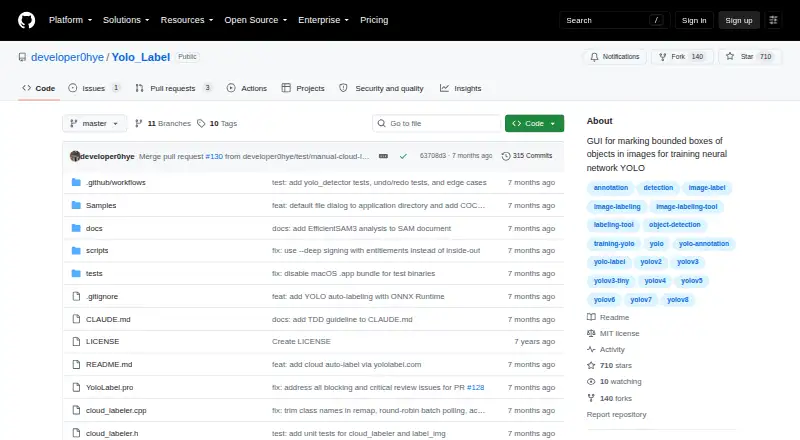
What YoloLabel is
YoloLabel is a free desktop GUI for marking object bounding boxes in images used to train YOLO neural networks. It loads JPG or PNG images from a directory and creates boxes with a two-click method. Annotation tools include moving, resizing, copying, pasting, undoing, and redoing labels, which can be exported in YOLO TXT format. For assisted labeling, the app can run local inference with Ultralytics detection models exported to ONNX, including YOLOv5, YOLOv8, YOLO11, YOLO12, and YOLOv26. A loaded model can label the current image or batch-process a dataset. YoloLabel also connects to YoloLabel AI for cloud open-vocabulary detection using an API key and optional prompt; cloud batch requests handle up to 20 images at a time. Prebuilt downloads are listed for Windows x64, Linux x64, and macOS on Apple Silicon, and the desktop repository uses the MIT License. Building from source requires Qt 6, while ONNX Runtime is optional unless local auto-labeling is needed. The app warns that moving the horizontal image slider does not automatically save the last processed image.
Good
- Free desktop app with MIT-licensed repository.
- Exports annotations in YOLO TXT format.
- Supports local ONNX-assisted labeling and batch processing.
- Prebuilt downloads cover Windows, Linux, and Apple Silicon macOS.
Watch out
- Cloud free tier allows 100 images per month.
- Cloud free tier has no SLA.
- Moving the image slider does not automatically save the last processed image.
Who it suits
YoloLabel suits people preparing YOLO training data who need manual boxes or local ONNX-assisted labeling. Its cloud option may suit users who want prompt-based detection and can work within the service's stated limits.
Verdict
YoloLabel covers manual bounding boxes and optional local or cloud-assisted labeling. Keep the slider save warning in mind, and check the cloud tier limits if using its online service.
The facts
Each one read from YoloLabel's own pages, with the date it was checked.
What it does
- Annotation
- It supports manual bounding box labeling and uses a two left-click method to create boxes.checked 30 Sep 2026
- Batch labeling
- With a loaded ONNX model, users can auto-label the current image or batch-process all images in the dataset.checked 30 Sep 2026
- Build requirement
- Building from source with auto-label support requires ONNX Runtime; without it, the app works without that feature.checked 30 Sep 2026
- Cloud API
- YoloLabel AI provides a REST API that accepts images and prompts and returns detections and YOLO-format labels.checked 30 Sep 2026
- Cloud batch limit
- Cloud Auto Label All submits images in batches of up to 20 per request.checked 30 Sep 2026
- Cloud data retention
- The cloud service says it retains job metadata for 90 days and account and usage records while an account is active.checked 30 Sep 2026
- Cloud image handling
- The cloud service privacy policy says uploaded images are processed in memory, discarded after inference, and not used to train models.checked 30 Sep 2026
- Cloud integration
- YoloLabel integrates with yololabel.com for cloud open-vocabulary object detection, using an API key and optional detection prompt.checked 30 Sep 2026
- Cloud limits
- The cloud service terms state that the free tier includes 100 images per month with no SLA, unused quota does not roll over, and over-limit requests return HTTP 402.checked 30 Sep 2026
- Cloud security
- The cloud privacy policy says it uses HTTPS, bcrypt password hashing, and short-lived JWTs with refresh token rotation.checked 30 Sep 2026
- Downloads
- Prebuilt desktop downloads are listed for Windows x64, Linux x64, and macOS Apple Silicon.checked 30 Sep 2026
- Image formats
- The README says to load .jpg or .png images from a directory.checked 30 Sep 2026
- Image tools
- The app includes real-time contrast adjustment and a usage timer that runs while its window is focused.checked 30 Sep 2026
- License
- The desktop repository is licensed under the MIT License, which permits use, modification, distribution, and sale subject to its stated conditions.checked 30 Sep 2026
- Local auto-labeling
- It can run local inference with Ultralytics detection models exported to ONNX, including YOLOv5, YOLOv8, YOLO11, YOLO12, and YOLOv26.checked 30 Sep 2026
- Manual annotation
- It uses a two-click method to create boxes and includes tools to move, resize, copy, paste, undo, and redo annotations.checked 30 Sep 2026
- Purpose
- YoloLabel is a GUI for marking object bounding boxes in images to train YOLO neural networks.checked 30 Sep 2026
- Source build
- The project says it can be built from source with Qt 6; ONNX Runtime is optional for builds that need local auto-labeling.checked 30 Sep 2026
- Support
- The cloud service lists [email protected] as its contact email for questions about its terms and privacy policy.checked 30 Sep 2026
- Supported models
- The README lists YOLOv5, YOLOv8, YOLO11, YOLO12, YOLOv26, and end-to-end ONNX models as supported for auto-labeling.checked 30 Sep 2026
- Usage caveat
- The README warns that moving the horizontal image slider does not automatically save the last processed image.checked 30 Sep 2026
Where it runs
- Download platforms
- The README lists prebuilt downloads for Windows x64, Linux x64, and macOS on Apple Silicon.checked 30 Sep 2026
The company
- Maker
- The maker’s GitHub profile identifies developer0hye as Yonghye Kwon.checked 30 Sep 2026
Alternatives to YoloLabel
- 1

Roboflow
Free planAndroidiOSWebAPI8.3From $39 a month - 2

Label Studio
Free planOpen sourceWebAPILinuxmacOS8.2From $99 a month - 3
VGG Image Annotator
Free planOpen sourceWebLinuxmacOSSelf-hosted7.7Free plan - 4
MakeSense.ai
Free planOpen sourceWebLinuxmacOSSelf-hosted7.6Free plan - 5
COCO Annotator
Free planOpen sourceWebAPILinuxSelf-hosted7.4Free plan - 6
Prodigy
WebAPILinuxmacOS7.0$390 one-time