
WorldSwitch
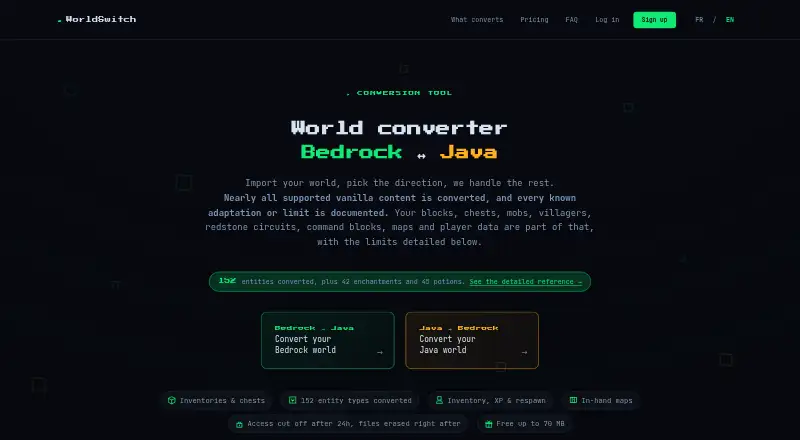
WorldSwitch is a browser-based service for converting Minecraft worlds between Bedrock and Java editions.
What WorldSwitch is
WorldSwitch is a browser-based service for converting Minecraft worlds between Bedrock and Java editions. You submit a world online, and conversion runs on the service’s server without requiring installation. Its conversion coverage includes terrain, blocks, inventories, player data, mobs, supported block entities, maps, biomes, and commands. Vanilla command syntax is translated between editions; commands with no equivalent are disarmed and reported. It does not transfer mods, data packs, behavior packs, resource packs, statistics, advancements, or terrain that has never been explored. The maximum is 10 GB for an unpacked world, and the uploaded file itself must also be no larger than 10 GB. The free option covers files up to 70 MB; one-time conversions cost €1.99 for 71–300 MB, €3.99 for 301 MB–1 GB, and €7.99 above 1 GB. Files are encrypted in transit, and access ends with deletion triggered 24 hours after conversion. The paid service is for private consumer use, not professional use.
Good
- Works through a browser without installation.
- Covers terrain, inventories, player data, and supported content.
- Translates vanilla command syntax between editions.
- Free conversions cover files up to 70 MB.
- Access ends and deletion is triggered after 24 hours.
Watch out
- Mods and data packs are not transferred.
- Unexplored terrain is not transferred.
- Uploaded files and unpacked worlds are limited to 10 GB.
- Paid service is not for professional use.
Who it suits
It suits Minecraft players who need to move a world between Bedrock and Java editions and whose world fits the size limit. It is intended for private consumer conversions, not professional use.
Verdict
WorldSwitch covers many parts of a Minecraft world and handles conversion online. Check the exclusions and file-size ceiling before converting; larger files have a one-time fee.
Plans and prices
From WorldSwitch's own pricing page, checked 15 Oct 2026.
| Plan | Price | What it gives you |
|---|---|---|
| Mini | Free | file up to 70 MB · no sign-up · per conversion |
| Small | €1.99, paid once | over 70 MB to 300 MB · per conversion |
| Medium | €3.99, paid once | over 300 MB to 1 GB · per conversion |
| Large | €7.99, paid once | over 1 GB to 10 GB · per conversion |
The facts
Each one read from WorldSwitch's own pages, with the date it was checked.
What it does
- Block fidelity
- Blocks retain their orientation and supported state information, including doors, stairs, logs and redstone components.checked 15 Oct 2026
- Command blocks
- Vanilla command syntax is rewritten between Java and Bedrock; commands without a safe equivalent are disarmed and reported.checked 15 Oct 2026
- Conversion coverage
- The maker says it converts terrain, blocks, inventories, player data, mobs, supported block entities, maps, biomes and commands.checked 30 Sep 2026
- Data use
- The privacy FAQ says uploaded worlds are used only for conversion and are not reused for AI training, resale or marketing analysis.checked 15 Oct 2026
- Download retention
- The converted file remains downloadable for 24 hours, after which access is cut off and deletion is triggered.checked 15 Oct 2026
- Enchantments and potions
- The published scope includes 42 enchantments and 45 potion variants.checked 15 Oct 2026
- Entities
- The service advertises conversion of 152 entity types, including mobs, villagers, boats and tamed animals.checked 15 Oct 2026
- Excluded content
- Mods, datapacks, resource packs, behavior packs and add-ons themselves are not converted.checked 15 Oct 2026
- File privacy
- The maker says conversion is automated, files are encrypted in transit using HTTPS, access ends 24 hours after conversion, and deletion is triggered then.checked 30 Sep 2026
- Gridinsoft domain-age finding
- Gridinsoft reported the domain as about three months old when checked on 16 September 2026.checked 15 Oct 2026
- Gridinsoft infrastructure
- Gridinsoft identified netcup GmbH hosting in Germany and OVH as registrar.checked 15 Oct 2026
- Gridinsoft registration finding
- Gridinsoft reported a 18 July 2026 domain-registration date and Belgium registration country.checked 15 Oct 2026
- Gridinsoft reputation limitation
- Gridinsoft said independent reputation data for the site was limited.checked 15 Oct 2026
- Gridinsoft security finding
- Gridinsoft reported no major malware or phishing detections in its automated checks.checked 15 Oct 2026
- Hosting
- The legal notice names netcup GmbH as host, with the server located in Nuremberg, Germany.checked 15 Oct 2026
- Intended customers
- The terms say the paid service is for consumers ordering conversions for private purposes, not professional use.checked 30 Sep 2026
- Inventories and chests
- Items, counts, enchantments, durability, names, lore and container contents are transferred slot by slot where the target edition has a counterpart.checked 15 Oct 2026
- Legal address
- The publisher's listed address is Rue de la Station 41, 1630 Linkebeek, Belgium.checked 15 Oct 2026
- Legal operator
- The legal notice identifies Patrick Simar, an individual Belgian sole proprietor, as the publisher.checked 15 Oct 2026
- Maps
- In-hand maps are transferred with drawing, scale, center and dimension information, with some color adaptation between editions.checked 15 Oct 2026
- Maximum size
- The service accepts worlds up to 10 GB, measured on the unpacked world as well as the uploaded file cap.checked 15 Oct 2026
Where it runs
- Browser service
- The maker says no installation is needed: users submit a world through the browser and conversion runs on its server.checked 30 Sep 2026
The company
- Company location
- The legal notice identifies Patrick Simar as the publisher and gives an address in Linkebeek, Belgium.checked 30 Sep 2026
- Headquarters
- Linkebeek, Belgiumchecked 28 Sep 2026
The full review of WorldSwitch
WorldSwitch is a browser service for converting Minecraft worlds between Bedrock and Java editions. It is best suited to players moving a private world who want conversion handled online rather than through a local install. Its broad coverage is useful, but excluded packs and world-progress data can make a conversion incomplete.
Overview
WorldSwitch accepts Bedrock and Java worlds and supports edition, version and format conversion in either direction. It aims to carry over terrain, blocks, inventories, player data, mobs, supported block entities, maps, biomes and commands. That is substantial coverage for a standard world, but not a full migration: mods, data packs, behavior packs, resource packs, statistics, advancements and terrain that has never been explored do not transfer.
The conversion runs on the service’s server after you upload a world through your browser, so there is no software to install. The limit is 10 GB for an unpacked world, and the uploaded file itself must also be no larger than 10 GB. The maker says files travel over HTTPS encrypted in transit; access ends 24 hours after conversion, when deletion is triggered. That offers a defined retention window, though it still means uploading a world to a remote service.
Key features
Broad built-in content coverage
The detailed reference spans 152 entity types, 42 enchantments and 45 potion variants. That breadth should matter to players whose worlds contain more than basic terrain and blocks. It does not remove the need to check the exclusions: custom content from mods or packs is outside the conversion scope.
Commands handled with a fallback
Vanilla command syntax is translated between editions. Commands with no equivalent are disarmed and reported rather than silently treated as supported. This is a sensible safeguard, but players who rely on edition-specific command behavior should expect to review the result.
Pricing
WorldSwitch charges once per conversion according to uploaded file size, rather than requiring a recurring subscription. The free Mini plan costs €0.00 per conversion for files up to 70 MB and requires no sign-up, making it a practical first choice for small worlds.
Small costs €1.99 per conversion for files from 71 MB to 300 MB. Medium costs €3.99 per conversion for files from 301 MB to 1 GB. Large costs €7.99 per conversion for files above 1 GB, up to the 10 GB world ceiling. Each paid tier buys capacity for a larger file, not a different conversion feature set. The one-time charges suit occasional migrations better than a subscription, but repeated conversions can add up. The paid service is intended for consumers converting worlds for private purposes, not professional use. Payments go through Stripe, with payment methods shown at checkout.
Platforms
WorldSwitch is a web service. The browser workflow avoids installing a desktop tool, while server-side processing means the world must be uploaded and stay within the file limit.
Who it's for
Choose WorldSwitch for a private Bedrock-to-Java or Java-to-Bedrock migration when the world is within the size cap and its important content is part of the supported conversion scope. It is less suitable when a world depends on mods or packs, when statistics and advancements must be preserved, or when unexplored terrain needs to move over. Bug reports go to [email protected]; general questions go to [email protected], which usually receives a reply within 24 hours.
Pros and cons
- Pros: Converts between Bedrock and Java, including versions and formats, through a browser without installation.
- Pros: Covers a wide range of built-in world content, with command handling that reports commands lacking an equivalent.
- Pros: The free tier covers files up to 70 MB, and larger-file fees are one-time rather than recurring.
- Cons: Mods, packs, statistics, advancements and never-explored terrain are excluded, which can leave a converted world incomplete.
- Cons: Every upload is capped at 10 GB, including the uploaded file itself; larger worlds cannot use the service.
- Cons: Paid conversion is limited to private consumer use, and repeated conversions incur another charge each time.
Alternatives
For a wider comparison, browse Minecraft World Converters.
- Universal Minecraft Tool is a Windows freemium option: its free plan edits NBT and world settings, while the $5 a year plan provides full access to all apps.
- Bridger is a free, open-source choice for Linux, macOS and Windows users who prefer a project with code and issue reporting hosted through GitHub.
- je2be is a free alternative with web and Windows versions; its web repository is released under AGPL-3.0.
- Chunkoid is a free Android app for players who want a mobile option; Android 8.0 or newer is required, with 2 GB or more free storage and 6–8 GB or more RAM recommended.
- MC Version Converter is a free, source-code option for Java Edition 26.x worlds targeting versions 1.18.2–1.21.11, built with Rust.
- Server to Singleplayer World Converter is another free browser-based Java and Bedrock world converter.
- LegacyEditor is a free option for Linux, macOS and Windows.
- Java2Nukkit World Converter is free MIT-licensed software for optimized Minecraft Java Edition 1.15.2 worlds and requires Java 1.8 or newer.
Verdict
WorldSwitch is a strong fit for players converting a private, conventional Minecraft world who value a browser workflow and broad support for built-in content. The free small-file tier and transparent one-time size bands make occasional use straightforward. Look elsewhere if the world relies on excluded packs or progress data, exceeds 10 GB, or the conversion is for professional use.
Alternatives to WorldSwitch
- 1
Chunker
Free planOpen sourceWebAPILinuxmacOS7.6Free plan - 2
je2be
Free planOpen sourceiOSWebWindows7.5Free plan - 3
Java2Nukkit World Converter
Free planOpen sourceAPILinuxmacOSWindows7.1Free plan - 4

Amulet Map Editor
APILinuxmacOSSelf-hosted6.9From £7 a year - 5
MC Version Converter
Free planLinuxmacOSWindows6.6Free plan - 6

Universal Minecraft Tool
Free planWindows6.5From $60 a year