Java2Nukkit World Converter
Java2Nukkit World Converter converts Minecraft Java Edition 1.15.2 anvil worlds into Nukkit's anvil world format.
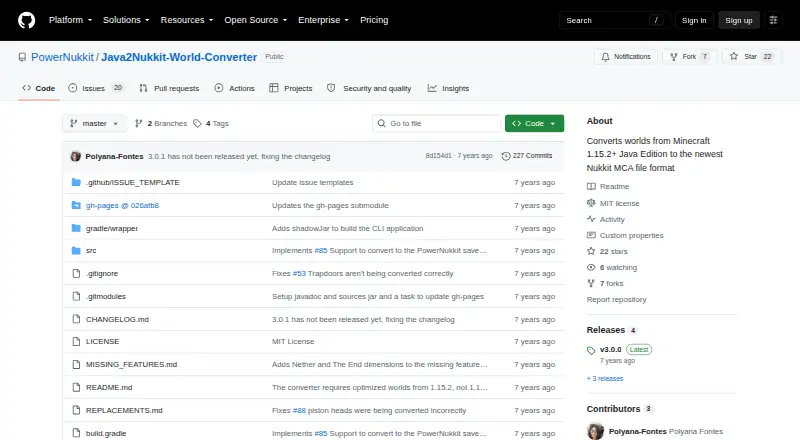
What Java2Nukkit World Converter is
Java2Nukkit World Converter converts Minecraft Java Edition 1.15.2 anvil worlds into Nukkit's anvil world format. It runs from a terminal with a Java JAR and source and destination world directories, and requires Java 1.8 or newer. The source world must be optimized using Minecraft 1.15.2; other versions or unoptimized worlds may convert incorrectly or crash. The converter can also be used as a Kotlin or Java library, although its API has no customizations. Its API supports choosing regions to convert; leaving the filter unchanged converts everything. Conversion is limited to the overworld, and entities are not carried over except item frames. Unsupported blocks and items may be replaced or removed because of Bedrock Edition or Nukkit limitations. Custom player heads are skipped by default, but an option can keep them as regular Steve heads. This is format conversion only, not Java-to-Bedrock or version conversion. The MIT license permits use, modification, and distribution without charge, but the software is supplied without warranty. The project directs users to GitHub issues for questions.
Good
- Free under the MIT license.
- Can convert selected regions through its API.
- Can be used as a Java or Kotlin library.
- Custom heads can be kept as regular Steve heads.
Watch out
- Only optimized Minecraft 1.15.2 worlds are supported.
- Only overworld dimensions are converted.
- Entities are not converted except item frames.
- Provided without warranty.
Who it suits
This tool suits users who need to convert optimized Minecraft Java Edition 1.15.2 worlds to Nukkit's anvil format. It is aimed at people comfortable running a Java JAR from a terminal or using a Java or Kotlin library.
Verdict
Java2Nukkit World Converter handles a specific world-format conversion, with strict source-world requirements and limits on dimensions and entities. Confirm those constraints fit your world before using it.
Plans and prices
From Java2Nukkit World Converter's own pricing page, checked 30 Sep 2026.
| Plan | Price | What it gives you |
|---|---|---|
| MIT-licensed software | Free | Minecraft Java Edition 1.15.2 · optimized worlds required · Java 1.8+ |
The facts
Each one read from Java2Nukkit World Converter's own pages, with the date it was checked.
What it does
- API maturity
- The README describes the API as very simple and says it does not currently allow customizations.checked 15 Oct 2026
- Build process
- Linux users build with ./gradlew build and Windows users with gradlew.bat build; the CLI JAR is placed in build/libs.checked 15 Oct 2026
- Changelog: PowerNukkit output
- The unreleased changelog lists a PowerNukkit save-format target enabled with --target powernukkit.checked 15 Oct 2026
- Changelog: version 3.0.0
- The 3.0.0 release dated January 25, 2020 added mappings for Minecraft Java Edition 1.15 items and blocks.checked 15 Oct 2026
- Cloudburst downloads
- The Cloudburst listing reports 11,122 downloads.checked 15 Oct 2026
- Cloudburst listing author
- The independent Cloudburst resource listing identifies joserobjr as the author.checked 15 Oct 2026
- Cloudburst listing date
- Cloudburst lists the resource creation date as May 26, 2019.checked 15 Oct 2026
- Cloudburst release history
- Cloudburst lists the first release as May 26, 2019 and the last update as January 25, 2020.checked 15 Oct 2026
- Cloudburst views
- The Cloudburst listing reports 14,800 views.checked 15 Oct 2026
- Command line
- Runs from a terminal with a Java JAR and source and destination world directories.checked 30 Sep 2026
- Command-line use
- The converter runs from a terminal with a Java JAR and source and destination world directories.checked 15 Oct 2026
- Compatibility handling
- Unsupported blocks and items are replaced or removed because of Bedrock Edition or Nukkit limitations.checked 30 Sep 2026
- Custom-head handling
- Custom player heads are skipped by default, with an option to convert them as ordinary Steve heads.checked 15 Oct 2026
- Dependency distribution
- The library is shared through JCenter with dependencies from SpigotMC and the orangy Maven repository.checked 30 Sep 2026
- Dependency publication
- Version 3.0.0 is published under the br.com.gamemods group and is shown with JCenter, Gradle, Maven and Ivy dependency examples.checked 15 Oct 2026
- Dimension handling
- Only the overworld is supported; Nether and The End are excluded.checked 15 Oct 2026
- Dimension limit
- Only overworld dimensions are supported; Nether and The End are not converted.checked 30 Sep 2026
- Dropped-item limitation
- Converted dropped items lose their Owner and Thrower tags because Java and Bedrock accounts differ.checked 15 Oct 2026
- Entity handling
- Entities are not converted except item frames, which are treated as blocks in Bedrock.checked 15 Oct 2026
- Head handling
- Custom player heads are skipped by default and can be retained as regular Steve heads with the keep-custom-heads option or skipSkinHeads setting.checked 30 Sep 2026
- Java requirement
- Java 1.8 or newer is required.checked 15 Oct 2026
- Language support
- The library API is documented for both Kotlin and Java.checked 15 Oct 2026
- Library API
- Can be used as a library from Kotlin or Java, although its API is described as having no customizations.checked 30 Sep 2026
- Library use
- The converter can be embedded as a library rather than used only as a CLI.checked 15 Oct 2026
The full review of Java2Nukkit World Converter
Java2Nukkit World Converter moves Minecraft Java Edition 1.15.2 worlds into Nukkit’s anvil format. It is best for Java-comfortable players and developers with an optimized overworld to migrate. Its narrow compatibility and conversion losses make it a poor choice for broader world transfers.
Overview
The converter runs as a Java JAR from a terminal, taking source and destination world directories; Java 1.8 or newer is required. The source must be optimized using Minecraft 1.15.2. Other versions and unoptimized worlds may convert incorrectly or crash, so this is a strict prerequisite rather than a minor compatibility caveat.
Only the overworld is converted: Nether and The End are outside its scope. It preserves no entities except item frames, which are blocks in Bedrock Edition. Unsupported blocks and items may be replaced or removed to meet Bedrock or Nukkit limitations. Custom player heads are skipped by default; an option can retain them as ordinary Steve heads, not their custom appearance.
Key features
Command-line and library workflows
The terminal workflow is suitable for users comfortable managing Java and world directories. Java and Kotlin developers can also use the converter as a library, but the API offers no customizations. Its region-selection support is useful when only part of a world needs conversion; leaving the filter unchanged converts everything. Library dependencies are distributed through JCenter and draw on SpigotMC and the orangy Maven repository, which developers should account for in their dependency setup.
Open license, limited assurances
The MIT license allows use, modification, distribution, sublicensing and sale without charge. The software is supplied as-is without warranty, and the project disclaims responsibility for damage caused by the tool. Questions are directed to GitHub issues.
Pricing
Java2Nukkit World Converter is free: its MIT-licensed software plan costs nothing. There are no paid tiers to weigh against one another; the meaningful cost is the compatibility constraint, plus the risk of damage covered by its as-is terms. The license permits commercial use, but it does not add support or warranty.
Platforms
The converter is available for Linux, macOS and Windows. The JAR requires Java 1.8 or newer, so platform support does not remove the need to install and use a compatible Java runtime.
Who it's for
This is a focused option for someone moving an optimized Minecraft 1.15.2 overworld into Nukkit who can work from a terminal, or for Java and Kotlin developers who want to incorporate conversion into software. It is not suitable for other source versions, unoptimized worlds, Nether or End transfers, or anyone who needs entities and custom head appearances preserved.
Pros and cons
- Pros: Free MIT-licensed use, including modification and commercial distribution, suits users who need a direct route from a compatible Java world to Nukkit.
- Pros: Library access and region selection give Java and Kotlin developers a way to target particular parts of a world.
- Cons: Requiring an optimized 1.15.2 source world rules out many migration scenarios and may cause incorrect conversion or crashes when unmet.
- Cons: No Nether or End conversion, almost no entity preservation, and possible block or item replacement mean the result is not a complete world copy.
- Cons: Custom heads can only be retained as regular Steve heads, and the software comes without warranty.
Alternatives
For a different Java-version conversion target, consider MC Version Converter: it is free, built from Rust source, and converts Java Edition 26.x worlds to versions 1.18.2–1.21.11, rather than targeting Nukkit format.
Chunker is another free, open-source option; choose it when you want to consider a tool described by its maker as an internal tool offered publicly.
Bridger is free and open source, with code, issue reporting and development hosted through GitHub.
LCEStudio is a free, MIT-licensed Windows option if Windows-only availability suits your needs.
WorldSwitch is a web alternative with a free tier for uploaded files up to 70 MB and paid per-conversion tiers for larger files.
Chunkoid is a free Android app if you need a mobile option; Android 8.0 or newer is required, with 2 GB+ free storage and 6–8 GB+ RAM recommended.
je2be is a free alternative with web and Windows platforms; its web repository is released under AGPL-3.0.
Server to Singleplayer World Converter is a free, browser-based option for Java and Bedrock world conversion.
Browse Minecraft World Converters for more options.
Verdict
Choose Java2Nukkit World Converter when your source is an optimized Minecraft 1.15.2 overworld and the destination must be Nukkit’s anvil format. Its free MIT license and library support are useful, but strict input requirements and substantial preservation limits make another converter the better choice for broader compatibility or fuller world fidelity.
Getting started
- Open the project website on GitHub
- Install Java 1.8 or newer
- Prepare a Minecraft Java Edition 1.15.2 world optimized with that version
- Run the Java JAR from a terminal with source and destination world directories
- Use the library from Kotlin or Java if preferred
Limits worth knowing
Conversion is limited to optimized Minecraft Java Edition 1.15.2 overworld worlds. Nether and The End dimensions are excluded, entities are not converted except item frames, and unsupported blocks or items may be replaced or removed.
Questions
What does Java2Nukkit World Converter convert?
It converts Minecraft Java Edition 1.15.2 anvil worlds into Nukkit’s anvil world format.
Which platforms are supported?
Linux, macOS, and Windows are supported.
Is the converter free?
Yes. It is free software under the MIT license.
Can it convert Nether or The End worlds?
No. Only overworld dimensions are supported.
Are entities preserved?
No entities are converted except item frames, which are treated as blocks in Bedrock Edition.
Can developers use it as a library?
Yes. Kotlin and Java library use are supported, with region selection available through the API.
Alternatives to Java2Nukkit World Converter
- 1
Chunker
Free planOpen sourceWebAPILinuxmacOS7.6Free plan - 2
je2be
Free planOpen sourceiOSWebWindows7.5Free plan - 3

WorldSwitch
Free planWeb7.3€1.99 one-time - 4

Amulet Map Editor
APILinuxmacOSSelf-hosted6.9From £7 a year - 5
MC Version Converter
Free planLinuxmacOSWindows6.6Free plan - 6

Universal Minecraft Tool
Free planWindows6.5From $60 a year