workro desk Purchase Approvals
workro desk Purchase Approvals combines purchase-request workflows with an internal IT helpdesk and equipment service log for operations teams.
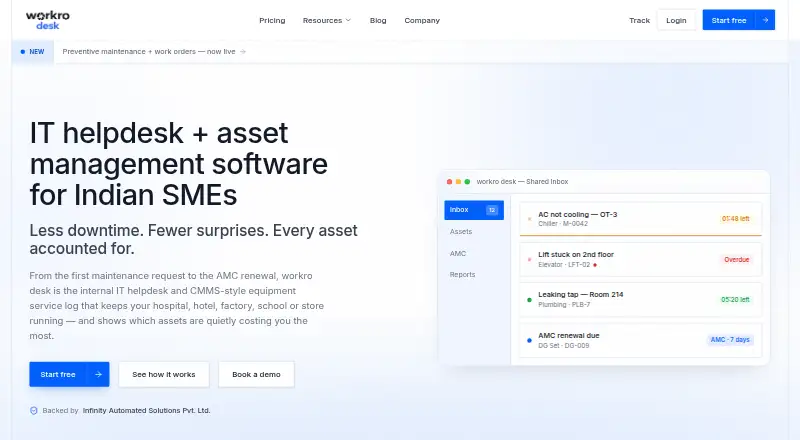
What workro desk Purchase Approvals is
workro desk Purchase Approvals combines purchase-request workflows with an internal IT helpdesk and equipment service log for operations teams. Staff can submit requests by email, QR scan, or public link, then follow ticket status through a magic link without an account. An owner can approve, reject, or modify purchase requests raised from tickets; thresholds and an audit trail help track decisions. The platform also includes an asset registry with health and repair history, preventive maintenance schedules, and automatically generated work orders. Other modules cover inventory, vendor records, AMC contracts, reports and analytics, and a knowledge base. The maker names hospitals, hotels, plants, and facilities among its users. Live integrations include SAP Business One, email-to-ticket, and CSV import and export. SAP data is pulled one-way and read-only, with an on-prem agent option for firewalled SAP. Web, API, and self-hosted options are listed.
Good
- Requests can be submitted by email, QR scan, or public link.
- Purchase decisions include thresholds and an audit trail.
- Tracks asset health, repairs, and preventive maintenance.
- SAP Business One integration is available.
- Offers web, API, and self-hosted options.
Watch out
- Free plan is limited to one admin and 10 assets.
- SAP Business One data is read-only and one-way.
Who it suits
It suits non-technical operations teams in settings such as hospitals, hotels, plants, and facilities that need purchase approvals and equipment service tracking. Teams with firewalled SAP Business One can use the listed on-prem agent option.
Verdict
workro desk brings purchase approval tracking together with helpdesk, asset, and maintenance modules. Its free plan has stated admin and asset limits, while paid plans start at ₹7,999/yr.
Plans and prices
From workro desk Purchase Approvals's own pricing page, checked 7 Oct 2026.
| Plan | Price | What it gives you |
|---|---|---|
| Free | Free | 1 admin · up to 10 assets · shared inbox and ticketing · basic SLA timers · community support · free forever |
| Starter | ₹7,999 a year | up to 150 assets · 5 GB document storage · unlimited admins · every feature included · email support · Billed yearly — 2 months free |
| Pro | ₹19,999 a year | up to 750 assets · 12 GB document storage · priority email + chat support · Billed yearly — 2 months free |
| Business | Priced on request | unlimited assets · unlimited document storage · SSO (SAML / OIDC) · on-premise deployment · API access · dedicated account manager · Dedicated onboarding |
The facts
Each one read from workro desk Purchase Approvals's own pages, with the date it was checked.
What it does
- Asset and maintenance features
- The product includes an asset registry, health and repair history, preventive maintenance schedules, and automatically generated work orders.checked 7 Oct 2026
- Hosting options
- The Business plan includes on-premise and air-gapped deployment options, according to the product FAQ.checked 7 Oct 2026
- Intended users
- The maker says the product is for non-technical operations teams and names hospitals, hotels, plants and facilities among its users.checked 7 Oct 2026
- Limits and overages
- The FAQ says the service does not hard-throttle users who exceed plan limits and that the team will reach out if usage consistently exceeds them.checked 7 Oct 2026
- Live integrations
- The maker lists SAP Business One, email-to-ticket, and CSV import and export as live integrations.checked 7 Oct 2026
- Other included modules
- The platform lists inventory, vendor records, AMC contracts, reports and analytics, and a knowledge base among its modules.checked 7 Oct 2026
- Privacy and data export
- The maker says it does not sell workspace data or use it to train AI models, and users can export records to CSV or request deletion.checked 7 Oct 2026
- Purpose
- workro desk describes itself as an internal IT helpdesk and equipment service log for operations teams.checked 7 Oct 2026
- Request intake
- Staff can submit requests by email, QR scan or public link, and follow ticket status using a magic link without an account.checked 7 Oct 2026
- SAP integration
- SAP Business One integration pulls items, stock, suppliers and fixed assets one-way and read-only, with owner approval and an on-prem agent option for firewalled SAP.checked 7 Oct 2026
- Security
- The maker says workspace data is isolated, access is limited to the owner and invited admins, and data is encrypted in transit and at rest.checked 7 Oct 2026
- Support
- The Free plan includes community support, Starter includes email support, and Pro includes priority email and chat support.checked 7 Oct 2026
The company
- Maker
- The site says workro desk is backed by Infinity Automated Solutions Pvt. Ltd.checked 7 Oct 2026
Where it runs
- Purchase approvals
- Purchase requests can be raised from tickets, approved, rejected or modified by an owner, and tracked with thresholds and a full audit trail.checked 7 Oct 2026
The full review of workro desk Purchase Approvals
workro desk Purchase Approvals is an internal service desk that connects purchasing decisions with equipment and facilities operations. It is best suited to non-technical teams in hospitals, hotels, plants and similar organisations where many employees submit requests but a smaller group manages them. The key decision is whether that broad operational scope is more useful than a dedicated accounting-connected purchasing system.
Overview
Requests can originate in tickets and pass through owner approval, rejection or modification. Thresholds, budget controls and a complete audit trail make spending decisions traceable rather than dependent on email history. Staff can submit by email, QR scan or public link, then follow progress through a magic link without creating an account. That low-friction intake is valuable when occasional requesters greatly outnumber administrators.
Purchasing sits alongside an asset registry, equipment health and repair history, preventive-maintenance schedules and automatically generated work orders. Inventory, vendor records, AMC contracts, reports and analytics, and a knowledge base broaden the system into an operations workspace. Accounting integrations are absent, so it is not the right fit for teams that need purchase approvals to post directly into accounting software.
Key features
Approval and request handling
Owner decisions can approve, reject or modify requests, with thresholds preserving a clear escalation trail. Email, QR and public-link intake accommodate staff who do not use a full-time service portal, while magic-link tracking avoids forcing those users to maintain accounts.
Assets and maintenance
Asset records retain health and repair history, and preventive schedules can generate work orders automatically. This links a purchase request to the equipment lifecycle, which is more useful for facilities teams than a standalone requisition form. Vendor and inventory records, AMC contracts, analytics and a knowledge base provide supporting context.
Integrations, security and deployment
Live integrations include SAP Business One, email-to-ticket and CSV import/export. The SAP connection is one-way and read-only for items, stock, suppliers and fixed assets; an on-premise agent supports firewalled SAP environments, but it does not provide accounting integration. Workspace data is isolated and encrypted in transit and at rest, with access limited to the owner and invited administrators. The maker says data is not sold or used to train AI models, and records can be exported to CSV or deleted on request. Business adds on-premise and air-gapped deployment.
Pricing
| Plan | Price and limits | Support and fit |
|---|---|---|
| Free | ₹0.00, free forever; 1 admin, up to 10 assets, shared inbox and ticketing, basic SLA timers | Community support. Suitable for a very small operation proving the workflow. |
| Starter | ₹7,999.00 per year, billed yearly with 2 months free; up to 150 assets, 5 GB document storage, unlimited admins, every feature | Email support. The practical entry tier for small teams that need the full feature set. |
| Pro | ₹19,999.00 per year, billed yearly with 2 months free; up to 750 assets, 12 GB storage | Priority email and chat support. Better for larger estates and teams needing faster assistance. |
| Business | Custom pricing; unlimited assets and document storage, SSO (SAML/OIDC), on-premise deployment and API access | Dedicated onboarding and account manager. Intended for enterprise governance and deployment requirements. |
The service does not automatically hard-throttle usage beyond plan limits; the team contacts customers when overuse is consistent. That avoids abrupt stoppages but makes sustained overages a commercial conversation. Free is constrained by its single administrator and 10-asset ceiling, while Starter and Pro require annual commitment.
Platforms
workro desk runs on the web and is offered through an API, with self-hosted deployment options. Business customers can choose on-premise or air-gapped hosting.
Who it's for
Choose it when purchase approvals must share records with helpdesk tickets, assets, maintenance and vendors. Hospitals, hotels, plants and facilities departments benefit most from account-free request intake and lifecycle history. It is less suitable when accounting-system synchronization is a core requirement or when a tiny team will not exceed the Free plan's narrow limits.
Pros and cons
- Pro: Thresholds, owner decisions and audit trails give operational purchases defensible governance.
- Pro: Email, QR, public links and magic-link tracking include occasional requesters without account administration.
- Pro: Asset, maintenance, inventory and vendor modules keep purchasing tied to equipment operations.
- Con: The Free plan allows only one admin and 10 assets, limiting it to very small deployments.
- Con: SAP Business One data flows one way and read-only, and no accounting integration is included.
- Con: Starter and Pro are annual plans, while Business pricing requires a separate quote.
Alternatives
For a broader directory of purchasing tools, see Purchase Request Software.
- Jodoo Purchase Requisition Software suits teams wanting Android and iOS access, a free trial and a generous free-user and automation allowance.
- Catalystk is a stronger choice for unlimited records across web and mobile on its free plan, with a ₹225.00-per-user monthly Max tier.
- RAQOZ Purchase Approvals fits a web-only approval deployment with a free Launch plan for one organisation, one location and up to five active users.
- RAQOZ Purchase Requisition Software is preferable when requisitions, basic approvals, RFQs and quotation comparison are the priority.
- Cordango Purchase Requests offers a free one-person plan and paid self-hosted/API-capable options for teams working with credits.
- CodeGlo Purchase Approval is a paid alternative available on Android, iOS and web.
- TeroTAM Purchase Requisition Module is for organisations seeking a custom-priced solution across mobile, web and Windows.
- OpenGov Accounts Payable is the alternative to consider when accounts-payable work is the central requirement.
Verdict
workro desk Purchase Approvals is a strong choice for facilities-heavy operations that want auditable purchasing alongside helpdesk, assets and maintenance. Its main reason to choose it is the combination of account-free intake and equipment lifecycle context. Look elsewhere if accounting integration, a very small free deployment, or a specialised requisition workflow matters more than an all-in-one operations desk.
Alternatives to workro desk Purchase Approvals
- 1
Catalystk
Free planAndroidiOSWeb8.0From ₹225 a month - 2

Tradogram
AndroidiOSWebAPI7.8From $950.40 a year - 3

Jodoo Purchase Requisition Software
Free planAndroidiOSWebAPI7.1From $144 a year - 4

Zoho Procurement
AndroidiOSWebAPI7.1 - 5

Precoro
AndroidiOSWebAPI6.8From $499 a month - 6

Cordango Purchase Requests
Free planWebAPISelf-hosted6.7From €441 a year