
WinCDEmu
WinCDEmu is a free, open-source Windows utility for mounting CD, DVD, and Blu-ray disc images.
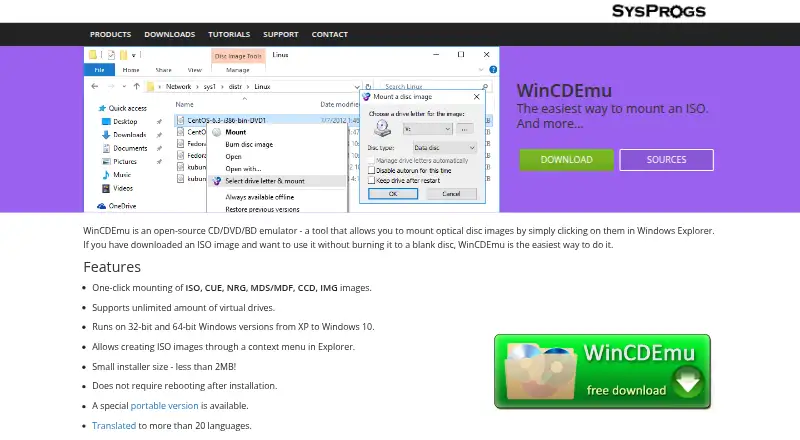
What WinCDEmu is
WinCDEmu is a free, open-source Windows utility for mounting CD, DVD, and Blu-ray disc images. It supports ISO, CUE, NRG, MDS/MDF, CCD, and IMG files, and an installed copy can mount an image by double-clicking or using a context-menu option to select a drive letter. It supports data, DVD-video, and BD-video images, with no stated limit on the number of virtual drives. WinCDEmu can also create ISO images from an Explorer context menu.
The listed Windows versions are 10, 8.1, 8, 7, 2008, Vista, 2003, and XP, including 64-bit editions. Windows 2000 is not directly supported. Installation requires administrator rights and confirmation of the WinCDEmu driver. A portable edition avoids installation but does not integrate with Explorer and requires manually starting the app to mount or unmount images. Settings can require administrator rights to mount images. The software is free for any kind of use; commercial licensing or customized versions can be discussed with its maker. Technical support is not included, with questions directed to the forum.
Good
- Mounts ISO, CUE, NRG, MDS/MDF, CCD, and IMG images.
- Supports unlimited virtual drives.
- Can create ISO images from Explorer.
- Free for any kind of use.
- Includes a portable edition.
Watch out
- Windows 2000 is not directly supported.
- The installer requires administrator rights.
- The portable edition lacks Explorer integration.
- Technical support is not included.
Who it suits
WinCDEmu suits Windows users who need to mount optical disc images from Explorer or create ISO images. It may also suit users who prefer a portable edition and do not need Explorer integration.
Verdict
WinCDEmu covers common optical-image formats and mounts them through Windows Explorer when installed. Users should account for its administrator-required installation and forum-only support.
Plans and prices
From WinCDEmu's own pricing page, checked 3 Oct 2026.
| Plan | Price | What it gives you |
|---|---|---|
| WinCDEmu | Free | Free for any kind of use · commercial licensing or customized versions available by contacting Sysprogs |
The facts
Each one read from WinCDEmu's own pages, with the date it was checked.
What it does
- Access control
- Settings include an option to require administrator rights for mounting disc images.checked 3 Oct 2026
- Disc types
- It supports data, DVD-video, and BD-video images.checked 3 Oct 2026
- Image creation
- It can create ISO images through a context menu in Explorer.checked 3 Oct 2026
- Image formats
- It supports one-click mounting of ISO, CUE, NRG, MDS/MDF, CCD, and IMG images.checked 3 Oct 2026
- Installation
- The installer requires administrator rights and the maker's installation instructions include confirming installation of the WinCDEmu driver.checked 3 Oct 2026
- License
- WinCDEmu is licensed under LGPL, and the maker invites inquiries about commercial licensing for use in a product or a customized version.checked 3 Oct 2026
- Mounting workflow
- Installed WinCDEmu can mount an image by double-clicking it or choosing a drive letter and mount option from its context menu.checked 3 Oct 2026
- Portable edition
- A portable version does not require installation, but it does not integrate with Windows Explorer and requires manually starting the app to mount or unmount images.checked 3 Oct 2026
- Purpose
- WinCDEmu is an open-source CD/DVD/BD emulator for mounting optical disc images in Windows Explorer.checked 3 Oct 2026
- Support
- The maker says the free product does not come with technical support and directs users with questions or problems to its forum.checked 3 Oct 2026
- Translations
- The community maintains UI language files, and the maker says WinCDEmu is translated into more than 20 languages.checked 3 Oct 2026
- Virtual drives
- It supports an unlimited number of virtual drives.checked 3 Oct 2026
The company
- Maker headquarters
- Sysprogs lists its main office in Vancouver, British Columbia, Canada, and an EEA sales address in Maardu, Estonia.checked 3 Oct 2026
Where it runs
- Windows 2000 limit
- Windows 2000 is not directly supported, though the maker says users can build the sources with the Windows 2000 DDK for a compatible version.checked 3 Oct 2026
- Windows support
- The download page lists Windows 10, 8.1, 8, 7, 2008, Vista, 2003, and XP, including x64.checked 3 Oct 2026
The full review of WinCDEmu
Overview
WinCDEmu is an open-source Windows utility for mounting CD, DVD and Blu-ray disc images in Explorer. It suits Windows users who want direct access to common image formats without paying for a virtual drive tool. Its breadth of format support and unlimited virtual drives make it capable for routine image work, though the installed version requires administrator rights and support is forum-based.
Key features
Double-click a supported image to mount it, or use the context menu to choose a drive letter and mount option. WinCDEmu handles ISO, CUE, NRG, MDS/MDF, CCD and IMG files, including data, DVD-video and BD-video images. Persistent mounts are supported, and there is no stated ceiling on the number of virtual drives, a useful advantage for users working with several images at once.
Explorer integration also lets users create ISO images from a context menu. The trade-off is installation: the installer needs administrator rights and requires confirming installation of the WinCDEmu driver. Settings can require administrator rights to mount images, which may suit managed environments but adds another access-control consideration.
A portable edition avoids installation, but loses Explorer integration; users must start the app manually to mount or unmount images. That makes it a narrower fit for occasional use when installing the driver is undesirable, rather than a like-for-like substitute for the integrated version.
Pricing
WinCDEmu costs nothing and is free for any kind of use. There is no free trial because the product itself is free. The LGPL license applies; commercial licensing or a customized version can be discussed with Sysprogs for users incorporating it into a product or needing a tailored build.
The free edition does not include technical support. Users with questions or problems are directed to the forum, so organizations that need a dedicated support channel should consider that limitation before adopting it.
Platforms
WinCDEmu supports Microsoft Windows 10, 8.1, 8, 7, 2008, Vista, 2003 and XP in 32-bit and 64-bit editions. Windows 2000 is not directly supported, although the maker says a compatible version can be built from the sources using the Windows 2000 DDK. The community maintains UI language files, with translations into more than 20 languages.
Who it's for
WinCDEmu is a strong fit for Windows users who want a free, Explorer-integrated way to mount a varied collection of optical image formats, create ISOs and keep multiple virtual drives available.
Pros and cons
Pros
- Supports six common image-format families and data, DVD-video and BD-video images, covering more than ISO-only use.
- Unlimited virtual drives and persistent mounts give users room to keep several images mounted.
- Free for any kind of use, with ISO creation and Explorer mounting included.
- A portable edition is available when installation is not an option, albeit with manual mounting.
Cons
- The integrated installer requires administrator rights and confirmation of the driver installation.
- The portable edition gives up Explorer integration and requires manual app startup for mounting and unmounting.
- Technical support is not included; users must turn to the forum.
- Windows 2000 requires a source build with the Windows 2000 DDK rather than direct support.
Alternatives
- DAEMON Tools Lite may suit readers who want a paid upgrade path: its free plan offers basic imaging functionality with partner offers and limited support, while Personal costs $29.99, paid once for a billed Lifetime Subscription.
- ImDisk is another free Windows option, with API support as well; choose it if those platform or API categories better match your needs.
- TotalMounter is worth considering for readers who need more than optical images: its free plan includes virtual encrypted disks, iSCSI disks and an INetDisk client alongside virtual CD/DVD-ROM and CD/DVD-RW.
- ExpanDrive is a better match for readers seeking Linux or macOS support and cloud services or protocols; its free plan is for personal use and allows up to 10 users or devices per year.
- VHD Attach is a free Windows alternative for users on Windows 7 or Windows Server 2008 R2 and above.
- Alcohol 52% offers a 15-day trial and a free edition; consider it if that trial option fits your evaluation needs.
- libguestfs is a free open-source library and tools option for readers seeking support across Linux, macOS, Windows, API and self-hosted environments.
- Virtual CloneDrive is a free Windows alternative capped at 15 virtual drives, a reasonable choice if that limit is sufficient.
For broader comparisons, see Virtual Drive Software and Emulator Software.
Verdict
Choose WinCDEmu if you want a free Windows tool that mounts a wide range of optical images directly through Explorer, with no cap on virtual drives. Its practical limits are the administrator-required driver installation and forum-only support; users who cannot accept either should look elsewhere.
Alternatives to WinCDEmu
- 1

DAEMON Tools Lite
Free planAndroidiOSmacOSWindows8.0$3 one-time - 2

RaiDrive
Free planLinuxWindows7.4Free plan - 3
Alcohol 52%
Free planWindows7.3$27 one-time - 4
libguestfs
Free planOpen sourceAPILinuxmacOSSelf-hosted7.3Free plan - 5
NetDrive
AndroidiOSmacOSWindows7.0From $29.90 a year - 6

ExpanDrive
Free planLinuxmacOSWindows6.8From $29 a month