Web Text Expander
Web Text Expander is a browser extension that turns typed shortcuts into saved replies, signatures, prompts, and templates.
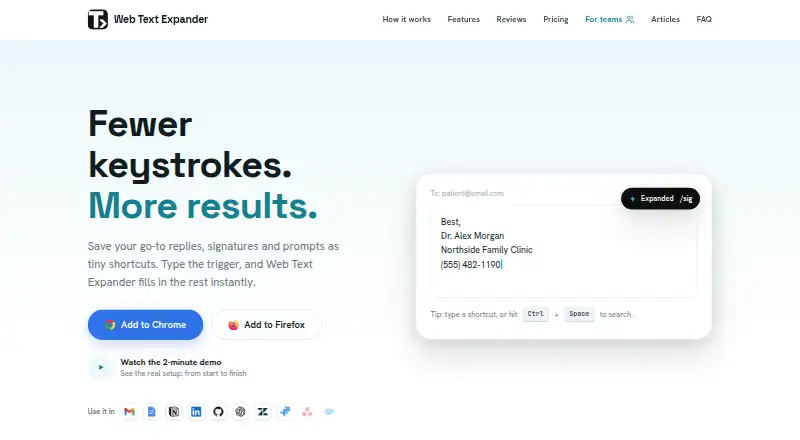
What Web Text Expander is
Web Text Expander is a browser extension that turns typed shortcuts into saved replies, signatures, prompts, and templates. It supports Chrome and Firefox, plus Chromium-based browsers such as Edge, Brave, and Opera, and runs on Windows, macOS, Linux, and ChromeOS wherever those browsers run. Shortcut features include rich formatting, fillable placeholders, categories, caret control, clipboard insertion, automatic dates, quick search, and quick add. The free plan includes unlimited shortcuts and import and export, with use on two devices per email. Plus costs €1.99 a month, billed €23.88 yearly; Team costs €4.99 a month, billed monthly, with a two-seat minimum. Team adds shared shortcut libraries and administration tools. Snippets are stored locally in the browser, and the maker says expansion happens on-device without reading, collecting, or transmitting typed text. The extension works on almost all websites, though some custom editors may behave differently. It is a desktop browser extension and is not available on iOS or Android.
Good
- Free plan includes unlimited shortcuts
- Supports Chrome, Firefox, and Chromium-based browsers
- Snippets are stored locally in the browser
- Team plan includes shared shortcut libraries
Watch out
- Unavailable on iOS and Android
- Free use is limited to two devices per email
- Some custom editors may behave differently
Who it suits
It may suit people who frequently enter repeated replies, signatures, prompts, or templates in desktop browsers. Team features are relevant to groups that want shared shortcut libraries and usage insights.
Verdict
Web Text Expander pairs shortcut insertion with formatting and organization tools, including shared libraries on Team. Its desktop-only availability and browser-specific behavior are worth considering before choosing it.
Plans and prices
From Web Text Expander's own pricing page, checked 8 Oct 2026.
| Plan | Price | What it gives you |
|---|---|---|
| Free | Free | Unlimited shortcuts · Import & export · 2 devices per email · Email support · Forever |
| Plus | €1.99 a month | Unlimited shortcut length · Rich text formatting · Fillable placeholders · Categories · Caret position control · Clipboard insertion · Date placeholders · Quick search · Quick add · Billed €23.88 yearly. Save 20%. |
| Team | €4.99 a month | Full Plus features · Shared shortcut libraries · Team dashboard · Usage insights · Centralized billing · Monthly only; minimum 2 seats |
The facts
Each one read from Web Text Expander's own pages, with the date it was checked.
Where it runs
- Browser support
- It supports Chrome and Firefox, plus most Chromium based browsers including Edge, Brave, and Opera through the Chrome extension.checked 8 Oct 2026
What it does
- Core features
- Features include rich formatting, fillable placeholders, category organization, caret control, clipboard insertion, automatic dates, quick search, and quick add.checked 8 Oct 2026
- Intended users
- The maker lists customer support, healthcare professionals, sales outreach, virtual assistants, recruiting teams, and freelancers among its intended users.checked 8 Oct 2026
- Mobile limit
- The product is a desktop browser extension and is not available on iOS or Android.checked 8 Oct 2026
- Purpose
- The browser extension expands typed shortcuts into saved replies, signatures, prompts, and templates.checked 8 Oct 2026
- Storage and privacy
- Snippets are stored locally in the browser, and the maker says expansion happens on-device without reading, collecting, or transmitting typed text.checked 8 Oct 2026
- Support
- The legal notice lists email as the primary support channel and says the provider normally replies within two business days.checked 8 Oct 2026
- Supported systems
- It works on Windows, macOS, Linux, and ChromeOS wherever Chrome or Firefox run.checked 8 Oct 2026
- Website compatibility
- It works on almost all websites, though some sites with custom editors may behave differently.checked 8 Oct 2026
Money
- Free limits
- The free plan allows unlimited shortcuts and includes import and export, with use on two devices per email.checked 8 Oct 2026
The company
- Team administration
- Team administrators can invite and remove members, manage seats, and view counts of shortcuts and characters expanded by each member.checked 8 Oct 2026
- Team sharing
- The Team plan can sync shared shortcut libraries automatically to members and lets admins control which categories each team receives.checked 8 Oct 2026
- Team storage choice
- The maker says teams can use the other Team plan features while keeping snippets local and sharing them through import and export.checked 8 Oct 2026
Alternatives to Web Text Expander
- 1

PhraseExpress
Free planAndroidiOSAPImacOS8.2$99.95 one-time - 2
InsertKit
Free planAndroidWebAPIExtension8.0From $2.99 a month - 3

Sniips
Free planAndroidiOSWebAPI8.0From $4 a month - 4

TextExpander
Free planiOSWebExtensionLinux7.9From $5 a month - 5

Briskine
Free planAndroidiOSWeb7.7Free plan - 6
Snippety
Free planiOSmacOS7.7From $2.99 a month