
Sniips
Sniips creates reusable text snippets and shortcuts that expand when you type.
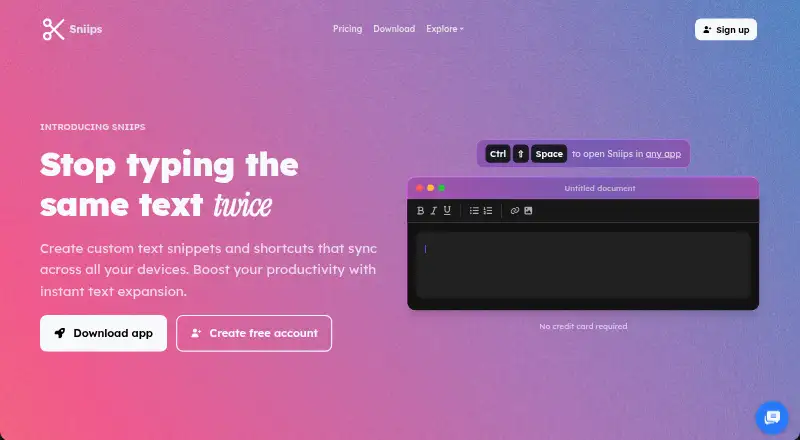
What Sniips is
Sniips creates reusable text snippets and shortcuts that expand when you type. It can insert saved text in browsers, email, code editors, chat apps, and other applications, helping individuals, developers, and teams reuse text or code. Snippets can contain rich text, variable placeholders, and date or time stamps. Smart variables can add dates, clipboard contents, cursor positions, or custom fill-in fields. Folders, tags, search, and favorites help organize snippets; import, export, and backup options support managing them. Sniips says it can import from TextExpander, aText, and other tools. Its browser extension works independently of the desktop app. Team features include shared folders, permission controls, and updates that sync to everyone immediately. An MCP integration connects AI assistants, with setup guidance for Claude, Cursor, VS Code, Codex, and Gemini CLI. Accounts also provide a private API key for API requests. Sniips says it uses end-to-end encryption and does not sell user data. The free Basic plan allows 25 snippets on two devices. Paid plans add capacity and features, with Max offering unlimited snippets and team sharing.
Good
- Expands snippets in browsers, email, code editors, and chat apps.
- Smart variables can insert clipboard contents and custom fields.
- Imports from TextExpander, aText, and other tools.
- Team plans include shared folders and permission controls.
- Browser extension works independently of the desktop app.
Watch out
- Free Basic is limited to 25 snippets and two devices.
- Mobile support is unavailable.
- Team sharing is included with Max, not the free plan.
Who it suits
Sniips suits individuals and developers who repeatedly enter text or code across apps, and teams that want shared snippets with permissions. It also fits users who want to connect AI assistants or make API requests using a private key.
Verdict
Choose Sniips if reusable text, smart variables, or shared team snippets are central to your workflow. The free plan is limited to 25 snippets on two devices, and mobile support is unavailable; Max is the listed plan with unlimited snippets and team sharing.
Plans and prices
From Sniips's own pricing page, checked 15 Oct 2026.
| Plan | Price | What it gives you |
|---|---|---|
| Basic | Free | 25 snippets · 2 devices |
| Plus | $4 a month | 200 snippets · unlimited device sync · smart variables · Billed $48 annually |
| Pro | $8 a month | 1,000 snippets · unlimited device sync · priority support · Billed $96 annually |
| Max | $16 a month | Unlimited snippets · unlimited device sync · team sharing · custom branding · Billed $192 annually |
| Enterprise | Priced on request | Custom solutions · advanced security · flexible pricing |
The facts
Each one read from Sniips's own pages, with the date it was checked.
What it does
- API
- The account page provides a private API key for authenticating API requests.checked 9 Oct 2026
- API and SDKs
- The official pages reviewed describe application features but do not provide a public API reference or SDK documentation.checked 15 Oct 2026
- Automatic updates
- The terms say the installed application may automatically install updated or revised files.checked 15 Oct 2026
- Code snippets
- Developer features include function and class templates, React scaffolds, API patterns, documentation blocks and debugging snippets.checked 15 Oct 2026
- Data rights
- The terms say Sniips collects only data it considers necessary and provide a right to request deletion under GDPR language.checked 15 Oct 2026
- Downgrade limit
- After downgrading beyond the free plan's limits, users can access and edit existing snippets but cannot create new ones until under the limit or upgraded.checked 9 Oct 2026
- Editor support
- The developer page says Sniips works in VS Code, IntelliJ, Sublime and Vim, regardless of language.checked 15 Oct 2026
- Email templates
- Reusable templates work in Gmail, Outlook, Apple Mail and other email clients, with recipient and date placeholders.checked 15 Oct 2026
- Expansion
- Snippets can expand in applications including browsers, email, code editors, and chat apps.checked 9 Oct 2026
- Features
- The site lists rich text, variable placeholders, date and time stamps, folders, tags, search, favorites, import and export, and backup options.checked 9 Oct 2026
- Importing
- Sniips says it can import snippets from TextExpander, aText, and other tools.checked 9 Oct 2026
- Import support
- Sniips says it can import snippets from TextExpander, aText, PhraseExpress and most other text expanders.checked 15 Oct 2026
- Independent mention
- Anthill’s 2018 SMART100 article lists Sniips among its honorable mentions.checked 15 Oct 2026
- Integrations
- The official solutions pages name Gmail, Outlook, Apple Mail, Slack, Word, browsers and code editors as places where expansion works.checked 15 Oct 2026
- Intended users
- The site presents Sniips for individuals, developers, and teams that want to reduce repetitive typing and reuse text or code.checked 9 Oct 2026
- Liability limit
- The terms limit claims against Sniips to the amount the user paid and disclaim liability for downtime, data loss and service changes.checked 15 Oct 2026
Where it runs
- Browser extension
- The browser extension can operate independently without the desktop application.checked 15 Oct 2026
- Cross-device sync
- Sniips synchronizes snippet libraries across Mac, Windows and browser extensions.checked 15 Oct 2026
The company
- Company activities
- LinkedIn says ITW Creative Works develops apps and provides marketing, SEO, software development and music-production services.checked 15 Oct 2026
- Company founding
- LinkedIn lists ITW Creative Works as founded in 2018.checked 15 Oct 2026
- Company headquarters
- LinkedIn lists ITW Creative Works headquarters in Redondo Beach, California.checked 15 Oct 2026
- Company ownership
- Sniips identifies itself as a brand within parent company ITW Creative Works.checked 15 Oct 2026
- Company size
- LinkedIn lists ITW Creative Works as having 2–10 employees.checked 15 Oct 2026
- Founded
- 2019checked 28 Sep 2026
The full review of Sniips
Sniips is a text-expansion tool for reusing text and code across apps, with variables for content that changes from one use to the next. It suits individuals who need a substantial snippet library and teams that want shared folders; its main compromises are no mobile support and a free tier capped at 25 snippets and two devices.
Its strongest case is combining flexible snippets with immediate team sync and developer integrations, rather than serving as a minimal personal shortcut list.
Overview
Assign a shortcut to a snippet and Sniips expands it in browsers, email, code editors, and chat apps. Rich text and organization tools help keep a growing library manageable, while smart variables let a saved message or code block adapt to the situation. The desktop, web, and browser-extension options cover common computer workflows, but the lack of mobile support rules it out for people who need snippets on phones or tablets.
The browser extension can work without the desktop app, so browser-based use does not depend on installing the desktop client. Sniips also offers an MCP integration for AI assistants and a private API key for authenticated requests. It says it uses end-to-end encryption and does not sell user data.
Key features
Reusable snippets and variables
Rich text, folders, tags, search, and favorites give users multiple ways to organize and retrieve snippets. Import and export plus backup options help maintain a library, and Sniips says it can import from TextExpander, aText, and other tools. Smart variables can insert dates, clipboard contents, cursor positions, and custom fill-in fields; that flexibility is useful for repeatable text that needs individualized details, not just fixed boilerplate.
Team sharing and integrations
Shared folders, permission controls, and immediate updates help teams keep common snippets current. These capabilities are limited to the Max plan, making it a poor fit for a group that needs sharing on a lower-cost tier. The MCP setup guidance covers Claude, Cursor, VS Code, Codex, and Gemini CLI; developers can also use the private API key to authenticate API requests.
Pricing
Sniips has a free plan, a 14-day trial, and paid subscriptions billed annually. The paid tiers add room for a larger library or priority support, while team sharing starts at Max.
| Plan | Price and limits | Best fit |
|---|---|---|
| Basic | Free; 25 snippets and two devices. | Trying Sniips or keeping a small personal collection. |
| Plus | $4.00 per year (billed $48 annually); 200 snippets, unlimited device sync, and smart variables. | Individuals who need variables and more than the free cap allows. |
| Pro | $8.00 per year (billed $96 annually); 1,000 snippets, unlimited device sync, and priority support. | Individuals with a large library who value faster support. |
| Max | $16.00 per year (billed $192 annually); unlimited snippets, unlimited device sync, team sharing, and custom branding. | Teams or heavy users who need unlimited capacity and shared folders. |
| Enterprise | Custom pricing for custom solutions for large organizations. | Large organizations seeking a tailored solution. |
Basic's two-device and 25-snippet caps make it a sampler rather than a durable choice for a broad library. Plus removes the device ceiling and adds smart variables, but caps the collection at 200 and does not include team sharing. Pro raises the snippet cap and adds priority support, but still lacks the sharing included with Max. After downgrading below the free plan's limits, users can still access and edit existing snippets, but cannot create new ones until they reduce the collection or upgrade.
Platforms
Sniips supports Windows, macOS, Linux, the web, and a browser extension. Although Android and iOS appear among its broader platform tags, mobile support is unavailable, so phone and tablet users should not treat it as a cross-device option.
Who it's for
Sniips is best for people who repeatedly enter the same messages, forms, or code and need variables to tailor each expansion. Developers may value the MCP connections and API access; teams that standardize shared responses should consider Max for its folders, permissions, and immediate updates. It is not the right choice when a mobile app is essential, or when a team needs sharing without paying for Max.
Pros and cons
- Smart variables: Dates, clipboard contents, cursor positions, and fill-in fields make reusable text adaptable.
- Team controls on Max: Shared folders, permissions, and immediate sync support a common team library.
- Multiple integration routes: MCP guidance and authenticated API requests can connect snippet workflows with developer tools and AI assistants.
- Small free allowance: 25 snippets across two devices can be restrictive once regular use builds a larger collection.
- No mobile support: Sniips does not cover phone or tablet workflows despite its broader platform tags.
- Sharing requires Max: Lower paid tiers increase personal capacity but do not provide team sharing.
Alternatives
Text Expansion Software is a useful category overview for comparing tools before choosing a specific app.
- InsertKit is worth considering if its free plan's 10 snippets and listed mobile-app support suit your needs better than Sniips's larger free cap without mobile support.
- TextExpander is an alternative with a free plan capped at five active snippets; choose it if that smaller allowance matches your needs.
- Briskine offers a free plan for one person with 30 templates, and a Premium plan at $7.00 per month for unlimited templates; it may suit a browser- or mobile-focused workflow.
- PhraseExpress is an alternative with free and trial options, plus Standard lifetime licensing and Professional sharing; choose it if those licensing options suit your preference.
- typedesk offers free personal use limited to 50 uses per week for one user; consider it if that usage cap is sufficient.
- Ant Text has a free tier with one custom group, 10 snippets, and an 800-character cap; consider it for a smaller collection.
- Web Text Expander offers unlimited shortcuts free on two devices per email, making it an option for someone prioritizing shortcut count over Sniips's variable and sharing features.
- Lightning Assist offers up to 20 free snippets and one team, so it may suit a team seeking a free starting point.
Verdict
Choose Sniips if reusable text with smart variables is central to your work, or if your team can justify Max for shared folders and permissions. The free tier is useful for a small trial collection, but the snippet and device caps constrain sustained use, and the absence of mobile support is decisive for anyone who needs phone or tablet access. Look elsewhere if mobile coverage or lower-tier team sharing is essential.
Getting started
- Visit https://sniips.com/.
- Choose the free Basic plan or a paid plan.
- Use the desktop app or browser extension on a supported platform.
- Create snippets and organize them with folders, tags, search, or favorites.
- For AI assistant access, follow the account page's MCP setup guidance for a supported client.
Limits worth knowing
Basic is free and allows 25 snippets on two devices. After downgrading beyond the free plan's limits, users can still access and edit existing snippets but cannot create new ones until they are under the limit or upgrade.
Questions
Is Sniips free?
Yes. Basic is free and includes 25 snippets on two devices.
What do paid plans cost?
Plus is listed at $4 a month, billed $48 annually; Pro at $8 a month, billed $96 annually; and Max at $16 a month, billed $192 annually. A 14-day trial is listed.
Which platforms does Sniips support?
The platform list includes Android, iOS, Linux, macOS, web, Windows, API, and extension. Mobile support is listed as unavailable; supported-platform details name Windows, macOS, Linux, web, and browser extension.
Can teams share snippets?
Yes. Team features include shared folders, permission controls, and updates that sync to everyone immediately. Max lists team sharing.
Does Sniips connect with AI assistants?
Its account page describes an MCP integration and setup guidance for Claude, Cursor, VS Code, Codex, and Gemini CLI.
What does Sniips say about security?
Sniips says it uses end-to-end encryption and does not sell user data.
Alternatives to Sniips
- 1

PhraseExpress
Free planAndroidiOSAPImacOS8.2$99.95 one-time - 2
InsertKit
Free planAndroidWebAPIExtension8.0From $2.99 a month - 3

TextExpander
Free planiOSWebExtensionLinux7.9From $5 a month - 4

Briskine
Free planAndroidiOSWeb7.7Free plan - 5
Snippety
Free planiOSmacOS7.7From $2.99 a month - 6
Texpand
Free planAndroid7.5Free plan