
Briskine
Briskine is a text expansion tool for making and inserting reusable templates on websites and in web apps.
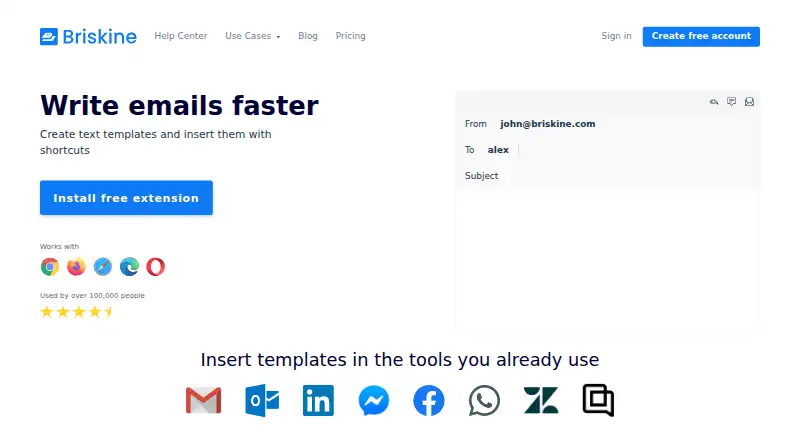
What Briskine is
Briskine is a text expansion tool for making and inserting reusable templates on websites and in web apps. Templates can use dynamic and custom variables, advanced formatting, images, and links, and can fill Subject, To, CC, and BCC email fields. The editor works with Chrome, Firefox, Safari, Edge, and Opera, and the service also supports Android and iOS mobile browsers. Templates can be shared and synced with a team, while insertion works on almost any website or web app. The Free plan is for one person and includes 30 templates; creating an account does not require a credit card. Premium includes unlimited templates and team members. The listed starting price is $7/user/mo. Plans can be upgraded, downgraded, or canceled at any time, and yearly billing provides two months free. Briskine provides email support. Discounts are available for teams of 30 or more, nonprofits, and educational institutions.
Good
- Free plan includes 30 templates.
- Templates support dynamic and custom variables.
- Can fill Subject, To, CC, and BCC fields.
- Works with five listed desktop browsers.
- Plans can be changed or canceled at any time.
Watch out
- Free plan is limited to one person.
- Free plan is limited to 30 templates.
- Premium starts at $7/user/mo.
Who it suits
Briskine suits people who frequently reuse text in emails or web apps. Teams that want shared templates may prefer Premium, which includes unlimited team members.
Verdict
Briskine turns reusable text into templates that can be inserted across supported browsers and web apps. Its free option is limited to one person and 30 templates, while Premium removes those stated limits.
Plans and prices
From Briskine's own pricing page, checked 28 Sep 2026.
| Plan | Price | What it gives you |
|---|---|---|
| Free | Free | 1 person; 30 templates · 30 templates · 1 person · billed monthly |
| Premium | — | Annual billing option · Unlimited templates · Unlimited team members · no annual price on the source page |
The facts
Each one read from Briskine's own pages, with the date it was checked.
What it does
- Annual discount
- Yearly billing provides 2 months free.checked 28 Sep 2026
- Card requirement
- Creating a free account does not require a credit card.checked 28 Sep 2026
- Dynamic variables
- Templates support dynamic variables and custom variables.checked 28 Sep 2026
- Email fields
- Templates can fill Subject, To, CC, and BCC fields.checked 28 Sep 2026
- Email support
- Briskine provides email support via [email protected].checked 28 Sep 2026
- Other discounts
- Discounts are available for nonprofits and educational institutions.checked 28 Sep 2026
- Paid from
- 7checked 20 Sep 2026
- Premium members
- Premium includes unlimited team members.checked 28 Sep 2026
- Premium templates
- Premium includes unlimited templates.checked 28 Sep 2026
- Rich text
- The editor supports advanced formatting, images, links, and other features.checked 28 Sep 2026
- Users
- Briskine says it is used by over 100,000 people.checked 28 Sep 2026
Money
- Billing flexibility
- Plans can be upgraded, downgraded, or canceled at any time.checked 28 Sep 2026
- Free plan
- Yeschecked 20 Sep 2026
- Free templates
- The free plan includes 30 templates.checked 28 Sep 2026
- Free users
- The free plan is for 1 person.checked 28 Sep 2026
The company
- Company entity
- The site identifies the company as Briskine SRL.checked 28 Sep 2026
- Team discounts
- Discounts are available for teams of 30 or more people.checked 28 Sep 2026
- Team sharing
- Templates can be shared and synced with a team.checked 28 Sep 2026
- Team snippet sharing
- Yeschecked 20 Sep 2026
Where it runs
- Supported browsers
- The extension works with Chrome, Firefox, Safari, Edge, and Opera.checked 28 Sep 2026
- Supported platforms
- Chrome, Firefox, Safari, Edge, Opera; Android and iOS mobile browserschecked 20 Sep 2026
- Web app insertion
- Templates can be inserted on almost any website or web app.checked 28 Sep 2026
The full review of Briskine
Overview
Briskine is a text-expansion tool for people who reuse content in email and web apps. It is best suited to browser-based work, especially when templates need formatting, variable fields, or team sharing. Its strongest advantage is the breadth of what a template can fill; the free plan’s one-person, 30-template limit is a meaningful constraint.
Key features
Templates can be inserted on almost any website or web app, so Briskine can handle recurring text beyond email. Dynamic and custom variables help adapt a reusable response without maintaining multiple near-identical copies. The editor supports advanced formatting, images, and links, making it more appropriate for polished correspondence than a plain-text-only snippet library.
Email templates can fill Subject, To, CC, and BCC as well as message content. That is useful when repeat messages require consistent routing, not just a standard body. Teams can share and sync templates, but the Free plan permits only one person, so a shared library means choosing Premium.
Pricing
Free costs nothing and allows one person and 30 templates. No credit card is required to create a free account. It is a practical starting point for an individual with a compact library, but the cap makes it a poor fit for a growing collection or a team.
Premium costs $7 a year and includes unlimited templates and unlimited team members. Yearly billing provides 2 months free. The plan can be upgraded, downgraded, or canceled at any time; discounts are available for teams of 30 or more, nonprofits, and educational institutions. Premium is the relevant choice for collaboration or removing the stated template cap, though the pricing information does not clarify the relationship between the stated yearly price and monthly billing.
Platforms
The extension supports Chrome, Firefox, Safari, Edge, and Opera, and Briskine also supports Android and iOS mobile browsers. That range suits people moving between desktop and mobile browser workflows; it does not establish support for native desktop applications.
Who it's for
Briskine is a strong fit for individuals who regularly send structured email or reuse formatted text across browser-based apps, and for teams that want shared templates and are willing to use Premium. It is less suitable for someone who needs a free shared workspace, a library beyond 30 templates without paying, or expansion outside the browser environment.
Pros and cons
- Pros: Rich formatting, images, links, and dynamic variables make templates adaptable and presentable.
- Pros: Filling Subject, To, CC, and BCC extends reuse to email setup, not just message text.
- Pros: Browser coverage includes five major desktop browsers, with Android and iOS mobile-browser support.
- Cons: Free is restricted to one person and 30 templates, limiting both collaboration and larger personal libraries.
- Cons: Team sharing and unlimited templates require Premium.
Alternatives
TextExpander is worth considering for people who want a broader mix of platform support, including Linux, macOS, and Windows, alongside extension, iOS, and web access; its free plan allows five active snippets.
PhraseExpress may suit users looking for a lifetime-license option, with 12 months of updates and upgrades on Standard and phrase sharing on Professional.
typedesk is an alternative for macOS, web, or Windows users: its free plan allows 50 uses per week for one user, while Briskine’s free plan offers 30 templates for one person.
Espanso is a free, open-source option for Linux, macOS, and Windows users.
Text Blaze is another freemium option for extension, macOS, and Windows users.
AutoKey is a free Linux and X11 desktop utility.
Rocket Typist is an option for iOS and macOS users; its free plan includes 10 snippets.
Magical is another freemium option, with individual and team plans.
Browse more options in Text Expanders Software and Text Expansion Software.
Verdict
Choose Briskine if you want formatted, variable-driven templates that can populate email fields and work across browsers, with Premium available for team sharing and an unlimited template library. Look elsewhere if you need team use or more than 30 templates on a free plan, or if your workflow depends on native desktop apps.
Getting started
- Visit the Briskine website.
- Create a free account without entering a credit card.
- Use the extension with Chrome, Firefox, Safari, Edge, or Opera, or a supported Android or iOS mobile browser.
- Create templates and insert them on websites or web apps.
- Upgrade to Premium for unlimited templates and team members, if needed.
Limits worth knowing
The free plan is for one person and includes 30 templates. Premium includes unlimited templates and team members, and starts at $7/user/mo.
Questions
Is Briskine free?
Yes. Its free plan includes 30 templates for one person, and creating a free account does not require a credit card.
How much does Premium cost?
Premium starts at $7/user/mo. It includes unlimited templates and team members.
Which browsers and platforms does it support?
The extension supports Chrome, Firefox, Safari, Edge, and Opera. Mobile browsers on Android and iOS are also supported.
Can teams share templates?
Yes. Templates can be shared and synced with a team.
Can plans be changed or canceled?
Plans can be upgraded, downgraded, or canceled at any time. Yearly billing provides two months free.
Alternatives to Briskine
- 1

PhraseExpress
Free planAndroidiOSAPImacOS8.2$99.95 one-time - 2

TextExpander
Free planiOSWebExtensionLinux7.9From $5 a month - 3
Snippety
Free planiOSmacOS7.7From $2.99 a month - 4
Texpand
Free planAndroid7.5Free plan - 5

typedesk
Free planWebmacOSWindows7.4From $5 a month - 6
Rocket Typist
Free planiOSmacOS7.1Free plan