
VSDC Free Video Editor
VSDC Free Video Editor is a nonlinear editor for creating and editing videos with visual and audio effects.
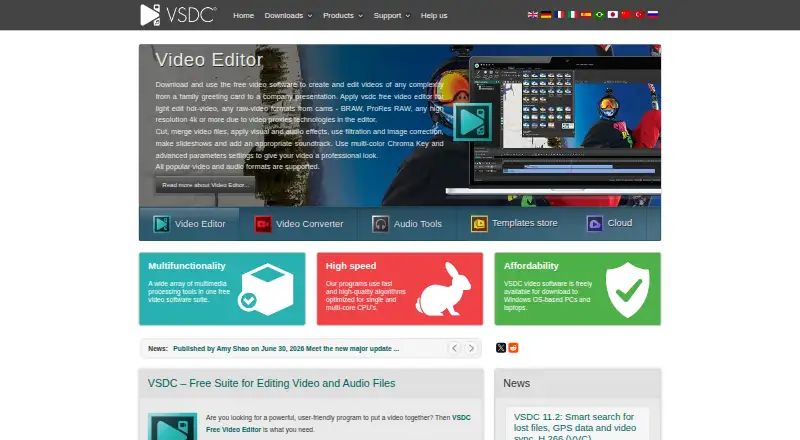
What VSDC Free Video Editor is
VSDC Free Video Editor is a nonlinear editor for creating and editing videos with visual and audio effects. Its free Windows editor supports 4K, 5.3K, and video up to 8K at up to 120 frames per second. The maker says free exports have no watermark and face no file-size or duration limits. The editor includes more than 200 video effects, filters, and color grading tools, along with audio effects, animated text, and a subtitle editor. It can synchronize multicamera footage and switch between two videos captured from different angles. Export profiles cover Facebook, YouTube, Instagram, Twitter, and Vimeo, with direct YouTube uploads also available. The free editor is available on Windows and iOS, with desktop and mobile apps but no web app. Pro costs $29.99 a year on an annual subscription, and includes hardware acceleration, advanced masking and chroma key, audio waveform, voiceover, and video stabilization. Projects using a Pro feature cannot be exported without upgrading.
Good
- Free exports have no watermark or file-size limits.
- Supports video up to 8K at up to 120 fps.
- Includes more than 200 effects and filters.
- Offers multicamera synchronization and direct YouTube uploads.
Watch out
- No web app is available.
- Projects using Pro features require Pro to export.
- Pro costs $29.99 a year on an annual subscription.
Who it suits
VSDC suits people editing video on Windows or iOS who want high-resolution workflows and a free option without watermarks or file-size and duration limits. Those needing Pro features or web access should note the upgrade and platform limits.
Verdict
VSDC offers a broad set of editing tools in its free Windows editor, including high-resolution support and no stated watermark or file-duration limits. Check which features a project needs before relying on the free version, since Pro-feature projects cannot be exported without upgrading.
Plans and prices
From VSDC Free Video Editor's own pricing page, checked 20 Sep 2026.
| Plan | Price | What it gives you |
|---|---|---|
| Free | Free | Video editing · Audio and visual effects · Format support · 4K and higher-resolution workflows |
| Pro | $29.99 a year | Hardware acceleration · Advanced editing settings · Advanced video effects · Annual subscription |
| VSDC Free Video Editor | Free | Windows desktop editor · Pro features cannot be exported in the free version |
| VSDC Pro | $19.99 a year | Paid upgrade with Pro editing features · valid for a year |
| VSDC Video Editor Pro for iOS | — | 7-day trial for monthly and annual subscriptions · Watermark-free export and additional features · App Store lists monthly, annual, and perpetual options; prices vary by selection |
The facts
Each one read from VSDC Free Video Editor's own pages, with the date it was checked.
What it does
- 4K export
- Yeschecked 20 Sep 2026
- Audio and subtitles
- The editor supports audio effects and filters, animated text, and a subtitle editor.checked 7 Oct 2026
- Camera tools
- The free editor includes multicamera synchronization and switching between two videos captured from different angles.checked 7 Oct 2026
- Documentation
- The online user manual covers the program’s Free and Pro options together.checked 21 Oct 2026
- Editing
- The free editor supports 4K, 5.3K, and up to 8K video at up to 120 frames per second.checked 7 Oct 2026
- Effects
- The free Windows editor includes more than 200 built-in video effects, filters, and color grading tools.checked 7 Oct 2026
- Export integrations
- Export profiles are provided for Facebook, YouTube, Instagram, Twitter, and Vimeo, and the app can upload directly to YouTube.checked 7 Oct 2026
- Extensibility
- The EULA prohibits reverse engineering, decompiling, disassembling, repackaging, and derivative works, subject to applicable law.checked 21 Oct 2026
- GPS compatibility
- VSDC Pro can sync GPS telemetry from imported GPX files, including files from Garmin, Suunto, or the VSDC Track iPhone app.checked 7 Oct 2026
- Integrations
- The maker’s privacy page says the software can use YouTube API Services to render and upload videos to a YouTube account.checked 21 Oct 2026
- Key feature: DVD
- The editor can burn finished projects to DVD, according to TechRadar’s review.checked 21 Oct 2026
- Key feature: editing
- The editor supports non-linear projects in which media objects can be placed and timed independently.checked 21 Oct 2026
- Key feature: effects
- The product page describes video and audio effects, filters, and transitions as part of the editing toolkit.checked 21 Oct 2026
- Key feature: formats
- The editor supports a range of media formats and provides export profiles for different devices.checked 21 Oct 2026
- Key feature: screen capture
- The product includes a desktop screen capture tool for recording video and still images.checked 21 Oct 2026
Where it runs
- Apple app capabilities
- The iPhone app listing describes cutting, splitting, merging, rotating, speed changes, voiceovers, titles, and filters.checked 21 Oct 2026
- Desktop app
- Yeschecked 20 Sep 2026
The company
- Company founding
- The company About page says the VSDC project was founded in 2011.checked 21 Oct 2026
- Company headquarters
- The maker’s About page does not state a headquarters location.checked 21 Oct 2026
- Company legal name
- The maker’s EULA names the licensor as FLASH-INTEGRO LLC.checked 21 Oct 2026
- Company size
- The About page describes VSDC as an SMB company but does not give an employee count.checked 21 Oct 2026
Money
- Free edition
- The maker says free users can try most options, but projects using a Pro feature cannot be exported in the free edition.checked 21 Oct 2026
- Free plan
- Yeschecked 20 Sep 2026
- Free versus Pro limitation
- The manual says free users can try most options, but projects using a Pro feature cannot be exported without Pro.checked 7 Oct 2026
Alternatives to VSDC Free Video Editor
- 1

CyberLink PowerDirector
Free planAndroidiOSmacOSWindows9.0From $59.99 a year - 2

Captions
Free planAndroidiOSWebAPI9.0From $4.99 a month - 3
Vizard
Free planAndroidiOSWebAPI8.9From $29 a month - 4

InVideo AI
Free planAndroidiOSWebAPI8.9From $4 a month - 5
FlexClip
Free planAndroidiOSWebWindows8.8From $143.88 a year - 6

Simplified
Free planAndroidiOSWebAPI8.8From $19 a month