vfox
vfox is an open-source version manager for installing and switching among development runtimes and SDKs on Linux, macOS, and Windows.
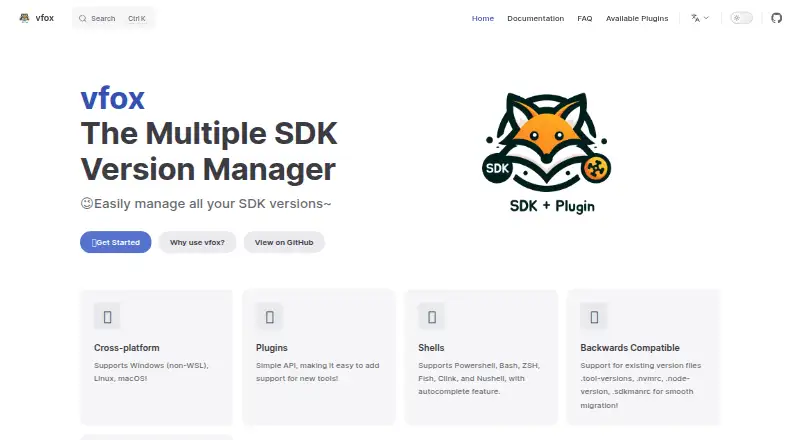
What vfox is
vfox is an open-source version manager for installing and switching among development runtimes and SDKs on Linux, macOS, and Windows. It can keep version selections at project, session, or global scope, and automatically select a version when you enter a project directory. Project settings can be recorded in `.vfox.toml` for sharing with a team. A plugin system adds support for tools and runtime environments, with community plugins listed in a public registry. Plugins that support legacy version files can read formats such as `.nvmrc`, and that ability is enabled by default. Documented shells include PowerShell, Git Bash, Bash, ZSH, Fish, CMD, Clink, Cmder, and Nushell; CMD is limited to global scope and is not recommended. For Docker, CI/CD, and other non-interactive shells, the documentation recommends `vfox exec` rather than interactive shell activation hooks. The guide also recommends group permissions for shared SDK storage on Linux and macOS, warning that world-writable permissions can allow others to change or remove files. vfox is released under the Apache 2.0 License.
Good
- Supports project, session, and global version scopes.
- Switches versions automatically when entering project directories.
- Shared project configuration can be stored in `.vfox.toml`.
- Supports a broad set of documented shells.
Watch out
- CMD supports only global scope and is not recommended.
- Proxy support is limited to HTTP(S).
- Shared SDK directories require careful permissions.
Who it suits
vfox suits developers who switch between projects that require different runtime environments or versions. Its shared `.vfox.toml` configuration can help teams keep project versions consistent.
Verdict
vfox offers runtime and SDK version management across Linux, macOS, and Windows, with project-level configuration and plugins. Its documented shell and proxy limitations are worth noting when choosing it for a workflow.
Plans and prices
From vfox's own pricing page, checked 4 Oct 2026.
| Plan | Price | What it gives you |
|---|---|---|
| vfox | Free | Apache 2.0 licensed |
The facts
Each one read from vfox's own pages, with the date it was checked.
What it does
- Audience
- The introduction recommends vfox for people switching between projects that require different runtime environments or versions.checked 4 Oct 2026
- Automatic switching
- It can automatically switch to the appropriate version when entering a project directory.checked 4 Oct 2026
- CI and containers
- For Docker, CI/CD, and other non-interactive shells, the FAQ recommends `vfox exec` because shell activation hooks are intended for interactive shells.checked 4 Oct 2026
- CI and scripts
- The vfox exec command runs commands in a managed SDK environment and is recommended for Docker, CI/CD, and other non-interactive shells.checked 4 Oct 2026
- Compatibility
- It supports existing version-file formats including .node-version, .nvmrc, and .sdkmanrc.checked 4 Oct 2026
- Configuration
- It saves tool version information in a .vfox.toml file that can be shared across projects and teams.checked 4 Oct 2026
- IDE integration
- The documentation gives an example of using vfox exec in a VS Code task to run a project with a selected SDK version.checked 4 Oct 2026
- Installation
- The quick start documents Windows installation through Scoop, winget, or a setup installer, and Unix-like installation through Homebrew, package repositories, or an install script.checked 4 Oct 2026
- Integrations
- The documentation lists community plugins for tools including Bun, Clang, CMake, Crystal, Dart, Deno, and .NET.checked 4 Oct 2026
- Legacy configuration
- Plugins with support can read legacy version files such as `.nvmrc`, and this capability is enabled by default.checked 4 Oct 2026
- License
- The site states that vfox is released under the Apache 2.0 License.checked 4 Oct 2026
- License and maintainer
- The site says vfox is released under the Apache 2.0 License and identifies Han Li in its copyright notice.checked 4 Oct 2026
- Notable limit
- The configuration guide says vfox currently supports only HTTP(S) proxy protocols.checked 4 Oct 2026
- Plugin registry
- The site describes its listed plugins as community plugins from the registry.checked 4 Oct 2026
- Plugins
- A plugin system lets users add support for tools and runtime environments, and the public plugin registry accepts community submissions.checked 4 Oct 2026
- Purpose
- vfox is a cross-platform version manager for installing and switching between development runtimes and SDKs.checked 4 Oct 2026
- Security
- The multi-user guide recommends group permissions for a shared SDK directory and warns that broad 777 permissions expose it to unauthorized users.checked 4 Oct 2026
- Security guidance
- For shared SDK storage on Linux and macOS, the guide recommends group permissions and warns that world-writable permissions can let users modify or delete others’ SDK files.checked 4 Oct 2026
- Shared configuration
- Tool versions can be recorded in `.vfox.toml` to share consistent project configuration with a team.checked 4 Oct 2026
- Shells
- Documented supported shells include PowerShell, Git Bash, Bash, ZSH, Fish, CMD, Clink, Cmder, and Nushell; CMD supports only global scope.checked 4 Oct 2026
- Shell support
- Supported shells include PowerShell, Git Bash, Bash, ZSH, Fish, CMD, Clink, Cmder, and Nushell; CMD supports only global scope and is not recommended.checked 4 Oct 2026
- Version scopes
- It supports project, session, and global version scopes, with automatic switching when entering a project directory.checked 4 Oct 2026
- What it does
- vfox is a cross-platform version manager for installing and switching development environments and runtime versions.checked 4 Oct 2026
The company
- Team use
- The multi-user guide describes sharing installed SDK files while users keep separate configuration and version selections.checked 4 Oct 2026
The full review of vfox
Overview
vfox is a cross-platform manager for selecting development runtimes and SDK versions, aimed at developers who move between projects with different requirements. Its project-aware switching and shareable configuration make it a strong fit for coordinated workflows, while its proxy and shell constraints may rule it out in some environments.
Key features
Versions can be set globally, for a session, or per project, with automatic switching on entering a project directory. That helps keep each project on its required runtime without changing the machine-wide default. Teams can record selections in .vfox.toml and share them, while each user can keep separate configuration and version choices even when SDK files are shared.
A plugin system expands support for tools and runtime environments, and the public registry accepts community contributions. Documented examples include Bun, Clang, CMake, Crystal, Dart, Deno, and .NET. Plugins that support legacy files can read formats such as .node-version, .nvmrc, and .sdkmanrc; this is enabled by default, so existing project conventions need not always be replaced.
For scripts, Docker, and CI/CD, vfox exec runs a command in a managed SDK environment. That is the practical route for non-interactive shells, where activation hooks intended for interactive use are not suitable. The documentation also shows it in a VS Code task. A notable constraint is proxy support: vfox currently supports HTTP(S) proxies only.
Pricing
vfox is open source under the Apache 2.0 License. Its sole listed plan, vfox, costs free and includes runtime management, dependency locking, configuration as code, and shell integration. There is no paid tier or seat or usage cap attached to this plan in the stated terms, making it a straightforward option for individual developers and teams that want version management without a subscription.
Platforms
vfox supports Linux, macOS, and Windows. Installation routes include Homebrew, package repositories, and an install script on Unix-like systems, plus Scoop, winget, or a setup installer on Windows. Documented shells include PowerShell, Git Bash, Bash, ZSH, Fish, CMD, Clink, Cmder, and Nushell. CMD is limited to global scope and is not recommended, so users relying on project-level switching should choose another supported shell. On Linux and macOS, shared SDK storage should use group permissions; world-writable access can let other users alter or delete installed SDK files.
Who it's for
vfox suits developers working across projects that require different runtime versions, particularly teams that want to commit shared version selections while preserving individual settings. Its broad shell support and plugin model also make it useful when projects span several tools. It is less suitable for CMD-only workflows that need project or session scopes, or for networks requiring a proxy protocol beyond HTTP(S).
Pros and cons
- Pros: Project, session, and global scopes with automatic directory switching keep version choices aligned with the task at hand.
- Pros: Shareable .vfox.toml, community plugins, and legacy version-file support can reduce friction across teams and existing projects.
- Pros: Free Apache 2.0 licensing and vfox exec cover both local development and non-interactive automation.
- Cons: CMD supports global scope only, limiting its usefulness for project-specific version management.
- Cons: HTTP(S)-only proxy support excludes workflows dependent on other proxy protocols.
- Cons: Shared SDK storage requires careful permissions on Linux and macOS to prevent other users from modifying installed files.
Alternatives
For related options, see Development Environment Management Tools and Development Environment Managers.
- ActiveState Platform is worth considering for an organization-oriented option with a free plan limited to public projects and a paid organization tier with custom pricing.
- devenv is another free, open-source choice if requiring Nix is acceptable; it works on Linux, macOS, and WSL.
- Flox may suit readers who want a free CLI and catalog access plus FloxHub environments, including three private environments on its Personal plan.
- Nix is a free, open-source package manager for readers seeking package management rather than vfox's focused runtime-version switching.
- PortBay offers a free Community plan with limits including up to six projects, two sandboxed runs, and one Mac.
- DDEV is a free Apache 2.0 option for readers comparing another cross-platform development tool.
- Devilbox is a free alternative for readers evaluating a different development environment tool.
- FlyEnv may fit readers who need a free local-sites option, with its Free plan capped at three local sites and three custom projects per runtime.
Verdict
Choose vfox if you regularly switch among projects with different runtime requirements and want shared, project-level version selections without a license cost. Its scope controls, plugins, and automation command make that focused job compelling; look elsewhere if your shell is CMD or your network depends on a non-HTTP(S) proxy.
Alternatives to vfox
- 1

DevPod
Free planOpen sourceLinuxmacOSSelf-hostedWindows7.4Free plan - 2
nvm
Free planOpen sourceLinuxmacOSSelf-hostedWindows7.4Free plan - 3

ActiveState Platform
Free planWebAPILinuxmacOS7.2Free plan - 4

Flox
Free planWebExtensionLinuxmacOS7.1From $20 a month - 5
GHCup
Free planWebLinuxmacOSSelf-hosted7.0Free plan - 6

devenv
Free planWebLinuxmacOSWindows6.9Free plan