
Vectorization.eu
Vectorization.eu converts bitmap images into scalable vector files through a web tool, with an API available for batch conversion.
What Vectorization.eu is
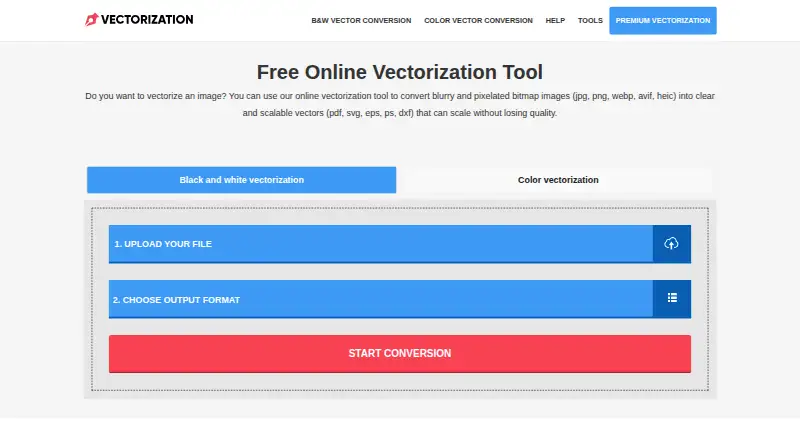
Vectorization.eu converts bitmap images into scalable vector files through a web tool, with an API available for batch conversion. Supported inputs include JPG, BMP, PNG, TIFF, WEBP, AVIF, and HEIC; vector outputs include EPS, PS, PDF, DXF, and SVG. Its full-color converter offers tracing controls such as clustering, curve fitting, color precision, gradient step, speckle filtering, corner threshold, segment length, and splice threshold. The site recommends images around 1000px in size or no larger than 1MB for best results. Listed uses include logos, screen printing, vinyl cutting, embroidery, digital printing, laser cutting, engraving, CNC, and 3D printing. The API can be integrated into a website or application and supports tools and languages including cURL, Java, .NET, Node.js, PHP, Python, and Ruby. Free API testing is available before purchasing a subscription. The site says submitted data is removed within a few hours, and its color converter says files are not saved on the server.
Good
- Free online conversion requires no registration.
- Supports common bitmap inputs and five vector outputs.
- Tracing controls allow adjustments to full-color conversion.
- API supports batch conversion and multiple languages.
Watch out
- Best-results guidance recommends images around 1000px or at most 1MB.
- Paid subscriptions require a minimum of 50 images.
Who it suits
It suits people who need to convert bitmap artwork into vector formats for print, cutting, engraving, or related listed uses. Developers can also consider its API for batch conversion and application integration.
Verdict
Vectorization.eu offers an unr egistered web converter alongside an API for batch workflows. Check its recommended image size and subscription image minimum against your expected use.
Plans and prices
From Vectorization.eu's own pricing page, checked 30 Sep 2026.
| Plan | Price | What it gives you |
|---|---|---|
| Free online vectorization tool | Free | No registration required · converts bitmap images to vector formats |
| Free online vectorizer | Free | No registration · JPG, BMP, PNG, TIFF, WEBP, AVIF and HEIC input · EPS, PS, PDF, DXF and SVG output · free |
| Yearly Subscription | $0.05 a year | Minimum 50 images per month · Renews annually |
| API yearly subscription | $0.05 a year | Per image · Minimum 50 images per month · renews annually |
| Monthly Subscription | $0.08 a month | Minimum 50 images · One-time payment |
| API monthly subscription | $0.08 a month | Per image · Minimum 50 images · one-time payment |
| Starter | $2.50, paid once | 160 credits · Up to 16 vectorizations · Up to 2 VectorArt generations · Free customer support · Continuous updates · pay once, use anytime |
| Professional | $20, paid once | 6,000 credits · Up to 600 vectorizations · Up to 75 VectorArt generations · Free customer support · Continuous updates · pay once, use anytime |
| Ultimate | $80, paid once | 24,000 credits · Up to 2,400 vectorizations · Up to 300 VectorArt generations · Free customer support · Continuous updates · pay once, use anytime |
| Individual Subscription | Priced on request | Custom pricing for orders over 600 images · Contact for more information |
| API individual subscription | Priced on request | Orders over 600 images · custom pricing |
The facts
Each one read from Vectorization.eu's own pages, with the date it was checked.
What it does
- AI batch feature
- The premium product advertises batch vectorization for multiple files and processing in roughly two to five seconds.checked 15 Oct 2026
- AI vectorizer
- The premium AI tool accepts JPG, PNG, BMP, WEBP, AVIF and HEIC and produces vector artwork from uploads.checked 15 Oct 2026
- API
- The API supports batch conversion and can be integrated into a website or application to process customer files.checked 30 Sep 2026
- API authentication
- The documented endpoint uses an Authorization secret key and multipart file fields.checked 15 Oct 2026
- API availability
- A public image-vectorizer API accepts uploaded raster files and returns vector files.checked 15 Oct 2026
- API batch processing
- The API documentation describes batches of 500, 1,000 or more images and processing customer uploads from another website.checked 15 Oct 2026
- API integrations
- The API page lists cURL, Java, .NET, Node.js, PHP, Python, and Ruby as supported languages or tools.checked 30 Sep 2026
- API languages
- The API example is documented for cURL, Java, .NET, Node.js, PHP, Python and Ruby.checked 15 Oct 2026
- API overage behavior
- The API stops working when the purchased image limit is reached, with upgrades handled through support.checked 15 Oct 2026
- Black-and-white conversion
- The main converter supports dedicated black-and-white vectorization.checked 15 Oct 2026
- Chrome extension adoption
- The Chrome Web Store listing showed 12 users when opened.checked 15 Oct 2026
- Chrome extension details
- The extension was version 1.0.0, updated September 1, 2024, and listed at 18.3 KiB.checked 15 Oct 2026
- Chrome privacy declaration
- The extension publisher declares that it does not collect or use user data and does not sell it to third parties.checked 15 Oct 2026
- Color conversion
- Color tracing exposes controls for speckle filtering, color precision, gradient steps, corner threshold, segment length, splice threshold and curve fitting.checked 15 Oct 2026
- Converter licence
- The vector-file converter credits CairoSVG and Inkscape and states that they are licensed under GNU LGPL-3.0 and GNU GPLv2.checked 15 Oct 2026
- Data deletion
- The homepage says uploaded data are removed from the server within a few hours, while the privacy notice specifies automatic deletion of conversion files after three hours.checked 15 Oct 2026
- Documentation depth
- The help area contains API instructions and troubleshooting articles, but the general help page says it is still being updated.checked 15 Oct 2026
- External domain-data limitation
- Scam Detector said it could not find a domain creation date and displayed the domain age as less than one month.checked 15 Oct 2026
- External technical finding
- Scam Detector reported valid HTTPS, no blacklist detection and a 10/100 proximity-to-suspicious-sites score.checked 15 Oct 2026
- External trust criticism
- Scam Detector assigned vectorization.eu a trust score of 18.6 out of 100 and tagged it “New. Suspicious. Dubious.”checked 15 Oct 2026
- File size guidance
- The color converter recommends images around 1000px in size or no larger than 1MB for best results.checked 30 Sep 2026
Where it runs
- Browser editor
- The free editor runs in a browser, edits SVG paths, groups, colors and text, and exports SVG or PNG.checked 15 Oct 2026
The company
- Founded
- 2015checked 28 Sep 2026
Money
- Free API testing
- The API page offers free access for testing before purchasing a subscription.checked 15 Oct 2026
The full review of Vectorization.eu
Vectorization.eu is a web-based bitmap-to-vector converter with a developer API for batch processing. It suits designers preparing production artwork and developers handling customer uploads; the free, no-registration route is the most compelling option, while paid plans make more sense only when you can meet their image minimums.
Overview
The service accepts JPG, BMP, PNG, TIFF, WEBP, AVIF and HEIC files and exports EPS, PS, PDF, DXF or SVG. That combination reaches well beyond ordinary web graphics. Vectorization.eu cites screen printing, vinyl cutting, embroidery, digital printing, laser cutting, engraving, CNC and 3D printing as intended applications, so the output formats are relevant to both design and fabrication workflows.
Its color converter exposes controls for clustering, curve fitting, color precision, gradient steps, speckle filtering, corner thresholds, segment length and splice thresholds. These settings provide useful control over how photographic or complex artwork is traced, although they also make the tool better suited to users who understand vector-tracing trade-offs than to people seeking a completely automatic result. The service recommends source images around 1000px or no larger than 1MB for best results, an important constraint when preparing larger artwork.
The project began as a raster-to-vector app in 2015 and is operated by a Europe-based team. Submitted data is removed from the server within a few hours, and the color-converter page says files are not saved. The homepage also says registration and personal information are unnecessary for image conversion.
Key features
The API adds batch conversion to the browser workflow and can be embedded in a website or application that processes customer files. Documentation lists cURL, Java, .NET, Node.js, PHP, Python and Ruby, giving teams several conventional integration paths. Free API access for testing lets developers validate an in-app workflow before committing to a subscription, which lowers the risk of choosing it for a customer-facing service.
Full-color tracing is the stated mode, and the adjustable parameters are valuable when a logo, print file or cutting pattern needs a different balance of detail, smoothing and noise removal. Users who only need occasional conversions can stay in the browser and avoid an account. Support is offered to people who run into trouble or are unhappy with results, though no response-time commitment is given.
Pricing
| Plan | Price and terms | Best fit |
|---|---|---|
| Free online vectorization tool | free; no registration required | Occasional conversions and initial evaluation |
| Yearly Subscription | $0.05 a year, billed and renewed annually; minimum 50 images per month | Recurring workflows that can consistently use the quota |
| Monthly Subscription | $0.08 a month, one-time payment; minimum 50 images | A defined batch needing at least 50 images without an annual renewal |
| Individual Subscription | Custom pricing; contact for information; custom orders over 600 images | Higher-volume requirements |
The free tier is unusually frictionless because it needs no account, but it is aimed at one-off work rather than sustained automation. The yearly and monthly prices are low as stated, yet their 50-image minimums mean a light user may pay for capacity they do not consume. The yearly option renews annually; the monthly option is described as a one-time payment rather than an automatic renewal. Orders above 600 images move to individual pricing, so larger operations must request a quote.
Platforms
Vectorization.eu is available through the web and API. The API's language and tool examples make it suitable for server-side integration, while the browser converter covers users who do not need an application workflow.
Who it's for
Choose it for production-oriented vector deliverables, especially EPS, DXF or PDF, or when a site or app must convert customer files in batches. It is also a practical fit for users who value short server retention and no-registration access. Look elsewhere if you need a desktop-first workflow, a generous free quota, or paid usage without a minimum image commitment.
Pros and cons
Pros
- Broad input and output coverage: modern bitmap inputs and fabrication-friendly vector formats support varied production jobs.
- Granular color tracing: numerous controls allow users to tune smoothing, detail and noise handling.
- API with free testing: batch conversion and broad language support let developers prototype before subscribing.
- Low-friction privacy posture: conversion requires no registration, with files removed within hours or not saved according to the converter page.
Cons
- Paid minimums: yearly and monthly subscriptions require at least 50 images, which weakens their appeal for sporadic use.
- Input guidance is limited: the recommended 1000px/1MB range may require preparation for larger source files.
- Settings demand expertise: the many tracing controls offer precision but can overwhelm users expecting one-click results.
- High-volume pricing is not transparent: orders over 600 images require custom pricing.
Alternatives
VTracer is the better choice for open-source, self-hosted or desktop use across Linux, macOS and Windows, with an MIT license and no paid plan. Vecto suits Windows users wanting either a free MIT-licensed build or a Microsoft Store purchase. VectorIt is a free, open-source desktop app for Windows, macOS and Linux. SVGcode offers a free, no-login option across Android, web and Windows. Adobe Capture is the mobile-oriented alternative for Android and iOS users already comfortable with Creative Cloud. AI Vectorizer provides an API and web service, but its free tier limits users to two Classic conversions per rolling 24 hours, 15MB files, watermarked free SVGs and 48-hour retention. Autotracer is a straightforward free web option with 6MB uploads, 5000×5000 dimensions and 1–256 colors. ImageTracerJS is a free web, API or self-hosted alternative with no paid plans or stated usage limits.
Verdict
Vectorization.eu is a strong fit for designers and developers who need full-color tracing, production-ready formats and batch API conversion without creating an account. Its main reason to choose is the combination of flexible controls, fabrication-oriented outputs and free API testing. Its main reason to look elsewhere is the 50-image minimum on paid plans, which makes a dedicated desktop or unrestricted free alternative more suitable for occasional or low-volume work.
Alternatives to Vectorization.eu
- 1
SVGcode
Free planOpen sourceAndroidWebmacOSSelf-hosted7.6Free plan - 2
Avidemux
Free planOpen sourceWebLinuxmacOSWindows7.3Free plan - 3
WinTopo
Free planWindows7.2£150 one-time - 4

Vectorizer.AI
WebAPILinuxmacOS7.1From $9.99 a month - 5

Vecto
Free planLinuxmacOSWindows6.7$7.99 one-time - 6

AI Vectorizer
Free planWebAPI6.6From $49.90 a month