
Adobe Capture
Adobe Capture is a free mobile app for turning visual material into assets for creative projects.
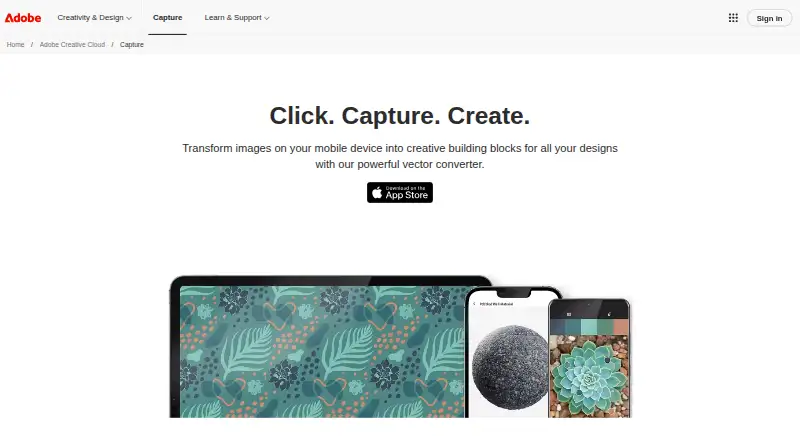
What Adobe Capture is
Adobe Capture is a free mobile app for turning visual material into assets for creative projects. It can create colors, patterns, shapes, looks, materials, type, and brushes, and convert images into clean, scalable vector artwork. For typography, it identifies fonts in images and suggests similar fonts for a Creative Cloud account. Image tools can remove or blur a background or replace it with a solid color. Capture also records voice and sound effects and includes an Enhance Voice Recording feature. Assets saved to Creative Cloud Libraries sync with compatible Adobe desktop and mobile apps; Adobe names Photoshop, Illustrator, InDesign, After Effects, Premiere, Fresco, and Express among the compatible apps for graphics. Users can share libraries with a team from Capture. The app is available on Android and iOS. A free basic Creative Cloud membership includes 2GB of storage for file syncing and sharing. Android effects are not supported, and adjustments require devices meeting specified Camera2, hardware, and SDK requirements.
Good
- Creates a range of visual assets from images.
- Identifies fonts and suggests similar options.
- Records voice and sound effects.
- Creative Cloud Libraries sync with compatible apps.
- Team library sharing is available in the app.
Watch out
- Android does not support Capture effects.
- Android adjustments require specific device capabilities.
- Free basic Creative Cloud membership includes 2GB storage.
Who it suits
Capture suits people who want to turn images, typography, or sounds into assets for creative projects across Adobe apps. It is also relevant to teams sharing Creative Cloud Libraries.
Verdict
Adobe Capture brings image, typography, and sound asset creation to mobile devices, with Creative Cloud library sharing and syncing. Android users should note the effects limitation and the device requirements for adjustments.
Plans and prices
From Adobe Capture's own pricing page, checked 8 Oct 2026.
| Plan | Price | What it gives you |
|---|---|---|
| Adobe Capture | Free | Free app download · free Creative Cloud membership provides 2GB storage · optional extra 20GB listed at $1.99/month |
The facts
Each one read from Adobe Capture's own pages, with the date it was checked.
Where it runs
- Android feature limit
- Capture effects are not supported on Android; adjustments are supported only on Android devices meeting the stated Camera2, hardware, and SDK requirements.checked 8 Oct 2026
- Platforms
- Adobe’s help page identifies iPhone, iPad, and Android phones as supported devices.checked 8 Oct 2026
What it does
- Asset types
- Adobe lists colors, patterns, shapes, looks, materials, type, and brushes as asset types created with Capture.checked 8 Oct 2026
- Audio
- Capture records voice and sound effects and offers an Enhance Voice Recording feature.checked 8 Oct 2026
- Graphics
- Capture can remove or blur an image background, or replace it with a solid color.checked 8 Oct 2026
- Integrations
- Assets saved in Creative Cloud Libraries sync to compatible Adobe desktop and mobile apps; Adobe lists Photoshop, Illustrator, InDesign, After Effects, Premiere, Fresco, and Express among compatible apps for graphics.checked 8 Oct 2026
- Intended users
- Adobe presents Capture as a tool for turning visual inspiration into assets for use in creative projects across Adobe apps.checked 8 Oct 2026
- Library sharing
- Adobe says users can share their Creative Cloud Libraries with a team directly from Capture.checked 8 Oct 2026
- Purpose
- Adobe Capture turns images from a mobile device into creative assets for design projects.checked 8 Oct 2026
- Security and compliance
- Adobe’s Trust Center says the company undergoes independent audits and provides current security and compliance information for its solutions.checked 8 Oct 2026
- Storage limit
- The App Store listing says a free basic Creative Cloud membership includes 2GB of storage for file syncing and sharing.checked 8 Oct 2026
- Support
- Adobe directs Capture users to tutorials, FAQs, and community forums for learning and help.checked 8 Oct 2026
- Typography
- Capture identifies fonts in images and suggests similar fonts for a Creative Cloud account.checked 8 Oct 2026
- Vector creation
- Capture can turn images into clean, scalable vector images.checked 8 Oct 2026
The full review of Adobe Capture
Adobe Capture turns a phone camera into a source of reusable design, typography, and audio assets. It is most useful for Adobe users who want ideas gathered on the move to flow into desktop and mobile Creative Cloud applications. The free price is compelling, but Android limitations and only 2GB of included storage make the choice less straightforward for some users.
Overview
Capture is built for converting visual inspiration into working material rather than leaving it as a photograph. An image can become a palette, pattern, brush, type reference, or scalable artwork, while recorded sound can join the same creative workflow. That breadth suits designers, illustrators, video makers, and other Adobe-oriented creators who regularly move between mobile discovery and project work.
Its strongest advantage is continuity with Creative Cloud Libraries. Assets saved there sync to compatible Adobe applications, so Capture makes sense when the next stage of work happens in Photoshop, Illustrator, InDesign, After Effects, Premiere, Fresco, or Express. Users can also share a library with a team directly from the app. Someone working outside Adobe’s ecosystem gets fewer benefits from that integration and may prefer a focused vector or image-conversion tool.
Key features
Asset extraction and vector work
Capture creates colors, patterns, shapes, looks, materials, type, and brushes from images. This range is practical when one reference image needs to feed several parts of a project, not merely a color scheme. It can produce clean, scalable vector images, supports batch conversion, and exports SVG. Those capabilities give it a credible role in a vector workflow, especially for collecting source material away from a computer.
Typography and graphics
The app identifies fonts shown in an image and suggests similar fonts for a Creative Cloud account. That is useful for researching lettering in signs, packaging, or editorial references, although the result is a recommendation rather than a guarantee of an exact match. Capture can remove or blur a background, or replace it with a solid color, making quick isolation and reference preparation possible before an asset reaches a fuller editor.
Audio and library workflow
Capture records voice and sound effects and includes Enhance Voice Recording. This broadens it beyond a purely visual scanner: a location note, spoken idea, or raw effect can be captured alongside design references. Creative Cloud Library syncing keeps those assets available across supported Adobe desktop and mobile apps, and library sharing supports team handoff without leaving Capture.
Android users need to check expectations. Effects are not supported on Android, and adjustments work only on devices meeting Adobe’s Camera2, hardware, and SDK requirements. That makes the iOS experience the safer choice for anyone who depends on the full adjustment and effects toolset.
Pricing
Adobe Capture: free. The app download is free, with a free Creative Cloud membership that provides 2GB of storage for file syncing and sharing. That is enough for a modest reference library, but active teams or people collecting substantial media can reach the cap quickly. An optional extra 20GB is listed at $1.99/month.
There is no free trial because the core plan is already free. The plan has no seat charge, but storage is the practical constraint: choosing Capture does not provide unlimited space for libraries or synced files. Readers who need only occasional asset capture can stay on the free allocation; heavier users should budget for the additional storage or accept more frequent library housekeeping.
Platforms
Adobe Capture is available on Android and iOS. Feature parity is not complete: Android does not support effects, and its adjustment tools depend on specific Camera2, hardware, and SDK requirements. iOS is therefore the better fit when those controls are central to the workflow. Adobe provides tutorials, FAQs, and community forums for learning and support. Its Trust Center describes independent audits and current security and compliance information for Adobe solutions.
Who it's for
Choose Capture if you already use Adobe applications and want a single mobile intake point for vector art, type references, palettes, patterns, brushes, graphics, and sound. It is particularly well matched to designers and creative teams that rely on shared Creative Cloud Libraries. It is less suitable for users who need a standalone desktop vectorizer, substantial included storage, or unrestricted Android effects.
Pros and cons
Pros
- Broad asset coverage: one mobile app handles visual, typographic, vector, and audio capture.
- Useful vector output: scalable artwork, batch conversion, and SVG export support downstream design work.
- Adobe workflow integration: Libraries sync with major Adobe desktop and mobile apps and can be shared with a team.
- No purchase barrier: the app and basic Creative Cloud membership cost 0.00 USD.
Cons
- Small included storage: the free membership provides only 2GB for syncing and sharing.
- Android restrictions: effects are unavailable, and adjustments require qualifying hardware and software support.
- Best value depends on Adobe: users outside Creative Cloud gain less from the library and app integrations.
Alternatives
For a directory of more vector-focused choices, see Image Vectorization Software.
- VTracer is a free, open-source option for Linux, macOS, Windows, web, and self-hosted use.
- Vecto offers a free open-source build with no watermark, plus a $7.99 one-time Microsoft Store version for Windows 10/11.
- VectorIt is a free, open-source desktop app for Windows, macOS, and Linux.
- SVGcode is a free-to-use freemium tool for Android, web, and Windows that requires no login.
- Vectorization.eu provides a no-registration free online converter and a yearly subscription option.
- AI Vectorizer has a free tier with two Classic conversions per rolling 24 hours, a 15MB file limit, watermarked SVG exports, and 48-hour file retention.
- Autotracer is a free web vectorizer with a 6MB upload limit, 5000×5000 maximum dimensions, and 1–256 color output.
- ImageTracerJS is free with no paid plans or usage limits stated.
Verdict
Adobe Capture is the right choice for Adobe users who want broad, mobile-first asset gathering that moves directly into Creative Cloud projects. Its free entry price, SVG/vector tools, typography recognition, audio capture, and library sharing are substantial strengths. Look elsewhere if you need full Android effects, more than 2GB of included storage, or a focused standalone vectorizer without dependence on Adobe’s ecosystem.
Alternatives to Adobe Capture
- 1

Vectorization.eu
Free planWebAPIExtensionLinux7.7From $0.05 a year - 2
SVGcode
Free planOpen sourceAndroidWebmacOSSelf-hosted7.6Free plan - 3
Avidemux
Free planOpen sourceWebLinuxmacOSWindows7.3Free plan - 4
WinTopo
Free planWindows7.2£150 one-time - 5

Vectorizer.AI
WebAPILinuxmacOS7.1From $9.99 a month - 6

Vecto
Free planLinuxmacOSWindows6.7$7.99 one-time