
uv
uv is a free Python package and project manager written in Rust for macOS, Linux, and Windows.
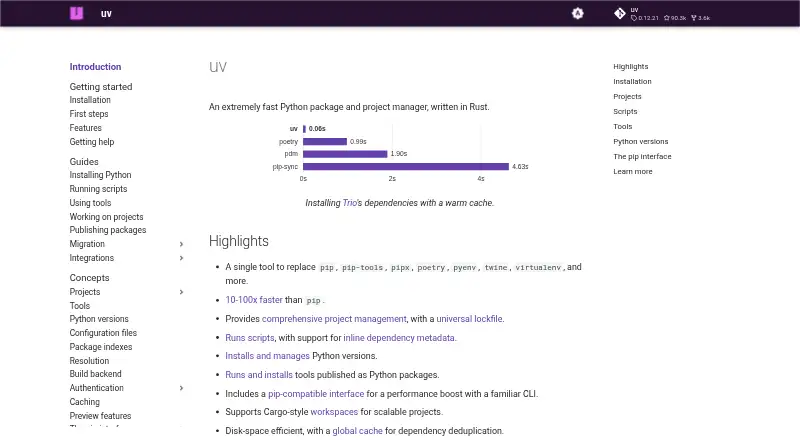
What uv is
uv is a free Python package and project manager written in Rust for macOS, Linux, and Windows. It manages project dependencies and environments, with support for lockfiles and workspaces, and can install, list, pin, or remove Python versions. It can run Python scripts with dependencies and run or install command-line tools from Python packages. Its pip-compatible interface can take on tasks handled by pip, pip-tools, pipx, poetry, pyenv, twine, and virtualenv, though its commands do not exactly match those tools. The documentation describes uv as 10–100x faster than pip. It supports source distributions, wheels, requirements.txt, and pylock.toml, along with offline installation and private registry authentication. Its default first-index strategy limits package candidates to the first index where a package is found. Credentials are not stored in uv.lock, but uv currently stores credentials in a plaintext file; native system secret storage is an experimental preview. Installation options include standalone installers, package managers, Docker, GitHub Releases, and Cargo.
Good
- Supports dependency resolution, lockfiles, and workspaces
- Can install packages offline
- Manages Python versions
- Runs scripts with dependencies and Python command-line tools
- Available for macOS, Linux, and Windows
Watch out
- Credentials are currently stored in a plaintext file
- Native system secret storage is an experimental preview
- Commands do not exactly match the tools it can replace
- Some platforms without a prebuilt wheel require a Rust toolchain
Who it suits
uv suits Python developers looking to manage project environments and dependencies, install Python versions, or run scripts and command-line tools. Its pip-compatible interface may appeal to those consolidating several Python tool workflows.
Verdict
uv combines Python package and project management with Python version and tool execution features. Note its command differences and current credential-storage limits when evaluating it for your workflow.
Plans and prices
From uv's own pricing page, checked 30 Sep 2026.
| Plan | Price | What it gives you |
|---|---|---|
| uv | Free | Open-source Python package and project manager |
The facts
Each one read from uv's own pages, with the date it was checked.
What it does
- Consolidated tooling
- uv is designed to replace tools including pip, pip-tools, pipx, poetry, pyenv, twine, and virtualenv.checked 30 Sep 2026
- Credentials
- Credentials are not stored in uv.lock; uv supports credentials through environment variables, URLs, netrc, and keyring.checked 30 Sep 2026
- Credential storage
- uv currently stores credentials in a plaintext file; native system secret storage is available as an experimental preview feature.checked 29 Sep 2026
- Dependency confusion protection
- By default, uv's first-index strategy limits package candidates to the first index where a package is found, to help prevent dependency confusion attacks.checked 30 Sep 2026
- Dependency resolution
- Yeschecked 22 Sep 2026
- Distribution
- uv can be installed with a standalone installer, PyPI, Homebrew, MacPorts, WinGet, Scoop, Docker, GitHub Releases, or Cargo.checked 29 Sep 2026
- Install methods
- uv offers standalone installers and is also available through PyPI, Homebrew, MacPorts, WinGet, Scoop, Docker, GitHub Releases, and Cargo.checked 30 Sep 2026
- Integrations
- The documentation lists integrations and guides for Docker, Jupyter, marimo, GitHub Actions, GitLab CI/CD, Pre-commit, PyTorch, FastAPI, and several package registries.checked 30 Sep 2026
- Intended users
- Astral says it builds high-performance developer tools for the Python ecosystem to help developers ship software faster.checked 29 Sep 2026
- Lockfile support
- Yeschecked 22 Sep 2026
- Offline installation
- Yeschecked 22 Sep 2026
- Package formats
- source distributions,wheels,requirements.txt,pylock.tomlchecked 22 Sep 2026
- Performance
- The documentation describes uv as 10–100x faster than pip.checked 29 Sep 2026
- pip compatibility
- uv provides a pip-compatible interface for common pip, pip-tools, and virtualenv commands.checked 30 Sep 2026
- Private registry auth
- Yeschecked 22 Sep 2026
- Project management
- uv manages project dependencies and environments and supports lockfiles and workspaces.checked 29 Sep 2026
- Projects
- uv manages project dependencies and environments and supports lockfiles and workspaces.checked 30 Sep 2026
- Purpose
- uv is an extremely fast Python package and project manager written in Rust.checked 30 Sep 2026
- Python versions
- uv installs and manages Python versions, including switching between versions.checked 30 Sep 2026
- Scripts and tools
- uv manages dependencies for single-file scripts and runs or installs command-line tools published as Python packages.checked 30 Sep 2026
- Security
- uv uses TLS with rustls and bundled Mozilla root certificates by default to verify HTTPS connections.checked 30 Sep 2026
Money
- Free plan
- Yeschecked 22 Sep 2026
The company
- Maker
- Astral says its mission is to make the Python ecosystem more productive by building high-performance developer tools, starting with Ruff.checked 30 Sep 2026
Where it runs
- Platform limits
- The documentation lists macOS, Linux, and Windows support; the PyPI installation note says platforms without a prebuilt wheel require a Rust toolchain to build from source.checked 30 Sep 2026
The full review of uv
Overview
uv is a Rust-based package and project manager for Python, best suited to developers who want dependencies, environments, Python versions, scripts, and command-line tools under one roof. Its breadth and documented speed make it a strong consolidation choice, provided you can accommodate some command differences and its current credential-storage limitation.
uv covers work often split among pip, pip-tools, pipx, Poetry, pyenv, twine, and virtualenv. Its documentation describes it as 10–100x faster than pip; that is a stated comparison, not a promise for every project. The pip-compatible interface eases adoption, but commands and behavior do not exactly match the tools it draws on, so existing workflows may need changes.
Compare it with other choices in our Python Package Managers and Package Managers directories.
Key features
Projects and dependencies
uv resolves dependencies and manages project environments, lockfiles, and workspaces. It supports source distributions, wheels, requirements.txt, and pylock.toml, as well as private registry authentication and offline installation. That combination suits both everyday Python projects and environments where network access or package sources are constrained.
Its default first-index strategy considers package candidates from the first index where a package is found, helping limit dependency-confusion risk. Credentials are not stored in uv.lock; authentication can use environment variables, URLs, netrc, or keyring. However, uv currently stores credentials in a plaintext file. Native system secret storage exists only as an experimental preview, a meaningful concern for users handling sensitive registry access.
Python versions, scripts, and tools
uv can install, list, pin, and uninstall Python versions, and run scripts with dependencies. It can also run or install command-line tools distributed as Python packages. Developers who currently coordinate separate version, environment, and tool-running utilities may value having these jobs in one manager.
Compatibility and integrations
Official integration guides cover Docker, Jupyter, GitHub Actions, GitLab CI/CD, Pre-commit, PyTorch, FastAPI, Bazel, and package registries. uv uses rustls with aws-lc-rs for TLS and bundled Mozilla root certificates by default. It supports macOS, Linux, and Windows, and works with CPython, PyPy, Pyodide, and GraalPy. On platforms without a prebuilt PyPI wheel, installing from PyPI requires a Rust toolchain to build from source.
Pricing
uv is free and open source: its uv plan costs nothing. There is no paid tier or trial to weigh against the core tool, making it a practical option for individual developers and teams that want Python package and project management without a software subscription.
Platforms
uv supports Linux, macOS, and Windows. It can be installed through a standalone installer, PyPI, Homebrew, MacPorts, WinGet, Scoop, Docker, GitHub Releases, or Cargo. Choose an installation route that fits your environment; PyPI users on platforms without a prebuilt wheel need Rust available to compile it.
Who it's for
uv is a good fit for Python developers who want one tool to manage project dependencies, environments, Python versions, scripts, and package-based command-line tools. Teams using private registries or working offline also get relevant support, with the caveat that current plaintext credential storage may not suit every security policy. Developers who rely on exact pip-family command behavior should account for differences before making it central to established workflows.
Pros and cons
- Broad Python workflow coverage: It can replace several separate package, environment, version, and tool-running utilities.
- Fast by design: The documentation’s 10–100x comparison with pip is attractive for users seeking faster package operations, though actual results will vary by workflow.
- Useful project controls: Dependency resolution, lockfiles, workspaces, offline installation, and private registry authentication cover common individual and team needs.
- Command differences: Pip compatibility is not exact, so scripts and habits built around other tools may need adjustment.
- Credential caveat: Credentials are currently stored in a plaintext file; native secret storage remains experimental.
- Source-build requirement in some cases: PyPI installation on systems without a prebuilt wheel requires a Rust toolchain.
Alternatives
Choose npm instead when your work centers on JavaScript packages and public package publishing; its free plan includes unlimited public packages and public registry access. Yarn is another free package manager for readers whose package workflow is not specifically Python-focused.
Cargo is the direct alternative for Rust package management and builds. For a free open-source build system, consider Gradle; for PHP dependency management, Composer is the relevant fit. pnpm and Conan are additional package-manager alternatives.
Pixi is worth comparing if its package-hosting plans better suit your needs: its open-source hosting plan includes a global CDN, 100GB of public packages, and unlimited channel users.
Verdict
Choose uv if you build in Python and want a fast, broad manager that brings dependencies, project environments, Python versions, scripts, and command-line tools together without a software fee. Look elsewhere if your workflow depends on exact pip-family behavior or requires native credential storage today; uv’s current plaintext credential file is the clearest reason to pause.
Getting started
- Open https://docs.astral.sh/uv/.
- Choose an installation route such as the standalone installer, PyPI, Homebrew, MacPorts, WinGet, Scoop, Docker, GitHub Releases, or Cargo.
- Install uv on Linux, macOS, or Windows.
- Use uv to manage project dependencies and environments, or Python versions.
- For a platform without a prebuilt PyPI wheel, use a Rust toolchain to build from source.
Limits worth knowing
The free uv plan is an open-source Python package and project manager, with no listed usage quota. Native system secret storage is an experimental preview, and platforms without a prebuilt PyPI wheel need a Rust toolchain to build from source.
Questions
Is uv free?
Yes. The uv plan is free and is an open-source Python package and project manager.
Which platforms does uv support?
The documentation lists Linux, macOS, and Windows. Supported Python implementations include CPython, PyPy, Pyodide, and GraalPy.
What kinds of package and project files does it support?
It supports source distributions, wheels, requirements.txt, and pylock.toml, along with dependency resolution, lockfiles, and workspaces.
Can uv install Python versions and run scripts?
Yes. It can install, list, pin, and uninstall Python versions, and run Python scripts with dependencies.
How can I install uv?
Options include a standalone installer, PyPI, Homebrew, MacPorts, WinGet, Scoop, Docker, GitHub Releases, and Cargo.
How does uv handle credentials?
It supports credentials through environment variables, URLs, netrc, and keyring, and credentials are not stored in uv.lock. It currently stores credentials in a plaintext file; native system secret storage is an experimental preview.