Pixi
Pixi is a free package management tool for developers who need reproducible project environments.
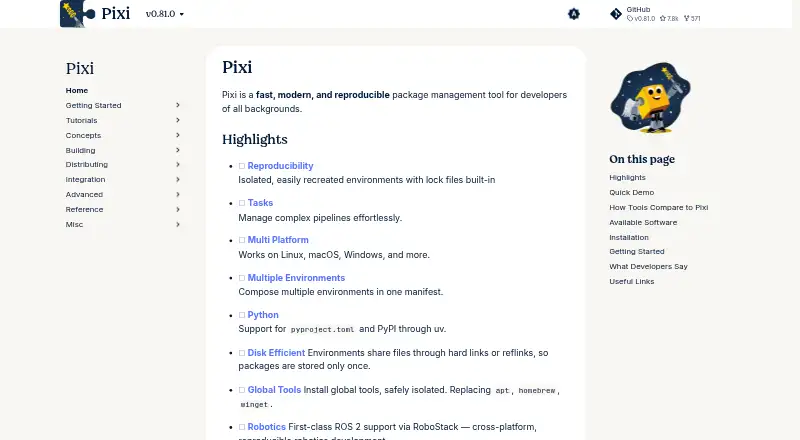
What Pixi is
Pixi is a free package management tool for developers who need reproducible project environments. It creates isolated environments that can be recreated from built-in lock files, and includes a task runner for project tasks and pipelines. Pixi supports Python and multiple other languages, plus pyproject.toml and PyPI through uv. It can install global tools in isolated environments. For robotics workflows, Pixi provides ROS 2 support through RoboStack for cross-platform development. Documented integrations include VS Code, JetBrains, Zed, RStudio, JupyterLab, GitHub Actions, and Direnv. The Python extension for VS Code can detect Pixi environments; a community-maintained Pixi extension adds task exploration and dependency management. Pixi runs on Linux, macOS, and Windows, with installation options including Homebrew, Windows Installer, Winget, Scoop, GitHub releases, and source installation. Separate package-hosting plans include free options and Pro hosting at €42 a month, billed €500 annually. Enterprise hosting is available by quote.
Good
- Recreates isolated environments from lock files.
- Includes a task runner.
- Supports Python and multiple other languages.
- ROS 2 support through RoboStack.
- Runs on Linux, macOS, and Windows.
Watch out
- Pro package hosting is €42 a month, billed €500 annually.
- Enterprise hosting price is available by quote.
- Pixi extension for VS Code is community-maintained.
Who it suits
Pixi suits developers working in robotics, data science, machine learning, and other software development workflows who need reproducible environments. Its documented platforms include Linux, macOS, and Windows.
Verdict
Pixi provides environment and task management across three desktop platforms, with language and robotics support. Its software is free, while package hosting has separate plans and limits.
Plans and prices
From Pixi's own pricing page, checked 30 Sep 2026.
| Plan | Price | What it gives you |
|---|---|---|
| Free (prefix.dev package hosting) | Free | Unlimited bandwidth · 500 Mb private package storage · 3 Gb public package storage · 1 user · 1 private channel · 500 Mb package size |
| Open Source (prefix.dev package hosting) | Free | Global CDN · 100GB public packages · Unlimited channel users |
| Pro (prefix.dev package hosting) | €42 a month | 10 Gb private/public package storage included · 5 users included · Unlimited private channels · Global CDN · Extra user: 10 Eur / month · Extra storage: 1 Eur / Gb · €500 annually |
| Enterprise (prefix.dev package hosting) | Priced on request | Large scale package hosting · SSO with SAML, SCIM · SLA uptime guarantees · Organizations · On-Prem option · Dedicated support channel · Advanced telemetry for traffic · Get a Quote |
The facts
Each one read from Pixi's own pages, with the date it was checked.
What it does
- Enterprise controls
- Enterprise builds can lock allowed channels, proxy settings, certificates, and other policy-sensitive configuration.checked 30 Sep 2026
- Environments
- Pixi creates isolated environments that can be recreated using built-in lock files.checked 30 Sep 2026
- Global tools
- Pixi can install global tools in isolated environments.checked 30 Sep 2026
- Install methods
- Installation documentation lists Homebrew, Windows Installer, Winget, Scoop, GitHub releases, and source installation as options.checked 30 Sep 2026
- Integrations
- The documentation covers integrations with VS Code, JetBrains, Zed, RStudio, JupyterLab, GitHub Actions, and Direnv.checked 30 Sep 2026
- Languages
- Pixi supports Python and multiple languages, and supports pyproject.toml and PyPI through uv.checked 30 Sep 2026
- Lockfile support
- Yeschecked 20 Sep 2026
- Purpose
- Pixi is a fast, modern, reproducible package management tool for developers.checked 30 Sep 2026
- Robotics
- Pixi provides first-class ROS 2 support via RoboStack for cross-platform, reproducible robotics development.checked 30 Sep 2026
- Supply-chain security
- The maker describes publishing from GitHub Actions without API keys using trusted publishing and attaching Sigstore attestations to releases.checked 30 Sep 2026
- Support
- Enterprise support offers contracted response times, issue triage, supported versions, backports, and direct maintainer access.checked 30 Sep 2026
- Tasks
- Pixi includes a task runner for managing and running project tasks and pipelines.checked 30 Sep 2026
- VS Code
- The Python extension can detect Pixi environments, and a community-maintained Pixi extension adds task exploration and dependency management.checked 30 Sep 2026
- Who it serves
- The maker presents Pixi for robotics, data science, machine learning, and other software development workflows.checked 30 Sep 2026
Money
- Free plan
- Yeschecked 20 Sep 2026
The company
- Headquarters
- Berlin, Germanychecked 28 Sep 2026
The full review of Pixi
Overview
Pixi is a cross-platform package and environment manager for developers who want reproducible projects alongside a built-in task runner. It stands out for combining broad language support with a first-class route into ROS 2 development; its package-hosting plans are separate from the free software.
Key features
Pixi creates isolated environments that can be recreated from built-in lock files, making it a strong fit for teams that need consistent project dependencies across machines. Its task runner also manages project tasks and pipelines, so development workflows can live alongside environment configuration rather than relying on a separate task tool.
Python is supported alongside multiple other languages, and Pixi works with pyproject.toml and PyPI through uv. Developers can also install global tools in isolated environments. That breadth makes Pixi more than a Python-only choice, though readers seeking a tool focused solely on Python may prefer a narrower alternative.
For robotics work, Pixi offers first-class ROS 2 support through RoboStack, aimed at cross-platform, reproducible development. Its documentation also covers integrations with VS Code, JetBrains, Zed, RStudio, JupyterLab, GitHub Actions, and Direnv. In VS Code, the Python extension can detect Pixi environments; a community-maintained Pixi extension adds task exploration and dependency management.
Supply-chain measures include trusted publishing from GitHub Actions without API keys and Sigstore attestations attached to releases. Enterprise builds can restrict channels, proxy settings, certificates, and other policy-sensitive configuration. Contracted response times, issue triage, supported versions, backports, and direct maintainer access are enterprise support options, making the enterprise offering relevant to organizations with operational controls and support requirements.
Pricing
The Pixi software is free. Package hosting from prefix.dev has separate plans, so teams should choose based on storage, access, and governance needs rather than assuming the free tool includes unlimited private hosting.
- Open Source (prefix.dev package hosting): free. Includes a global CDN, 100GB of public packages, and unlimited channel users. This suits public package distribution where private storage is unnecessary.
- Free (prefix.dev package hosting): free. Includes unlimited bandwidth, 500 Mb of private package storage, 3 Gb of public package storage, one user, one private channel, and a 500 Mb package-size cap. The single seat and modest storage make it a practical starting point for an individual or small evaluation, but a team needing more users or private capacity will outgrow it.
- Pro (prefix.dev package hosting): €42 a month, billed €500 annually. Includes 10 Gb of private/public package storage, five users, unlimited private channels, and a global CDN. Additional users cost 10 Eur per month and extra storage costs 1 Eur per Gb. It fits teams that need multiple users and more storage, but annual billing and per-seat and storage charges matter as usage grows.
- Enterprise (prefix.dev package hosting): custom pricing. Offers large-scale hosting, SSO with SAML and SCIM, SLA uptime guarantees, organizations, an on-prem option, a dedicated support channel, and advanced traffic telemetry. It is aimed at organizations needing administration, deployment, or service guarantees beyond Pro.
Platforms
Pixi supports Linux, macOS, and Windows. Installation options include Homebrew, a Windows Installer, Winget, Scoop, GitHub releases, and source installation, giving users several routes across the three desktop platforms.
Who it's for
Pixi is suited to developers in robotics, data science, machine learning, and other software workflows who value reproducible environments and a task runner in one tool. Its multi-language support makes it a plausible shared choice across varied projects, while ROS 2 users get a particularly direct reason to consider it. Teams that need hosted private packages can start free, but should account for the free plan’s one-user and storage limits.
Pros and cons
- Pro: Built-in lock files and isolated environments support repeatable setups across Linux, macOS, and Windows.
- Pro: A task runner, global tool installation, and support beyond Python cover more of a project workflow than dependency installation alone.
- Pro: First-class ROS 2 support through RoboStack gives robotics developers a cross-platform reproducibility path.
- Pro: Enterprise controls and support options address policy and operational needs for larger organizations.
- Con: Package hosting is a separate paid-plan decision for teams that need more than the free plan’s one user, one private channel, and limited storage.
- Con: Pro is billed annually, with extra-user and extra-storage charges that can raise the cost as a team or repository grows.
- Con: The VS Code extension for task exploration and dependency management is community-maintained, unlike the Python extension’s environment detection.
Alternatives
For broader comparisons, see Python Package Managers and Package Managers.
- uv is another free, cross-platform option for readers comparing Python package tools.
- Poetry is a free alternative for Linux, macOS, and Windows.
- PDM is another free option across the same desktop platforms.
- conda is a free, BSD-licensed open-source command-line alternative for Linux, macOS, and Windows.
- Miniconda is free to download, install, use, and update; package access through Anaconda’s repositories is subject to its Terms of Service.
- pip-tools is a free command-line option installed per virtual environment, for Python 3.9 and later.
- conda-lock is free, MIT-licensed software installable through pip, conda, mamba, pipx, or condax.
- Hatch is a free, MIT-licensed Python project manager.
Verdict
Choose Pixi if you want reproducible cross-platform environments with task management, especially for multi-language work or ROS 2 development. Its free software and broad workflow support are compelling; look elsewhere if your priority is a simpler Python-focused tool, or plan carefully if private package hosting needs exceed the free tier’s tight seat and storage caps.