Userplay
Userplay is playtesting infrastructure for game studios, organizing player recruitment, game distribution, session capture, review, and feedback in one workf…
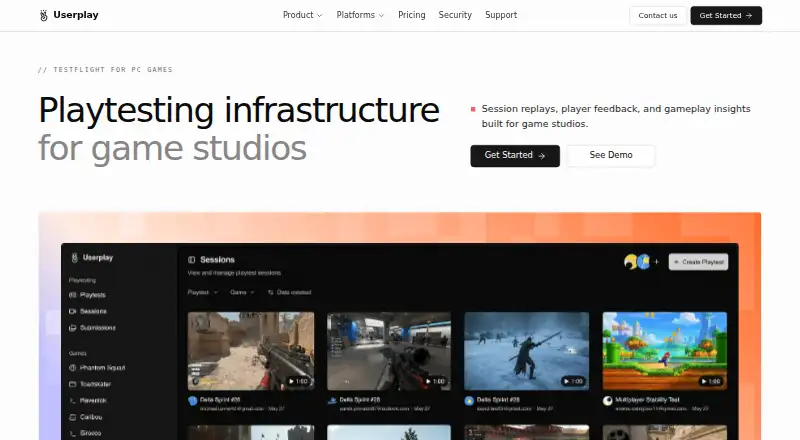
What Userplay is
Userplay is playtesting infrastructure for game studios, organizing player recruitment, game distribution, session capture, review, and feedback in one workflow. Studios can recruit and screen playtesters from Discord communities, distribute keys, and review session replays. The platform surfaces bugs, feedback, and standout gameplay moments, and provides voice transcripts to help teams understand player responses. Post-playtest surveys and custom forms collect structured feedback. Userplay lists compatibility with game engines including GameMaker, Defold, Godot, Unity, and Unreal Engine, as well as several game stores, operating systems, and web games. Discord integration supports recruitment and key distribution; Mailchimp synchronization supports targeted campaigns. The browser recorder captures configured tracks locally, then uploads video and audio after the session. Microphone capture is off by default, webcam video is not captured, and players must consent before recording. Production and recording data is hosted in the United States, with encryption in transit and at rest.
Good
- Recruit and screen players from Discord communities.
- Session replays surface bugs and gameplay moments.
- Voice transcripts and custom surveys support feedback review.
- Microphone capture is off by default.
- Players must consent before recording begins.
Watch out
- Indie plan supports up to 10 seats.
- Indie plan supports up to 1,000 players.
- Production and recording data is hosted in the United States.
Who it suits
Userplay suits game studios that need to recruit playtesters, distribute builds, review sessions, and collect feedback in a shared workflow. Its plan limits may help studios assess fit by seat and player volume.
Verdict
Userplay combines recruiting, session review, and feedback collection for studio playtests. Compare the plan's seat, player, and recording-retention limits with your team's needs.
Plans and prices
From Userplay's own pricing page, checked 15 Oct 2026.
| Plan | Price | What it gives you |
|---|---|---|
| Indie | Free | Up to 10 seats · unlimited playtests · up to 1,000 players · 30-day recording retention · 25 announcement messages · Pay as you go |
| Essential | $99 a month | Up to 25 seats · unlimited playtests · up to 5,000 players · 30-day recording retention · 150 announcement messages · Billed annually |
| Starter | $199 a month | Up to 75 seats · unlimited playtests · up to 10,000 players · 90-day recording retention · 400 announcement messages · Billed annually |
| Studio | $359 a month | Up to 125 seats · unlimited playtests · up to 25,000 players · one-year recording retention · 1,000 announcement messages · Billed annually |
The facts
Each one read from Userplay's own pages, with the date it was checked.
What it does
- Access controls
- Workspace roles, authenticated membership, signed playback URLs and tenant isolation control recording access.checked 15 Oct 2026
- Announcements
- Announcements can be scheduled for Discord, including playtest, key-drop and player-group messages.checked 15 Oct 2026
- API and documentation
- Userplay provides an API reference through docs.userplay.io and exposes API access as a plan feature.checked 15 Oct 2026
- Chrome data disclosure
- The extension disclosure says it handles user activity and website content and declares that data is not sold outside approved use cases.checked 15 Oct 2026
- Chrome developer listing
- The Chrome listing identifies the developer as Userplane at an address in Koramangala, Bengaluru, India, and marks the developer as a non-trader.checked 15 Oct 2026
- Chrome extension adoption
- The Chrome Web Store page displayed 4 users and no ratings when opened.checked 15 Oct 2026
- Chrome extension purpose
- The Userplay Playtest MCP Apps extension supports playtesting MCP apps and games across ChatGPT, Claude and Gemini with screen recordings, transcripts and gameplay events.checked 15 Oct 2026
- Chrome extension version
- The Chrome Web Store lists version 1.0.0, updated July 22, 2026, with an 808 KiB package size.checked 15 Oct 2026
- Data hosting
- Userplay states that all production platform and recording data is hosted in the United States.checked 1 Oct 2026
- Data location
- Userplay states that production platform and recording data is hosted in the United States.checked 15 Oct 2026
- Game compatibility
- Userplay lists compatibility with GameMaker, Defold, Godot, Unity, Unreal Engine, Steam, Epic Games, GOG, itch.io, Chrome, Windows, macOS, Linux, and web games.checked 1 Oct 2026
- Game engines
- The site lists GameMaker, Defold, Godot, Unity and Unreal Engine among compatible development tools.checked 15 Oct 2026
- Gameplay analysis
- Gameplay analysis surfaces key moments, issues and feedback and supports searching sessions through transcripts.checked 15 Oct 2026
- Gameplay recording
- The service records gameplay with player feedback without requiring game code changes, plugins or downloads.checked 15 Oct 2026
- Gameplay review
- Userplay provides session replays and automatically surfaces bugs, feedback, and standout gameplay moments.checked 1 Oct 2026
- Game storefronts
- Supported distribution channels listed by Userplay are Steam, Epic Games Store, GOG and itch.io.checked 15 Oct 2026
- Integrations
- Native integrations listed by Userplay are Discord for recruitment and announcements and Mailchimp for player-audience synchronization.checked 15 Oct 2026
- Key distribution
- Studios can store game keys in vaults, assign them to eligible players and record assignment and redemption.checked 15 Oct 2026
- Limit: recording duration
- The plan comparison limits an individual recording to up to 90 minutes.checked 15 Oct 2026
- NDAs
- Players can accept a studio's non-disclosure terms before a build becomes available.checked 15 Oct 2026
- Player CRM
- Userplay maintains a reusable player record and directory for people arriving through different channels.checked 15 Oct 2026
- Player insights
- The product provides invitation-to-completion funnels and allows playtest datasets to be exported.checked 15 Oct 2026
Money
- Limit: paid billing
- All published paid tiers show annual billing, while recording credits cost $4.50 per 30 minutes on a pay-as-you-go basis.checked 15 Oct 2026
The company
- Maker identity
- The Chrome Web Store describes the product as built by Userplay Interactive.checked 15 Oct 2026
The full review of Userplay
Userplay is a playtesting platform for studios that want recruitment, gameplay review, and player feedback in one workflow. It suits teams running recurring tests, particularly those recruiting through Discord. Its free plan supports unlimited playtests, but player caps and shorter recording retention define when an upgrade makes sense.
Overview
Userplay brings player recruitment and screening, key distribution, session capture, review, and feedback collection together. Studios can recruit from Discord communities, then use replays, transcripts, surveys, and custom forms to understand both player behavior and feedback. Automatically surfaced bugs, comments, and standout moments can help teams navigate recorded sessions; the practical limits are the number of players, seats, announcement messages, and days of recording retention in each plan.
Key features
- Recruitment and distribution: Recruit and screen playtesters through Discord communities, and distribute keys through the Discord integration. Mailchimp synchronization supports targeted campaigns. This is useful for studios with an established community or campaign list, though player targeting is basic.
- Session review: Replays, voice transcripts, and automatically surfaced bugs, feedback, and standout gameplay moments give teams several ways to interpret a test. That makes the review workflow more than a video archive, while still leaving teams to decide which findings matter.
- Structured feedback: Post-playtest surveys and custom forms collect responses in a consistent format alongside recorded sessions.
- Recording and privacy: The browser recorder captures configured tracks locally and uploads video and audio in chunks after a session ends. Microphone capture is off by default, webcam video is not captured, and players must consent before recording starts. Production and recording data are hosted in the United States; data in transit uses TLS 1.2 or higher and data at rest uses AES-256 or equivalent encryption. Default recording retention is 12 months, with shorter periods configurable by workspace owners or per playtest.
- Game compatibility: Compatibility spans GameMaker, Defold, Godot, Unity, and Unreal Engine, as well as games distributed through Steam, Epic Games, GOG, itch.io, Chrome, Windows, macOS, Linux, and the web.
Pricing
The Indie plan is free, billed pay as you go, and allows up to 10 seats and 1,000 players, with unlimited playtests, 30-day recording retention, 25 announcement messages, and email support. It is a useful starting point for small teams, but its player ceiling and short retention can constrain larger or longer-running programs.
Essential costs $99 a month, billed annually. It raises the limits to 25 seats, 5,000 players, and 150 announcement messages, while keeping 30-day retention and unlimited playtests; priority support is included. This is the clearest step up for a team that needs more tester capacity but not longer recording storage.
Starter costs $199 a month, billed annually. It supports up to 75 seats, 10,000 players, 400 announcement messages, and 90-day retention, with unlimited playtests, multiplayer sessions, and priority support. Choose it when multiplayer testing or a longer review window matters.
Studio costs $359 a month, billed annually. Its limits rise to 125 seats, 25,000 players, and 1,000 announcement messages, with one-year retention, live gameplay sessions, and dedicated support. It is aimed at larger programs that need live sessions and greater capacity. All paid plans use annual billing, so the monthly price is not a month-to-month term.
Platforms
Userplay supports Linux, macOS, Windows, and the web. Its listed game compatibility includes desktop and browser games, alongside the named engines and storefronts.
Who it's for
Userplay is a strong fit for studios that want to connect Discord-based recruitment and key distribution with recording, session review, and structured feedback. Indie teams can begin without a subscription, while larger programs can buy more player capacity, retention, and support. It is less compelling for teams whose player-targeting needs exceed basic targeting or whose scale does not justify annual paid billing.
Pros and cons
- Pros: Unlimited playtests on every plan keep test frequency from being the main constraint; replays, transcripts, surfaced moments, and surveys bring several review tasks into one workflow; privacy controls make recording opt-in and leave webcam capture out.
- Cons: The free plan caps seats at 10 and players at 1,000, with only 30-day recording retention; paid plans are billed annually; player targeting is basic, which may not suit teams needing more specific recruitment.
Alternatives
Compare game playtesting platforms if you want to weigh Userplay against options across the category. Antidote is worth considering for a short, small-scale trial: its free trial lasts 14 days and covers one playtest, up to five community players, 20 survey questions, and sessions up to 20 minutes. FirstLook Engagement Analytics may suit teams prioritizing player-profile and email allowances, with a free tier offering 100,000 player profiles, up to 500 playtesters, and 1,000 emails per month.
PlayProbe offers a smaller free starting scope—one game, three tests, and 20 sessions per test—along with pre- and post-surveys and a results dashboard. Go Testify is another option for teams seeking unlimited playtesting and insight reports within one active project on its free Essential plan. AccelByte PlaytestHub is a free, open-source, self-hosted option that requires AccelByte Gaming Services (AGS) Extend.
Game Tester is an alternative for readers comparing game-testing software. Indieable may appeal to teams looking for a no-card, time-unlimited free plan covering tester recruitment and screening, keys and tracked BYO links, playtest rounds, feedback, and bug reports. Playcocola is another web-based alternative, with a free Hobbyist plan that includes one hour of video recording, thinking-aloud recording, text feedback, invitations to your own testers, and one-week video storage.
Verdict
Choose Userplay if your studio wants a single workflow for Discord-based recruitment, gameplay review, and structured feedback, with unlimited playtests even on the free plan. Its main trade-offs are finite player and seat allowances, short free-plan retention, basic targeting, and annual billing for paid tiers; teams that need more tailored recruitment or avoid annual commitments should compare alternatives.
Alternatives to Userplay
- 1

Antidote
Free planAndroidiOSWebLinux8.1From $99.95 a month - 2

Go Testify
Free planAndroidWebAPIWindows7.7From $250 a year - 3
FirstLook Engagement Analytics
Free planAndroidiOSWebAPI7.4From $149 a month - 4
AccelByte PlaytestHub
Free planOpen sourceWebAPILinuxmacOS7.3Free plan - 5

PlayProbe
Free planAndroidWebLinuxmacOS7.3From $19 a month - 6

We Playtest Games
Free planWebAPI7.3From $790 a year