Unmixr Dubbing
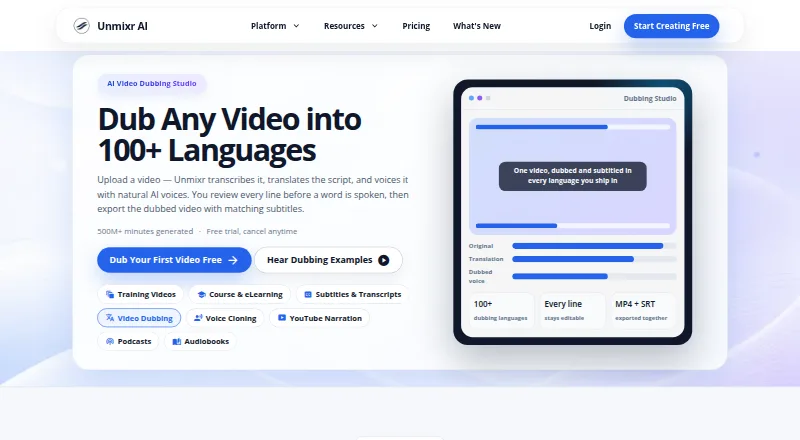
Unmixr Dubbing creates dubbed video or audio by transcribing speech, translating the script, and voicing it with AI voices assigned to detected speakers.
What Unmixr Dubbing is
Unmixr Dubbing creates dubbed video or audio by transcribing speech, translating the script, and voicing it with AI voices assigned to detected speakers. You can review and edit translated lines, split or merge segments, and regenerate only the parts you change. Timing and speaking speed can be adjusted segment by segment. Exports include dubbed media and translated subtitles in SRT or VTT format. The dubbing page describes support for 100+ languages, while plan details list 85. Uploads can be up to 60 minutes, with MP4, MOV, MP3, and WAV among the listed formats. Dubbing does not alter video frames or re-animate speakers’ lips. The free account provides 5,000 credits and watermarked exports up to three minutes; its FAQ distinguishes that from the seven-day trial, which includes 20,000 credits. Background music separation is available on paid recurring plans, not during the trial.
Good
- Edit translated lines and regenerate changed segments.
- Assign distinct voices to detected speakers.
- Adjust timing and speaking speed per segment.
- Export subtitles in SRT and VTT formats.
- Uploads can be up to 60 minutes.
Watch out
- Free exports are watermarked and capped at three minutes.
- Lite has no developer API.
- Dubbing does not alter lips or video frames.
- Trial excludes background music separation.
Who it suits
Unmixr Dubbing suits creators who need translated voice tracks and subtitles, with per-speaker voice assignment and editable timing. Check the listed language count and the free export limit if those matter to your workflow.
Verdict
Unmixr Dubbing combines translation, speaker-specific AI voices, and segment-level editing in one workflow. Its free account has a short, watermarked export limit, and dubbing does not provide lip synchronization.
Plans and prices
From Unmixr Dubbing's own pricing page, checked 15 Oct 2026.
| Plan | Price | What it gives you |
|---|---|---|
| Free | Free | 5,000 signup credits · up to 3-minute watermarked exports · one video up to 1 hour · 500 MB video |
| Lite | $9 a month | 100K credits/month · 7 hours transcription · 52 dubbing minutes · 1 voice-clone profile · audio-only MP3/WAV exports · $90/year |
| Starter | $19 a month | 400K credits/month · 28 hours transcription · 208 dubbing minutes · 5 voice-clone profiles · video workflows · API access · $190/year |
| Pro | $49 a month | 2.6M credits/month · 181 hours transcription · 1,354 dubbing minutes · unlimited voice-clone profiles · higher API limits · $490/year |
| Business | $99 a month | 6.5M credits/month · 451 hours transcription · 3,385 dubbing minutes · highest API limits · priority support · $990/year |
The facts
Each one read from Unmixr Dubbing's own pages, with the date it was checked.
What it does
- AI training privacy
- The privacy policy says user content and voice data are not used to train AI models.checked 15 Oct 2026
- API access
- Nochecked 20 Sep 2026
- API callbacks
- Long jobs run asynchronously and can send signed per-paragraph completion or failure callbacks.checked 15 Oct 2026
- API endpoints
- Version 2 documents short and long TTS, status, voices, cloned voices, credit balance and credit-estimate endpoints.checked 15 Oct 2026
- API limits
- Short TTS accepts 2,000 characters; long requests range from 30,000 to 200,000 characters by plan and reject excess with HTTP 422.checked 15 Oct 2026
- API protocol
- The developer service is a REST API over HTTPS using JSON and bearer-token authentication, returning MP3 or WAV.checked 15 Oct 2026
- Background audio
- The FAQ says background music separation is available on paid recurring plans but not in the free trial.checked 29 Sep 2026
- Content use
- The privacy policy states that user content and voice data are not used to train AI models.checked 29 Sep 2026
- Credit metering
- Dubbing consumes 1,920 credits per video minute and the same wallet also pays for voiceover and transcription.checked 15 Oct 2026
- Editable translation
- Users can edit translated lines, split or merge segments, and regenerate only changed segments.checked 29 Sep 2026
- Exports
- Exports include dubbed MP4, dubbed MP3, SRT or VTT subtitles, burned-in captions and translated transcripts.checked 15 Oct 2026
- File retention
- Terms state dubbing files are automatically deleted one year after creation, while other generated content is retained until deletion requests.checked 15 Oct 2026
- Input limit
- The dubbing FAQ says uploads can be up to 60 minutes and lists MP4, MOV, MP3, and WAV as common formats.checked 29 Sep 2026
- Integration listing
- GetApp describes Zapier integration and shared team workspaces alongside the REST API.checked 15 Oct 2026
- Integrations and API
- The pricing page lists developer API access on Starter, Pro, and Business plans, with tiered rate limits.checked 29 Sep 2026
- Language coverage
- The dubbing workflow supports more than 100 languages and multiple voices per language.checked 15 Oct 2026
- Latest release
- An October 13, 2026 release added script imports for transcripts, screenplays, SRT, VTT, DOCX, EPUB, PDF and PPTX with background processing for large files.checked 15 Oct 2026
- Limit: credit flexibility
- A reviewer requests credit rollover or more flexible top-ups for irregular workloads.checked 15 Oct 2026
- Limit: failed jobs
- One reviewer says four dubbed videos totaling about 200 minutes failed while credits were consumed and were not reimbursed.checked 15 Oct 2026
- Limit: interface
- A reviewer describes the interface as cluttered with many buttons and distracting elements.checked 15 Oct 2026
- Limit: support responsiveness
- Some AppSumo reviewers report unanswered support tickets or email and Discord messages.checked 15 Oct 2026
- Lip sync
- The FAQ states that dubbing does not re-animate speakers’ lips or alter video frames.checked 29 Sep 2026
The company
- Company facts
- LinkedIn describes Unmixr AI as a privately held 2–10-person company founded in 2023 and headquartered in Newark, Delaware.checked 15 Oct 2026
Money
- Free plan
- Yeschecked 20 Sep 2026
The full review of Unmixr Dubbing
Unmixr Dubbing is an AI dubbing tool for translating spoken audio and video into new voice tracks. It is best suited to creators and teams who want to revise translations and control voices by speaker. Its segment-level editing is a strong fit for localization work that needs correction, but not for videos that require lip-synced speech.
Overview
Unmixr combines speech transcription, translation, and AI voice generation in a workflow with review before dubbing. Users can edit translated lines, split or merge segments, and regenerate only the parts they change. That targeted control can save rework when a few lines need correction, though it makes human review part of the process rather than promising a finished result in one pass.
The system detects speakers and allows a distinct voice for each, helping keep dialogue differentiated. Users can adjust timing and speaking speed per segment, and exports include dubbed video or audio plus translated subtitles in SRT and VTT formats. Uploads can be up to 60 minutes; common formats include MP4, MOV, MP3, and WAV. Unmixr does not re-animate lips or change video frames, so it cannot deliver visual lip synchronization.
Key features
- Translation control: Edit lines, split or merge segments, and regenerate changed sections. This is useful for correcting localized dialogue without rerunning the entire piece.
- Speaker-specific voices: Assign separate AI voices to detected speakers, a practical advantage for interviews and dialogue with multiple participants.
- Segment timing: Adjust timing and speaking speed section by section to better align the dub with the video. It offers control over pacing, but does not make the speakers’ mouths match the new audio.
- Subtitles and media exports: Export dubbed video or audio and subtitles in SRT or VTT, giving users both a replacement voice track and subtitle files.
- Privacy and support: Unmixr says it uses TLS encryption, hashed password storage, access controls, and production-system isolation. It also says user content and voice data are not used to train AI models. Support is offered by email and Discord, with a stated aim to respond within 24 hours on business days.
Language coverage has a discrepancy: the dubbing page says more than 100 languages, while paid plan summaries specify 85 output languages. Buyers who need a particular language should confirm coverage before committing.
Pricing
Unmixr uses a freemium model. The free account provides 5,000 credits on signup and supports dubbing, but exports are limited to three minutes and carry a watermark. It has no trial. That is enough to assess a short clip, not to produce clean, longer-form deliverables.
Lite costs $9 a month, billed at $9 /mo or $90/year. It includes 100K credits per month, dubbing, and 85 languages, but no developer API. It is the lowest-cost paid option for users who need more than the free export allows and do not need API access.
Starter costs $19 a month, billed at $19 /mo or $190/year. It includes 500K credits per month, dubbing, 260 minutes listed, 85 languages, and a seven-day trial. Developer API access begins at this tier, with tiered rate limits, making it the entry point for API workflows.
Pro costs $49 a month, billed at $49 /mo or $490/year. Its 2.6M monthly credits and 1,354 minutes listed come with dubbing, 85 languages, and higher API limits. Business costs $99 a month, billed at $99 /mo or $990/year, for 6.5M credits, 3,385 minutes listed, the highest API limits, and priority support. These higher tiers suit heavier workloads; Business is the clearest fit when priority support matters.
The seven-day trial includes 20,000 credits. Background music separation is available on paid recurring plans, but not during the trial. The plan page also lists API access on Starter, Pro, and Business, despite the separate platform entry identifying API as a platform; Lite explicitly has no developer API.
Platforms
Unmixr is available on the web. API access is included with Starter, Pro, and Business plans, subject to tiered rate limits; Lite does not include it. The entry also identifies API as a platform, but this is not the same as access on every plan.
Who it's for
Unmixr is a sensible choice for creators, publishers, and teams adapting interviews or other spoken video and audio who want per-speaker voices, editable translations, subtitles, and segment-level timing control. It is less suitable when lip synchronization is essential, or when a free, watermark-free export is needed. The free cap is especially restrictive for work longer than three minutes.
Pros and cons
- Pros: Segment-level edits and regeneration let users fix specific translation or timing problems without redoing the whole dub.
- Pros: Distinct voices for detected speakers help preserve dialogue distinctions, while SRT and VTT exports support subtitle workflows.
- Pros: The free account enables dubbing, and paid plans scale from 100K to 6.5M monthly credits.
- Cons: Dubbing does not synchronize visible mouth movements with the translated speech, limiting its fit for close-up dialogue.
- Cons: Free exports stop at three minutes and are watermarked, so a usable longer deliverable requires a paid plan.
- Cons: Lite has no API access, and the stated language count differs between the dubbing page and paid plan summaries.
Alternatives
AI Dubbing Software and Text-to-Speech Software are category directories for comparing options by use case.
- HeyGen is worth considering for a free plan that allows up to three videos per month, each up to one minute, and is available on Android and iOS as well as web and API.
- pyVideoTrans is an open-source option with no feature limits and support for desktop, self-hosted, and web platforms; third-party API charges are paid separately.
- VideoLingo offers a free 15 minutes of video translation for English and Chinese videos, with bilingual subtitles and 480p output.
- CAMB.AI offers a one-time free 5K-credit plan and a paid Essentials plan at $5 a month with 10K credits per month.
- Perso Dubbing provides one free generation on signup, including dubbing, speech-to-text, and audio separation.
- Vidby offers a free plan with 30 credits, 70 languages, watermarked output, original and subtitle downloads, and automatic voice cloning.
- Vozo AI may suit a creator who wants a project-based free tier: it includes three projects, 20 AI points, about six AI dubbing minutes, one seat, and one concurrent task.
- DubDuck provides $10 in free credits for each new account; free dubbed videos are watermarked, and beta uploads are limited to 3.5 minutes and 50 MB.
Verdict
Choose Unmixr Dubbing if you need speaker-specific AI voices and the ability to correct translations and timing one segment at a time. Its strongest case is controlled localization with subtitle exports, backed by paid tiers that add substantial monthly credit allowances and API access. Look elsewhere if lip-synced visuals are a requirement or if the three-minute, watermarked free export is not enough to judge your intended workflow.
Alternatives to Unmixr Dubbing
- 1

Voicebox
Free planOpen sourceAndroidiOSWebAPI9.3From $12 a year - 2

Speechify
Free planAndroidiOSWebAPI9.0From $10 a month - 3
Resemble AI
Free planAndroidiOSWebAPI9.0From $280 a month - 4
iSpeech
Free planOpen sourceAndroidiOSWebAPI9.0Free plan - 5

Fliki
Free planAndroidiOSWebAPI8.8From $28 a month - 6
Voice.ai
Free planAndroidiOSWebAPI8.8From $5 a month