
Voicebox
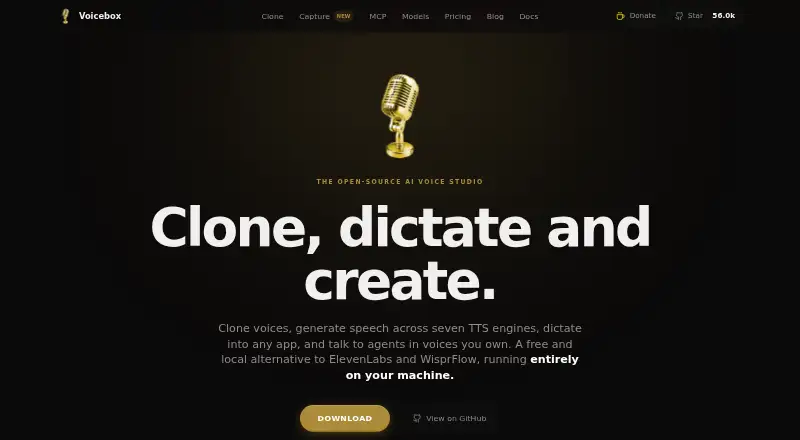
Voicebox is a free, open-source local AI voice studio for voice cloning, speech generation, dictation, and agent voice output.
What Voicebox is
Voicebox is a free, open-source local AI voice studio for voice cloning, speech generation, dictation, and agent voice output. Its desktop app can clone a voice from a short audio sample supplied by upload, microphone recording, or system capture. The maker lists seven text-to-speech engines, with options for cloning, preset voices, and delivery control. A timeline editor supports multi-voice narratives, track arrangement, trimming, and conversation mixing; effects include pitch shift, reverb, delay, and compression. Dictation uses a global shortcut to send a transcript to the focused text field or clipboard, with local Whisper models supporting 99 languages. The app works offline without an account, and its privacy policy says recordings, profiles, transcripts, generations, and settings are not sent to the maker. A local REST API covers speech generation and related functions. The Local plan is free forever with unlimited local generations and captures. Cloud backup and mobile sync are marked as coming soon, and cloud pricing and limits are not final.
Good
- Free local app with unlimited generations and captures
- Voice cloning from a short audio sample
- Timeline editor supports multi-voice narratives
- Dictation with local Whisper models for 99 languages
- Local REST API for speech generation
Watch out
- Cloud backup and mobile sync are coming soon
- Cloud pricing and limits are not final
- No free trial is listed
Who it suits
Voicebox may suit people creating voice content, dictating into apps, or adding voice output to agents. Its local operation and API may appeal to users who want offline workflows or client integrations.
Verdict
Voicebox combines voice creation, dictation, editing, and agent output in a local app. Its desktop features are distinct from the cloud and mobile offering, which is not yet available.
Plans and prices
From Voicebox's own pricing page, checked 14 Oct 2026.
| Plan | Price | What it gives you |
|---|---|---|
| Local | Free | No account required · all TTS engines · voice cloning · dictation and capture · MCP/personality features · unlimited local generations · free forever |
| Cloud | $12 a year | End-to-end encrypted backup · 25 GB storage · up to 5 devices · 30-day version history · sync across desktop and mobile · launch price; coming soon |
| Studio | $48 a year | 250 GB encrypted storage · unlimited devices · one-year version history · priority support · placeholder; pricing TBD; coming soon |
The facts
Each one read from Voicebox's own pages, with the date it was checked.
What it does
- Agent integration
- The built-in MCP server lets Claude Code, Cursor, Cline, Windsurf, and other MCP clients call Voicebox speech tools.checked 14 Oct 2026
- Agent integrations
- MCP-aware agents including Claude Code, Cursor, and Cline can speak through Voicebox using a cloned voice; the maker also describes a POST /speak endpoint for other clients.checked 2 Oct 2026
- API
- Voicebox exposes a local REST API for speech generation, voice profiles, model status, generation history, and health checks.checked 2 Oct 2026
- API access
- Yeschecked 20 Sep 2026
- API endpoint
- The documented local server runs at http://127.0.0.1:17493 and exposes OpenAPI documentation at /docs.checked 14 Oct 2026
- Architecture
- Voicebox uses a Tauri desktop shell, React and TypeScript frontend, and Python FastAPI backend communicating over localhost HTTP.checked 14 Oct 2026
- Audio effects
- Its effects pipeline supports pitch shift, reverb, delay, compression, and saved presets.checked 14 Oct 2026
- Cloud security
- The announced cloud backup encrypts library data on users’ devices, while servers store ciphertext and cannot decrypt it.checked 2 Oct 2026
- Cloud status
- Voicebox Cloud is marked coming soon, and the pricing page says cloud pricing and limits are not final.checked 2 Oct 2026
- Commercial use
- Yeschecked 20 Sep 2026
- Dictation
- A global keyboard shortcut records speech and places the transcript into a focused application field or the clipboard.checked 14 Oct 2026
- Documentation
- The documentation covers installation, Docker deployment, quick start, GPU acceleration, dictation, cloning, MCP, stories, troubleshooting, API reference, architecture, building, and contributing.checked 14 Oct 2026
- Languages
- 23checked 20 Sep 2026
- Licence
- The source repository is released under the MIT licence, permitting use, modification, distribution, sublicensing, and sale subject to the notice requirement.checked 14 Oct 2026
- Limit: cloning setup
- Dave Swift reported that models must be installed before cloning, clipped recordings can make cloning fail, and the app uses the operating system's selected microphone.checked 14 Oct 2026
- Limit: commercial polish
- HysenLabs characterized Voicebox as unsuitable for users needing a fully polished commercial product or prebuilt Linux binaries.checked 14 Oct 2026
- Limit: compliance
- HysenLabs noted that the project claims no compliance certification despite local processing being suitable for privacy-sensitive workflows.checked 14 Oct 2026
- Limit: effects bug
- Dave Swift reported that built-in effects were unimpressive and saving customized presets produced an error.checked 14 Oct 2026
- Limit: hardware dependence
- Dave Swift reported that local hardware directly affects generation speed and that stronger machines produce faster results.checked 14 Oct 2026
- Limit: remote API security
- Limpid Reviews warned that the localhost REST API is unauthenticated by default and could be risky if exposed on shared or networked machines.checked 14 Oct 2026
The company
- Company facts: acquisition record
- Crunchbase lists Voicebox Technologies Corporation as acquired by Nuance Communications and operating status closed.checked 14 Oct 2026
- Company facts: similarly named entity
- LinkedIn lists a separate Voicebox Technologies Corporation in Bellevue, Washington, founded in 2001, with 201–500 employees.checked 14 Oct 2026
- Company identity
- The Voicebox website footer identifies the maker as Spacedrive Technology Inc.checked 14 Oct 2026
Money
- Free plan
- Yeschecked 20 Sep 2026
The full review of Voicebox
Voicebox suits creators, developers, and accessibility users who want voice tools to run locally on a desktop. Its broad mix of cloning, dictation, editing, and agent output is compelling; cloud sync and mobile use remain future offerings.
Overview
Voicebox brings voice generation and cloning together with a story editor, sound effects, dictation, and local agent integrations. It is a strong fit for people who want to create or route speech without sending their work to the maker, but less suitable for anyone who needs a ready-to-use mobile or cloud workflow.
A voice clone can start with three seconds of audio, captured by upload, microphone, or system audio. The app supports dubbing and 23 languages. Potential uses range from game dialogue and audiobooks to accessibility readouts, podcast intros, and app or agent output. Voicebox is relevant to Voice Cloning Software, AI Voice Cloning Software, Text-to-Speech Software, and Voice Changer Software.
Key features
Generation and editing
Seven text-to-speech engines offer models for cloning and preset voices, with delivery controls. The timeline-based Stories editor arranges multiple voices and tracks, trims clips, and mixes conversations. That combination is better suited to shaping a longer narrative than simply producing isolated lines.
Pitch shift, reverb, delay, compression, and other effects have saved presets and live preview. These tools make the app useful for refining output in place, though the breadth of controls may be unnecessary for someone who only needs straightforward dictation or speech generation.
Dictation and agents
A global shortcut records speech and sends the transcript to the focused text field or clipboard. Local Whisper models support 99 languages, making dictation a practical companion to the creative tools rather than an afterthought.
MCP-aware agents such as Claude Code, Cursor, and Cline can speak through Voicebox using a cloned voice. A local REST API covers speech generation, voice profiles, model status, generation history, and health checks; a POST /speak endpoint is also described for other clients. These connections make Voicebox especially relevant to developers, while users seeking a hosted integration should note that the current API is local.
Pricing
The Local plan is free forever: it includes the full open-source app, unlimited local generations and captures, and no account requirement. It is the clear starting point for users who can keep their work on a supported desktop and do not need synced storage.
Cloud costs $12/year at the stated launch price and is marked coming soon, with pricing and limits not final. It is set to include 25 GB of encrypted storage, up to five devices, 30-day version history, and encrypted backup and sync. This is aimed at users who want a library carried across devices, but it is not yet an available substitute for the local plan.
Studio is shown at $48/year as a placeholder, with pricing still to be determined. Its proposed 250 GB storage, unlimited devices, one-year version history, and priority support target heavier multi-device use. Both paid plans are forthcoming; there is no free trial.
Platforms
Desktop downloads are listed for macOS on Apple Silicon and Intel, and Windows 64-bit; Linux users build from source. The platform list also includes Android, iOS, API, and self-hosted, but the mobile and cloud offering is marked coming soon. Docker deployment is documented. The current desktop app works offline without an account; the maker says recordings, profiles, transcripts, generations, and settings are not sent to it. Cloud backup is designed to encrypt library data on the user’s device, leaving servers with ciphertext they cannot decrypt.
Who it's for
Voicebox is a good choice for voice creators who want cloning, multi-voice editing, and effects in one local tool, and for developers who want agents or scripts to generate speech through a local API. Its dictation shortcut and broad Whisper language support also suit users who value local speech-to-text. It is a weaker choice for anyone who needs mobile access or cloud sync today, or who wants a simple hosted service rather than a desktop studio.
Pros and cons
- Pros: Three-second cloning samples lower the barrier to creating a voice profile.
- Pros: A timeline editor, multi-voice mixing, and live-preview effects cover substantial audio work in one app.
- Pros: Offline use, no-account access, and the stated local privacy approach favor users keeping recordings and generations on their own machine.
- Pros: Unlimited local generations and captures make the free plan unusually unconstrained for local use.
- Cons: Cloud sync and mobile use are not ready, despite being part of the planned offering.
- Cons: Linux requires a source build rather than a listed ready-made desktop download.
- Cons: Paid storage plans are coming soon, and Studio’s displayed price is explicitly a placeholder.
Alternatives
Fish Audio is worth considering for users who want a freemium alternative with API, web, desktop, and self-hosted platform coverage; its free tier specifies 8,000 monthly credits and generation caps.
VoiceStudio is a free alternative with API, web, desktop, and self-hosted platform coverage.
Kits AI is a freemium option for users who want voice conversion minutes and generative vocals; its free plan has 15 conversion minutes and no voice slots or download minutes.
CosyVoice suits readers seeking free, self-managed open-source software with downloadable source and models.
CereProc is a paid alternative with broad platform coverage and a cloud plan priced at £12.99 a month for one million credits.
GPT-SoVITS is a free alternative for readers comparing software available across API, desktop, web, and self-hosted platforms.
OpenVoiceChanger is a free alternative with API, Linux, self-hosted, and web platform coverage.
ModelTalker is a paid alternative for readers considering a personal voice service, priced at $100 a month.
Verdict
Choose Voicebox if you want a local-first voice studio that can move from a short cloning sample to edited narratives, dictation, and agent speech without an account. Its breadth and unrestricted free local use are the main reasons to choose it. Look elsewhere if cloud sync or mobile access is essential now, or if you prefer a hosted workflow over a desktop app.
Getting started
- Open the Voicebox website
- Choose a download for macOS, Windows, or Linux source build
- Install the desktop application
- Use local mode without creating an account
- Record or upload audio to create a voice profile
- Generate speech, dictate, or connect an agent through the local API
Limits worth knowing
The free Local plan has unlimited local generations and captures. Cloud and Studio plans are marked coming soon, and their pricing and limits are not final.
Questions
Is Voicebox free?
The Local plan is free forever at no cost and includes the full app, unlimited local generations and captures, and no account requirement.
What platforms does Voicebox support?
Platforms listed are Android, API, iOS, Linux, macOS, self-hosted, and Windows. Desktop downloads cover macOS Apple Silicon and Intel, Windows 64-bit, and Linux source builds.
Can Voicebox work offline?
Yes. The desktop app works offline without an account, and its privacy policy says recordings, profiles, transcripts, generations, and settings are not transmitted to the maker.
Does it provide an API?
Yes. Voicebox offers a local REST API for speech generation, voice profiles, model status, generation history, and health checks.
Are cloud plans available now?
Cloud and Studio plans are marked coming soon. The listed Cloud plan is $12 a year and Studio is $48 a year, with pricing and limits subject to change.
Alternatives to Voicebox
- 1

Speechify
Free planAndroidiOSWebAPI9.0From $10 a month - 2
Resemble AI
Free planAndroidiOSWebAPI9.0From $280 a month - 3
iSpeech
Free planOpen sourceAndroidiOSWebAPI9.0Free plan - 4

Fliki
Free planAndroidiOSWebAPI8.8From $28 a month - 5
Voice.ai
Free planAndroidiOSWebAPI8.8From $5 a month - 6

Altered Studio
Free planWebAPImacOSSelf-hosted8.6From $30 a month