
pyVideoTrans
pyVideoTrans is free, open-source software for translating spoken video into another language.
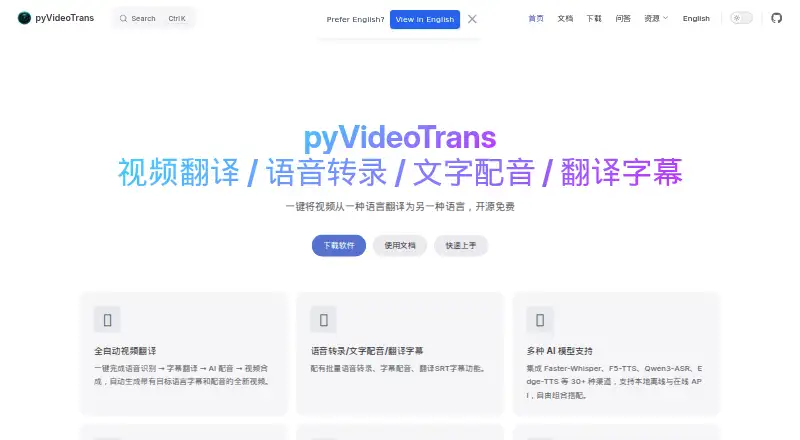
What pyVideoTrans is
pyVideoTrans is free, open-source software for translating spoken video into another language. It automates speech recognition, subtitle translation, AI dubbing, and video assembly to create output with translated audio and subtitles. It also handles batch transcription into timed SRT files, subtitle dubbing, and batch SRT translation while keeping timestamps and formatting. Users can choose from more than 30 channels, including Faster-Whisper, F5-TTS, Qwen3-ASR, and Edge-TTS, with local offline and online API options. The project offers a desktop GUI, WebUI, and command-line interface, plus guidance for remote access, server deployment, and Docker. It documents translation services such as DeepL, Google Translate, Microsoft Translate, DeepSeek, ChatGPT, Gemini, and LibreTranslate. The software is available for Windows, macOS, and Linux, and is described as having no feature limits or login requirement. Third-party API use may cost extra. It needs clear human speech and cannot remove hardcoded subtitles.
Good
- Free and open source under GPL-V3, with no feature limits.
- Offers desktop, web, and command-line interfaces.
- Supports batch SRT translation while preserving timestamps and formatting.
- Runs with or without an NVIDIA GPU.
- Includes voice cloning, subtitle translation, and AI dubbing.
Watch out
- Third-party API charges are paid separately by the user.
- Some local model channels require model downloads on first use.
- Cannot process media without clear human speech.
- Cannot remove hardcoded subtitles.
Who it suits
It suits content creators, educators, and individuals translating spoken videos into multiple languages. It may also fit users who want to choose between local models and online API channels.
Verdict
pyVideoTrans combines translation, transcription, and dubbing workflows in a free tool with several interface and model options. Check the speech and subtitle limitations, and account for any charges from third-party APIs.
Plans and prices
From pyVideoTrans's own pricing page, checked 5 Oct 2026.
| Plan | Price | What it gives you |
|---|---|---|
| pyVideoTrans | Free | Open source under GPL-V3 · no feature limits · third-party API charges are paid separately by the user |
The facts
Each one read from pyVideoTrans's own pages, with the date it was checked.
What it does
- Audience
- The maker identifies content creators, educators, and individual users translating videos into multiple languages as intended users.checked 5 Oct 2026
- Hardware
- The maker says it can run with or without an NVIDIA GPU, with CUDA acceleration available when supported hardware is present.checked 5 Oct 2026
- Integrations
- Documented translation channels include DeepL, Google Translate, Microsoft Translate, DeepSeek, ChatGPT, Gemini, and LibreTranslate.checked 4 Oct 2026
- Intended users
- The maker identifies content creators, educators, and individual users who want to translate videos into multiple languages as intended users.checked 4 Oct 2026
- Interfaces
- It offers desktop GUI, WebUI, and command-line interfaces for local use, remote access, server deployment, and Docker.checked 5 Oct 2026
- Local models
- Some integrated model channels require downloading their model files on first use, while local API channels can call a model service deployed by the user.checked 4 Oct 2026
- Model options
- The software supports local offline models and online APIs, including Faster-Whisper, F5-TTS, Qwen3-ASR, and Edge-TTS among 30+ channels.checked 5 Oct 2026
- Other tasks
- It can batch transcribe speech to timed SRT files, synthesize speech from text or subtitles, and translate SRT files while preserving their timecodes and format.checked 5 Oct 2026
- Pricing and licensing
- The maker describes the software as free and open source under GPL-3, with no feature limits or login requirement; third-party API charges are paid by the user.checked 4 Oct 2026
- Privacy
- The website privacy policy says the site may collect IP addresses, browser and device information, cookies, and analytics data.checked 4 Oct 2026
- Processing limitation
- The documentation says it can process audio or video containing clear human speech, cannot process material with only background music or visuals, and cannot remove hard subtitles.checked 4 Oct 2026
- Processing limitations
- The documentation says it can process audio or video with clear human speech, but cannot process media with no speech or remove hardcoded subtitles.checked 5 Oct 2026
- Security
- The website privacy policy says reasonable security measures are used but does not guarantee absolute information security.checked 5 Oct 2026
- Speech integrations
- Documented speech recognition and synthesis channels include OpenAI, ElevenLabs, Deepgram, Edge-TTS, Azure TTS, and local models.checked 5 Oct 2026
- Support
- The maker provides documentation, tutorials, a Q&A forum, and a contact email.checked 5 Oct 2026
- Supported systems
- The maker provides a Windows 10/11 package and source deployment instructions for macOS, Linux, and Windows.checked 4 Oct 2026
- Translation integrations
- Documented subtitle translation channels include Microsoft Translate, Google Translate, DeepL, DeepSeek, ChatGPT, Gemini, and LibreTranslate.checked 5 Oct 2026
- Video translation
- It automates speech recognition, subtitle translation, AI dubbing, and video composition to produce video with translated subtitles and voiceover.checked 5 Oct 2026
- Website privacy
- The website privacy policy says it may collect IP addresses, browsing and device information, use cookies and analytics, and share information with service providers or advertising partners.checked 5 Oct 2026
Money
- Free and licensing
- The maker describes the software as open-source and free under GPL-V3, with no feature limits and no login requirement.checked 5 Oct 2026
- Third-party costs
- Use of third-party APIs may incur charges, and users must provide their own accounts and keys, which the maker says are stored locally.checked 5 Oct 2026
Where it runs
- Platforms
- The site offers a prepackaged Windows 10/11 download and source deployment instructions for macOS, Linux, and Windows.checked 5 Oct 2026
The full review of pyVideoTrans
Overview
pyVideoTrans is open-source software for translating videos, transcribing speech, translating subtitles, and dubbing audio. It suits creators, educators, and individuals who want control over the tools and services in a localization workflow. Its broad set of interfaces and model options comes with a firm boundary: the source media must contain clear human speech.
The project is free under GPL-V3, requires no login, and places no feature limits. That makes it a practical option for people willing to configure a workflow; API use can still cost money, and media with only music or visuals is outside its reach.
Key features
The central workflow combines speech recognition, subtitle translation, AI dubbing, and video assembly, producing translated audio and subtitles. It is more useful for end-to-end localization than a tool limited to transcription. Separate batch tools can transcribe speech into timed SRT files, dub subtitles, and translate batches of SRT files while preserving timestamps and formatting.
More than 30 channels are supported, including Faster-Whisper, F5-TTS, Qwen3-ASR, and Edge-TTS, with local offline and online API options. Translation integrations include DeepL, Google Translate, Microsoft Translate, DeepSeek, ChatGPT, Gemini, and LibreTranslate. Speech options include OpenAI, ElevenLabs, Deepgram, Edge-TTS, Azure TTS, and local models. This range gives users room to choose services, but some local channels require downloading model files, and local API channels depend on a model service the user deploys.
A desktop GUI, WebUI, and command-line interface offer different ways to work, with remote access, server deployment, and Docker use also described. Users who want a graphical workflow can avoid the command line, while deployment options may suit those managing a server. CUDA acceleration is available with a supported, configured NVIDIA GPU; the software can also run without one.
Voice cloning, subtitle translation, AI dubbing, API access, and a review workflow are supported. Third-party APIs require users to supply their own accounts and keys; the maker says those credentials are stored locally. The project provides documentation, tutorials, a Q&A forum, and a technical support page.
Pricing
The pyVideoTrans plan costs free. It is open source under GPL-V3, has no feature limits, and does not require a login. There is no separate paid tier or free-trial period to weigh against it.
That unlimited feature access is appealing for individuals and teams comfortable running the software themselves. It does not make every workflow cost-free: third-party API charges are paid separately, and users must provide the relevant accounts and keys. Local model channels can avoid relying on an online API, but some require model downloads or a user-deployed service.
Platforms
The project offers desktop, web, and command-line interfaces, and supports remote access and server deployment. The maker provides a Windows 10/11 package and source deployment instructions for macOS, Linux, and Windows. It also describes Docker use. The platform breadth suits people who want to choose between a desktop workflow and deployment options; the source-based paths may require more setup than a packaged application.
With or without an NVIDIA GPU, the software can run; CUDA acceleration is an option when a supported GPU is configured. That flexibility helps users without compatible graphics hardware, though they should not expect CUDA acceleration unless they have set up the required GPU.
Who it's for
pyVideoTrans is a strong fit for content creators, educators, and individuals translating speech-bearing videos into multiple languages, especially when they want transcription, subtitles, dubbing, and assembly in one workflow. Its batch SRT tools also suit users handling subtitle files in quantity or needing timestamps and formatting preserved.
It is not suitable for turning music-only or silent footage into translated speech, and it cannot remove hardcoded subtitles. People who want a managed service rather than configuring model channels, deploying services, or supplying API credentials may prefer a more hosted alternative.
Pros and cons
- Pros: Free, open-source use with no feature limits or login requirement keeps access straightforward, including for users who need more than a trial allowance.
- Pros: Transcription, subtitle translation, dubbing, and video assembly cover a broader localization workflow than subtitle conversion alone.
- Pros: Local and online model choices, multiple interfaces, and Windows, macOS, and Linux support give technically capable users flexibility in how they work.
- Cons: Clear human speech is required; music-only and silent media cannot be processed, and hardcoded subtitles cannot be removed.
- Cons: Online API services may incur separate charges and require users to supply their own accounts and keys.
- Cons: Some local channels require model downloads, while local API channels require a user-deployed model service, adding setup work.
Alternatives
HeyGen is worth considering if a web or mobile freemium option with a defined free allowance fits better: its free plan includes up to three videos per month, each up to one minute.
CAMB.AI offers a web and API freemium alternative, with a free plan of 5K credits as a one-time allowance and paid monthly tiers. Choose it when that credit-based setup suits your usage better.
Translate.Video is a web-based freemium option, but its free plan includes zero dubbing minutes, zero auto-caption or subtitle minutes, and zero storage. It is a reasonable alternative to assess if a web service is preferred and a paid plan is acceptable.
Perso Dubbing has a web and API free plan with one generation on sign-up, covering dubbing, speech-to-text, and audio separation. Its free trial is a better fit for someone who wants to try a single generation before choosing a paid plan.
Vidby offers a web free plan with 30 credits, 70 languages, a watermark, downloads of original and subtitle files, and automatic voice cloning. Consider it when that credit-based, watermark-bearing allowance suits the project.
Wavel AI has an API free option described as one-time trial access rather than an unlimited plan: it includes 15 credits for seven days and watermarked videos. It may suit a short, bounded evaluation rather than ongoing free use.
Maestra is a paid alternative with a free trial and monthly options including Pay As You Go at $12 a month for 60 minutes and Lite at $23 a month for 180 minutes. It is worth comparing if a minutes-based paid plan is preferable to configuring pyVideoTrans.
Rask AI offers a free trial with three minutes included, voice cloning in 32 languages, and no credit card required. Consider it if that limited trial is enough to assess a paid option.
For broader category browsing, see Video Localization Software and AI Dubbing Software.
Verdict
Choose pyVideoTrans if you want a free, open-source way to connect transcription, subtitle translation, dubbing, and video assembly, and are prepared to configure the models or APIs that suit you. Its main advantage is the breadth of that workflow without feature caps or a login. Look elsewhere if your footage lacks clear speech, you need hardcoded subtitles removed, or you would rather avoid deployment work and possible third-party API charges.
Getting started
- Open the pyVideoTrans website.
- Choose the Windows 10/11 package or follow source deployment instructions for Windows, macOS or Linux.
- Select the desktop GUI, WebUI or command-line interface.
- Choose a local model or configure an online API channel; some integrated models require downloading model files on first use.
- Provide your own accounts and keys for third-party APIs you use.
Limits worth knowing
The free plan has no feature limits and does not require login. Third-party API charges are paid separately by the user.
Questions
How much does pyVideoTrans cost?
It is free under GPL-V3. Third-party API charges may apply separately.
Does pyVideoTrans have a free plan or trial?
The listed plan is free. There is no free trial.
Which platforms does it support?
Listed platforms are API, Linux, macOS, self-hosted, web and Windows. The maker provides a Windows 10/11 package and source deployment instructions for Windows, macOS and Linux.
Is pyVideoTrans open source?
Yes. The maker describes it as open source under GPL-V3.
Which translation and speech services can it use?
Translation channels include DeepL, Google Translate, Microsoft Translate, DeepSeek, ChatGPT, Gemini and LibreTranslate. Speech options include OpenAI, ElevenLabs, Deepgram, Edge-TTS, Azure TTS and local models.
Does it require an account, and what media can it process?
The software has no login requirement. It processes audio or video containing clear human speech, but cannot process material with only background music or visuals, or remove hard subtitles.
Alternatives to pyVideoTrans
- 1

HeyGen
Free planAndroidiOSWebAPI8.3From $24 a month - 2
Wavel AI
Free planWebAPILinuxmacOS8.0From $16 a month - 3

AI Studios
Free planWebAPI7.6From $24 a month - 4

ElevenLabs
Free planWebAPI7.6From $6 a month - 5
CAMB.AI
Free planWebAPI7.5From $5 a month - 6
Unmixr Dubbing
Free planWebAPI7.5From $9 a month