
Universal File Opener
Universal File Opener is an offline viewer and editor for supported files on Android and Windows.
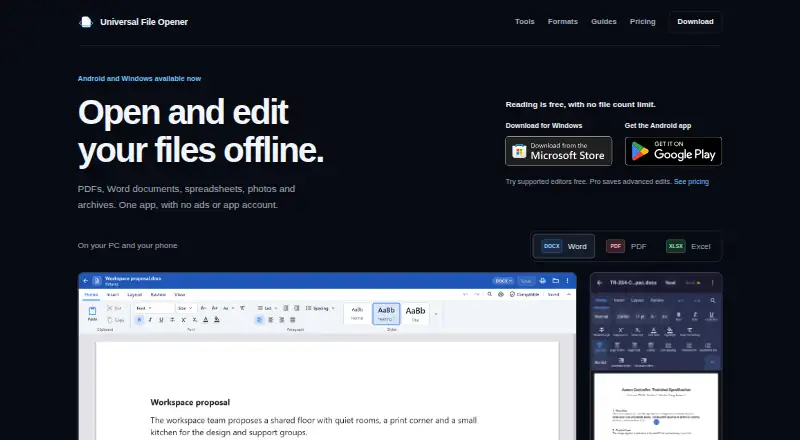
What Universal File Opener is
Universal File Opener is an offline viewer and editor for supported files on Android and Windows. Its tools handle PDFs, Office documents, spreadsheets, presentations, images, archives, text, code, data, audio and video, with available actions depending on the platform and format. The listing covers 214 formats and includes archive, Office and code previews, plus in-file search. Reading supported files is free, with no file-count limit, expiry or watermark; individual formats still have size and compatibility limits. Files are processed on the device: Android does not request INTERNET permission, and the Windows app makes no network connections of its own. The apps have no ads, analytics or Krauq account requirement. Android includes offline OCR for English text in scans. Android Pro plans are $1.99 a month, $9.99 a year or $5,029.99, paid once. A Windows Pro lifetime plan is listed, but no price is stated. Cloud providers handle their own downloads and syncing.
Good
- Free reading has no file-count limit, expiry or watermark.
- Files are processed on the device.
- No advertising, app analytics or Krauq account.
- Android includes offline OCR for English scans.
- Includes archive, Office and code previews.
Watch out
- Individual formats have size and compatibility limits.
- Android spreadsheet editing lacks full workbook recalculation.
- Windows Pro has no listed price.
- RAR5 and split multi-volume archives are unsupported.
Who it suits
It suits people who want to read supported files offline on Android or Windows, including users who need previews or in-file search. Android users who need spreadsheet editing should note that it does not provide full workbook recalculation.
Verdict
Universal File Opener combines offline reading with tools for a wide range of file types on Android and Windows. Check the format and platform limits before relying on it for editing or archive access.
Plans and prices
From Universal File Opener's own pricing page, checked 15 Oct 2026.
| Plan | Price | What it gives you |
|---|---|---|
| Free | Free | unlimited reading · no expiry · no watermark · no ads · no account |
| Android Pro monthly | $1.99 a month | all Android Pro editing and conversion saves · auto-renewing subscription · monthly |
| Android Pro annual | $9.99 a year | all Android Pro features · platform-specific entitlement · billed annually |
| Android Pro lifetime | $15, paid once | same Android Pro features · lifetime access · no recurring charge · 50% off regular US$29.99 |
| Windows Pro introductory | $19.99, paid once | lifetime Windows Pro · future Windows updates included · introductory price through August 28, 2027; regular US$39.99 |
| UFO CLI organizations up to 50 people | $99 a month | commercial license · higher batch/search/job limits · one organization license · monthly; annual option US$990 |
| Windows Pro | — | Windows edition only · introductory price active until August 28, 2027 at 11:59 PM UTC · One payment; lifetime Windows Pro with future Windows updates included. |
The facts
Each one read from Universal File Opener's own pages, with the date it was checked.
What it does
- Ads and accounts
- The apps have no advertising, app analytics or Krauq account.checked 30 Sep 2026
- Agent integrations
- The CLI documents setup for Claude Code, Codex, Cursor and Windsurf through stdio MCP connections with folder allow-lists.checked 15 Oct 2026
- Archive features
- ZIP, 7z, TAR variants and RAR4 can be browsed and extracted, while RAR5 and split RAR are refused and edited-archive saves are Pro.checked 15 Oct 2026
- Archive limit
- Classic RAR archives are supported, but RAR5 and split multi-volume archives are not supported.checked 30 Sep 2026
- Changelog news
- Windows version 1.6.0 dated October 6, 2026 added selectable audio tracks, subtitle loading, fullscreen video and an always-on-top mini-player.checked 15 Oct 2026
- CLI and MCP
- UFO CLI is a local Linux command-line tool and MCP server that returns JSON inspection results and edit receipts while preserving originals.checked 15 Oct 2026
- CLI limits
- Free CLI use allows 25-step batch plans, searches or reports over up to 200 files and one job at a time.checked 15 Oct 2026
- CLI packages
- Install options include a shell installer, npm package @krauq/ufo-cli, Debian package and a container image.checked 15 Oct 2026
- Documentation and support
- The maker publishes format references, feature guides, FAQ pages, release notes, CLI installation and agent setup documentation, with email support at [email protected].checked 15 Oct 2026
- Editing limits
- Android spreadsheet editing does not provide full workbook recalculation; Windows recalculates supported dependent XLSX formulas after literal-cell edits, but formula entry is unavailable.checked 30 Sep 2026
- File tools
- The app provides tools for documents, spreadsheets, presentations, images, archives, text, code, data, audio and video, with capabilities varying by platform and format.checked 30 Sep 2026
- Format coverage
- The website advertises support for 372 file types spanning documents, spreadsheets, presentations, ebooks, images, audio, video, archives, email, fonts and code.checked 15 Oct 2026
- Image features
- The image editor has crop, adjustment, filters, markup and tools tabs, with 22 conversion targets and free metadata removal.checked 15 Oct 2026
- Independent launch fact
- The maker reported that the Android app had passed 10,000 downloads before the Windows launch.checked 15 Oct 2026
- Integrations and sharing
- Users can open files through Android sharing or the system file picker and Windows open dialogs or drag and drop; cloud providers handle their own downloads and syncing.checked 30 Sep 2026
- Licence
- The Android and Windows apps use a limited personal, non-exclusive, non-transferable proprietary licence; bundled open-source components retain their own licences.checked 15 Oct 2026
- Limit: editor customization
- A Google Play reviewer requested more font choices for DOCX editing and more page-size options.checked 15 Oct 2026
- Limit: missing integrations
- Reddit users requested cloud integrations, batch archive extraction, PDF splitting, metadata and hex views, and stronger theme customization.checked 15 Oct 2026
Where it runs
- Android OCR
- Android can read English text from scans using offline OCR.checked 30 Sep 2026
- Browser processing
- UFO Web opens local files in the browser without uploading them; a connected agent can receive file content.checked 15 Oct 2026
The company
- Company headquarters
- The privacy policy identifies Krauq LLC as based in California, United States.checked 15 Oct 2026
- Company legal name
- The product is published by Krauq LLC.checked 15 Oct 2026
- Headquarters
- California, United Stateschecked 28 Sep 2026
Money
- Free reading
- Reading supported files is free with no file count limit, expiry or watermark, although individual formats have size and compatibility limits.checked 30 Sep 2026
The full review of Universal File Opener
Universal File Opener is an offline viewer and editor for supported files on Android and Windows. It suits people who need to read a mix of formats without an account or a per-file reading cap. Free reading is its clearest strength; editing limits and archive gaps make it less convincing for specialist workflows.
Overview
The app supports 214 formats across documents, spreadsheets, presentations, images, archives, text, code, data, audio and video. That breadth is useful for opening varied files in one place, but capabilities depend on both platform and format, so the format count should not be read as a promise of equal editing support throughout. Office and code previews, archive preview and in-file search help with inspection.
Files are processed on the device. Android requests no INTERNET permission, while the Windows app makes no network connections of its own; neither app has advertising, app analytics or a Krauq account. This is a sensible fit for offline file access, though cloud downloads and syncing are handled by the cloud provider, not the app.
Key features
Reading, search and OCR
Reading supported files is free without a file-count limit, expiry or watermark, which makes the app useful as a general-purpose viewer even if you never upgrade. Individual formats still have size and compatibility limits. Android can also use offline OCR to read English text from scans, a practical benefit when working without a connection.
Editing and archives
Spreadsheet work has meaningful constraints. Android editing does not recalculate a full workbook; Windows recalculates supported dependent XLSX formulas after literal-cell edits, but formula entry is unavailable. If spreadsheet calculations or authoring formulas are central to your work, this is not a strong substitute for a dedicated office suite.
Classic RAR archives are supported, but RAR5 and split multi-volume archives are not. That rules out some archive workflows despite the broader file coverage. Files can be opened through Android sharing or the system file picker, and through Windows open dialogs or drag and drop. Support is available by email at [email protected], with replies handled by a person.
Pricing
The Free plan costs nothing and covers supported-file reading with no file-count limit, expiry, watermark, ads or app account. File-size and compatibility limits remain, so it is a strong choice for reading rather than a guarantee of unrestricted file handling.
Android Pro Monthly costs $1.99 a month and includes the same Android Pro features as the annual and lifetime plans. Eligible monthly subscribers get 14 days free, then pay US$0.99/month for 3 months before the 1.99 USD monthly rate; subscriptions renew automatically unless cancelled in Google Play. Android Pro Annual costs $9.99 a year, with the same features and no trial. For readers who expect to keep using Pro, the annual plan is much cheaper than paying the regular monthly rate for a full year, but it requires an annual commitment.
Android Pro Lifetime costs $5,029.99, paid once for lifetime access to Android Pro features; Google Play shows the local lifetime offer before purchase. Windows Pro is a one-payment lifetime Windows edition with future Windows updates included, at custom pricing. Its introductory price is active until August 28, 2027 at 11:59 PM UTC. The Android plans do not cover Windows Pro, so buyers should choose by platform rather than assume one upgrade covers both.
Platforms
Universal File Opener is available on Android and Windows, with mobile as its primary access point. The differences in spreadsheet behavior make the platform choice consequential: Windows offers supported dependent-formula recalculation after literal edits, while Android does not recalculate a full workbook. Check the format and platform needed before relying on it for editing.
Who it's for
It is a good fit for readers who regularly receive varied files, want offline viewing, or need a no-account reader with a generous free reading allowance. It is less suitable for people who depend on full spreadsheet recalculation, formula entry, RAR5 or split archives, or consistent editing across Android and Windows.
Pros and cons
- Pro: Free reading has no file-count cap, expiry or watermark, making it useful before committing to a paid plan.
- Pro: On-device processing, no app account or advertising, and Android's lack of INTERNET permission support an offline-oriented workflow.
- Pro: 214 supported formats, search, previews and Android OCR cover a broad range of everyday inspection needs.
- Con: Editing varies by platform and format; spreadsheet recalculation and formula entry are limited.
- Con: RAR5 and split multi-volume archives are unsupported, despite classic RAR support.
- Con: Android and Windows Pro are separate platform-specific purchases rather than one cross-platform plan.
Alternatives
ViewAnyFile.app is a free option to consider if you want a viewer spanning Android, iOS, Linux, macOS, web and Windows. OpenFiles is another free choice for Linux, macOS or Windows users. For a self-hosted or web-based option, consider File Viewer, which is free.
Geeqie, nomacs and Okular are free options for Linux, macOS or Windows users. OmniViewer is a free alternative for Linux, macOS, web or Windows. FastStone Image Viewer is a Windows alternative with a free personal and educational plan.
For a broader comparison, browse File Viewer Software.
Verdict
Choose Universal File Opener if you want broad offline reading on Android or Windows without an account or a reading cap; its free plan makes that easy to do. Look elsewhere if your work depends on full spreadsheet editing, RAR5 or split archives, or if you need a single Pro purchase to cover both platforms.
Alternatives to Universal File Opener
- 1
ViewAnyFile.app
Free planAndroidiOSWebLinux7.9From $9.99 a month - 2

Okular
Free planLinuxmacOSWindows6.9Free plan - 3
FastStone Image Viewer
Free planWindows6.8Free plan - 4
IrfanView
Free planWindows6.8Free plan - 5
Evince
Free planLinux6.5Free plan - 6

File Viewer Plus
AndroidWindows6.3From €22 a year