
File Viewer
File Viewer is a browser-based component ecosystem for previewing business files, with parsing and rendering done in the browser rather than through a conver…
What File Viewer is
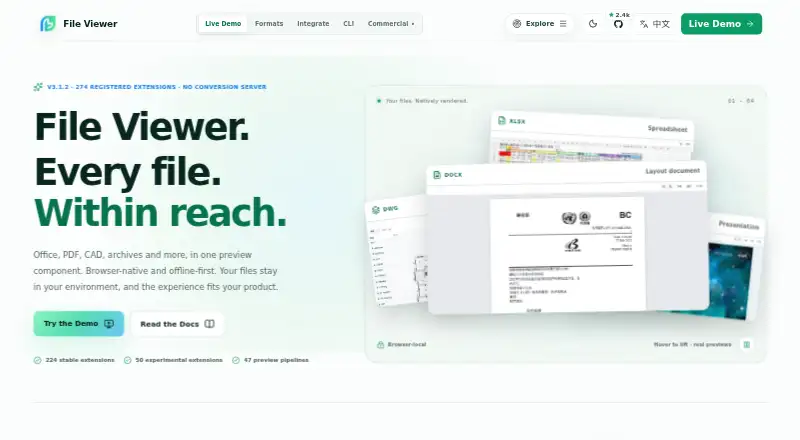
File Viewer is a browser-based component ecosystem for previewing business files, with parsing and rendering done in the browser rather than through a conversion server. The project lists 274 registered extensions across 47 preview pipelines, including 224 stable and 50 experimental extensions. Viewer options include search, zoom, print, download, HTML export, watermarks, lifecycle hooks, and operation guards. Teams can integrate it with Vanilla JavaScript and Web Components, Vue, React, Svelte, or jQuery, and choose individual renderers or preset bundles for text and media, Office documents, engineering formats, or the full matrix. Runtime assets can be served from a customer's own origin for offline or private deployments. File Viewer is open source under Apache-2.0 for its own source and packages; optional dependencies retain their own licenses. It is a viewer rather than an editor, and the project does not promise native-app fidelity for every complex file. Large inputs, fonts, vendor features, or encrypted files can affect memory use or fidelity.
Good
- Parses and renders files in the browser
- Lists 274 extensions across 47 pipelines
- Integrations for several JavaScript frameworks
- Runtime assets can be self-hosted
Watch out
- Not a professional editor
- Complex files may not match native-app fidelity
- Large inputs can affect memory use
- Cross-origin file URLs need suitable CORS headers
Who it suits
File Viewer may suit teams building browser-based file previews into web applications, especially when they want self-hosted or offline deployment. It is for viewing rather than editing files.
Verdict
File Viewer offers a broad, modular set of browser-based previews with self-hosting options. Teams should account for its read-only purpose and validate large or complex files against their needs.
The facts
Each one read from File Viewer's own pages, with the date it was checked.
What it does
- Commercial offering
- A separate commercial Office engine focuses on Word, Excel, and PowerPoint fidelity, large-file performance, private delivery, and enterprise support.checked 1 Oct 2026
- Distribution
- The project is distributed through npm packages, public GitHub repositories, release downloads, and self-hostable runtime assets.checked 1 Oct 2026
- Features
- Viewer options include search, zoom, print, download, HTML export, watermarks, lifecycle hooks, and operation guards.checked 1 Oct 2026
- Format coverage
- The product site reports 274 registered extensions and 47 preview pipelines, with 224 stable and 50 experimental.checked 2 Oct 2026
- Formats
- The maker lists 274 registered file extensions across 47 preview pipelines, with 224 stable and 50 experimental extensions.checked 1 Oct 2026
- Frameworks
- Integration packages are listed for Vanilla JS/Web Components, Vue 2 and 3, React, Svelte, and jQuery.checked 2 Oct 2026
- Input requirements
- A file URL must be reachable by the browser, and cross-origin files need appropriate CORS headers; a File object can also be supplied.checked 2 Oct 2026
- Integrations
- The maker documents integrations for Vanilla JavaScript and Web Components, Vue, React, Svelte, and jQuery.checked 1 Oct 2026
- Known constraints
- The project says fonts, vendor-specific features, encrypted files, and very large inputs can affect fidelity or memory use.checked 2 Oct 2026
- Large files
- The maker advises validating extreme large files with real samples because file size can affect performance and memory use.checked 1 Oct 2026
- License
- The source is licensed Apache-2.0, while the DWG/DWF/DWFX runtime packages named by the project are AGPL-3.0-only.checked 2 Oct 2026
- Limit
- File Viewer is a preview component rather than a professional editor and does not promise native-app fidelity for every complex file.checked 1 Oct 2026
- Modular packages
- Teams can install individual renderers or choose Lite, Office, Engineering, or Full presets.checked 2 Oct 2026
- Offline deployment
- The documentation says runtime assets can be served from the application's own origin for offline or private deployments.checked 2 Oct 2026
- Presets
- Preset bundles cover lightweight text and media, Office documents, engineering formats, or the full published matrix.checked 1 Oct 2026
- Product
- File Viewer is a read-only, browser-based file preview component for Office, PDF/OFD, CAD, archives, email, and other formats.checked 2 Oct 2026
- Read-only
- The project describes File Viewer as a viewer rather than an editor.checked 2 Oct 2026
- Rendering
- Built-in renderers do not require a conversion server; Workers, WASM, and fonts can be self-hosted.checked 2 Oct 2026
- Security and privacy
- The maker describes the product as browser-local and self-hostable, allowing files and runtime assets to stay within the deployment environment.checked 1 Oct 2026
- Support
- The repository directs users to GitHub Sponsors for maintenance support and enterprise support for private deployments or response commitments.checked 2 Oct 2026
Alternatives to File Viewer
- 1
ViewAnyFile.app
Free planAndroidiOSWebLinux7.9From $9.99 a month - 2

Universal File Opener
Free planAndroidWebLinuxSelf-hosted7.8From $9.99 a year - 3

Okular
Free planLinuxmacOSWindows6.9Free plan - 4
FastStone Image Viewer
Free planWindows6.8Free plan - 5
IrfanView
Free planWindows6.8Free plan - 6
Evince
Free planLinux6.5Free plan