
Geeqie
Geeqie is a free image viewer and organiser for Linux, macOS, and Windows.
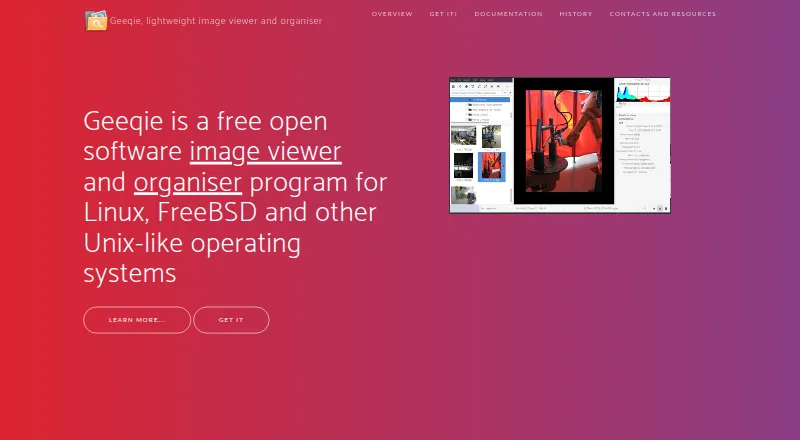
What Geeqie is
Geeqie is a free image viewer and organiser for Linux, macOS, and Windows. It displays images as thumbnails, in multiple windows, or full screen; rather than importing a library, users can open a folder directly. File management includes copying, moving, renaming, and deleting. Search can use date, size, or image similarity, while the duplicate finder compares dimensions or checksums. Geeqie supports viewing and editing Exif, IPTC, and XMP metadata, and adding XMP keywords for searching. Documented formats include JPEG, PNG, GIF, TIFF, RAW variants, and SVG, as well as images inside ZIP and TAR archives. It can show video previews and thumbnails, with playback handled by a defined external program. The app also has slideshows, remote control through command-line scripts or an infrared device, and configurable plugins that can call programs such as Gimp. Users can open images with an external editor.
Good
- No image import is required
- Search includes image similarity
- Duplicate finder compares dimensions or checksums
- Supports Exif, IPTC, and XMP metadata
Watch out
- Video playback uses a defined external program
- Project support is directed to a mailing list and GitHub bug reporting
Who it suits
Geeqie suits people who want a folder-based image viewer with file management, search, duplicate checking, and metadata tools. Its listed platforms include Linux, macOS, and Windows.
Verdict
Geeqie combines image viewing, organization, search, and metadata features without requiring an imported library. It is a fit for users comfortable working from folders and using an external program for video playback.
Plans and prices
From Geeqie's own pricing page, checked 29 Sep 2026.
| Plan | Price | What it gives you |
|---|---|---|
| Geeqie | Free | Free open software · GPLv2 |
The facts
Each one read from Geeqie's own pages, with the date it was checked.
What it does
- Duplicates
- The duplicate finder can compare image files using parameters such as image dimensions or checksum.checked 29 Sep 2026
- External tools
- Geeqie can call external programs such as Gimp through configurable plugins and can open images with an external editor.checked 29 Sep 2026
- File management
- Geeqie provides copy, move, rename, and delete functions for images.checked 29 Sep 2026
- Formats
- The documented formats include JPEG, PNG, GIF, TIFF, RAW variants, and SVG; images in ZIP and TAR archives can also be displayed.checked 29 Sep 2026
- History
- Geeqie is the successor to GqView, which was first released in 1998; GqView was renamed Geeqie in 2007.checked 29 Sep 2026
- Importing
- Geeqie does not require importing images; users can point it at a folder to display its contents.checked 29 Sep 2026
- Metadata and tagging
- Geeqie supports browsing and editing Exif, IPTC, and XMP metadata, and adding XMP keywords for search.checked 29 Sep 2026
- Presentations
- Geeqie includes a slideshow and can be remotely controlled through command line scripts or an infrared device.checked 29 Sep 2026
- Purpose
- Geeqie is an image viewer and organiser for Linux, FreeBSD, and other Unix-like operating systems.checked 29 Sep 2026
- Search
- Search methods include file date, file size, and image similarity.checked 29 Sep 2026
- Support
- The project site directs users to a mailing list and GitHub bug reporting.checked 29 Sep 2026
- Video previews
- Geeqie can display previews and thumbnails of video clips, which can be run with a defined external program.checked 29 Sep 2026
- Viewing
- Images can be viewed as thumbnails, in multiple windows, or full screen.checked 29 Sep 2026
The company
- Founded
- 2007checked 23 Sep 2026
Where it runs
- Platforms
- The site lists GNU/Linux, FreeBSD, NetBSD, OpenBSD, and macOS availability, and says Geeqie can be run on Windows 11.checked 29 Sep 2026
Getting started
- Visit https://www.geeqie.org/.
- Install Geeqie on Linux, macOS or Windows.
- Point Geeqie at a folder containing images.
- Choose thumbnails, multiple windows or full-screen viewing.
- Use search, metadata tools or duplicate comparison as needed.
- Configure an external program for video clips or editing.
Questions
Is Geeqie free?
Yes. Geeqie is free open software under GPLv2.
Which platforms support Geeqie?
Supported platforms are Linux, macOS and Windows; the project also describes support for FreeBSD and other Unix-like systems.
Does Geeqie require importing images?
No. You can point it at a folder to display its contents.
Which image formats can Geeqie display?
Documented formats include JPEG, PNG, GIF, TIFF, RAW variants and SVG, plus images in ZIP and TAR archives.
Can Geeqie edit image metadata?
Yes. It can browse and edit Exif, IPTC and XMP metadata and add XMP keywords.
How is Geeqie supported?
The project directs users to a mailing list and GitHub bug reporting.
Alternatives to Geeqie
- 1
ViewAnyFile.app
Free planAndroidiOSWebLinux7.9From $9.99 a month - 2

Universal File Opener
Free planAndroidWebLinuxSelf-hosted7.8From $9.99 a year - 3

Okular
Free planLinuxmacOSWindows6.9Free plan - 4
FastStone Image Viewer
Free planWindows6.8Free plan - 5
IrfanView
Free planWindows6.8Free plan - 6
Evince
Free planLinux6.5Free plan