Twingate
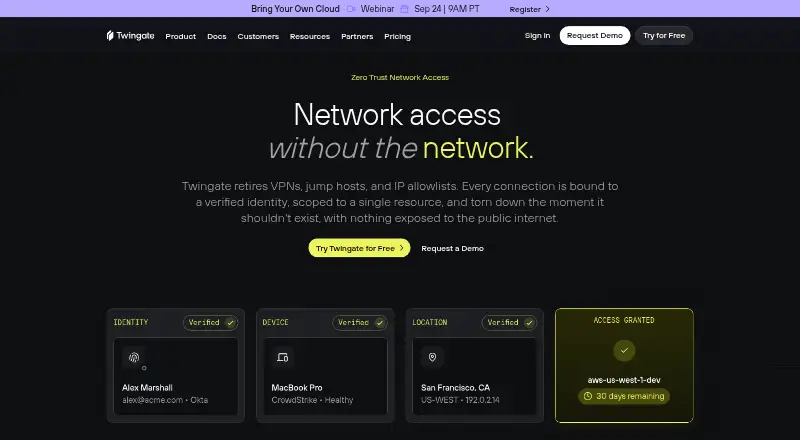
Twingate provides zero trust network access that connects users to individual resources through verified identities.
What Twingate is
Twingate provides zero trust network access that connects users to individual resources through verified identities. Its policies can factor in authentication, device security, location, and time or usage controls, applied at resource, group, or network level. The design uses outbound-only connections with no open inbound ports; Twingate says direct peer-to-peer tunnels connect users and resources without routing traffic through its cloud. Deployment methods include Docker scripts, Terraform, and Helm Charts. Identity integrations include Okta, Google Workspace, Microsoft Azure Active Directory, OneLogin, and JumpCloud. Infrastructure options include Terraform, Kubernetes, GitHub, GitLab, and Pulumi, while device security integrations include CrowdStrike, SentinelOne, Microsoft Intune, Kandji, Jamf, and 1Password Device Trust.
Clients are available for macOS, Windows, Linux, iOS, and Android, with Android support also covering ChromeOS. Twingate lists TCP, UDP, and ICMP, device posture checks, SIEM log export, and session recording. Starter is free for up to five users and 50 resources. Paid plans range from Home at $15 a month to Business at $10 per user per month, with Teams at $5 per user per month when billed yearly; a 14-day trial is offered. The company began building the product in 2019 and is based in Redwood City, California.
Good
- Access policies can use identity, device, location, and usage conditions.
- Outbound-only connections avoid open inbound ports.
- Direct peer-to-peer tunnels do not route traffic through Twingate's cloud.
- Clients cover desktop, mobile, and Android on ChromeOS.
- Integrations include identity, infrastructure, and device security tools.
Watch out
- Starter is limited to five users and 50 resources.
- Clients older than 12 months cannot connect.
- Business DNS filtering is an add-on.
Who it suits
Twingate suits teams that want identity-based access to specific network resources with policies tied to device security, location, or usage. Its range of client platforms and deployment methods may also fit organizations using different operating systems or infrastructure tools.
Verdict
Choose Twingate if you need to grant access to individual resources using identity and contextual policies, with a free Starter plan for smaller deployments. Look elsewhere if your clients cannot stay within the supported 12-month window or if your needs exceed Starter's user and resource limits without moving to a paid plan.
Plans and prices
From Twingate's own pricing page, checked 21 Oct 2026.
| Plan | Price | What it gives you |
|---|---|---|
| Starter | Free | Up to 5 users · Up to 50 Resources · macOS, Windows, Linux, iOS, Android and more · peer-to-peer connections · split tunneling · conditional access controls |
| Home | $15 a month | Up to 7 users · secure service accounts · exit networks · native device posture checks · MFA · non-commercial use · per month |
| Teams | $5 a month | Up to 100 users · Google Workspace SSO · SaaS application gating · device posture checks · MFA · automated least-privilege policies · per user per month; yearly billing shown as 15% discount |
| Business | $10 a month | Up to 500 users · IdP provisioning · Okta and Entra ID SSO · device and endpoint integrations · service accounts · JIT policies · exit networks · DNS filtering add-on · per user per month; yearly billing shown as 15% discount |
| Enterprise | Priced on request | Custom account sizes · custom MSA and SLA · invoice billing · geoblocking · static IP add-on · privileged access for Kubernetes, SSH, databases and web apps · priority support · custom per user per month |
The facts
Each one read from Twingate's own pages, with the date it was checked.
What it does
- Access policy
- Its security policies can combine authentication, device security, location, and time or usage controls at resource, group, or network level.checked 29 Sep 2026
- Admin API
- The public Admin API is GraphQL at each tenant's /api/graphql/ endpoint and supports management of networks, connectors, resources, users, groups, devices, policies and service accounts.checked 21 Oct 2026
- API authentication
- API tokens have read-only, read/write or read/write/provision permission levels and can be restricted to up to 10 IP or CIDR ranges.checked 21 Oct 2026
- API limits
- The documented default API throttles are 60 read requests and 20 write requests per minute, with HTTP 429 responses when exceeded.checked 21 Oct 2026
- Client support limit
- The client documentation says clients older than 12 months are unsupported and cannot connect to the Twingate service.checked 29 Sep 2026
- Client support window
- Clients older than 12 months are unsupported and may be blocked from connecting to the service.checked 21 Oct 2026
- Cloud integrations
- Cloud integrations include AWS, Google Cloud Platform, Microsoft Azure, DigitalOcean and Coder.checked 21 Oct 2026
- Connections
- Twingate says direct peer-to-peer tunnels connect users and resources without routing traffic through its cloud.checked 29 Sep 2026
- Connector deployment
- Connectors run behind the firewall as Docker containers or Linux systemd services, with deployment options for Kubernetes, Azure Container Instances, AWS ECS Fargate and AWS AMIs.checked 21 Oct 2026
- Continuous policy checks
- Security Policies can require reauthentication, MFA, trusted devices, approved operating systems, geoblocking and usage limits.checked 21 Oct 2026
- Deployment
- The product can be deployed using Docker scripts, Terraform, Helm Charts, and other methods.checked 29 Sep 2026
- Direct tunnels
- The service creates direct peer-to-peer tunnels when possible and uses relays when direct connectivity is unavailable.checked 21 Oct 2026
- DNS and monitoring integrations
- Twingate lists NextDNS, Cloudflare, DNSFilter, Amazon S3, Datadog and PagerDuty integrations.checked 21 Oct 2026
- Documentation depth
- The documentation site contains architecture explanations, deployment guides, cloud-provider and homelab guides, API references, security policies and use-case sections.checked 21 Oct 2026
- Funding
- Twingate announced a $42 million Series B round led by BOND on April 14, 2022, with WndrCo, 8VC and SignalFire participating.checked 21 Oct 2026
Where it runs
- Client platforms
- The client documentation lists macOS, Windows, Linux, iOS, and Android, with Android support also covering ChromeOS.checked 29 Sep 2026
- Device security integrations
- Device posture integrations include CrowdStrike, SentinelOne, Microsoft Intune, Kandji, Jamf, 1Password and Hexnode.checked 21 Oct 2026
The company
- Company
- Twingate says it began building the product in 2019 and is remote-first, with a core team in Redwood City, California.checked 29 Sep 2026
- Company founding and headquarters
- Twingate says it was founded in 2019 and has its core headquarters in Redwood City, California.checked 21 Oct 2026
- Company legal name
- Crunchbase identifies the legal name as Twingate Inc.checked 21 Oct 2026
- Company size
- LinkedIn lists Twingate as privately held with 51–200 employees and 89 employee profiles.checked 21 Oct 2026
- Founded
- 2019checked 23 Sep 2026
- Headquarters
- Redwood City, California, United Stateschecked 23 Sep 2026
Money
- Free plan
- Yeschecked 20 Sep 2026
The full review of Twingate
Twingate is a zero-trust network access service that gives authenticated users access to particular private resources instead of an entire network. It suits organizations replacing broad VPN access with identity- and context-based rules, especially those that can keep clients current and fit within the Starter plan’s limits. Its hybrid deployment, broad platform coverage, and integration options make it a credible choice for small teams through larger enterprises, although higher-scale features require paid tiers.
Overview
Twingate positions its service as an alternative to VPNs, jump hosts, and IP allowlists. Access is tied to verified identities and individual resources, while policies can evaluate authentication, device security, location, and time or usage conditions. Rules can be applied at resource, group, or network level, giving administrators more precise control than a simple network-wide connection.
The service uses outbound-only connections and zero open inbound ports, according to Twingate. It also describes direct peer-to-peer tunnels between users and resources, avoiding the need to route that traffic through its cloud. Deployment can be handled with Docker scripts, Terraform, Helm Charts, or other methods, which suits teams with established infrastructure automation. Twingate is a remote-first company founded in 2019 with a core team in Redwood City, California.
Key features
- Conditional access: Authentication can be combined with device, location, and time or usage conditions. This is useful when access requirements vary by person, endpoint, or circumstance.
- Resource-level access: Users receive access to specified resources rather than blanket network reach. That narrower model is better suited to segmented environments.
- Peer-to-peer tunnels: Direct connections can keep user-to-resource traffic off Twingate’s cloud path, while outbound-only networking avoids opening inbound ports.
- Identity integrations: Okta, Google Workspace, Microsoft Azure Active Directory, OneLogin, and JumpCloud support established identity workflows.
- Infrastructure integrations: Terraform, Kubernetes, GitHub, GitLab, and Pulumi fit infrastructure-as-code and development workflows.
- Device security integrations: CrowdStrike, SentinelOne, Microsoft Intune, Kandji, Jamf, and 1Password Device Trust can feed device-management or security processes.
- Protocols and controls: Agent-based access supports TCP, UDP, and ICMP. Device posture checks, SIEM log export, and session recording are available capabilities.
- Compliance resources: Twingate’s Trust Center covers DORA, GDPR, HIPAA, PCI DSS, and SOC 2 resources.
The main operational caveat is client support: clients older than 12 months cannot connect to the Twingate service. Organizations that cannot enforce regular client updates should treat that as a material constraint.
Pricing
Twingate uses a freemium model, with paid plans from $5/user/mo (annual) and a 14-day trial.
| Plan | Price and limits | What it adds |
|---|---|---|
| Starter | free; up to 5 users and 50 resources | Peer-to-peer connections, split tunneling, and conditional access controls |
| Home | $15 a month, billed monthly; up to 7 users; non-commercial use | Secure service accounts, exit networks, and native device posture checks |
| Teams | $5 a month, billed per user; yearly billing offers 15% off; up to 100 users | Google Workspace SSO, SaaS application gating, and native device posture checks |
| Business | $10 a month, billed per user; yearly billing offers 15% off; up to 500 users | IdP user provisioning, endpoint integrations, usage-based and just-in-time access policies; DNS filtering is an add-on |
| Enterprise | Custom pricing; custom account sizes | Custom MSA and SLAs, privileged access for Kubernetes, SSH, databases, and web apps, plus priority support |
Starter is a practical fit for a very small deployment, but its five-user and 50-resource ceilings arrive quickly. Home is aimed at up to seven users and explicitly restricts use to non-commercial settings. Teams is the sensible entry point for commercial groups needing Google Workspace SSO and SaaS application gating, while Business is for larger organizations that need provisioning, endpoint integrations, and more advanced policy controls. Enterprise is the route for custom scale, contractual commitments, privileged application access, and priority support. Community and basic support are listed for lower tiers; Enterprise offers additional support options.
Platforms
Twingate provides clients for Android, iOS, Linux, macOS, Windows, and web. Android support also covers ChromeOS. The hybrid deployment model and agent access method accommodate mixed infrastructure, but the 12-month client support window makes endpoint lifecycle management important.
Who it's for
Twingate is well suited to small businesses that need controlled access to a limited set of resources, distributed teams replacing traditional VPN access, and security-conscious organizations using identity providers and device-management systems. Infrastructure teams can benefit from Terraform, Kubernetes, Helm, and related integrations. It is less suitable for deployments that need more than 500 users without an enterprise agreement, exceed the Starter quotas, require commercial use on Home, or cannot keep client software within the supported age window.
Pros and cons
Pros
- Resource-specific, conditional policies provide finer control than blanket network access.
- Outbound-only networking avoids open inbound ports, while peer-to-peer tunnels can keep traffic off the service cloud path.
- Starter costs nothing for up to five users and 50 resources, making small deployments easy to begin.
- Identity, infrastructure, and device-security integrations cover common enterprise workflows.
- Broad desktop and mobile support includes ChromeOS through Android support.
Cons
- Starter’s five-user and 50-resource caps limit its usefulness as an organization grows.
- Home is non-commercial and capped at seven users.
- Advanced provisioning, endpoint integrations, and usage-based or just-in-time policies start at Business.
- Clients older than 12 months cannot connect, creating an ongoing update requirement.
- DNS filtering costs extra on Business, and Enterprise pricing is custom.
Alternatives
Cloudflare One is a better fit when a 50-user free plan, API access, and up to 24 hours of standard log retention matter more than Twingate’s resource-focused model.
OpenZiti suits teams wanting free, self-hosted and self-managed software under the Apache 2.0 license.
Cloudflare Gateway is an option for a forever-free 50-user tier or a separately priced gateway service.
Dope Security CASB Neural is aimed at secure web gateway and cloud-app control use cases on macOS and Windows.
Zscaler Private Access, Skyhigh Private Access, Forcepoint Data Security Cloud, and NetFoundry are paid alternatives with custom or request-based pricing.
For broader category comparisons, see Security Service Edge Software, Zero Trust Network Access Software, and Business VPN Software.
Verdict
Choose Twingate when you need identity- and context-aware access to individual resources, with a free way to support a small deployment and a clear path to Teams, Business, or Enterprise capabilities. Look elsewhere if your users cannot maintain supported clients, your deployment outgrows the lower-tier quotas, or you need advanced scale and contractual features without moving to custom pricing.
Getting started
- Open the Twingate product website.
- Choose a plan or use the 14-day trial.
- Deploy using Docker scripts, Terraform, Helm Charts, or another method.
- Install a client for macOS, Windows, Linux, iOS, or Android.
- Connect identity workflows through an available integration such as Okta or Google Workspace.
Limits worth knowing
Starter is free for up to 5 users and 50 resources. The Home plan supports up to 7 users; Teams supports up to 100, and Business up to 500. Clients older than 12 months are unsupported and cannot connect.
Questions
Is there a free plan?
Yes. Starter costs nothing and supports up to 5 users and 50 resources.
How much do paid plans cost?
Home is $15 a month. Teams is $5 per user per month and Business is $10 per user per month; yearly billing offers 15% off for both. Enterprise pricing is custom.
Which platforms are supported?
Clients are listed for macOS, Windows, Linux, iOS, and Android. Android support also covers ChromeOS.
Which identity integrations are available?
Listed identity and authentication integrations include Okta, Google Workspace, Microsoft Azure Active Directory, OneLogin, and JumpCloud.
What does Enterprise include?
Enterprise offers custom account sizes, custom MSA and SLAs, privileged access for Kubernetes, SSH, databases, and web apps, and priority support.
Alternatives to Twingate
- 1

Tailscale
Free planOpen sourceAndroidiOSWebAPI9.4From $1 a month - 2

Windscribe
Free planOpen sourceAndroidiOSWebExtension9.1From $3 a month - 3

NetBird
Free planAndroidiOSLinuxmacOS9.0From €6 a month - 4

GoodAccess
Free planAndroidiOSWebLinux8.8Free plan - 5
ZeroTier
Free planAndroidiOSWebAPI8.8From $18 a month - 6

OPNsense
Free planOpen sourceAndroidiOSWebAPI8.8Free plan