TeXstudio
TeXstudio is a free desktop environment for creating and editing LaTeX documents.
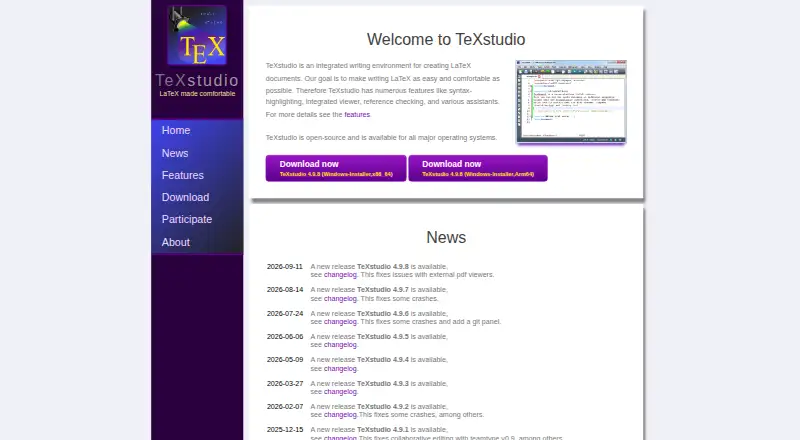
What TeXstudio is
TeXstudio is a free desktop environment for creating and editing LaTeX documents. It runs on Windows, Linux, and macOS, and is licensed under GPL v2, which permits users to modify it. Editing tools include multi-cursors, autocomplete, more than 1,000 mathematical symbols, bookmarks, link overlays, assistants, image drag-and-drop, and table formatting. Structure view, code folding, syntax highlighting, spellchecking, grammar checking, reference checking, and LaTeX error and warning displays help with reviewing documents. Its build system supports LaTeX compilers, index, bibliography and glossary tools, Latexmk, automatic detection of multiple runs, and custom program execution. An integrated PDF viewer provides near word-level syncing and live previews of formulas and code. TeXstudio can detect MikTeX, TeX Live, Ghostscript, and Standardlatex, and supports SVN. Collaborative editing through teamtype is available on OSX and Linux. Windows 11 requires the Visual Studio runtime; there is no release for macOS 10.x, though it can be compiled from source or with Homebrew.
Good
- Free under GPL v2, with permission to modify.
- Includes an integrated PDF viewer and live previews.
- Checks spelling, grammar, references, errors, and warnings.
- Build tools include Latexmk and custom program execution.
Watch out
- Windows 11 requires the Visual Studio runtime.
- No release is available for macOS 10.x.
- Teamtype collaboration is limited to OSX and Linux.
Who it suits
TeXstudio suits people who create LaTeX documents and want editing, checking, building, and PDF viewing in one desktop environment. Its teamtype collaboration is an option for users on OSX or Linux.
Verdict
TeXstudio brings document editing, LaTeX build tools, checking, and PDF viewing together in a free desktop application. Check its Windows runtime requirement and macOS 10.x availability against your setup.
Plans and prices
From TeXstudio's own pricing page, checked 30 Sep 2026.
| Plan | Price | What it gives you |
|---|---|---|
| TeXstudio (GPL v2 open-source) | Free | Windows, Linux, macOS · use and modify under GPL v2 |
The facts
Each one read from TeXstudio's own pages, with the date it was checked.
What it does
- Build system
- The build system supports LaTeX compilers, index, bibliography and glossary tools, Latexmk, automatic multiple-run detection, and custom program execution.checked 30 Sep 2026
- Checking
- It provides structure view, code folding, syntax highlighting, spellchecking, grammar checking, reference checking, and LaTeX error and warning displays.checked 30 Sep 2026
- Code signing
- Windows code signing is provided free by SignPath.io with a SignPath Foundation certificate.checked 30 Sep 2026
- Collaboration
- Release 4.9.0 introduced collaborative editing with teamtype, currently available on OSX and Linux.checked 30 Sep 2026
- Editing
- Features include multi-cursors, auto-completion, more than 1000 mathematical symbols, bookmarks, link overlays, assistants, image drag and drop, and table formatting.checked 30 Sep 2026
- Integrations
- The setup can automatically detect MikTeX, TeX Live, Ghostscript and Standardlatex, and it supports SVN.checked 30 Sep 2026
- License
- TeXstudio is licensed under the GPL v2 and users are free to use and modify it.checked 30 Sep 2026
- Network behavior
- The Windows download page states that the program will not transfer information to other networked systems unless specifically requested by the user or operator.checked 30 Sep 2026
- Operating systems
- TeXstudio runs on Windows, Unix/Linux, BSD, and Mac OS X.checked 30 Sep 2026
- PDF viewing
- It includes an integrated PDF viewer with almost word-level syncing and live-updating inline previews for formulas and code segments.checked 30 Sep 2026
- Purpose
- TeXstudio is an integrated writing environment for creating LaTeX documents.checked 30 Sep 2026
- Support
- Feature requests, bug reports and questions can be submitted through the GitHub issue tracker.checked 30 Sep 2026
The company
- Founded
- 2009checked 28 Sep 2026
Money
- Free plan
- Yeschecked 20 Sep 2026
Where it runs
- macOS limit
- There is no TeXstudio release for macOS 10.x, although it can be compiled from source or with Homebrew.checked 30 Sep 2026
- Windows requirement
- On Windows 11, the Visual Studio runtime is required.checked 30 Sep 2026
The full review of TeXstudio
TeXstudio is an integrated desktop environment for creating LaTeX documents. It is best suited to technical authors, researchers, students and teams who want source editing, document checks, compilation and PDF review in one application. Its free GPL-licensed toolset is unusually broad, provided your operating system fits its requirements.
Overview
TeXstudio treats LaTeX work as a complete document-production workflow rather than a text editor with a separate compiler. You can write and modify the application under GPL v2, making it suitable for individuals and organisations that prefer an open desktop tool with no subscription. The emphasis is local and desktop-based, although collaborative editing extends the workflow on supported systems. Readers on older macOS releases need to look elsewhere or compile the software themselves.
Key features
Editing and document checks
Multi-cursors, autocomplete, bookmarks, assistants, image drag-and-drop and table formatting make detailed source work less cumbersome. A library of more than 1,000 mathematical symbols is especially useful for scientific and mathematical writing. Structure view, code folding and syntax highlighting keep large files manageable. Spellchecking, grammar checking and reference checking provide broader editorial safeguards, while visible LaTeX errors and warnings help locate problems before they become confusing output.
Build and PDF workflow
The build system covers LaTeX compilers, indexing, bibliography and glossary tools, with Latexmk support for projects that need repeatable compilation. Automatic detection of multiple required runs reduces manual build housekeeping, and custom program execution accommodates workflows beyond the default commands. An integrated PDF viewer with almost word-level source-to-output synchronisation makes it easier to move between a line of LaTeX and the resulting page. Live inline previews for formulas and code segments are useful when refining technical notation.
Integrations and collaboration
TeXstudio can automatically detect MikTeX, TeX Live, Ghostscript and Standardlatex installations, which can simplify setup when those components are already present. SVN support serves teams using that version-control system, and the software also provides Git integration. Release 4.9.0 added collaborative editing through teamtype, but that capability is currently available on OSX and Linux rather than across every supported platform.
Pricing
TeXstudio costs nothing under its single plan, “TeXstudio (GPL v2 open-source).” The plan covers Windows, Linux and macOS and permits use and modification under GPL v2. There are no paid tiers, renewal terms, seat charges or stated usage quotas to weigh against the free offering. That simplicity suits students, independent authors and teams standardising on open software; it does not provide a hosted service tier or a separate commercial support package.
Platforms
TeXstudio is a desktop application for Windows, Linux and macOS, with Unix/Linux and BSD also covered by its operating-system support. Windows 11 requires the Visual Studio runtime. There is no TeXstudio release for macOS 10.x, although users of those systems can compile it from source or with Homebrew. The Windows download page states that the program does not transfer information to other networked systems unless the user or operator specifically requests it. Windows binaries are code-signed free by SignPath.io with a SignPath Foundation certificate. Feature requests, bug reports and questions go through the GitHub issue tracker.
Who it's for
Choose TeXstudio if you write substantial LaTeX documents and want editing, validation, build orchestration and PDF navigation together. It is a strong fit for technical and academic work, especially where mathematical notation, references, glossaries and repeatable compilation matter. It is less suitable for users who need a browser-first workflow, broad mobile coverage or official support for macOS 10.x.
Pros and cons
Pros
- Complete LaTeX workflow: Editing, checks, compilation tools and PDF review live in one desktop application.
- Strong technical-writing support: More than 1,000 symbols, reference checking, glossary and bibliography tooling address demanding documents.
- Open and free: GPL v2 permits use and modification with no paid plan, renewal or stated quota.
- Useful source-to-output feedback: Near word-level PDF synchronisation and live inline previews shorten review cycles.
Cons
- Older macOS exclusion: There is no release for macOS 10.x without compiling it yourself.
- Desktop orientation: The product is not presented as a hosted or mobile-first writing service.
- Limited collaboration reach: teamtype collaborative editing is currently restricted to OSX and Linux.
- External LaTeX components remain relevant: Automatic detection of MikTeX and TeX Live helps, but those toolchains are still part of the surrounding setup.
Alternatives
Browse LaTeX Editors for a wider category comparison, or see Writing Apps if your needs extend beyond LaTeX.
- JianTeX is the better choice when you want Linux, macOS, Windows, web and self-hosted options alongside a free open-source plan.
- VerbTeX suits readers who need Android or iOS access and accept a free tier capped at two local projects, two documents per local project, two uploads per local project and two cloud projects.
- Texmaker is a straightforward free alternative for Windows, Linux and macOS, provided you install a LaTeX distribution separately.
- Texpile is an alternative free offline desktop editor.
- Verbosus is a freemium web and mobile option with a free tier limited to two local projects, two documents per local project, two uploads per local project and two cloud projects.
- Gummi is a free cross-platform alternative with no paid plans or usage limits stated.
- Kile is a free downloadable desktop application with source code available.
- LyX is free GPL software for Windows, Linux and macOS.
Verdict
TeXstudio is an excellent choice for LaTeX authors who want a powerful, open and free desktop workspace covering the full path from source to compiled PDF. Its main reason to choose it is the concentration of editing, checking and build controls in one application. Look elsewhere if you require macOS 10.x support, mobile or browser delivery, or collaboration that works consistently across every platform.
Alternatives to TeXstudio
- 1

Overleaf
Free planOpen sourceWebAPIExtensionLinux8.3From $8.25 a month - 2
Verbosus
Free planAndroidiOSWebWindows8.0$15.99 one-time - 3
VerbTeX
Free planAndroidiOSWebmacOS8.0Free plan - 4
Papeeria
Free planAndroidiOSWeb7.4From $5 a month - 5
Avidemux
Free planOpen sourceWebLinuxmacOSWindows7.3Free plan - 6

Oleafly
Free planOpen sourceAPILinuxmacOSSelf-hosted7.2Free plan