Texmaker
Texmaker is a free desktop LaTeX editor for Linux, macOS, and Windows.
What Texmaker is
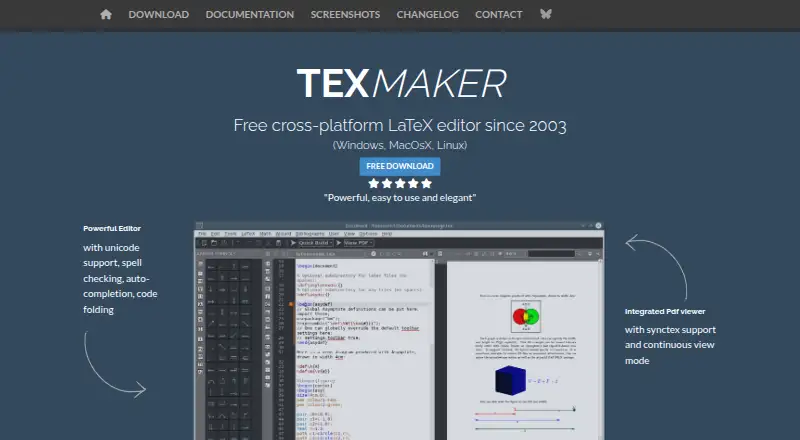
Texmaker is a free desktop LaTeX editor for Linux, macOS, and Windows. Its editing tools include Unicode support, spelling checks while typing, code completion, and code folding. A structure view updates while typing, and master mode supports documents split across multiple files. Quick Build compiles with predefined commands, while the built-in PDF viewer offers continuous scrolling and SyncTeX support. Texmaker includes 370 mathematical symbols, document and presentation wizards, and LaTeX documentation. After compilation, it identifies errors and warnings in the log and lets users jump to the related document lines. When opening a .tex document, it can scan detected .bib files and add bibliography references to auto-completion. Texmaker is released under GNU General Public License Version 2. It is an editor, not a complete LaTeX setup: users also need a separate LaTeX distribution, such as TeX Live or MiKTeX on Windows, TeX Live on Linux, or MacTeX on Mac.
Good
- Unicode, spell checking, code completion, and code folding
- Built-in PDF viewer supports SyncTeX
- Quick Build compiles with predefined commands
- Finds log errors and warnings and links to document lines
Watch out
- A separate LaTeX distribution is required
- Available for desktop platforms only
Who it suits
Texmaker suits Linux, macOS, and Windows users developing documents with LaTeX who want editing, compilation, navigation, and PDF viewing tools together. Users must be prepared to install a separate LaTeX distribution.
Verdict
Texmaker brings useful LaTeX editing and compilation aids into a free desktop application. It is only the editor, so account for the separate distribution needed to work with LaTeX.
Plans and prices
From Texmaker's own pricing page, checked 4 Oct 2026.
| Plan | Price | What it gives you |
|---|---|---|
| Texmaker | Free | Free LaTeX editor · LaTeX distribution required separately |
The facts
Each one read from Texmaker's own pages, with the date it was checked.
What it does
- Audience
- The maker describes Texmaker as a LaTeX editor for Linux, macOS, and Windows users developing documents with LaTeX.checked 4 Oct 2026
- Bibliography
- The manual says Texmaker scans detected .bib files when opening a .tex document and adds bibliography references to auto-completion.checked 4 Oct 2026
- Compilation
- Quick Build provides one-click compilation using predefined commands.checked 4 Oct 2026
- Document navigation
- A structure view updates while typing, and master mode supports documents split across multiple files.checked 4 Oct 2026
- Editor features
- The editor supports Unicode, spell checking while typing, code completion, and code folding.checked 4 Oct 2026
- Error handling
- After compilation, Texmaker locates errors and warnings in the log and lets users jump to the corresponding document lines.checked 4 Oct 2026
- Integrations
- Texmaker requires a separate LaTeX distribution, such as TeX Live or MiKTeX on Windows, TeX Live on Linux, or MacTeX on Mac.checked 4 Oct 2026
- License
- Texmaker is released under GNU General Public License Version 2.checked 4 Oct 2026
- Limits
- The maker states that Texmaker is only an editor and that a LaTeX distribution is also required to work with LaTeX.checked 4 Oct 2026
- PDF viewer
- It includes a built-in PDF viewer with continuous scrolling and SyncTeX support.checked 4 Oct 2026
- Product
- Texmaker is a free, cross-platform LaTeX editor that brings document development tools together in one application.checked 4 Oct 2026
- Security and compliance
- The maker page identifies the GPL Version 2 license; the reviewed maker pages did not state security certifications or compliance standards.checked 4 Oct 2026
- Support and contributions
- The site provides a contact form and says code contributions should be submitted as patches from the latest source tarball; untested patches are automatically rejected.checked 4 Oct 2026
- Writing aids
- Texmaker includes 370 mathematical symbols, document and presentation wizards, and LaTeX documentation.checked 4 Oct 2026
The company
- Founded
- 2003checked 28 Sep 2026
Where it runs
- Platforms
- The download page lists Windows 10/11 64-bit installers, macOS ARM64 packages for macOS 11 or later, and Linux packages for Debian, Ubuntu, and Fedora.checked 4 Oct 2026
The full review of Texmaker
Texmaker is a free desktop LaTeX editor for Linux, macOS and Windows. It suits people who want editing, compilation aids and PDF review in one place, especially when working on structured or multi-file documents. Its focused toolset is useful, but you must install a separate LaTeX distribution to compile documents.
Overview
Texmaker brings common stages of LaTeX document work together: editing, building, navigating document structure and viewing the resulting PDF. That makes it a practical choice for writers who want an integrated desktop workspace without paying for the editor. It is not a complete LaTeX installation, however; the separate distribution adds setup and maintenance beyond Texmaker itself.
Released under the GNU General Public License Version 2, Texmaker is a desktop application for Windows, macOS and Linux. It has been available since 2003. The maker provides a contact form, and accepts code contributions as patches from the latest source tarball; untested patches are automatically rejected.
Key features
The editor combines Unicode support with spell checking as you type, code completion and code folding. These features help with long source files and LaTeX syntax, though they do not remove the need to understand the document markup.
Quick Build compiles with predefined commands in one step, while the built-in PDF viewer supports continuous scrolling and SyncTeX. Together, these tools make it easier to move between source and output during revision. After compilation, Texmaker identifies errors and warnings in the log and lets you jump to the corresponding lines, reducing the hunt for problems in a lengthy document.
A structure view updates as you type, and master mode supports projects split across multiple files. The manual also says Texmaker scans detected .bib files when opening a .tex document and adds bibliography references to completion suggestions. These are useful conveniences for larger documents and citation-heavy work, although the editor still depends on an external LaTeX distribution to build them.
Texmaker includes 370 mathematical symbols, document and presentation wizards, and LaTeX documentation. Those aids can speed up common writing tasks and help users find syntax guidance without leaving the application.
Pricing
Texmaker is free, with a plan listed as free. It includes the LaTeX editor; the LaTeX distribution required for compilation must be obtained separately. There is no free trial because the application itself is free, and no paid tier is needed to access the stated editor offering.
Platforms
Texmaker is a desktop editor for Windows, macOS and Linux. The required LaTeX distribution varies by system: TeX Live or MiKTeX on Windows, TeX Live on Linux, and MacTeX on Mac. Git integration is supported.
Who it's for
Texmaker is best suited to LaTeX users who want a free cross-platform editor with a built-in PDF viewer, compilation shortcuts, structure navigation and useful writing aids. Multi-file document authors should find master mode particularly relevant. It is less suitable for someone seeking an all-in-one installer or an editor that does not rely on separate LaTeX software.
Pros and cons
- Pro: Quick Build, the PDF viewer and SyncTeX keep compilation and output review close to the source-editing workflow.
- Pro: Structure view, master mode and bibliography completion support work on organized, multi-file documents.
- Pro: Spell checking, completion, 370 symbols and wizards provide practical help without a paid plan.
- Con: A separate LaTeX distribution is required, so Texmaker alone cannot compile a document.
- Con: Its desktop platform support does not include Android, iOS or web use.
Alternatives
Browse LaTeX Editors for more options. JianTeX is another free option, with desktop, online and self-hosted choices across Linux, macOS and Windows. Pick it if those deployment options matter more than Texmaker's stated editing workflow.
VerbTeX offers Android, iOS, macOS, web and Windows access, but its free plan caps local and cloud projects at two each, with two documents per project and two file uploads per local project. Consider it if mobile or web access matters and those limits fit your work. Texpile is a free offline desktop editor for Linux, macOS and Windows; it is an alternative if an offline editor is your priority.
TeXstudio is a free GPL v2 editor for Windows, Linux and macOS, making it another cross-platform desktop option. Verbosus is a freemium option for Android, iOS and web, with its free plan capped at two local and two cloud projects, and two documents per project. Gummi, Kile and LyX are also free alternatives.
Verdict
Choose Texmaker if you want a free desktop LaTeX editor that brings source editing, compilation aids and PDF review together across Windows, macOS and Linux. Its strongest case is the combination of document navigation, error jumping and built-in PDF tools. Look elsewhere if you need the LaTeX distribution bundled with the editor or want to work on mobile or in a browser.
Getting started
- Open the Texmaker website
- Install Texmaker for Windows, macOS, or Linux
- Install a separate LaTeX distribution such as TeX Live, MiKTeX, or MacTeX
- Open or create a LaTeX document
- Use Quick Build to compile and review the PDF
Limits worth knowing
Texmaker itself is only an editor, so LaTeX work requires a separate distribution. The listed free plan provides the editor but does not include that distribution.
Questions
Is Texmaker free?
Yes. The Texmaker plan costs nothing.
Which operating systems are supported?
Texmaker supports Windows, macOS, and Linux.
Is Texmaker open source?
It is released under the GNU General Public License Version 2.
Does Texmaker include LaTeX?
No. A separate LaTeX distribution is required, such as TeX Live, MiKTeX on Windows, or MacTeX on Mac.
Does it include a PDF viewer?
Yes. The built-in viewer supports continuous scrolling and SyncTeX.
Can it help with bibliography references?
Yes. When opening a .tex document, Texmaker can scan detected .bib files and add bibliography references to auto-completion.
Alternatives to Texmaker
- 1

Overleaf
Free planOpen sourceWebAPIExtensionLinux8.4From $8.25 a month - 2
Verbosus
Free planAndroidiOSWebWindows8.0$15.99 one-time - 3
VerbTeX
Free planAndroidiOSWebmacOS8.0Free plan - 4
Papeeria
Free planAndroidiOSWeb7.4From $5 a month - 5
Avidemux
Free planOpen sourceWebLinuxmacOSWindows7.3Free plan - 6

Oleafly
Free planOpen sourceAPILinuxmacOSSelf-hosted7.2Free plan