Tesseract
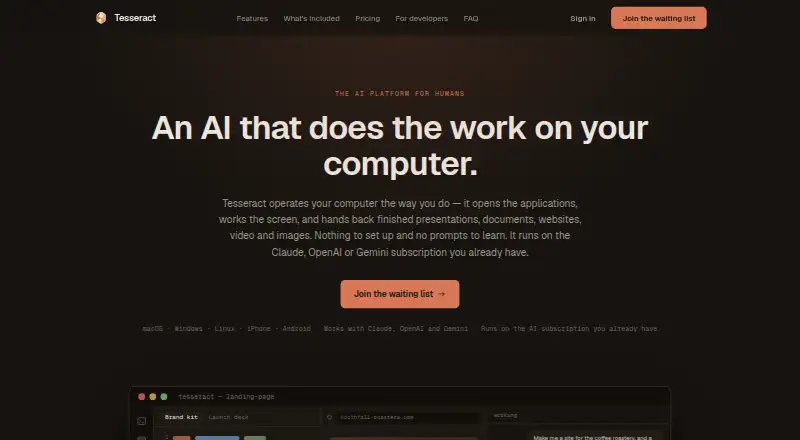
Tesseract turns written or spoken requests into presentations, websites, logos, videos, and documents on a computer.
What Tesseract is
Tesseract turns written or spoken requests into presentations, websites, logos, videos, and documents on a computer. It can build websites from 240+ templates across 20 industries, create presentations and documents, make videos, and generate or edit images, fonts, and logos. Research tools search across 121 engines, produce sourced reports, and can fill forms or gather information from live pages. The site lists integrations with AI tools including Claude, OpenAI Codex, Gemini CLI, Cursor, and others. Device features include remote desktop, a private network between Mac, Windows, and Linux computers, clipboard history across devices, and file sending. Presentations can be downloaded as PowerPoint, PDF, or an animated web page; websites are delivered as files ready to publish. Tesseract says files stay on users’ computers and sign-in is optional, but conversations are stored and processed in the cloud. Desktop apps support Mac, Windows, and Linux; browser access is invite-only. Users can connect an existing AI subscription without Tesseract metering use, though provider limits still apply. Listed options include free allowances and a $10.00 USD one-time top-up.
Good
- Creates presentations, websites, videos, and documents
- Research searches across 121 engines
- Presentations export to PowerPoint, PDF, or animated web pages
- Desktop apps support Mac, Windows, and Linux
Watch out
- Browser version is invite-only
- Conversations are stored and processed in the cloud
- Provider limits apply when connecting an AI subscription
Who it suits
It suits people who want to create varied media from written or spoken requests, or use research and device-sharing tools alongside AI integrations. Desktop users can choose Mac, Windows, or Linux; browser access is invite-only.
Verdict
Tesseract combines content creation, research, and cross-device tools in one product, with both included AI options and bring-your-own-subscription use. Consider its cloud handling of conversations and invite-only browser access when choosing how to use it.
Plans and prices
From Tesseract's own pricing page, checked 15 Oct 2026.
| Plan | Price | What it gives you |
|---|---|---|
| Bring your own AI | Free | existing Claude or ChatGPT subscription · Tesseract does not meter use · all tools · forever |
| Free allowance | Free | AI included through Tesseract · larger allowance when signed in · ask for more · refills on its own |
| Top up | $10, paid once | smallest top-up · unlocks most capable models · first top-up bonus · optional auto top-up · pay as you go |
The facts
Each one read from Tesseract's own pages, with the date it was checked.
What it does
- AI integrations
- The site lists Claude, OpenAI Codex, Gemini CLI, OpenCode, Kimi Code, Qwen Code, MiniMax Code, CodeBuddy, Grok Build, Cursor, Hermes Agent, OpenClaw and NanoClaw.checked 15 Oct 2026
- AI usage limits
- Tesseract says it does not meter use when users connect their own AI subscription, but that provider’s own limits still apply.checked 4 Oct 2026
- Chrome extension function
- Tesseract Companion is a password manager and authenticator with autofill, TOTP codes, local password generation and an optional AI side panel.checked 15 Oct 2026
- Cloud encryption
- Synced conversations and project data use AES-256-GCM at rest, but the policy says this content is not end-to-end encrypted.checked 15 Oct 2026
- Creation tools
- It can create presentations and documents, build websites from 240+ templates across 20 industries, make videos, and generate or edit images, fonts, and logos.checked 4 Oct 2026
- Data processing
- Prompts and agent content may be sent to selected providers including Anthropic, OpenAI, Google, OpenRouter, DeepSeek and Moonshot; fully local Ollama processing is supported.checked 15 Oct 2026
- Developer distribution
- The maker's site links to a command-line package named tesseract-agent on npm, but no public API reference is shown on the homepage.checked 15 Oct 2026
- Exports
- Presentations export to PowerPoint, PDF or an animated web page, while websites are supplied as files ready to publish.checked 15 Oct 2026
- Image and branding tools
- The product includes layered image editing, transparent cut-outs, font creation from handwriting, logos and brand kits.checked 15 Oct 2026
- Limit: cloud dependency
- Using third-party model providers can transfer content outside the United States or European Economic Area, including to providers in China, under the selected provider's terms.checked 15 Oct 2026
- Limit: review-site identity
- Search results for the name Tesseract prominently return OCR, field-service and unrelated products, so review-site ratings cannot safely be treated as reviews of tesseract.dev.checked 15 Oct 2026
- Model limits
- When users bring their own AI subscription, Tesseract says it does not meter usage, but the provider's own limits still apply.checked 15 Oct 2026
- Operating systems
- The downloadable desktop application is advertised for Mac, Windows and Linux and installs and updates itself.checked 15 Oct 2026
- Password manager
- The built-in password manager uses a master password and encrypts the vault end to end so the company says it cannot read it.checked 15 Oct 2026
- Password security
- The built-in password manager encrypts passwords on the device with a master password, which the company says prevents it from reading them.checked 4 Oct 2026
Where it runs
- Browser access
- A browser version is available at app.tesseract.dev.checked 15 Oct 2026
- Cross-device transfer
- The product includes searchable clipboard history and file sending between devices.checked 15 Oct 2026
- Device features
- Tesseract offers remote desktop, a private network between Mac, Windows, and Linux computers, cross-device clipboard history, and file sending.checked 4 Oct 2026
- Platform availability
- The desktop app supports Mac, Windows, and Linux; the browser version is invite-only.checked 4 Oct 2026
The company
- Company
- The site identifies Eightcell Labs, Inc. as the company; its privacy policy says it is based in the United States and is a Delaware corporation.checked 4 Oct 2026
- Company ecosystem
- A Moldova Innovation Technology Park LinkedIn post dated 2026 names Eightcell Labs among 12 Moldovan startups selected for a Web Summit Lisbon 2026 booth.checked 15 Oct 2026
- Company legal name
- The privacy policy identifies the maker as Eightcell Labs, Inc., a Delaware corporation.checked 15 Oct 2026
- Company location
- The privacy policy says Eightcell Labs is based in the United States, without specifying a headquarters city.checked 15 Oct 2026
- Company presence
- A LinkedIn profile for Corneliu Maftuleac lists San Jose, California and Financial AI as his current profile context.checked 15 Oct 2026
The full review of Tesseract
Tesseract is a desktop app for making creative work, researching the web, and connecting computers. It suits people who want those jobs in one place and can use an included AI allowance or bring an existing subscription. Its breadth is useful, but cloud-stored conversations and invite-only browser access are meaningful trade-offs.
Overview
Written or spoken requests can produce presentations, websites, logos, videos, and documents on a computer. Alongside those creation tools, Tesseract offers research and utilities for moving between devices. That combination is more compelling for general-purpose work than for someone seeking only a focused coding editor.
The company says files stay on users’ computers and sign-in is optional, but conversations are stored and processed in the cloud. Its password manager encrypts passwords on-device with a master password; the company says this prevents it from reading them. Users comfortable with local files but not cloud-handled conversations should weigh that distinction carefully.
Key features
Creation and research
Tesseract can create presentations and documents, make videos, and generate or edit images, fonts, and logos. Its website builder offers more than 240 templates across 20 industries, and provides websites as files ready to publish. Presentations can be downloaded as PowerPoint, PDF, or an animated web page, giving users practical formats for sharing or continued use.
Research searches across 121 engines, produces sourced reports, and can fill forms or collect information from live web pages. This is a useful pairing for people who want to move from gathering information to producing a deliverable without switching products. The breadth may be unnecessary for users who only need one creation tool.
AI and device utilities
The site lists integrations including Claude, OpenAI Codex, Gemini CLI, OpenCode, Gemini CLI, Kimi Code, Qwen Code, MiniMax Code, CodeBuddy, Grok Build, Cursor, Hermes Agent, OpenClaw, and NanoClaw. Tesseract supports multiple models, agent mode, and a built-in terminal. Users can connect their own AI subscription without Tesseract metering usage, though provider limits still apply.
Remote desktop, a private network between Mac, Windows, and Linux computers, cross-device clipboard history, and file sending make the app useful beyond content generation. Those tools matter most to people who work across several computers; they add less for someone using a single device.
Pricing
Tesseract is freemium, with paid access from $20/mo. The Free allowance is free, with AI included through Tesseract, a larger allowance when signed in, and the option to ask for more. Its allowance refills on its own; this tier suits users who want included AI rather than connecting a separate subscription, but the allowance is finite.
Bring your own AI costs nothing, billed forever. It includes all tools and lets users sign in with an existing AI subscription; Tesseract does not meter use, but the AI provider’s limits remain in force. This is the better fit for users who already pay for an eligible subscription and want Tesseract’s tools without a separate Tesseract usage meter.
Top up costs $10, paid once, billed Pay as you go. It is the smallest top-up and unlocks the most capable models, with a first-top-up bonus and optional auto top-up. It suits occasional users who want access to stronger models without committing to a recurring charge, though auto top-up should be considered when managing spend. The product also describes unlimited agent usage on every tier when users bring their own agent login or subscription.
Platforms
The desktop app supports Mac, Windows, and Linux, while Tesseract’s platform range also includes Android, iOS, and web. Browser access is invite-only, so users who need immediate access through a browser should not assume they can use it without an invitation.
Who it's for
Tesseract is a strong candidate for people who want creation, research, and cross-device tools together, especially those already paying for an AI subscription. It is less suited to users who need a browser app they can access immediately, want a narrow-purpose coding editor, or are uncomfortable with conversations being processed in the cloud.
Pros and cons
- Pros: A broad set of creation tools, research, and computer utilities in one product reduces the need to assemble separate tools for those tasks.
- Pros: The bring-your-own-AI tier includes all tools without a Tesseract usage meter, which can suit existing subscribers.
- Pros: Presentations have several export formats, and websites are delivered ready to publish.
- Cons: Conversations are stored and processed in the cloud, despite files staying on the user’s computer.
- Cons: Browser access is invite-only, limiting its appeal to people who expect unrestricted web access.
- Cons: Bring-your-own-subscription use still depends on the provider’s own limits.
Alternatives
For a broader comparison, see AI Code Editors.
Choose Replit instead if its free daily usage and allowance of one live project and one background task at a time suit your workflow. Kiro offers a free plan with 50 credits, open-weight models and Claude Sonnet 4.5, and teams up to 500. Qoder has a free tier with limited messages, completions, and next edits, plus BYOK; its Pro plan is 20.00 USD.
Zubvo offers a free Hobby tier with 100 credits per month, open-source models, and up to 2,000 tab completions. ACLIDE has a free plan listed as free. Creor has a free tier with 200 gateway requests per month and five cloud-agent runs per month. Devgrex offers local completions, agent chat, and offline mode on its free plan. Devin Desktop provides a free tier with a light agent quota and unlimited inline edits and Tab completions.
Verdict
Choose Tesseract if you want creative production, web research, and cross-device utilities in one desktop app, particularly if you already have an AI subscription to connect. Look elsewhere if cloud-handled conversations are a deal-breaker or you need browser access without an invitation.
Alternatives to Tesseract
- 1

Replit
Free planAndroidiOSWebLinux8.4From $18 a month - 2

Qoder
Free planAndroidiOSWebAPI8.1From $20 a month - 3
Google Antigravity IDE
Free planAndroidAPIExtensionLinux8.0From $30 a month - 4

Cortex AI IDE
Free planOpen sourceLinuxmacOSWindows7.9From $40 a year - 5

Creor
Free planWebAPILinuxmacOS7.7From $20 a month - 6
Tidet
Free planWebAPIExtensionLinux7.7From $15 a month