
Cortex AI IDE
Cortex AI IDE is an agentic coding workspace that plans changes, edits files, runs terminal commands, and verifies work through reviewable diffs.
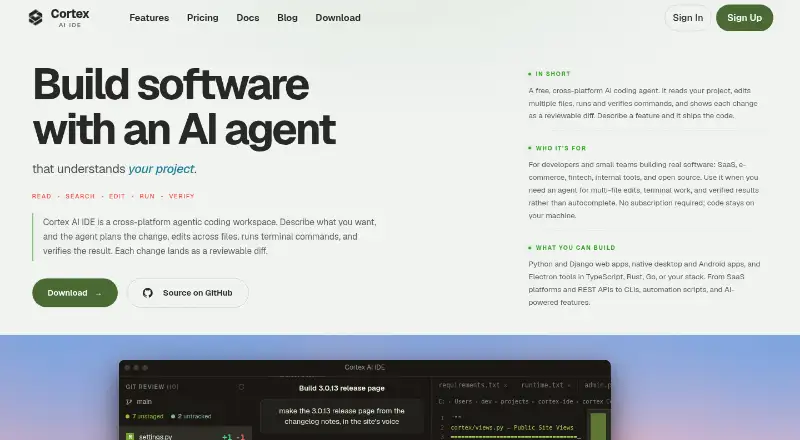
What Cortex AI IDE is
Cortex AI IDE is an agentic coding workspace that plans changes, edits files, runs terminal commands, and verifies work through reviewable diffs. Its tools include Git, grep, glob, semantic and web search, language-server features, and task tracking. More than 250 included skills cover workflows such as debugging, refactoring, documentation, SEO, and design reviews. Cortex offers eight built-in AI provider integrations and can connect to OpenAI-compatible endpoints; Model Context Protocol servers can add external tools and services. Project memory and chat history are stored locally within each project. The site says API keys are kept in the operating system’s secure credential store, and bring-your-own-key requests go directly to the chosen provider over TLS. The free plan includes core coding features and requires users to supply API keys, with model usage paid directly to providers. AI features require an internet connection and a supported key. Windows and Linux builds are offered; macOS users get a source-build guide rather than a prebuilt installer.
Good
- Free plan includes an AI agent and multiple-file editing.
- Includes more than 250 workflow skills.
- Offers eight built-in provider integrations.
- Project memory and chat history are stored locally.
- Windows and Linux builds are available.
Watch out
- AI features require internet and a supported API key.
- Model usage is paid directly to providers.
- No prebuilt macOS installer is listed.
Who it suits
Cortex may suit developers and small teams building SaaS, e-commerce, fintech, internal tools, or open-source projects. It is relevant to users comfortable supplying their own AI provider keys.
Verdict
Cortex brings agentic editing, search, and terminal workflows into a coding workspace with several provider options. The free plan depends on user-supplied keys, and macOS installation requires building from source.
Plans and prices
From Cortex AI IDE's own pricing page, checked 15 Oct 2026.
| Plan | Price | What it gives you |
|---|---|---|
| Free (BYOK) | Free | whole IDE · agent loop · codebase context/indexing · terminal/Git/file tools · OpenAI-compatible providers · local semantic-search fallback · community support · Free |
| Pro Monthly | $5 a month | web search · voice prompts · semantic code search · MCP connections · all LLM models via BYOK · full IDE · $10 $5 /seat/month |
| Pro Yearly | $40 a year | everything in Pro Monthly · priority support · early-access features · stated $80 annual saving · $120 $40 /seat/year |
The facts
Each one read from Cortex AI IDE's own pages, with the date it was checked.
What it does
- Agent modes
- The documentation provides Agent mode for edits, Ask mode for read-only investigation, and Plan mode for implementation plans without file changes.checked 15 Oct 2026
- Agent tools
- The documented core tool set includes file read/write/edit, Bash, Glob, Grep, semantic search, LSP, web search/fetch, Git-related work, task tracking, and Loop review.checked 15 Oct 2026
- AI providers
- The site lists eight built-in provider integrations: Xiaomi MiMo, DeepSeek, Anthropic, OpenAI, OpenRouter, Alibaba Qwen, Google Gemini, and InferenceHub.checked 4 Oct 2026
- Audience
- The site describes it as intended for developers and small teams building SaaS, e-commerce, fintech, internal tools, and open source projects.checked 4 Oct 2026
- Credential security
- The site says API keys are stored in the operating system's secure credential store and BYOK model requests go directly to the selected provider over TLS.checked 4 Oct 2026
- Custom endpoints
- Cortex Connect accepts OpenAI-compatible endpoints, including hosted services and local or self-managed Ollama, vLLM, and LM Studio servers.checked 15 Oct 2026
- Custom providers
- Cortex Connect supports OpenAI-compatible endpoints, including local services such as Ollama and vLLM and hosted services such as Groq and NVIDIA NIM.checked 4 Oct 2026
- Data routing
- Cortex states that code, prompts, chats, project memory, and API keys are not sent to Cortex servers; account email and plan information are retained for account operation.checked 15 Oct 2026
- Documentation depth
- The documentation covers installation, workspace use, chat modes, every agent tool, providers and keys, memory, permissions, updates, and troubleshooting, with a stated October 5, 2026 update.checked 15 Oct 2026
- Download status
- Windows builds are distributed through Microsoft Store, Linux through x64 .deb and .rpm packages, and macOS requires a source build because no .dmg is published.checked 15 Oct 2026
- Editor
- Cortex uses the Monaco editor with syntax support for mainstream languages and an integrated project file explorer.checked 15 Oct 2026
- Extensions
- The documentation describes a plugin system managed through Settings → Extensions.checked 15 Oct 2026
- Licence
- The desktop source is released under Apache License 2.0, while hosted account, billing, update, and distribution services are separate components.checked 15 Oct 2026
- Limit: administration
- The independent AI IDE List says mature enterprise administration, SSO, policy controls, and procurement features are not documented.checked 15 Oct 2026
- Limit: early stability
- The changelog records early fixes for long-chat freezes, terminal behavior, blank panels, crashes, provider errors, and update-notification failures.checked 15 Oct 2026
- Limit: ecosystem
- The independent AI IDE List identifies a smaller VS Code and JetBrains extension ecosystem as a trade-off.checked 15 Oct 2026
- Limit: liability
- The EULA disclaims responsibility for AI-generated code errors, security or data loss, provider outages, and provider rate limits, with liability capped at the greater of $100 or fees paid in the prior 12 months.checked 15 Oct 2026
- Limit: provider responsibility
- The independent AI IDE List notes that users must manage their own provider API keys and separate model billing.checked 15 Oct 2026
- MCP
- MCP servers can add external tools and data, and Cortex can read existing Cursor and Claude MCP configurations.checked 15 Oct 2026
Money
- BYOK billing
- Users supply provider keys and pay the selected model provider directly; Cortex says it adds no token markup or usage meter.checked 15 Oct 2026
- No free trial
- The pricing page says there is no time-limited free trial because the complete core IDE remains available in the free BYOK tier.checked 15 Oct 2026
The company
- Company
- Cortex is described as a technology venture of Pasons Group, a Dubai-headquartered UAE business group established in 2003 with more than 70 outlets.checked 15 Oct 2026
Where it runs
- Limit: macOS
- The independent AI IDE List flags the absence of a prebuilt, notarized macOS installer and the need to build from source.checked 15 Oct 2026
- macOS
- The download page says there is no prebuilt macOS installer and provides an official source-build guide for Apple silicon and Intel Macs.checked 4 Oct 2026
Alternatives to Cortex AI IDE
- 1

Replit
Free planAndroidiOSWebLinux8.4From $18 a month - 2

Qoder
Free planAndroidiOSWebAPI8.1From $20 a month - 3

Google Antigravity IDE
Free planAndroidAPIExtensionLinux8.0From $30 a month - 4
Tesseract
Free planAndroidiOSWebExtension7.9Free plan - 5

Creor
Free planWebAPILinuxmacOS7.7From $20 a month - 6

Tidet
Free planWebAPIExtensionLinux7.7From $15 a month